Just launched: Summer prints for your phone and wallet. Shop now
👑15% off sitewide with code MBR15 | 2× points for Super Users + 20% off with code MBR20👑 Shop now
Save up to 70% on selected tech essentials & Unlock our mystery box for just $29.99 Shop now
Free shipping on all orders over $50
Wagen 0
  • Hüllen
    • iPhone
    • iPad
    • AirPods
    • Samsung
      iPhone 17🔥
    • iPhone 17e🔥
    • iPhone 17 Pro Max🔥
    • iPhone 17 Pro🔥
    • iPhone Air🔥
    • iPhone 17🔥
    • iPhone 16
    • iPhone 16e
    • iPhone 16 Pro Max
    • iPhone 16 Pro
    • iPhone 16 Plus
    • iPhone 16
    • iPhone 15
    • iPhone 15 Pro Max
    • iPhone 15 Pro
    • iPhone 15 Plus
    • iPhone 15
    • iPhone 14
    • iPhone 14 Pro Max
    • iPhone 14 Pro
    • iPhone 14 Plus
    • iPhone 14
    • iPhone 13
    • iPhone 13 Pro Max
    • iPhone 13 Pro
    • iPhone 13
       
    • iPad Air 13 (2026)🔥
    • iPad Air 11 (2026)🔥
    •  
    • iPad Pro 13 (2025)
    • iPad Pro 11 (2025)
    • iPad 11th Gen (2025)
    • iPad Air 13 (2025)
    • iPad Air 11 (2025)
    •  
    • iPad Pro 13 (2024)
    • iPad Pro 11 (2024)
    • iPad Air 13 (2024)
    • iPad Air 11 (2024)
    • iPad mini 7 (2024)
    •  
    • iPad Pro 12.9 (2022)
    • iPad Pro 11 (2022)
    • iPad Air 5/4 (2022)
    • iPad 10th Gen (2022)
    •  
    • iPad mini 6 (2021)
    • iPad Pro 12.9 (2021)
    • iPad Pro 11 (2021)
    • iPad Pro 11 (2020)
       
    • AirPods Pro 3🔥
    • AirPods 4
    • AirPods Pro (2023/2022/2019)
      Galaxy S26🔥
    • Galaxy S26 Ultra🔥
    • Galaxy S26 Plus🔥
    • Galaxy S26🔥
    • Galaxy S25
    • Galaxy S25 Ultra
    • Galaxy S25+
    • Galaxy S24
    • Galaxy S24 Ultra
    • Galaxy S24+
    • Galaxy S24
    • Galaxy S23
    • Galaxy S23 Ultra
    • Galaxy S23
  • Displayschutzfolien
    • iPhone
    • iPad
    • Apple Watch
    • Samsung
      iPhone 17🔥
    • iPhone 17e🔥
    • iPhone 17 Pro Max🔥
    • iPhone 17 Pro🔥
    • iPhone Air🔥
    • iPhone 17🔥
    • iPhone 16
    • iPhone 16e
    • iPhone 16 Pro Max
    • iPhone 16 Pro
    • iPhone 16 Plus
    • iPhone 16
    • iPhone 15
    • iPhone 15 Pro Max
    • iPhone 15 Pro
    • iPhone 15 Plus
    • iPhone 15
    • iPhone 14
    • iPhone 14 Pro Max
    • iPhone 14 Pro
    • iPhone 14 Plus
    • iPhone 14
    • iPhone 13
    • iPhone 13 Pro Max
    • iPhone 13/13 Pro
       
    • iPad Air 13 (2026)🔥
    • iPad Air 11 (2026)🔥
    •  
    • iPad Pro 13 (2025)
    • iPad Pro 11 (2025)
    • iPad 11th Gen (2025)
    • iPad Air 13 (2025)
    • iPad Air 11 (2025)
    •  
    • iPad Pro 13 (2024)
    • iPad Pro 11 (2024)
    • iPad Air 13 (2024)
    • iPad Air 11 (2024)
    •  
    • iPad Pro 12.9 (6th/5th/4th/3rd Gen)
    • iPad Pro 11 (4th/3rd/2nd/1st Gen)
    • iPad Air 5/4 (2022)
    • iPad 10th Gen (2022)
       
    • Apple Watch🔥
      Galaxy S26🔥
    • Galaxy S26 Ultra🔥
    • Galaxy S25
    • Galaxy S25 Ultra
    • Galaxy S24
    • Galaxy S24 Ultra
    • Galaxy S23
    • Galaxy S23 Ultra
    • Galaxy S23+
    • Galaxy S23
    • Galaxy S22
    • Galaxy S22 Ultra
  • iPad Tastaturen & Stifte
    • Tastaturen für iPad
    • Stifte & Mäuse
      Wähle dein Gerät
    • iPad Air 13 (2026)🔥
    • iPad Air 11 (2026)🔥
    •  
    • iPad Pro 13 (2025)
    • iPad Pro 11 (2025)
    • iPad 11. Generation (2025)
    • iPad Air 13 (2025)
    • iPad Air 11 (2025)
    •  
    • iPad Pro 13 (2024)
    • iPad Pro 11 (2024)
    • iPad Air 13 (2024)
    • iPad Air 11 (2024)
    •  
    • iPad Pro 12.9 (6./5./4./3. Generation)
    • iPad Pro 11″ (4./3./2./1. Generation)
    • iPad Air 5/4 (2022)
    • iPad 10. Generation (2022)
       
    • Digitale Stifte
    • Mäuse
  • Ladegeräte
    • Kabellose Ladegeräte & Halterungen
    • Auto-Ladegeräte & Halterungen
    Kabellose Ladegeräte & Halterungen
    • ESR CryoBoost Klappbare 3-in-1 Magnet-Ladestation (25W) – US Plug-Black

      ESR CryoBoost Klappbare 3-in-1 Magnet-Ladestation (25W) – US Plug-Black

    • 3-in-1 Magnetische Ladestation (15W)- Grey - US PLUG

      3-in-1 Magnetische Ladestation (15W)- Grey - US PLUG

    • ESR CryoBoost Klappbare 3-in-1 Magnet-Ladestation (25W) – US Plug-Black

      ESR CryoBoost Klappbare 3-in-1 Magnet-Ladestation (25W) – US Plug-Black

    • 25W CryoBoost Klappbares 3-in-1 Magnet-Ladegerät und Auto-Ladegerät (Lüftungshalterung) Set– US-Stecker – Schwarz

      25W CryoBoost Klappbares 3-in-1 Magnet-Ladegerät und Auto-Ladegerät (Lüftungshalterung) Set– US-Stecker – Schwarz

    • CryoBoost 3-in-1 Magnetische Ladestation (25W, Qi2.2)  - US Plug–Black

      CryoBoost 3-in-1 Magnetische Ladestation (25W, Qi2.2) - US Plug–Black

    • All Kabellose Ladegeräte & Halterungen >
    Auto-Ladegeräte & Halterungen
    • OmniLock Magnet-Autoladegerät (25W, CryoBoost, Lüftungsschlitz) - Black

      OmniLock Magnet-Autoladegerät (25W, CryoBoost, Lüftungsschlitz) - Black

    • Magnetisches kabelloses 15W Autoladegerät (HaloLock) - Black

      Magnetisches kabelloses 15W Autoladegerät (HaloLock) - Black

    • 15W Kabelloses Armaturenbrett Autoladegerät (HaloLock) - Black

      15W Kabelloses Armaturenbrett Autoladegerät (HaloLock) - Black

    • OmniLock Magnet-Autohalterung (Saugnapf) - Black

      OmniLock Magnet-Autohalterung (Saugnapf) - Black

    • 15W kabelloses Autoladegerät mit CryoBoost (HaloLock)  - Black

      15W kabelloses Autoladegerät mit CryoBoost (HaloLock) - Black

    • All Auto-Ladegeräte & Halterungen >
  • Wallets
  • 🔥Neuheiten🔥
    • 🏝️Sommer Print-Kollektion🏝️
    • Galaxy S26 Serie🔥
    • iPhone 17e🔥
    • iPad Air 2026 Serie🔥
    • 25W Qi2 Kabelloses Laden
  • 👑ESR Mitglieder-Aktion👑
    • ESR Mitglieder-Aktion für Smartphones
    • ESR Mitglieder-Aktion für iPads
    • ESR Mitglieder-Aktion für Ladegeräte
    • Final Sale
  • Support
    • Kontakt
    • Produktrückrufe
    • Produktvideos und FAQs
    • Allgemeine FAQ
    • Bestellstatus
    • Rückgabe & Erstattungsrichtlinie
    • Garantie Politik
    • Versand Politik
  • Entdecken
    • Über ESR
    • ESR Blog
    • Nachrichtenbereich
Super-User-Vorteile
  • Werde ESR Super-User
  • Exklusive Super-User-Angebote
  • Freunde werben & Cashback sichern
Mein Konto
Anmeldung Registrieren
North America
Europe
Asia Pacific
Middle East
Australien
USD $
Bahrain
USD $
Belgien
USD $
Bulgarien
USD $
Dänemark
USD $
Deutschland
USD $
Estland
USD $
Finnland
USD $
Frankreich
USD $
Griechenland
USD $
Indonesien
USD $
Irland
USD $
Italien
USD $
Japan
USD $
Jordanien
USD $
Kanada
USD $
Katar
USD $
Kroatien
USD $
Lettland
USD $
Litauen
USD $
Luxemburg
USD $
Malaysia
USD $
Mexiko
USD $
Neuseeland
USD $
Niederlande
USD $
Norwegen
USD $
Österreich
USD $
Oman
USD $
Philippinen
USD $
Polen
USD $
Portugal
USD $
Rumänien
USD $
Saudi-Arabien
USD $
Schweden
USD $
Schweiz
USD $
Singapur
USD $
Slowakei
USD $
Slowenien
USD $
Spanien
USD $
Südkorea
USD $
Taiwan
USD $
Thailand
USD $
Tschechien
USD $
Ungarn
USD $
Vereinigte Arabische Emirate
USD $
Vereinigte Staaten
USD $
Vereinigtes Königreich
USD $
Vietnam
USD $
English
Deutsch
français
  • Hüllen
    • iPhone
    • iPad
    • AirPods
    • Samsung
      iPhone 17🔥
    • iPhone 17e🔥
    • iPhone 17 Pro Max🔥
    • iPhone 17 Pro🔥
    • iPhone Air🔥
    • iPhone 17🔥
    • iPhone 16
    • iPhone 16e
    • iPhone 16 Pro Max
    • iPhone 16 Pro
    • iPhone 16 Plus
    • iPhone 16
    • iPhone 15
    • iPhone 15 Pro Max
    • iPhone 15 Pro
    • iPhone 15 Plus
    • iPhone 15
    • iPhone 14
    • iPhone 14 Pro Max
    • iPhone 14 Pro
    • iPhone 14 Plus
    • iPhone 14
    • iPhone 13
    • iPhone 13 Pro Max
    • iPhone 13 Pro
    • iPhone 13
       
    • iPad Air 13 (2026)🔥
    • iPad Air 11 (2026)🔥
    •  
    • iPad Pro 13 (2025)
    • iPad Pro 11 (2025)
    • iPad 11th Gen (2025)
    • iPad Air 13 (2025)
    • iPad Air 11 (2025)
    •  
    • iPad Pro 13 (2024)
    • iPad Pro 11 (2024)
    • iPad Air 13 (2024)
    • iPad Air 11 (2024)
    • iPad mini 7 (2024)
    •  
    • iPad Pro 12.9 (2022)
    • iPad Pro 11 (2022)
    • iPad Air 5/4 (2022)
    • iPad 10th Gen (2022)
    •  
    • iPad mini 6 (2021)
    • iPad Pro 12.9 (2021)
    • iPad Pro 11 (2021)
    • iPad Pro 11 (2020)
       
    • AirPods Pro 3🔥
    • AirPods 4
    • AirPods Pro (2023/2022/2019)
      Galaxy S26🔥
    • Galaxy S26 Ultra🔥
    • Galaxy S26 Plus🔥
    • Galaxy S26🔥
    • Galaxy S25
    • Galaxy S25 Ultra
    • Galaxy S25+
    • Galaxy S24
    • Galaxy S24 Ultra
    • Galaxy S24+
    • Galaxy S24
    • Galaxy S23
    • Galaxy S23 Ultra
    • Galaxy S23
  • Displayschutzfolien
    • iPhone
    • iPad
    • Apple Watch
    • Samsung
      iPhone 17🔥
    • iPhone 17e🔥
    • iPhone 17 Pro Max🔥
    • iPhone 17 Pro🔥
    • iPhone Air🔥
    • iPhone 17🔥
    • iPhone 16
    • iPhone 16e
    • iPhone 16 Pro Max
    • iPhone 16 Pro
    • iPhone 16 Plus
    • iPhone 16
    • iPhone 15
    • iPhone 15 Pro Max
    • iPhone 15 Pro
    • iPhone 15 Plus
    • iPhone 15
    • iPhone 14
    • iPhone 14 Pro Max
    • iPhone 14 Pro
    • iPhone 14 Plus
    • iPhone 14
    • iPhone 13
    • iPhone 13 Pro Max
    • iPhone 13/13 Pro
       
    • iPad Air 13 (2026)🔥
    • iPad Air 11 (2026)🔥
    •  
    • iPad Pro 13 (2025)
    • iPad Pro 11 (2025)
    • iPad 11th Gen (2025)
    • iPad Air 13 (2025)
    • iPad Air 11 (2025)
    •  
    • iPad Pro 13 (2024)
    • iPad Pro 11 (2024)
    • iPad Air 13 (2024)
    • iPad Air 11 (2024)
    •  
    • iPad Pro 12.9 (6th/5th/4th/3rd Gen)
    • iPad Pro 11 (4th/3rd/2nd/1st Gen)
    • iPad Air 5/4 (2022)
    • iPad 10th Gen (2022)
       
    • Apple Watch🔥
      Galaxy S26🔥
    • Galaxy S26 Ultra🔥
    • Galaxy S25
    • Galaxy S25 Ultra
    • Galaxy S24
    • Galaxy S24 Ultra
    • Galaxy S23
    • Galaxy S23 Ultra
    • Galaxy S23+
    • Galaxy S23
    • Galaxy S22
    • Galaxy S22 Ultra
  • iPad Tastaturen & Stifte
    • Tastaturen für iPad
    • Stifte & Mäuse
      Wähle dein Gerät
    • iPad Air 13 (2026)🔥
    • iPad Air 11 (2026)🔥
    •  
    • iPad Pro 13 (2025)
    • iPad Pro 11 (2025)
    • iPad 11. Generation (2025)
    • iPad Air 13 (2025)
    • iPad Air 11 (2025)
    •  
    • iPad Pro 13 (2024)
    • iPad Pro 11 (2024)
    • iPad Air 13 (2024)
    • iPad Air 11 (2024)
    •  
    • iPad Pro 12.9 (6./5./4./3. Generation)
    • iPad Pro 11″ (4./3./2./1. Generation)
    • iPad Air 5/4 (2022)
    • iPad 10. Generation (2022)
       
    • Digitale Stifte
    • Mäuse
  • Ladegeräte
    • Kabellose Ladegeräte & Halterungen
    • Auto-Ladegeräte & Halterungen
    Kabellose Ladegeräte & Halterungen
    • ESR CryoBoost Klappbare 3-in-1 Magnet-Ladestation (25W) – US Plug-Black

      ESR CryoBoost Klappbare 3-in-1 Magnet-Ladestation (25W) – US Plug-Black

    • 3-in-1 Magnetische Ladestation (15W)- Grey - US PLUG

      3-in-1 Magnetische Ladestation (15W)- Grey - US PLUG

    • ESR CryoBoost Klappbare 3-in-1 Magnet-Ladestation (25W) – US Plug-Black

      ESR CryoBoost Klappbare 3-in-1 Magnet-Ladestation (25W) – US Plug-Black

    • 25W CryoBoost Klappbares 3-in-1 Magnet-Ladegerät und Auto-Ladegerät (Lüftungshalterung) Set– US-Stecker – Schwarz

      25W CryoBoost Klappbares 3-in-1 Magnet-Ladegerät und Auto-Ladegerät (Lüftungshalterung) Set– US-Stecker – Schwarz

    • CryoBoost 3-in-1 Magnetische Ladestation (25W, Qi2.2)  - US Plug–Black

      CryoBoost 3-in-1 Magnetische Ladestation (25W, Qi2.2) - US Plug–Black

    • All Kabellose Ladegeräte & Halterungen >
    Auto-Ladegeräte & Halterungen
    • OmniLock Magnet-Autoladegerät (25W, CryoBoost, Lüftungsschlitz) - Black

      OmniLock Magnet-Autoladegerät (25W, CryoBoost, Lüftungsschlitz) - Black

    • Magnetisches kabelloses 15W Autoladegerät (HaloLock) - Black

      Magnetisches kabelloses 15W Autoladegerät (HaloLock) - Black

    • 15W Kabelloses Armaturenbrett Autoladegerät (HaloLock) - Black

      15W Kabelloses Armaturenbrett Autoladegerät (HaloLock) - Black

    • OmniLock Magnet-Autohalterung (Saugnapf) - Black

      OmniLock Magnet-Autohalterung (Saugnapf) - Black

    • 15W kabelloses Autoladegerät mit CryoBoost (HaloLock)  - Black

      15W kabelloses Autoladegerät mit CryoBoost (HaloLock) - Black

    • All Auto-Ladegeräte & Halterungen >
  • Wallets
  • 🔥Neuheiten🔥
    • 🏝️Sommer Print-Kollektion🏝️
    • Galaxy S26 Serie🔥
    • iPhone 17e🔥
    • iPad Air 2026 Serie🔥
    • 25W Qi2 Kabelloses Laden
  • 👑ESR Mitglieder-Aktion👑
    • ESR Mitglieder-Aktion für Smartphones
    • ESR Mitglieder-Aktion für iPads
    • ESR Mitglieder-Aktion für Ladegeräte
    • Final Sale
  • Support
    • Kontakt
    • Produktrückrufe
    • Produktvideos und FAQs
    • Allgemeine FAQ
    • Bestellstatus
    • Rückgabe & Erstattungsrichtlinie
    • Garantie Politik
    • Versand Politik
  • Entdecken
    • Über ESR
    • ESR Blog
    • Nachrichtenbereich
Super-User-Vorteile
  • Werde ESR Super-User
  • Exklusive Super-User-Angebote
  • Freunde werben & Cashback sichern

Werden Sie Super User und sichern Sie sich exklusive Prämien

  • * 15 % Willkommensrabatt
  • * Punkte bei jedem Einkauf sammeln
  • * Exklusive Mitgliedervorteile
Jetzt beitreten Einloggen
Wagen 0
North America
Europe
Asia Pacific
Middle East
Australien
USD $
Bahrain
USD $
Belgien
USD $
Bulgarien
USD $
Dänemark
USD $
Deutschland
USD $
Estland
USD $
Finnland
USD $
Frankreich
USD $
Griechenland
USD $
Indonesien
USD $
Irland
USD $
Italien
USD $
Japan
USD $
Jordanien
USD $
Kanada
USD $
Katar
USD $
Kroatien
USD $
Lettland
USD $
Litauen
USD $
Luxemburg
USD $
Malaysia
USD $
Mexiko
USD $
Neuseeland
USD $
Niederlande
USD $
Norwegen
USD $
Österreich
USD $
Oman
USD $
Philippinen
USD $
Polen
USD $
Portugal
USD $
Rumänien
USD $
Saudi-Arabien
USD $
Schweden
USD $
Schweiz
USD $
Singapur
USD $
Slowakei
USD $
Slowenien
USD $
Spanien
USD $
Südkorea
USD $
Taiwan
USD $
Thailand
USD $
Tschechien
USD $
Ungarn
USD $
Vereinigte Arabische Emirate
USD $
Vereinigte Staaten
USD $
Vereinigtes Königreich
USD $
Vietnam
USD $
English
Deutsch
français

Durchsuchen Sie unseren Shop

Werden Sie Super User und sichern Sie sich exklusive Prämien

  • * 15 % Willkommensrabatt
  • * Punkte bei jedem Einkauf sammeln
  • * Exklusive Mitgliedervorteile
Jetzt beitreten Einloggen
Wagen 0
beliebte Suchanfragen:
iPad 2026 Case iPhone 17e Galaxy S26 iPad Keyboard
Tipps & Guides

3 Easy Ways to Transfer Data from iPhone to iPhone

von Adam An Jul 07, 2020 (Last Updated:Apr 09, 2025)
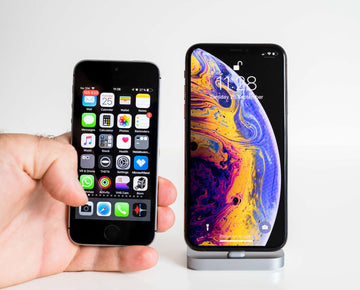
Transfer Data from iPhone to iPhone

Have you ever been worried about how to move your data from your old iPhone to a new one? You bet! …Well, yeah same with me. I have been in those shoes before and bet they stuck right in the mud as I was damn scared I was going to lose all of the previous data that I thought for a second to let go of the new one… did I? hell no! I didn’t. I found ways around it. Ways? Yeah, you read right.

I love new devices (iPhone, especially) so, I tend to spend more time getting acquainted with it. I can’t imagine Vanessa ringing my line like forever only for her to end up in my voicemail almost always. Bet she would storm right in no time and hit me real hard.

If you Just recently upgraded your old iPhone to a new one or you know someone who just did so, you can lend a hand in helping out. Well then, this article is for you as I have included 3 easy ways in which you can transfer your data from your old iPhone to the new one. I made sure to satisfy every of your curiosity.

What about computer users? Don’t sweat it we got you covered also. I use a MacBook? Would I still be able to do that? Absolutely!

So, imagine this as a mind game. let’s get started as we play a bit with your subconscious!

Enjoy!

HOW TO TRANSFER DATA FROM IPHONE TO IPHONE WITH 3 EASY METHODS


METHOD 1: (without computers)

This method is for transferring data without the use of computers. You can easily do this with your old and new iPhone.

TRANSFER DATA FROM IPHONE TO IPHONEUSING ICLOUD

BACKUP YOUR OLD IPHONE USING ICLOUD

First things first, you need to back up your old iPhone. Apparently, you have either heard the word “iCloud” on some tech podcast or YouTube videos or read about them in magazines or email copy or online articles. iCloud is as important as eating else you would risk losing your data.

First off, your device has to be connected to wi-fi. With that being done, go to your phone’s setting and click your name at the top, clicking this takes you to your Apple ID page.

Depending on your phone type, do either of the following;

  • Click either iCloud > iCloud backup > backup or
  • After clicking on your Apple ID page, a list of devices your ID is signed in to pops up. In this case click on your iPhone, then click iCloud backup, toggle on it, click on backup now then, let your phone back up.

A more defined form is highlighted in the 10 steps below

  • On your iPhone, go to settings

Tap the Apple ID banner

  • Click on iCloud
  • Click on iCloud backup
  • Tap backup now
  • Turn off your old iPhone once the backup is finished
  • Remove the SIM card from your old iPhone or If you are going to move it to your new one,

you can put aside your old iPhone and be sure to switch off your new iPhone before you begin the next steps

If you want to move it between device,

  1. Insert your old SIM card into your new iPhone
  2. Turn on your new iPhone
  3. Depending on the type of device you want to set up, slide up or press the home button
  4. Follow the direction that pops up to choose your language. Then proceed to set up your Wi-Fi network
  5. Click restore from iCloud backup
  6. Sign in to your iCloud account that is, your Apple ID
  7. Click next
  8. Click agree
  9. Click agree for a second time
  10. Choose the “backup” you just made

TRANSFER DATA FROM IPHONE TO IPHONE WITH COMPUTER

METHOD 2: WITH COMPUTERS  (Using mobileTrans)

Using mobileTrans eases the process of transferring data between iPhone as it is faster and more efficient than other file transfer apps.

Firstly, download and install the mobileTrans file transfer software. Then proceed with the following steps

Step 1: go to your desktop home screen and locate the mobileTrans file transfer software icon. Double click on the icon to open it. A window pops up. Navigate to the “phone transfer” section. This section allows you to transfer data from iPhone to iPhone.

Step 2: with the use of a good USB cable, connect both old and new iPhone device to your computer. The good news here is, you can switch both phones as “source” and “destination” without having to disconnect both phones by using the “flip” button at the top of the screen.

Step 3: Select the contents you want to be copied and wait for the application to complete the process.

METHOD 3: Via iTunes

Use the following steps to execute transfer via iTunes

Step 1: be sure to have the latest version of iTunes running on your device

Step 2: using a USB, plug your old iPhone to your computer

Step 3: launch your iTunes. A phone icon will appear on the menu bar almost immediately, click on it.

Step 4: click on encrypt the backup. If you are encrypting for the first time, you would be prompted to input a password. With that being done, click on backup now

You can ignore the “backup apps” as they will redownload on their own. Unplug your old iPhone when the backup process is completed.

Step 5: Insert the SIM card into a new iPhone, switch it on and plug it into the computer used for the backup. Slide up to set up your device and choose a language option.

Step 6: set up wi-fi network and choose “restore from iTunes backup” when the welcome to your new iPhone window pops up

Click on iTunes on your computer and select “summary in setting app”

Step 7: from the list, select your most recent backup, then select restore from this backup.

Step 8: When done, click on continue. You will be prompted to enter your password (provided your backup is encrypted).

NB: do not unplug your iPhone device when the transfer is ongoing and also be sure to keep your Wi-Fi connection switched on all through the transfer process in order to ensure successful completion of the transfer and redownloads. This process may be fast of slow depending on the amount of data to be transferred.

TRANSFER DATA FROM IPHONE TO IPHONE WITH iTunes

BONUS TIP

I saved up my easiest method for meticulous readers. Bet you didn’t expect that but here it is!

My bonus tip is the iPhone migration feature, designed for easy transfer of data between iPhone devices wirelessly at a quicker rate than the previous method. It is an improvement that provides some flexibility. The process is highlighted in the steps below

Step 1: switch on the receiving iPhone device. Place it next to the iPhone from which the data will be sent. This will initiate the quick start proximity-based initial setup utility.

An authentication pattern will appear on the receiving iPhone. Authenticate this pattern by using the source iPhone camera. Enter the passcode of the source device on the receiving device. This creates a wireless connection that will allow you to migrate settings between both devices automatically.

Step 2: a “transfer your data” screen comes up. From which three options are available to pick from

  • Transfer from iPhone (that is, the new iPhone migration tool)
  • Download from iCloud (allows you to restore from iCloud backup)
  • Other options (includes access to the old apps and data page for migrating from android, restoring from iTunes page, or setup as a new device)

Another way to launch the migration tool while on the transfer data screen is through a wired set up using a lightning to USB 3 camera adapter and a USB cable

Step 3: select the transfer from the iPhone option and this will initiate a data migration using “peer-to-peer” wi-fi between the two devices.

Click Agree to the “agree to terms and conditions” then set up automatic updates. A new screen pops up indicating that iPhone migration has started. Keep the device together to prevent migration from being paused. Once complete, a “transfer complete” message appears on the destination device.

On the source device, tap continues to go back to the home screen. You can go ahead to factory reset while a rebooting process automatically starts on the destination device. If you wish to download the apps migrated, go ahead provided you have a good network connection.

So, there you have it. Make sure to follow the method that suits you.

Cheers!

Stichworte: iPhone 12 Setup
Vorherige
Easy Guides to Take a Screenshot on any iPhone or iPad
Nächste
Wie viele GB für das iPhone 11: 64, 128 GB oder doch mehr?

In Verbindung stehende Artikel

Samsung Wallpaper Size Guide: How to Download, Customize, and Protect Your Perfect Phone Wallpaper

Samsung Hintergrundbild-Größenratgeber: So laden Sie Ihr perfektes Handy-Hintergrundbild herunter, passen es an und schützen es

The Complete Director’s Vlogging Kit: Best Smartphone Setups for Every Budget (2026 Guide)

Das komplette Vlogging-Kit für Regisseure: Die besten Smartphone-Setups für jedes Budget (2026 Guide)

Samsung Galaxy S26 vs. S25: Should You Trade In Your S25 Today?

Samsung Galaxy S26 vs. S25: Sollten Sie Ihr S25 heute noch eintauschen?

what-is-the-ipad-wallpaper-size

Größentabelle für iPad-Hintergrundbilder – Alle Modelle ab 2026 (Air, Pro, Standard-iPad (Einsteigermodell))

Hinterlasse einen Kommentar

Deine Email-Adresse wird nicht veröffentlicht.

Recent Post

Apple Watch Kaufberatung 2026: Solltest du auf die Ultra 4 warten, zur Series 12 wechseln...

Apple wird voraussichtlich im September 2026 neue Uhren auf den...

10 Handy-Accessoires, die Papa wirklich benutzt — Vatertags-Geschenkguide

Papa utilise toujours une coque fissurée datant de plusieurs années....

AirPods Ultra vs AirPods 5 vs AirPods Pro 3 Gerüchte: Was 2026 zu erwarten ist

Kameras, KI, eine Verzögerung – und das Modell, auf das...

Wir haben die neue Sommerkollektion von ESR getestet – und so ist es, damit zu...

ESR hat sich historisch eher auf funktionale Accessoires als auf...

Die besten Zeichen-Apps für das iPad Pro 2026: Vom Hobbykünstler zum Profi

2026 fühlt sich Zeichnen auf dem iPad weniger wie Tablet-Nutzung...

Die besten Zubehörteile für das M4 iPad Air (2026): ESR Shift Tastatur-Cases für ultimative Produktivität

Wenn du dir Zubehör für das iPad Air 2026 anschaust,...

Get 20% off with code: BLOG20

Company

  • Über ESR
  • Unser Blog
  • Pressebereich
  • Händler werden

Products

  • Schutzhüllen
  • iPhone Cases
  • iPad-Hüllen
  • Entwickelt für MagSafe
  • iPad-Produktivität
  • Schutzfolien
  • Kabelloses Laden
  • Geldbörse und Zubehör
  • Weitere Zubehörteile

Community

  • Mein Konto
  • Freunde empfehlen, CashBack verdienen
  • Werde ESR Super User
  • Affiliate Programm
  • Student Discount

Support

  • Kontaktieren Sie uns
  • Einrichtungsvideos und FAQs
  • Bestellstatus
  • Rückgabe und Rückerstattung
  • Garantiebestimmungen
  • Versandbedingungen
  • Zahlungsmethoden
  • Product Recalls

Zahlungsmöglichkeiten:
  • American Express
  • JCB
  • Mastercard
  • PayPal
  • Visa
  • Klarna Klarna
  • Afterpay
Excellent 4.6 out of 5 - Review :2579 •

© 2026 ESR All rights reserved.

  • Nutzungsbedingungen
  • Datenschutzrichtlinie
  • Rechtliche Erklärung
  • Cookie-Richtlinie
  • Versand Politik
  • Rückgabe und Rückerstattung
  • Track Your Order

Einkaufswagen

Get a 15% off coupon when you

sign up

for free shipping!

$38.00
You're $38.00 away from Free Shipping!

$50.00
You're $50.00 away from Free Shipping!

Benefits applied automatically at checkout

Your Cart is Empty

Sign In / Register to view saved cart items
Shop Now
ESR_IMG

Protect Your iPhone's Camera Control

ESR_IMG

Always Find Your Wallet

ESR_IMG

Drop-Proof FlickLlock, Effortless MagSafe

ESR_IMG

Qi2 Fast Charging on the Go

Zwischensumme $0.00
Warenkorb ansehen

Thank you for choosing to transfer to a human service.

Sorry! The previous responses were from our AI customer service. Since it didn't satisfy you, you've been transferred to a human agent. We'll reply within 24 hours from Mon to Fri and 48 hours on weekends for further help.

Please select the reason for transfer