Just launched: Summer prints for your phone and wallet. Shop now
Save 15% with code BTS15 | 20% off any 2 with code BTS20 | 25% off any 2 with code BTS25 for Super Users Shop now
Save up to 70% on selected tech essentials Shop now
Free shipping on all orders over $50

Devenez Super User et profitez de récompenses exclusives

  • * 15 % de remise de bienvenue
  • * Gagnez des points à chaque achat
  • * Avantages exclusifs réservés aux membres
Rejoindre maintenant Se connecter
  • Devenez un Super Utilisateur ESR
  • Offres exclusives Super Utilisateur
  • Parrainez des amis et recevez du Cashback
Chariot 0
  • Coques
    • iPhone
    • iPad
    • AirPods
    • Samsung
      iPhone 17🔥
    • iPhone 17e🔥
    • iPhone 17 Pro Max🔥
    • iPhone 17 Pro🔥
    • iPhone Air🔥
    • iPhone 17🔥
    • iPhone 16
    • iPhone 16e
    • iPhone 16 Pro Max
    • iPhone 16 Pro
    • iPhone 16 Plus
    • iPhone 16
    • iPhone 15
    • iPhone 15 Pro Max
    • iPhone 15 Pro
    • iPhone 15 Plus
    • iPhone 15
    • iPhone 14
    • iPhone 14 Pro Max
    • iPhone 14 Pro
    • iPhone 14 Plus
    • iPhone 14
    • iPhone 13
    • iPhone 13 Pro Max
    • iPhone 13 Pro
    • iPhone 13
       
    • iPad Air 13 (2026)🔥
    • iPad Air 11 (2026)🔥
    •  
    • iPad Pro 13 (2025)
    • iPad Pro 11 (2025)
    • iPad 11th Gen (2025)
    • iPad Air 13 (2025)
    • iPad Air 11 (2025)
    •  
    • iPad Pro 13 (2024)
    • iPad Pro 11 (2024)
    • iPad Air 13 (2024)
    • iPad Air 11 (2024)
    • iPad mini 7 (2024)
    •  
    • iPad Pro 12.9 (2022)
    • iPad Pro 11 (2022)
    • iPad Air 5/4 (2022)
    • iPad 10th Gen (2022)
    •  
    • iPad mini 6 (2021)
    • iPad Pro 12.9 (2021)
    • iPad Pro 11 (2021)
    • iPad Pro 11 (2020)
       
    • AirPods Pro 3🔥
    • AirPods 4
    • AirPods Pro (2023/2022/2019)
      Galaxy S26🔥
    • Galaxy S26 Ultra🔥
    • Galaxy S26 Plus🔥
    • Galaxy S26🔥
    • Galaxy S25
    • Galaxy S25 Ultra
    • Galaxy S25+
    • Galaxy S24
    • Galaxy S24 Ultra
    • Galaxy S24+
    • Galaxy S24
    • Galaxy S23
    • Galaxy S23 Ultra
    • Galaxy S23
  • Protecteurs d’écran
    • iPhone
    • iPad
    • Apple Watch
    • Samsung
      iPhone 17🔥
    • iPhone 17e🔥
    • iPhone 17 Pro Max🔥
    • iPhone 17 Pro🔥
    • iPhone Air🔥
    • iPhone 17🔥
    • iPhone 16
    • iPhone 16e
    • iPhone 16 Pro Max
    • iPhone 16 Pro
    • iPhone 16 Plus
    • iPhone 16
    • iPhone 15
    • iPhone 15 Pro Max
    • iPhone 15 Pro
    • iPhone 15 Plus
    • iPhone 15
    • iPhone 14
    • iPhone 14 Pro Max
    • iPhone 14 Pro
    • iPhone 14 Plus
    • iPhone 14
    • iPhone 13
    • iPhone 13 Pro Max
    • iPhone 13/13 Pro
       
    • iPad Air 13 (2026)🔥
    • iPad Air 11 (2026)🔥
    •  
    • iPad Pro 13 (2025)
    • iPad Pro 11 (2025)
    • iPad 11th Gen (2025)
    • iPad Air 13 (2025)
    • iPad Air 11 (2025)
    •  
    • iPad Pro 13 (2024)
    • iPad Pro 11 (2024)
    • iPad Air 13 (2024)
    • iPad Air 11 (2024)
    •  
    • iPad Pro 12.9 (6th/5th/4th/3rd Gen)
    • iPad Pro 11 (4th/3rd/2nd/1st Gen)
    • iPad Air 5/4 (2022)
    • iPad 10th Gen (2022)
       
    • Apple Watch Sport Band🔥
    • Apple Watch Cases & Screen Protectors🔥
      Galaxy S26🔥
    • Galaxy S26 Ultra🔥
    • Galaxy S25
    • Galaxy S25 Ultra
    • Galaxy S24
    • Galaxy S24 Ultra
    • Galaxy S23
    • Galaxy S23 Ultra
    • Galaxy S23+
    • Galaxy S23
    • Galaxy S22
    • Galaxy S22 Ultra
  • Claviers iPad & stylets
    • Claviers pour iPad
    • Stylets & souris
      Choisissez votre appareil
    • iPad Air 13 (2026)🔥
    • iPad Air 11 (2026)🔥
    •  
    • iPad Pro 13 (2025)
    • iPad Pro 11 (2025)
    • iPad 11e génération (2025)
    • iPad Air 13 (2025)
    • iPad Air 11 (2025)
    •  
    • iPad Pro 13 (2024)
    • iPad Pro 11 (2024)
    • iPad Air 13 (2024)
    • iPad Air 11 (2024)
    •  
    • iPad Pro 12.9 (6e/5e/4e/3e génération)
    • iPad Pro 11 (4e/3e/2e/1er)
    • iPad Air 5/4 (2022)
    • iPad 10e génération (2022)
       
    • Stylets numériques
    • Souris
  • Chargeurs
    • Chargeurs sans fil & supports
    • Chargeurs voiture et Supports
    • Station de charge magnétique pliable 3-en-1 CryoBoost (25 W) – US Plug-Black

      Station de charge magnétique pliable 3-en-1 CryoBoost (25 W) – US Plug-Black

    • Station de charge magnétique pliable 3-en-1 CryoBoost (25 W) – US Plug-Frosted Graphite

      Station de charge magnétique pliable 3-en-1 CryoBoost (25 W) – US Plug-Frosted Graphite

    • Station de charge avec CryoBoost 3-en-1 (25 W, Qi2.2)  - US Plug–Black

      Station de charge avec CryoBoost 3-en-1 (25 W, Qi2.2) - US Plug–Black

    • Anneau Universel 360 (HaloLock) - Black-2 Pack

      Anneau Universel 360 (HaloLock) - Black-2 Pack

    • Pack chargeur magnétique pliable 3-en-1 25 W CryoBoost et chargeur voiture (grille d’aération) – Prise US – Noir

      Pack chargeur magnétique pliable 3-en-1 25 W CryoBoost et chargeur voiture (grille d’aération) – Prise US – Noir

    • Station de charge magnétique pliable 3-en-1 CryoBoost (25 W) – EU Plug-Black

      Station de charge magnétique pliable 3-en-1 CryoBoost (25 W) – EU Plug-Black

    • Station de charge magnétique pliable 3-en-1 CryoBoost (25 W) – US Plug-White

      Station de charge magnétique pliable 3-en-1 CryoBoost (25 W) – US Plug-White

    • Station de charge magnétique pliable 3-en-1 CryoBoost (25 W) – US Plug-White

      Station de charge magnétique pliable 3-en-1 CryoBoost (25 W) – US Plug-White

    • Station de charge avec CryoBoost 3-en-1 (25 W, Qi2.2)  - EU Plug–Black

      Station de charge avec CryoBoost 3-en-1 (25 W, Qi2.2) - EU Plug–Black

    • All Chargeurs sans fil & supports >
    • Chargeur magnétique de voiture OmniLock (25W, CryoBoost, Grille d'aération)  - Black

      Chargeur magnétique de voiture OmniLock (25W, CryoBoost, Grille d'aération) - Black

    • Support Chargeur Sans Fil Magnétique HaloLock™ à Voiture - Black

      Support Chargeur Sans Fil Magnétique HaloLock™ à Voiture - Black

    • Chargeur de Voiture MagSafe avec CryoBoost™ (HaloLock) - Wireless Charger with 36W Adapter

      Chargeur de Voiture MagSafe avec CryoBoost™ (HaloLock) - Wireless Charger with 36W Adapter

    • Chargeur de Voiture MagSafe avec CryoBoost™ (HaloLock) - Wireless Charger

      Chargeur de Voiture MagSafe avec CryoBoost™ (HaloLock) - Wireless Charger

    • ESR Support magnétique pour voiture OmniLock(Grille d'aération) - Black

      ESR Support magnétique pour voiture OmniLock(Grille d'aération) - Black

    • Support Magnétique de Téléphone de Voiture (HaloLock) - Metallic Grey

      Support Magnétique de Téléphone de Voiture (HaloLock) - Metallic Grey

    • Support de Téléphone pour Tableau de Bord (HaloLock) - Black

      Support de Téléphone pour Tableau de Bord (HaloLock) - Black

    • ESR Chargeur de Voiture 15W avec MagSafe + CryoBoost - Cool Grey

      ESR Chargeur de Voiture 15W avec MagSafe + CryoBoost - Cool Grey

    • Pack chargeur magnétique voiture sans fil & chargeur pliable CryoBoost 3-en-1 25 W-Prise US – Noir

      Pack chargeur magnétique voiture sans fil & chargeur pliable CryoBoost 3-en-1 25 W-Prise US – Noir

    • All Chargeurs voiture et Supports >
  • Porte-cartes
  • 🔥Nouveautés🔥
    • Apple Watch Sport Band🔥
    • 🏝️Collection imprimée d’été🏝️
    • Série Galaxy S26
    • iPhone 17e🔥
    • Série iPad Air 2026
    • Chargement sans fil Qi2 15 W
  • ✏️Offres pour la rentrée✏️
    • Offres pour la rentrée pour iPad
    • Offres pour la rentrée pour téléphones
    • Offres pour la rentrée pour chargeurs
    • Final Sale
  • Support
    • Contactez-nous
    • Rappels de produits
    • Vidéos de configuration et FAQs
    • FAQ générales
    • Statut de la commande
    • Politique de retour et de remboursement
    • Politique de garantie
    • Politique d'expédition
  • Explorer
    • Notre Histoire
    • ESR Blog
    • Salle de presse
Avantages Super User
  • Devenez un Super Utilisateur ESR
  • Offres exclusives Super Utilisateur
  • Parrainez des amis et recevez du Cashback
Mon compte
Se connecter Registre

Select Your Country/Region

Global
  • Mondial
North America
  • États-Unis
  • Canada
Europe
  • Europe
  • Norvège
  • Suisse
  • Royaume-Uni
Asia-Pacific
  • Australie
  • Japon

Preferred Language

Changing language will not affect your selected region

  • Coques
    • iPhone
    • iPad
    • AirPods
    • Samsung
      iPhone 17🔥
    • iPhone 17e🔥
    • iPhone 17 Pro Max🔥
    • iPhone 17 Pro🔥
    • iPhone Air🔥
    • iPhone 17🔥
    • iPhone 16
    • iPhone 16e
    • iPhone 16 Pro Max
    • iPhone 16 Pro
    • iPhone 16 Plus
    • iPhone 16
    • iPhone 15
    • iPhone 15 Pro Max
    • iPhone 15 Pro
    • iPhone 15 Plus
    • iPhone 15
    • iPhone 14
    • iPhone 14 Pro Max
    • iPhone 14 Pro
    • iPhone 14 Plus
    • iPhone 14
    • iPhone 13
    • iPhone 13 Pro Max
    • iPhone 13 Pro
    • iPhone 13
       
    • iPad Air 13 (2026)🔥
    • iPad Air 11 (2026)🔥
    •  
    • iPad Pro 13 (2025)
    • iPad Pro 11 (2025)
    • iPad 11th Gen (2025)
    • iPad Air 13 (2025)
    • iPad Air 11 (2025)
    •  
    • iPad Pro 13 (2024)
    • iPad Pro 11 (2024)
    • iPad Air 13 (2024)
    • iPad Air 11 (2024)
    • iPad mini 7 (2024)
    •  
    • iPad Pro 12.9 (2022)
    • iPad Pro 11 (2022)
    • iPad Air 5/4 (2022)
    • iPad 10th Gen (2022)
    •  
    • iPad mini 6 (2021)
    • iPad Pro 12.9 (2021)
    • iPad Pro 11 (2021)
    • iPad Pro 11 (2020)
       
    • AirPods Pro 3🔥
    • AirPods 4
    • AirPods Pro (2023/2022/2019)
      Galaxy S26🔥
    • Galaxy S26 Ultra🔥
    • Galaxy S26 Plus🔥
    • Galaxy S26🔥
    • Galaxy S25
    • Galaxy S25 Ultra
    • Galaxy S25+
    • Galaxy S24
    • Galaxy S24 Ultra
    • Galaxy S24+
    • Galaxy S24
    • Galaxy S23
    • Galaxy S23 Ultra
    • Galaxy S23
  • Protecteurs d’écran
    • iPhone
    • iPad
    • Apple Watch
    • Samsung
      iPhone 17🔥
    • iPhone 17e🔥
    • iPhone 17 Pro Max🔥
    • iPhone 17 Pro🔥
    • iPhone Air🔥
    • iPhone 17🔥
    • iPhone 16
    • iPhone 16e
    • iPhone 16 Pro Max
    • iPhone 16 Pro
    • iPhone 16 Plus
    • iPhone 16
    • iPhone 15
    • iPhone 15 Pro Max
    • iPhone 15 Pro
    • iPhone 15 Plus
    • iPhone 15
    • iPhone 14
    • iPhone 14 Pro Max
    • iPhone 14 Pro
    • iPhone 14 Plus
    • iPhone 14
    • iPhone 13
    • iPhone 13 Pro Max
    • iPhone 13/13 Pro
       
    • iPad Air 13 (2026)🔥
    • iPad Air 11 (2026)🔥
    •  
    • iPad Pro 13 (2025)
    • iPad Pro 11 (2025)
    • iPad 11th Gen (2025)
    • iPad Air 13 (2025)
    • iPad Air 11 (2025)
    •  
    • iPad Pro 13 (2024)
    • iPad Pro 11 (2024)
    • iPad Air 13 (2024)
    • iPad Air 11 (2024)
    •  
    • iPad Pro 12.9 (6th/5th/4th/3rd Gen)
    • iPad Pro 11 (4th/3rd/2nd/1st Gen)
    • iPad Air 5/4 (2022)
    • iPad 10th Gen (2022)
       
    • Apple Watch Sport Band🔥
    • Apple Watch Cases & Screen Protectors🔥
      Galaxy S26🔥
    • Galaxy S26 Ultra🔥
    • Galaxy S25
    • Galaxy S25 Ultra
    • Galaxy S24
    • Galaxy S24 Ultra
    • Galaxy S23
    • Galaxy S23 Ultra
    • Galaxy S23+
    • Galaxy S23
    • Galaxy S22
    • Galaxy S22 Ultra
  • Claviers iPad & stylets
    • Claviers pour iPad
    • Stylets & souris
      Choisissez votre appareil
    • iPad Air 13 (2026)🔥
    • iPad Air 11 (2026)🔥
    •  
    • iPad Pro 13 (2025)
    • iPad Pro 11 (2025)
    • iPad 11e génération (2025)
    • iPad Air 13 (2025)
    • iPad Air 11 (2025)
    •  
    • iPad Pro 13 (2024)
    • iPad Pro 11 (2024)
    • iPad Air 13 (2024)
    • iPad Air 11 (2024)
    •  
    • iPad Pro 12.9 (6e/5e/4e/3e génération)
    • iPad Pro 11 (4e/3e/2e/1er)
    • iPad Air 5/4 (2022)
    • iPad 10e génération (2022)
       
    • Stylets numériques
    • Souris
  • Chargeurs
    • Chargeurs sans fil & supports
    • Chargeurs voiture et Supports
    • Station de charge magnétique pliable 3-en-1 CryoBoost (25 W) – US Plug-Black

      Station de charge magnétique pliable 3-en-1 CryoBoost (25 W) – US Plug-Black

    • Station de charge magnétique pliable 3-en-1 CryoBoost (25 W) – US Plug-Frosted Graphite

      Station de charge magnétique pliable 3-en-1 CryoBoost (25 W) – US Plug-Frosted Graphite

    • Station de charge avec CryoBoost 3-en-1 (25 W, Qi2.2)  - US Plug–Black

      Station de charge avec CryoBoost 3-en-1 (25 W, Qi2.2) - US Plug–Black

    • Anneau Universel 360 (HaloLock) - Black-2 Pack

      Anneau Universel 360 (HaloLock) - Black-2 Pack

    • Pack chargeur magnétique pliable 3-en-1 25 W CryoBoost et chargeur voiture (grille d’aération) – Prise US – Noir

      Pack chargeur magnétique pliable 3-en-1 25 W CryoBoost et chargeur voiture (grille d’aération) – Prise US – Noir

    • Station de charge magnétique pliable 3-en-1 CryoBoost (25 W) – EU Plug-Black

      Station de charge magnétique pliable 3-en-1 CryoBoost (25 W) – EU Plug-Black

    • Station de charge magnétique pliable 3-en-1 CryoBoost (25 W) – US Plug-White

      Station de charge magnétique pliable 3-en-1 CryoBoost (25 W) – US Plug-White

    • Station de charge magnétique pliable 3-en-1 CryoBoost (25 W) – US Plug-White

      Station de charge magnétique pliable 3-en-1 CryoBoost (25 W) – US Plug-White

    • Station de charge avec CryoBoost 3-en-1 (25 W, Qi2.2)  - EU Plug–Black

      Station de charge avec CryoBoost 3-en-1 (25 W, Qi2.2) - EU Plug–Black

    • All Chargeurs sans fil & supports >
    • Chargeur magnétique de voiture OmniLock (25W, CryoBoost, Grille d'aération)  - Black

      Chargeur magnétique de voiture OmniLock (25W, CryoBoost, Grille d'aération) - Black

    • Support Chargeur Sans Fil Magnétique HaloLock™ à Voiture - Black

      Support Chargeur Sans Fil Magnétique HaloLock™ à Voiture - Black

    • Chargeur de Voiture MagSafe avec CryoBoost™ (HaloLock) - Wireless Charger with 36W Adapter

      Chargeur de Voiture MagSafe avec CryoBoost™ (HaloLock) - Wireless Charger with 36W Adapter

    • Chargeur de Voiture MagSafe avec CryoBoost™ (HaloLock) - Wireless Charger

      Chargeur de Voiture MagSafe avec CryoBoost™ (HaloLock) - Wireless Charger

    • ESR Support magnétique pour voiture OmniLock(Grille d'aération) - Black

      ESR Support magnétique pour voiture OmniLock(Grille d'aération) - Black

    • Support Magnétique de Téléphone de Voiture (HaloLock) - Metallic Grey

      Support Magnétique de Téléphone de Voiture (HaloLock) - Metallic Grey

    • Support de Téléphone pour Tableau de Bord (HaloLock) - Black

      Support de Téléphone pour Tableau de Bord (HaloLock) - Black

    • ESR Chargeur de Voiture 15W avec MagSafe + CryoBoost - Cool Grey

      ESR Chargeur de Voiture 15W avec MagSafe + CryoBoost - Cool Grey

    • Pack chargeur magnétique voiture sans fil & chargeur pliable CryoBoost 3-en-1 25 W-Prise US – Noir

      Pack chargeur magnétique voiture sans fil & chargeur pliable CryoBoost 3-en-1 25 W-Prise US – Noir

    • All Chargeurs voiture et Supports >
  • Porte-cartes
  • 🔥Nouveautés🔥
    • Apple Watch Sport Band🔥
    • 🏝️Collection imprimée d’été🏝️
    • Série Galaxy S26
    • iPhone 17e🔥
    • Série iPad Air 2026
    • Chargement sans fil Qi2 15 W
  • ✏️Offres pour la rentrée✏️
    • Offres pour la rentrée pour iPad
    • Offres pour la rentrée pour téléphones
    • Offres pour la rentrée pour chargeurs
    • Final Sale
  • Support
    • Contactez-nous
    • Rappels de produits
    • Vidéos de configuration et FAQs
    • FAQ générales
    • Statut de la commande
    • Politique de retour et de remboursement
    • Politique de garantie
    • Politique d'expédition
  • Explorer
    • Notre Histoire
    • ESR Blog
    • Salle de presse

Devenez Super User et profitez de récompenses exclusives

  • * 15 % de remise de bienvenue
  • * Gagnez des points à chaque achat
  • * Avantages exclusifs réservés aux membres
Rejoindre maintenant Se connecter
  • Devenez un Super Utilisateur ESR
  • Offres exclusives Super Utilisateur
  • Parrainez des amis et recevez du Cashback
Chariot 0

Select Your Country/Region

Global
  • Mondial
North America
  • États-Unis
  • Canada
Europe
  • Europe
  • Norvège
  • Suisse
  • Royaume-Uni
Asia-Pacific
  • Australie
  • Japon

Preferred Language

Changing language will not affect your selected region

Rechercher notre magasin

Chariot 0
Recherches populaires:
iPad 2026 Case iPhone 17e Atelier Case iPad Keyboard
Conseils & Guides

How to Take Good Photos with iPhone? (10 Tips)

par Sandy sur Jul 11, 2020 (Last Updated:Apr 09, 2025)
How to Take Good Photos with iPhone

Before smartphones came into being, taking great photos was considered labor-intensive. You would have to purchase a fancy camera, expensive editing softwares, and invest some serious time and energy into learning how to use them.

In 2007, Apple released its first iPhone with a 2-megapixel camera that brought photography to the hands of everyone. Fast forward to 2020, many advanced releases like the iPhone 11 Pro, have made it easier to capture high-quality photos and edit them, all from the same device that was only meant to connect people.

But what exactly is the key to taking incredible photos on an iPhone? While some people may work years and years to master their photography skills, all you need are some simple tips and an eye for detail.

In this article, we’ll share information on how to take good photos with your iPhone.

Tips for taking good photos

Keeping photos simple

Among all the things you need to do to take good photos with an iPhone is keeping them simple. Avoid including too many details. Too many details distract viewers and make it hard to create beautiful compositions. Instead of using multiple objects, include a single subject. This will make it relatively easier to create a strong composition.

Tips for taking good photos

Check the scene for any distracting elements when preparing for the shot. Try to change your viewpoint so these unwanted objects are removed. Minimalist compositions are among the most powerful ways you can create eye-catching photos. It’s natural for you to worry about the empty space or the negative space as we call it, but it’s a great way you can differentiate the subject.

Your photo will stand out if it is clean and simple.

Shooting from a low angle

The most convenient way to take photos on a mobile device is by clicking from chest height. However, there are some more creative options as well.

Learning how to capture great photos requires thinking out of the box. One such way to improve your photos is shooting from a lower angle. There are three very good reasons to click pictures this way.

Shooting from a low angle

One, it makes the picture intriguing and shows the world from a different perspective.

Two, shooting from a lower angle helps remove unwanted objects from the background thus making your subject stand out against a plain background.

Three, it allows you to show interesting details in the image foreground. For example, while shooting landscapes, try to shoot at a lower angle to capture the grass and flowers, or if shooting near a water body, you can capture ripples and reflections in the water.

Shooting photos with depth

Photos that convey a sense of depth look much better than those which don’t. Creating depth makes your photos engaging and helps capture viewer attention.

You can create depth by capturing landscapes with leading lines in the composition. Roads, railway tracks, rivers, fences, etc. make for excellent leading lines. If you are at the beach, use the sand ripples as the leading lines in your composition.

Shooting photos with depth

Make sure to compose your photo such that the lines lead from the foreground into the distance. This leads the viewer through the scene and makes your photo more appealing.

Another way you can create depth is by including some objects in the foreground like rocks, and flowers, etc.

If you struggle to locate such objects, prefer shooting from a lower angle, and including objects in the foreground, middle-ground, and the background. Doing this will help make your image look more three dimensional thus adding more sense of depth to it.

Capturing Close up details

One of the most amazing things to experiment with photography is getting close to the subject. This is important if you want to photograph objects with details. Shooting close up allows you to capture the minute details like patterns, textures, and colors that bring your photos to life.

You can try shooting flowers, dissected vegetables, dry leaves, water droplets, and other textured surfaces that look more exciting up close.

Capturing Close up details

Taking close up shots is a popular technique in portrait photography. They work perfectly when photographing people and pets. Letting you capture the facial features in detail and display emotions in a better way, close up shots create far more impact than normal pictures.

If you are looking to get close to your subject with your iPhone camera, you may not be able to focus on it if the lens is too close. In such cases, you can use add-on camera attachments like Macro lenses that allow phone cameras to focus close to the subject.

If you are shooting landscapes, it won’t be a bad idea to include little close-up details in the foreground. Capture those details and you’ll find your photos visually interesting with a sense of depth as well.

Capturing silhouettes

Silhouette is the dark shape of an object captured against bright light and create a stunning composition to catch viewer attention. To shoot a silhouette with your iPhone, all you need to do is find an interesting subject and then shoot towards the light source.

Make sure the silhouette you capture appears dark. For this, you would need to darken the exposure in your camera app. If you wish to darken the silhouettes further, you can use editing softwares like Picasa or Photoshop later on.

Capturing silhouettes

Silhouettes are the best when captured during the golden hours of sunrise and sunset. With the sun low on the horizon, it becomes easier to position the light behind the subject, plus you get to have the beautiful shade of the sky as the background.

You can also use other light sources to create silhouettes. For example, using white lights behind a subject that you want to include in your composition.

Using the Self-Timer on your iPhone

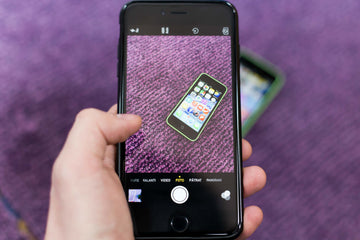
While you may be taking all sorts of pictures of different subjects, you can always try clicking self-portraits. If you are wondering how to do this, the secret lies in using the self-timer feature in your iPhone Camera app.

Choose a composition as simple or as minimalistic as possible and you’ll definitely come up with great portraits of yourself. To use the Self-Timer on your iPhone, follow the steps:

  • Open the Camera app on your iPhone.
  • On the menu bar at the top, click on the arrow sign and then select the duration for which you want the timer to run.
  • Simply click on the shoot button and the timer will start to run.

Using the Self-Timer on your iPhone

Using the Burst Mode

Burst Mode in your iPhone comes handy if you want to shoot something with accuracy that is moving too fast. If you are looking to use the Burst Mode in your iPhone, swipe left on the shutter button and hold to shoot.

Using the Burst Mode

Using the HDR Mode

HDR expands to High Dynamic Range. This mode works to create perfectly lit photos with rich colors and detail in bright as well as dark areas. To use the HDR mode on your iPhone, follow the steps:

  • Open device settings.
  • Go to Camera and tap on the toggle button next to the Smart HDR tab in the HDR section so it is ON.

Using the HDR Mode

Using the HDR Mode

Using the Grid

Using the Grid allows amateur photographers to follow the rule of thirds, enabling them to click photos that look interesting. To enable the Grid feature in your iPhone camera follow the steps:

  • Open device settings.
  • Go to Camera and tap on the toggle button next to the Grid tab so it is ON.

Using the Grid

iPhone Camera Shaking Issue

While you are ready to venture out on the journey to click beautiful photos, the camera shaking issues in your iPhone can take your time and patience away from doing photography. Here’s how you can alleviate the same:

Take out your iPhone from the case if any. Clean the rear camera lens to remove any accumulated dirt that might be causing the shaking effect. If doing this doesn’t work, you can restart the camera app. Another thing to try when looking to pacify the shaking effect is locking the focus on your subject. To lock the focus on your subject, follow the steps:

  • Open the Camera App.
  • Focus your camera on the subject that you want to capture.
  • Long press on the screen where the subject is visible until a message saying AE/AF Lock appears on the screen.

If locking the camera focus doesn’t help, try restarting your iPhone.

iPhone Camera Shaking Issue

The final word

The photography tips discussed in the article will improve your photography skills and help you take better photos with your iPhone. Though there is some equipment and editing softwares that can be used to add special effects, images will turn out beautiful if they are natural and the composition is simple yet engaging.

Précédent
Votre iPhone chauffe et la batterie se décharge rapidement ? Voici ce qui se passe réellement
Suivant
Is It Worth Switching From Android To iPhone? (Pros & Cons)

Articles Liés

Why Are There No Outlets in College Classrooms? How Students Can Stay Charged

Pourquoi n'y a-t-il pas de prises électriques dans les salles de cours universitaires ? Guide de l'étudiant pour rester chargé

Should You Buy the First iPhone Ultra/Fold — or Wait for Generation Two?

Faut-il acheter le premier iPhone Ultra/Fold, ou attendre la deuxième génération ?

Samsung Wallpaper Size Guide: How to Download, Customize, and Protect Your Perfect Phone Wallpaper

Guide des tailles de fond d'écran Samsung : Comment télécharger, personnaliser et protéger le fond d'écran parfait pour votre téléphone

The Complete Director’s Vlogging Kit: Best Smartphone Setups for Every Budget (2026 Guide)

Le kit de vlogging complet du réalisateur : Les meilleures configurations de smartphone pour tous les budgets (Guide 2026)

Laissez un commentaire

Votre adresse email ne sera pas publiée.

Recent Post

Bracelet Apple Watch pour le sport et les activités de plein air : résistant à...

Les bracelets sport pour Apple Watch sont soumis à des...

Guide d'achat Apple Watch 2026 : devriez-vous attendre l'Ultra 4, passer à la Série 12,...

Apple devrait lancer de nouvelles Watch en septembre 2026, et...

10 accessoires téléphone que papa utilisera vraiment — guide cadeaux pour la Fête des Pères

Papa utilise toujours une coque fissurée datant de plusieurs années....

Rumeurs sur les AirPods Ultra, AirPods 5 et AirPods Pro 3 : À quoi s'attendre...

Caméras, IA, retard — et le modèle que la plupart...

Nous avons testé la nouvelle collection d’été ESR — voici ce que cela donne réellement...

ESR s’est historiquement concentré sur des accessoires fonctionnels plutôt que...

Meilleures applications de dessin pour iPad Pro en 2026 : de l'amateur au professionnel

En 2026, dessiner sur un iPad ressemble moins à l’utilisation...

Get 20% off with code: BLOG20

product.title

Protecteur d'objectif d'appareil photo pour iPad Pro 13"/11" (2024) et 12,9”/ 11” (2022/2021/2020) - 2 Pack

$8.99 $15.99
Learn More
product.title

Protecteur d'écran de confidentialité magnétique pour iPad Air 11" (2024) - 1 Pack

$9.99
Learn More
product.title

Protecteurs de Lentilles de Caméra en Verre trempé pour iPhone 14 Pro/14 Pro Max - 1 Set

$9.99
Learn More

Company

  • À propos de nous
  • Notre blog
  • Salle de presse
  • Devenir revendeur

Products

  • Coques de téléphone
  • iPhone Cases
  • Coques pour iPad
  • Conçu pour MagSafe
  • Productivité
  • Protections d’Écran
  • Chargement sans fil
  • Portefeuilles magnétiques
  • Autres accessoires

Community

  • Mon Compte
  • Référer vos amis, gagnez du CashBack
  • Devenir un Super Utilisateur ESR
  • Programme d’Affiliation
  • Réduction étudiante

Support

  • Contactez-nous
  • Vidéos d'installation et FAQ
  • Statut de la commande
  • Retour et remboursement
  • Politique de garantie
  • Politique d'expédition
  • Modes de paiement
  • Product Recalls

Options de paiement:
  • American Express
  • JCB
  • Mastercard
  • PayPal
  • Visa
  • Klarna Klarna
  • Afterpay
Excellent 4.6 out of 5 - Review :2594 •

© 2026 ESR All rights reserved.

  • Conditions d'utilisation
  • politique de confidentialité
  • Déclaration légale
  • Politique de cookies
  • Politique d'expédition
  • Retour et remboursement
  • Track Your Order

Panier

Get a 15% off coupon when you

sign up

for free shipping!

$38.00
You're $38.00 away from Free Shipping!

$50.00
You're $50.00 away from Free Shipping!

Benefits applied automatically at checkout

Your Cart is Empty

Sign In / Register to view saved cart items
Shop Now
ESR_IMG

Protect Your iPhone's Camera Control

ESR_IMG

Always Find Your Wallet

ESR_IMG

Drop-Proof FlickLlock, Effortless MagSafe

ESR_IMG

Qi2 Fast Charging on the Go

Total $0.00
Voir le panier

Thank you for choosing to transfer to a human service.

Sorry! The previous responses were from our AI customer service. Since it didn't satisfy you, you've been transferred to a human agent. We'll reply within 24 hours from Mon to Fri and 48 hours on weekends for further help.

Please select the reason for transfer