Just launched: Summer prints for your phone and wallet. Shop now
Save up to 70% on selected tech essentials & Unlock our mystery box for just $29.99 Shop now
Free shipping on all orders over $50
Chariot 0
  • Coques
    • iPhone
    • iPad
    • AirPods
    • Samsung
      iPhone 17🔥
    • iPhone 17e🔥
    • iPhone 17 Pro Max🔥
    • iPhone 17 Pro🔥
    • iPhone Air🔥
    • iPhone 17🔥
    • iPhone 16
    • iPhone 16e
    • iPhone 16 Pro Max
    • iPhone 16 Pro
    • iPhone 16 Plus
    • iPhone 16
    • iPhone 15
    • iPhone 15 Pro Max
    • iPhone 15 Pro
    • iPhone 15 Plus
    • iPhone 15
    • iPhone 14
    • iPhone 14 Pro Max
    • iPhone 14 Pro
    • iPhone 14 Plus
    • iPhone 14
    • iPhone 13
    • iPhone 13 Pro Max
    • iPhone 13 Pro
    • iPhone 13
       
    • iPad Air 13 (2026)🔥
    • iPad Air 11 (2026)🔥
    •  
    • iPad Pro 13 (2025)
    • iPad Pro 11 (2025)
    • iPad 11th Gen (2025)
    • iPad Air 13 (2025)
    • iPad Air 11 (2025)
    •  
    • iPad Pro 13 (2024)
    • iPad Pro 11 (2024)
    • iPad Air 13 (2024)
    • iPad Air 11 (2024)
    • iPad mini 7 (2024)
    •  
    • iPad Pro 12.9 (2022)
    • iPad Pro 11 (2022)
    • iPad Air 5/4 (2022)
    • iPad 10th Gen (2022)
    •  
    • iPad mini 6 (2021)
    • iPad Pro 12.9 (2021)
    • iPad Pro 11 (2021)
    • iPad Pro 11 (2020)
       
    • AirPods Pro 3🔥
    • AirPods 4
    • AirPods Pro (2023/2022/2019)
      Galaxy S26🔥
    • Galaxy S26 Ultra🔥
    • Galaxy S26 Plus🔥
    • Galaxy S26🔥
    • Galaxy S25
    • Galaxy S25 Ultra
    • Galaxy S25+
    • Galaxy S24
    • Galaxy S24 Ultra
    • Galaxy S24+
    • Galaxy S24
    • Galaxy S23
    • Galaxy S23 Ultra
    • Galaxy S23
  • Protecteurs d’écran
    • iPhone
    • iPad
    • Apple Watch
    • Samsung
      iPhone 17🔥
    • iPhone 17e🔥
    • iPhone 17 Pro Max🔥
    • iPhone 17 Pro🔥
    • iPhone Air🔥
    • iPhone 17🔥
    • iPhone 16
    • iPhone 16e
    • iPhone 16 Pro Max
    • iPhone 16 Pro
    • iPhone 16 Plus
    • iPhone 16
    • iPhone 15
    • iPhone 15 Pro Max
    • iPhone 15 Pro
    • iPhone 15 Plus
    • iPhone 15
    • iPhone 14
    • iPhone 14 Pro Max
    • iPhone 14 Pro
    • iPhone 14 Plus
    • iPhone 14
    • iPhone 13
    • iPhone 13 Pro Max
    • iPhone 13/13 Pro
       
    • iPad Air 13 (2026)🔥
    • iPad Air 11 (2026)🔥
    •  
    • iPad Pro 13 (2025)
    • iPad Pro 11 (2025)
    • iPad 11th Gen (2025)
    • iPad Air 13 (2025)
    • iPad Air 11 (2025)
    •  
    • iPad Pro 13 (2024)
    • iPad Pro 11 (2024)
    • iPad Air 13 (2024)
    • iPad Air 11 (2024)
    •  
    • iPad Pro 12.9 (6th/5th/4th/3rd Gen)
    • iPad Pro 11 (4th/3rd/2nd/1st Gen)
    • iPad Air 5/4 (2022)
    • iPad 10th Gen (2022)
       
    • Apple Watch🔥
      Galaxy S26🔥
    • Galaxy S26 Ultra🔥
    • Galaxy S25
    • Galaxy S25 Ultra
    • Galaxy S24
    • Galaxy S24 Ultra
    • Galaxy S23
    • Galaxy S23 Ultra
    • Galaxy S23+
    • Galaxy S23
    • Galaxy S22
    • Galaxy S22 Ultra
  • Claviers iPad & stylets
    • Claviers pour iPad
    • Stylets & souris
      Choisissez votre appareil
    • iPad Air 13 (2026)🔥
    • iPad Air 11 (2026)🔥
    •  
    • iPad Pro 13 (2025)
    • iPad Pro 11 (2025)
    • iPad 11e génération (2025)
    • iPad Air 13 (2025)
    • iPad Air 11 (2025)
    •  
    • iPad Pro 13 (2024)
    • iPad Pro 11 (2024)
    • iPad Air 13 (2024)
    • iPad Air 11 (2024)
    •  
    • iPad Pro 12.9 (6e/5e/4e/3e génération)
    • iPad Pro 11 (4e/3e/2e/1er)
    • iPad Air 5/4 (2022)
    • iPad 10e génération (2022)
       
    • Stylets numériques
    • Souris
  • Chargeurs
    • Chargeurs sans fil & supports
    • Chargeurs voiture et Supports
    Chargeurs sans fil & supports
    • Station de charge magnétique pliable 3-en-1 CryoBoost (25 W) – US Plug-Black

      Station de charge magnétique pliable 3-en-1 CryoBoost (25 W) – US Plug-Black

    • Set de recharge sans fil pour Watch Qi2 3 en 1 (HaloLock) - Grey - US PLUG

      Set de recharge sans fil pour Watch Qi2 3 en 1 (HaloLock) - Grey - US PLUG

    • Station de charge magnétique pliable 3-en-1 CryoBoost (25 W) – US Plug-Black

      Station de charge magnétique pliable 3-en-1 CryoBoost (25 W) – US Plug-Black

    • Pack chargeur magnétique pliable 3-en-1 25 W CryoBoost et chargeur voiture (grille d’aération) – Prise US – Noir

      Pack chargeur magnétique pliable 3-en-1 25 W CryoBoost et chargeur voiture (grille d’aération) – Prise US – Noir

    • Station de charge avec CryoBoost 3-en-1 (25 W, Qi2.2)  - US Plug–Black

      Station de charge avec CryoBoost 3-en-1 (25 W, Qi2.2) - US Plug–Black

    • All Chargeurs sans fil & supports >
    Chargeurs voiture et Supports
    • Chargeur magnétique de voiture OmniLock (25W, CryoBoost, Grille d'aération)  - Black

      Chargeur magnétique de voiture OmniLock (25W, CryoBoost, Grille d'aération) - Black

    • Chargeur de voiture magnétique sans fil 15W (HaloLock) - Black

      Chargeur de voiture magnétique sans fil 15W (HaloLock) - Black

    • Chargeur de voiture sans fil 15W avec CryoBoost (HaloLock)  - Black

      Chargeur de voiture sans fil 15W avec CryoBoost (HaloLock) - Black

    • Chargeur de voiture sans fil pour tableau de bord 15W (HaloLock) - Black

      Chargeur de voiture sans fil pour tableau de bord 15W (HaloLock) - Black

    • ESR Chargeur de Voiture 15W avec MagSafe + CryoBoost - Cool Grey

      ESR Chargeur de Voiture 15W avec MagSafe + CryoBoost - Cool Grey

    • All Chargeurs voiture et Supports >
  • Porte-cartes
  • 🔥Nouveautés🔥
    • 🏝️Collection imprimée d’été🏝️
    • Série Galaxy S26
    • iPhone 17e🔥
    • Série iPad Air 2026
    • Chargement sans fil Qi2 15 W
  • Promotions
  • Support
    • Contactez-nous
    • Rappels de produits
    • Vidéos de configuration et FAQs
    • FAQ générales
    • Statut de la commande
    • Politique de retour et de remboursement
    • Politique de garantie
    • Politique d'expédition
  • Explorer
    • Notre Histoire
    • ESR Blog
    • Salle de presse
Avantages Super User
  • Devenez un Super Utilisateur ESR
  • Offres exclusives Super Utilisateur
  • Parrainez des amis et recevez du Cashback
Mon compte
Se connecter Registre
North America
Europe
Asia Pacific
Middle East
Allemagne
USD $
Arabie saoudite
USD $
Australie
USD $
Autriche
USD $
Bahreïn
USD $
Belgique
USD $
Bulgarie
USD $
Canada
USD $
Corée du Sud
USD $
Croatie
USD $
Danemark
USD $
Émirats arabes unis
USD $
Espagne
USD $
Estonie
USD $
États-Unis
USD $
Finlande
USD $
France
USD $
Grèce
USD $
Hongrie
USD $
Indonésie
USD $
Irlande
USD $
Italie
USD $
Japon
USD $
Jordanie
USD $
Lettonie
USD $
Lituanie
USD $
Luxembourg
USD $
Malaisie
USD $
Mexique
USD $
Norvège
USD $
Nouvelle-Zélande
USD $
Oman
USD $
Pays-Bas
USD $
Philippines
USD $
Pologne
USD $
Portugal
USD $
Qatar
USD $
Roumanie
USD $
Royaume-Uni
USD $
Singapour
USD $
Slovaquie
USD $
Slovénie
USD $
Suède
USD $
Suisse
USD $
Taïwan
USD $
Tchéquie
USD $
Thaïlande
USD $
Viêt Nam
USD $
English
Deutsch
français
  • Coques
    • iPhone
    • iPad
    • AirPods
    • Samsung
      iPhone 17🔥
    • iPhone 17e🔥
    • iPhone 17 Pro Max🔥
    • iPhone 17 Pro🔥
    • iPhone Air🔥
    • iPhone 17🔥
    • iPhone 16
    • iPhone 16e
    • iPhone 16 Pro Max
    • iPhone 16 Pro
    • iPhone 16 Plus
    • iPhone 16
    • iPhone 15
    • iPhone 15 Pro Max
    • iPhone 15 Pro
    • iPhone 15 Plus
    • iPhone 15
    • iPhone 14
    • iPhone 14 Pro Max
    • iPhone 14 Pro
    • iPhone 14 Plus
    • iPhone 14
    • iPhone 13
    • iPhone 13 Pro Max
    • iPhone 13 Pro
    • iPhone 13
       
    • iPad Air 13 (2026)🔥
    • iPad Air 11 (2026)🔥
    •  
    • iPad Pro 13 (2025)
    • iPad Pro 11 (2025)
    • iPad 11th Gen (2025)
    • iPad Air 13 (2025)
    • iPad Air 11 (2025)
    •  
    • iPad Pro 13 (2024)
    • iPad Pro 11 (2024)
    • iPad Air 13 (2024)
    • iPad Air 11 (2024)
    • iPad mini 7 (2024)
    •  
    • iPad Pro 12.9 (2022)
    • iPad Pro 11 (2022)
    • iPad Air 5/4 (2022)
    • iPad 10th Gen (2022)
    •  
    • iPad mini 6 (2021)
    • iPad Pro 12.9 (2021)
    • iPad Pro 11 (2021)
    • iPad Pro 11 (2020)
       
    • AirPods Pro 3🔥
    • AirPods 4
    • AirPods Pro (2023/2022/2019)
      Galaxy S26🔥
    • Galaxy S26 Ultra🔥
    • Galaxy S26 Plus🔥
    • Galaxy S26🔥
    • Galaxy S25
    • Galaxy S25 Ultra
    • Galaxy S25+
    • Galaxy S24
    • Galaxy S24 Ultra
    • Galaxy S24+
    • Galaxy S24
    • Galaxy S23
    • Galaxy S23 Ultra
    • Galaxy S23
  • Protecteurs d’écran
    • iPhone
    • iPad
    • Apple Watch
    • Samsung
      iPhone 17🔥
    • iPhone 17e🔥
    • iPhone 17 Pro Max🔥
    • iPhone 17 Pro🔥
    • iPhone Air🔥
    • iPhone 17🔥
    • iPhone 16
    • iPhone 16e
    • iPhone 16 Pro Max
    • iPhone 16 Pro
    • iPhone 16 Plus
    • iPhone 16
    • iPhone 15
    • iPhone 15 Pro Max
    • iPhone 15 Pro
    • iPhone 15 Plus
    • iPhone 15
    • iPhone 14
    • iPhone 14 Pro Max
    • iPhone 14 Pro
    • iPhone 14 Plus
    • iPhone 14
    • iPhone 13
    • iPhone 13 Pro Max
    • iPhone 13/13 Pro
       
    • iPad Air 13 (2026)🔥
    • iPad Air 11 (2026)🔥
    •  
    • iPad Pro 13 (2025)
    • iPad Pro 11 (2025)
    • iPad 11th Gen (2025)
    • iPad Air 13 (2025)
    • iPad Air 11 (2025)
    •  
    • iPad Pro 13 (2024)
    • iPad Pro 11 (2024)
    • iPad Air 13 (2024)
    • iPad Air 11 (2024)
    •  
    • iPad Pro 12.9 (6th/5th/4th/3rd Gen)
    • iPad Pro 11 (4th/3rd/2nd/1st Gen)
    • iPad Air 5/4 (2022)
    • iPad 10th Gen (2022)
       
    • Apple Watch🔥
      Galaxy S26🔥
    • Galaxy S26 Ultra🔥
    • Galaxy S25
    • Galaxy S25 Ultra
    • Galaxy S24
    • Galaxy S24 Ultra
    • Galaxy S23
    • Galaxy S23 Ultra
    • Galaxy S23+
    • Galaxy S23
    • Galaxy S22
    • Galaxy S22 Ultra
  • Claviers iPad & stylets
    • Claviers pour iPad
    • Stylets & souris
      Choisissez votre appareil
    • iPad Air 13 (2026)🔥
    • iPad Air 11 (2026)🔥
    •  
    • iPad Pro 13 (2025)
    • iPad Pro 11 (2025)
    • iPad 11e génération (2025)
    • iPad Air 13 (2025)
    • iPad Air 11 (2025)
    •  
    • iPad Pro 13 (2024)
    • iPad Pro 11 (2024)
    • iPad Air 13 (2024)
    • iPad Air 11 (2024)
    •  
    • iPad Pro 12.9 (6e/5e/4e/3e génération)
    • iPad Pro 11 (4e/3e/2e/1er)
    • iPad Air 5/4 (2022)
    • iPad 10e génération (2022)
       
    • Stylets numériques
    • Souris
  • Chargeurs
    • Chargeurs sans fil & supports
    • Chargeurs voiture et Supports
    Chargeurs sans fil & supports
    • Station de charge magnétique pliable 3-en-1 CryoBoost (25 W) – US Plug-Black

      Station de charge magnétique pliable 3-en-1 CryoBoost (25 W) – US Plug-Black

    • Set de recharge sans fil pour Watch Qi2 3 en 1 (HaloLock) - Grey - US PLUG

      Set de recharge sans fil pour Watch Qi2 3 en 1 (HaloLock) - Grey - US PLUG

    • Station de charge magnétique pliable 3-en-1 CryoBoost (25 W) – US Plug-Black

      Station de charge magnétique pliable 3-en-1 CryoBoost (25 W) – US Plug-Black

    • Pack chargeur magnétique pliable 3-en-1 25 W CryoBoost et chargeur voiture (grille d’aération) – Prise US – Noir

      Pack chargeur magnétique pliable 3-en-1 25 W CryoBoost et chargeur voiture (grille d’aération) – Prise US – Noir

    • Station de charge avec CryoBoost 3-en-1 (25 W, Qi2.2)  - US Plug–Black

      Station de charge avec CryoBoost 3-en-1 (25 W, Qi2.2) - US Plug–Black

    • All Chargeurs sans fil & supports >
    Chargeurs voiture et Supports
    • Chargeur magnétique de voiture OmniLock (25W, CryoBoost, Grille d'aération)  - Black

      Chargeur magnétique de voiture OmniLock (25W, CryoBoost, Grille d'aération) - Black

    • Chargeur de voiture magnétique sans fil 15W (HaloLock) - Black

      Chargeur de voiture magnétique sans fil 15W (HaloLock) - Black

    • Chargeur de voiture sans fil 15W avec CryoBoost (HaloLock)  - Black

      Chargeur de voiture sans fil 15W avec CryoBoost (HaloLock) - Black

    • Chargeur de voiture sans fil pour tableau de bord 15W (HaloLock) - Black

      Chargeur de voiture sans fil pour tableau de bord 15W (HaloLock) - Black

    • ESR Chargeur de Voiture 15W avec MagSafe + CryoBoost - Cool Grey

      ESR Chargeur de Voiture 15W avec MagSafe + CryoBoost - Cool Grey

    • All Chargeurs voiture et Supports >
  • Porte-cartes
  • 🔥Nouveautés🔥
    • 🏝️Collection imprimée d’été🏝️
    • Série Galaxy S26
    • iPhone 17e🔥
    • Série iPad Air 2026
    • Chargement sans fil Qi2 15 W
  • Promotions
  • Support
    • Contactez-nous
    • Rappels de produits
    • Vidéos de configuration et FAQs
    • FAQ générales
    • Statut de la commande
    • Politique de retour et de remboursement
    • Politique de garantie
    • Politique d'expédition
  • Explorer
    • Notre Histoire
    • ESR Blog
    • Salle de presse
Avantages Super User
  • Devenez un Super Utilisateur ESR
  • Offres exclusives Super Utilisateur
  • Parrainez des amis et recevez du Cashback

Devenez Super User et profitez de récompenses exclusives

  • * 15 % de remise de bienvenue
  • * Gagnez des points à chaque achat
  • * Avantages exclusifs réservés aux membres
Rejoindre maintenant Se connecter
Chariot 0
North America
Europe
Asia Pacific
Middle East
Allemagne
USD $
Arabie saoudite
USD $
Australie
USD $
Autriche
USD $
Bahreïn
USD $
Belgique
USD $
Bulgarie
USD $
Canada
USD $
Corée du Sud
USD $
Croatie
USD $
Danemark
USD $
Émirats arabes unis
USD $
Espagne
USD $
Estonie
USD $
États-Unis
USD $
Finlande
USD $
France
USD $
Grèce
USD $
Hongrie
USD $
Indonésie
USD $
Irlande
USD $
Italie
USD $
Japon
USD $
Jordanie
USD $
Lettonie
USD $
Lituanie
USD $
Luxembourg
USD $
Malaisie
USD $
Mexique
USD $
Norvège
USD $
Nouvelle-Zélande
USD $
Oman
USD $
Pays-Bas
USD $
Philippines
USD $
Pologne
USD $
Portugal
USD $
Qatar
USD $
Roumanie
USD $
Royaume-Uni
USD $
Singapour
USD $
Slovaquie
USD $
Slovénie
USD $
Suède
USD $
Suisse
USD $
Taïwan
USD $
Tchéquie
USD $
Thaïlande
USD $
Viêt Nam
USD $
English
Deutsch
français

Rechercher notre magasin

Devenez Super User et profitez de récompenses exclusives

  • * 15 % de remise de bienvenue
  • * Gagnez des points à chaque achat
  • * Avantages exclusifs réservés aux membres
Rejoindre maintenant Se connecter
Chariot 0
Recherches populaires:
iPad 2026 Case iPhone 17e Galaxy S26 iPad Keyboard
Conseils & Guides

How to Clean and Maintain Your AirPods Pro for Long-lasting Performance

par Deb Hazarika sur Mar 24, 2023 (Last Updated:Apr 09, 2025)
airpods pro 2023

As we wash our clothes when they are dirty (to make them look vibrant again), we ought to take care of our Airpods pro, smartphones, and other gadgets. Regular cleaning and maintenance will ensure that the Airpods pro is in good shape and functioning at its best.

Overview of steps to maintain AirPods Pro performance

Store your AirPods pro in their case when not in use.

Keep your hands off the case.

One earbud should only be used at a time to conserve power.

Avoid extreme temperatures.

Give the smart features a break to save some power.

Lower the volume to some reasonable level

Cleaning the Ear Tips

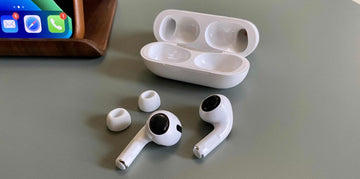
1. Removing ear tips from the AirPods Pro

Pinch the tip of the AirPod Pro with your thumb and fingers while holding the device in one hand. Pull hard on the base of the ear tip, which is where it is joined to the AirPod, with your fingers to remove one ear tip.

2. Washing ear tips with warm, soapy water

Since you’ll be utilizing warm soapy water for this, it’s easier to clean the AirPods Pro if you remove the silicone ear tips first. This also helps prevent unintentional damage to the AirPods Pro. Using the clean, lint-free cloth, clean the exterior of the ear tips after rinsing the ear tips in the previously prepared solution of soapy water.

3. Drying and reattaching ear tips

Wipe up any lingering water (to avoid damage) by using your clean, lint-free cloth. Before re-applying the ear tips, make sure they have had enough time to dry.

Cleaning the AirPods Pro Earbuds

Cleaning-AirPods-Pro

1. Use a soft, dry lint-free cloth

Use a clean, lint-free cloth to clean your AirPods Pro. For better results, lightly spritz the cloth with isopropyl alcohol. Remember to also submerge the cotton swabs (if you’re using one) in the isopropyl alcohol. After that, use them to clean the mesh and debris in the earphones.

2. Gently brush the speaker grills with an anti-static brush

Ensure to use the gentle brush on each earbud and speaker to remove any tiny, more difficult-to-remove dirt or debris. Once more, you must be cautious when brushing so as not to harm the mesh.

3. Avoiding the use of sharp objects or excessive force

Since the speaker is soft and sensitive, you must be gentle on it. Because of its fragility, if too much force is exerted, the speaker may tear. For very tiny dirt, toothpicks are safer and more effective than other sharp tools. But, you must still use the toothpick with caution to avoid harming the speaker mesh.

Cleaning the Charging Case

Cleaning-AirPods-Pro-Case

1. Wiping down the exterior with a soft, damp cloth

Clean the exterior of the charging case with a lint-free cloth, then clean the interior of the case with a Q-tip. If it doesn’t work, use a cotton swab or a cloth lightly dipped in isopropyl alcohol to wipe the dirt off your case.

2. Cleaning the lightning connector with a dry, soft-bristled brush

In all you do, avoid trying to blow the dirt out because blowing it could insert saliva particles that could moisten the contact points. You can use a dry, soft-bristled brush instead. Always prevent fluids from entering the charging ports.

3. Ensuring the case is dry before closing

Although Airpods pro comes with some water resistance capabilities, it is still advisable that you let your Airpods pro case dry properly before closing it. While water may not do immediate damage, leaving water in the case for a long time could spell doom for your Airpods pro.

Maintaining Battery Health

1. Keeping AirPods Pro and the charging case at room temperature

Your AirPods’ batteries can be harmed by extreme conditions (hot or cold). Avoid using your AirPods in bad weather and avoid leaving them in the sun while not in use to extend their battery life. The AirPods and case should not be kept in an area that is frequently hot or cold.

2. Avoiding overcharging and using Apple-approved chargers

The battery level should be displayed for 8 seconds via the status light. While placing your AirPods Pro on the charging pad, you can simply tap the case to confirm that it’s charging (an amber light will appear) or is charged up (green light will appear). Don’t leave it plugged in once it’s fully charged and always use the Apple-recommended charging mat.

3. Storing AirPods Pro in their charging case when not in use

Keep your AirPods in their charging case whenever not in use because, depending on the model, it can extend their battery life by up to 30 hours. By doing this, they will be prepared for use whenever you need them.

Firmware Updates

1. For optimum performance, the AirPods Pro firmware should be updated often

When your AirPods are charging and within Bluetooth range of your iPhone, iPad, or Mac, firmware updates are regularly provided.

2. Connecting AirPods Pro to an iPhone or iPad for automatic updates

You don’t need to upgrade your AirPods because firmware updates happen automatically. All you need to do is ensure that your AirPods pro is connected to an iPhone or iPad.

3. Verifying the current firmware version

Make sure you have the most recent version of iPadOS or iOS on your iPhone or iPad to utilize them to check that your AirPods are up to date. To verify the current firmware version, click the Info button next to the name of your AirPods under Bluetooth in Settings. The firmware version can be found in the About section by scrolling down.

Proper Storage and Handling

1. Storing AirPods Pro in their charging case when not in use

Keep your AirPods in their charging case whenever not in use because, depending on the model, it can extend their battery life by up to 30 hours. By doing this, they will be prepared for use whenever you need them.

 2. Avoiding extreme temperatures, moisture, and direct sunlight

Airpods pro are safe to use at room temperature or where the outside temperature ranges from 32 degrees Fahrenheit to 95 degrees Celsius. The device may alter its behavior to regulate its temperature when it is exposed to too-low or too-high-temperature situations. Using AirPods outside of their recommended working range may cause the device to switch off or briefly reduce battery life. When you put the gadget back in a warmer environment, the battery life will resume. While using AirPods in extreme heat, the battery life may be permanently shortened. Keep your AirPods somewhere that is between -10° and 45° C (14° and 113° F) in temperature. Lastly, because parked cars can get hotter than this range of temperatures, don’t leave your AirPods in your vehicle.

3. Using protective cases and accessories to prevent damage

Scratches can be avoided by using AirPods Pro cases to guard against cosmetic harm. Even if you don’t frequently drop the case, other objects in your backpack or purse may scratch it without you knowing.

Troubleshooting Common Issues

1. Addressing sound quality or connectivity problems

  • On your linked iPhone, iPad, iPod touch, or Mac, confirm that the most recent software is installed.
  • Make sure the device you’re linked to is close by and that there are no obstacles or wireless interference in your path to it.
  • To determine if the problem is caused by the app, listen to audio from another app.

2. Resetting AirPods Pro to factory settings

  • Place your AirPods inside the charging case, then snap the lid shut and pause for 30 seconds.
  • Put your AirPods in your ears after opening the charging case cover.
  • Navigate to Bluetooth Settings. If your AirPods pro is listed as being linked there, hit the “More Details” button next to them, choose to Forget This Device, and then tap the screen once more to confirm.
  • When the status light on the front of the case flashes amber and then white, press and hold the setup button on the case’s back for approximately 15 seconds.
  • Reconnecting your AirPods requires you to put them close to your iPhone or iPad when the charging case’s lid is open and the AirPods are inside. Follow the actions listed on your device’s screen.

Note: One Apple ID can be used to link several AirPods. Someone must first delete the AirPods from their Apple ID before they may use their third-generation or first- or second-generation AirPods Pro.If you’ve tried all you can and it seems not working, then you should contact professionals at Apple help.

Conclusion

The importance of cleaning and maintenance cannot be overstated as it has a lot to do with the optimum effectiveness and efficiency of your Airpod pro.It’s a good idea to clean your AirPods after 72 hours of use to prevent an excessive buildup of foreign objects inside the headphones. You should wipe your AirPods down with a tissue or lint-free cloth after each usage to prevent oil buildup on the surface.

Besides keeping your Airpod pro safe from dirt, regular care can boost performance and make the device last longer. For instance, if you do not take care of your Airpod or you don’t keep it under the right temperature the battery life may begin to degrade.

After all said and done, it will be wise for you to invest in proper care and protection for your AirPods pro. Yes, it may be a little pricey but it’s worth every penny. Don’t leave your Airpods unprotected. Get your AirPods pro a protective case.

You May Also Like to Read:

Top 8 AirPods Pro Accessories: Elevate Your Listening Experience

How to Fix AirPods Pro Battery Drain Issues?

The Best Cases for AirPods Pro 2

Mots clés: AirPods Pro, AirPods Pro 2022
Précédent
Must-Have iPhone Accessories for Business People
Suivant
Is it Safe to Use Portable MagSafe Chargers Every Day?

Articles Liés

Should You Buy the First iPhone Ultra/Fold — or Wait for Generation Two?

Faut-il acheter le premier iPhone Ultra/Fold, ou attendre la deuxième génération ?

Samsung Wallpaper Size Guide: How to Download, Customize, and Protect Your Perfect Phone Wallpaper

Guide des tailles de fond d'écran Samsung : Comment télécharger, personnaliser et protéger le fond d'écran parfait pour votre téléphone

The Complete Director’s Vlogging Kit: Best Smartphone Setups for Every Budget (2026 Guide)

Le kit de vlogging complet du réalisateur : Les meilleures configurations de smartphone pour tous les budgets (Guide 2026)

Samsung Galaxy S26 vs. S25: Should You Trade In Your S25 Today?

Samsung Galaxy S26 vs S25 : faut-il échanger votre S25 aujourd’hui ?

Laissez un commentaire

Votre adresse email ne sera pas publiée.

Recent Post

Guide d'achat de l'Apple Watch 2026 : Faut-il attendre l'Ultra 4, passer à la Series...

Apple devrait lancer de nouvelles montres en septembre 2026, et...

10 accessoires téléphone que papa utilisera vraiment — guide cadeaux pour la Fête des Pères

Papa utilise toujours une coque fissurée datant de plusieurs années....

Rumeurs sur les AirPods Ultra, AirPods 5 et AirPods Pro 3 : À quoi s'attendre...

Caméras, IA, un retard — et le modèle que la...

Nous avons testé la nouvelle collection d’été ESR — voici ce que cela donne réellement...

ESR s’est historiquement concentré sur des accessoires fonctionnels plutôt que...

Meilleures applications de dessin pour iPad Pro en 2026 : de l'amateur au professionnel

En 2026, dessiner sur un iPad ressemble moins à l’utilisation...

Meilleurs accessoires pour iPad Air M4 (2026) : Étuis-claviers ESR Shift pour une productivité optimale

Si vous cherchez des accessoires pour l’iPad Air 2026, le...

Get 20% off with code: BLOG20

Company

  • À propos de nous
  • Notre blog
  • Salle de presse
  • Devenir revendeur

Products

  • Coques de téléphone
  • iPhone Cases
  • Coques pour iPad
  • Conçu pour MagSafe
  • Productivité
  • Protections d’Écran
  • Chargement sans fil
  • Portefeuilles magnétiques
  • Autres accessoires

Community

  • Mon Compte
  • Référer vos amis, gagnez du CashBack
  • Devenir un Super Utilisateur ESR
  • Programme d’Affiliation
  • Réduction étudiante

Support

  • Contactez-nous
  • Vidéos d'installation et FAQ
  • Statut de la commande
  • Retour et remboursement
  • Politique de garantie
  • Politique d'expédition
  • Modes de paiement
  • Product Recalls

Options de paiement:
  • American Express
  • JCB
  • Mastercard
  • PayPal
  • Visa
  • Klarna Klarna
  • Afterpay
Excellent 4.6 out of 5 - Review :2584 •

© 2026 ESR All rights reserved.

  • Conditions d'utilisation
  • politique de confidentialité
  • Déclaration légale
  • Politique de cookies
  • Politique d'expédition
  • Retour et remboursement
  • Track Your Order

Panier

Get a 15% off coupon when you

sign up

for free shipping!

$38.00
You're $38.00 away from Free Shipping!

$50.00
You're $50.00 away from Free Shipping!

Benefits applied automatically at checkout

Your Cart is Empty

Sign In / Register to view saved cart items
Shop Now
ESR_IMG

Protect Your iPhone's Camera Control

ESR_IMG

Always Find Your Wallet

ESR_IMG

Drop-Proof FlickLlock, Effortless MagSafe

ESR_IMG

Qi2 Fast Charging on the Go

Total $0.00
Voir le panier

Thank you for choosing to transfer to a human service.

Sorry! The previous responses were from our AI customer service. Since it didn't satisfy you, you've been transferred to a human agent. We'll reply within 24 hours from Mon to Fri and 48 hours on weekends for further help.

Please select the reason for transfer