
Nouveau : des imprimés d’été pour votre téléphone et votre portefeuille. Acheter
Économisez jusqu’à 70 % sur une sélection d’essentiels tech. Acheter
Livraison gratuite pour les commandes de plus de $50
Chariot 0
  • Coques
    • iPhone
    • iPad
    • AirPods
    • Samsung
      iPhone 17🔥
    • iPhone 17e🔥
    • iPhone 17 Pro Max🔥
    • iPhone 17 Pro🔥
    • iPhone Air🔥
    • iPhone 17🔥
    • iPhone 16
    • iPhone 16e
    • iPhone 16 Pro Max
    • iPhone 16 Pro
    • iPhone 16 Plus
    • iPhone 16
    • iPhone 15
    • iPhone 15 Pro Max
    • iPhone 15 Pro
    • iPhone 15 Plus
    • iPhone 15
    • iPhone 14
    • iPhone 14 Pro Max
    • iPhone 14 Pro
    • iPhone 14 Plus
    • iPhone 14
    • iPhone 13
    • iPhone 13 Pro Max
    • iPhone 13 Pro
    • iPhone 13
       
    • iPad Air 13 (2026)🔥
    • iPad Air 11 (2026)🔥
    •  
    • iPad Pro 13 (2025)
    • iPad Pro 11 (2025)
    • iPad 11th Gen (2025)
    • iPad Air 13 (2025)
    • iPad Air 11 (2025)
    •  
    • iPad Pro 13 (2024)
    • iPad Pro 11 (2024)
    • iPad Air 13 (2024)
    • iPad Air 11 (2024)
    • iPad mini 7 (2024)
    •  
    • iPad Pro 12.9 (2022)
    • iPad Pro 11 (2022)
    • iPad Air 5/4 (2022)
    • iPad 10th Gen (2022)
    •  
    • iPad mini 6 (2021)
    • iPad Pro 12.9 (2021)
    • iPad Pro 11 (2021)
    • iPad Pro 11 (2020)
       
    • AirPods Pro 3🔥
    • AirPods 4
    • AirPods Pro (2023/2022/2019)
      Galaxy S26🔥
    • Galaxy S26 Ultra🔥
    • Galaxy S26 Plus🔥
    • Galaxy S26🔥
    • Galaxy S25
    • Galaxy S25 Ultra
    • Galaxy S25+
    • Galaxy S24
    • Galaxy S24 Ultra
    • Galaxy S24+
    • Galaxy S24
    • Galaxy S23
    • Galaxy S23 Ultra
    • Galaxy S23
  • Protecteurs d’écran
    • iPhone
    • iPad
    • Apple Watch
    • Samsung
      iPhone 17🔥
    • iPhone 17e🔥
    • iPhone 17 Pro Max🔥
    • iPhone 17 Pro🔥
    • iPhone Air🔥
    • iPhone 17🔥
    • iPhone 16
    • iPhone 16e
    • iPhone 16 Pro Max
    • iPhone 16 Pro
    • iPhone 16 Plus
    • iPhone 16
    • iPhone 15
    • iPhone 15 Pro Max
    • iPhone 15 Pro
    • iPhone 15 Plus
    • iPhone 15
    • iPhone 14
    • iPhone 14 Pro Max
    • iPhone 14 Pro
    • iPhone 14 Plus
    • iPhone 14
    • iPhone 13
    • iPhone 13 Pro Max
    • iPhone 13/13 Pro
       
    • iPad Air 13 (2026)🔥
    • iPad Air 11 (2026)🔥
    •  
    • iPad Pro 13 (2025)
    • iPad Pro 11 (2025)
    • iPad 11th Gen (2025)
    • iPad Air 13 (2025)
    • iPad Air 11 (2025)
    •  
    • iPad Pro 13 (2024)
    • iPad Pro 11 (2024)
    • iPad Air 13 (2024)
    • iPad Air 11 (2024)
    •  
    • iPad Pro 12.9 (6th/5th/4th/3rd Gen)
    • iPad Pro 11 (4th/3rd/2nd/1st Gen)
    • iPad Air 5/4 (2022)
    • iPad 10th Gen (2022)
       
    • Apple Watch🔥
      Galaxy S26🔥
    • Galaxy S26 Ultra🔥
    • Galaxy S25
    • Galaxy S25 Ultra
    • Galaxy S24
    • Galaxy S24 Ultra
    • Galaxy S23
    • Galaxy S23 Ultra
    • Galaxy S23+
    • Galaxy S23
    • Galaxy S22
    • Galaxy S22 Ultra
  • Claviers iPad & stylets
    • Claviers pour iPad
    • Stylets & souris
      Choisissez votre appareil
    • iPad Air 13 (2026)🔥
    • iPad Air 11 (2026)🔥
    •  
    • iPad Pro 13 (2025)
    • iPad Pro 11 (2025)
    • iPad 11e génération (2025)
    • iPad Air 13 (2025)
    • iPad Air 11 (2025)
    •  
    • iPad Pro 13 (2024)
    • iPad Pro 11 (2024)
    • iPad Air 13 (2024)
    • iPad Air 11 (2024)
    •  
    • iPad Pro 12.9 (6e/5e/4e/3e génération)
    • iPad Pro 11 (4e/3e/2e/1er)
    • iPad Air 5/4 (2022)
    • iPad 10e génération (2022)
       
    • Stylets numériques
    • Souris
  • Chargeurs
    • Chargeurs sans fil & supports
    • Chargeurs voiture et Supports
    Chargeurs sans fil & supports
    • Station de charge magnétique pliable 3-en-1 CryoBoost (25 W) – US Plug-Black

      Station de charge magnétique pliable 3-en-1 CryoBoost (25 W) – US Plug-Black

    • Station de charge magnétique pliable 3-en-1 CryoBoost (25 W) – US Plug-Black

      Station de charge magnétique pliable 3-en-1 CryoBoost (25 W) – US Plug-Black

    • Pack chargeur magnétique pliable 3-en-1 25 W CryoBoost et chargeur voiture (grille d’aération) – Prise US – Noir

      Pack chargeur magnétique pliable 3-en-1 25 W CryoBoost et chargeur voiture (grille d’aération) – Prise US – Noir

    • Station de charge avec CryoBoost 3-en-1 (25 W, Qi2.2)  - US Plug–Black

      Station de charge avec CryoBoost 3-en-1 (25 W, Qi2.2) - US Plug–Black

    • Station de charge avec CryoBoost 3-en-1 (25 W, Qi2.2)  - EU Plug–Black

      Station de charge avec CryoBoost 3-en-1 (25 W, Qi2.2) - EU Plug–Black

    • All Chargeurs sans fil & supports >
    Chargeurs voiture et Supports
    • Chargeur magnétique de voiture OmniLock (25W, CryoBoost, Grille d'aération)  - Black

      Chargeur magnétique de voiture OmniLock (25W, CryoBoost, Grille d'aération) - Black

    • Chargeur de voiture magnétique sans fil 15W (HaloLock) - Black

      Chargeur de voiture magnétique sans fil 15W (HaloLock) - Black

    • Chargeur de voiture sans fil 15W avec CryoBoost (HaloLock)  - Black

      Chargeur de voiture sans fil 15W avec CryoBoost (HaloLock) - Black

    • Chargeur de voiture sans fil pour tableau de bord 15W (HaloLock) - Black

      Chargeur de voiture sans fil pour tableau de bord 15W (HaloLock) - Black

    • ESR Chargeur de Voiture 15W avec MagSafe + CryoBoost - Cool Grey

      ESR Chargeur de Voiture 15W avec MagSafe + CryoBoost - Cool Grey

    • All Chargeurs voiture et Supports >
  • Porte-cartes
  • 🔥Nouveautés🔥
    • 🏝️Collection imprimée d’été🏝️
    • Série Galaxy S26
    • iPhone 17e🔥
    • Série iPad Air 2026
    • Chargement sans fil Qi2 15 W
  • Promotions
  • Support
    • Contactez-nous
    • Rappels de produits
    • Vidéos de configuration et FAQs
    • FAQ générales
    • Statut de la commande
    • Politique de retour et de remboursement
    • Politique de garantie
    • Politique d'expédition
  • Explorer
    • Notre Histoire
    • ESR Blog
    • Salle de presse
Avantages Super User
  • Devenez un Super Utilisateur ESR
  • Offres exclusives Super Utilisateur
  • Parrainez des amis et recevez du Cashback
Mon compte
Se connecter Registre
North America
Europe
Asia Pacific
Middle East
Allemagne
USD $
Arabie saoudite
USD $
Australie
USD $
Autriche
USD $
Bahreïn
USD $
Belgique
USD $
Bulgarie
USD $
Canada
USD $
Corée du Sud
USD $
Croatie
USD $
Danemark
USD $
Émirats arabes unis
USD $
Espagne
USD $
Estonie
USD $
États-Unis
USD $
Finlande
USD $
France
USD $
Grèce
USD $
Hongrie
USD $
Indonésie
USD $
Irlande
USD $
Italie
USD $
Japon
USD $
Jordanie
USD $
Lettonie
USD $
Lituanie
USD $
Luxembourg
USD $
Malaisie
USD $
Mexique
USD $
Norvège
USD $
Nouvelle-Zélande
USD $
Oman
USD $
Pays-Bas
USD $
Philippines
USD $
Pologne
USD $
Portugal
USD $
Qatar
USD $
Roumanie
USD $
Royaume-Uni
USD $
Singapour
USD $
Slovaquie
USD $
Slovénie
USD $
Suède
USD $
Suisse
USD $
Taïwan
USD $
Tchéquie
USD $
Thaïlande
USD $
Viêt Nam
USD $
français
English
  • Coques
    • iPhone
    • iPad
    • AirPods
    • Samsung
      iPhone 17🔥
    • iPhone 17e🔥
    • iPhone 17 Pro Max🔥
    • iPhone 17 Pro🔥
    • iPhone Air🔥
    • iPhone 17🔥
    • iPhone 16
    • iPhone 16e
    • iPhone 16 Pro Max
    • iPhone 16 Pro
    • iPhone 16 Plus
    • iPhone 16
    • iPhone 15
    • iPhone 15 Pro Max
    • iPhone 15 Pro
    • iPhone 15 Plus
    • iPhone 15
    • iPhone 14
    • iPhone 14 Pro Max
    • iPhone 14 Pro
    • iPhone 14 Plus
    • iPhone 14
    • iPhone 13
    • iPhone 13 Pro Max
    • iPhone 13 Pro
    • iPhone 13
       
    • iPad Air 13 (2026)🔥
    • iPad Air 11 (2026)🔥
    •  
    • iPad Pro 13 (2025)
    • iPad Pro 11 (2025)
    • iPad 11th Gen (2025)
    • iPad Air 13 (2025)
    • iPad Air 11 (2025)
    •  
    • iPad Pro 13 (2024)
    • iPad Pro 11 (2024)
    • iPad Air 13 (2024)
    • iPad Air 11 (2024)
    • iPad mini 7 (2024)
    •  
    • iPad Pro 12.9 (2022)
    • iPad Pro 11 (2022)
    • iPad Air 5/4 (2022)
    • iPad 10th Gen (2022)
    •  
    • iPad mini 6 (2021)
    • iPad Pro 12.9 (2021)
    • iPad Pro 11 (2021)
    • iPad Pro 11 (2020)
       
    • AirPods Pro 3🔥
    • AirPods 4
    • AirPods Pro (2023/2022/2019)
      Galaxy S26🔥
    • Galaxy S26 Ultra🔥
    • Galaxy S26 Plus🔥
    • Galaxy S26🔥
    • Galaxy S25
    • Galaxy S25 Ultra
    • Galaxy S25+
    • Galaxy S24
    • Galaxy S24 Ultra
    • Galaxy S24+
    • Galaxy S24
    • Galaxy S23
    • Galaxy S23 Ultra
    • Galaxy S23
  • Protecteurs d’écran
    • iPhone
    • iPad
    • Apple Watch
    • Samsung
      iPhone 17🔥
    • iPhone 17e🔥
    • iPhone 17 Pro Max🔥
    • iPhone 17 Pro🔥
    • iPhone Air🔥
    • iPhone 17🔥
    • iPhone 16
    • iPhone 16e
    • iPhone 16 Pro Max
    • iPhone 16 Pro
    • iPhone 16 Plus
    • iPhone 16
    • iPhone 15
    • iPhone 15 Pro Max
    • iPhone 15 Pro
    • iPhone 15 Plus
    • iPhone 15
    • iPhone 14
    • iPhone 14 Pro Max
    • iPhone 14 Pro
    • iPhone 14 Plus
    • iPhone 14
    • iPhone 13
    • iPhone 13 Pro Max
    • iPhone 13/13 Pro
       
    • iPad Air 13 (2026)🔥
    • iPad Air 11 (2026)🔥
    •  
    • iPad Pro 13 (2025)
    • iPad Pro 11 (2025)
    • iPad 11th Gen (2025)
    • iPad Air 13 (2025)
    • iPad Air 11 (2025)
    •  
    • iPad Pro 13 (2024)
    • iPad Pro 11 (2024)
    • iPad Air 13 (2024)
    • iPad Air 11 (2024)
    •  
    • iPad Pro 12.9 (6th/5th/4th/3rd Gen)
    • iPad Pro 11 (4th/3rd/2nd/1st Gen)
    • iPad Air 5/4 (2022)
    • iPad 10th Gen (2022)
       
    • Apple Watch🔥
      Galaxy S26🔥
    • Galaxy S26 Ultra🔥
    • Galaxy S25
    • Galaxy S25 Ultra
    • Galaxy S24
    • Galaxy S24 Ultra
    • Galaxy S23
    • Galaxy S23 Ultra
    • Galaxy S23+
    • Galaxy S23
    • Galaxy S22
    • Galaxy S22 Ultra
  • Claviers iPad & stylets
    • Claviers pour iPad
    • Stylets & souris
      Choisissez votre appareil
    • iPad Air 13 (2026)🔥
    • iPad Air 11 (2026)🔥
    •  
    • iPad Pro 13 (2025)
    • iPad Pro 11 (2025)
    • iPad 11e génération (2025)
    • iPad Air 13 (2025)
    • iPad Air 11 (2025)
    •  
    • iPad Pro 13 (2024)
    • iPad Pro 11 (2024)
    • iPad Air 13 (2024)
    • iPad Air 11 (2024)
    •  
    • iPad Pro 12.9 (6e/5e/4e/3e génération)
    • iPad Pro 11 (4e/3e/2e/1er)
    • iPad Air 5/4 (2022)
    • iPad 10e génération (2022)
       
    • Stylets numériques
    • Souris
  • Chargeurs
    • Chargeurs sans fil & supports
    • Chargeurs voiture et Supports
    Chargeurs sans fil & supports
    • Station de charge magnétique pliable 3-en-1 CryoBoost (25 W) – US Plug-Black

      Station de charge magnétique pliable 3-en-1 CryoBoost (25 W) – US Plug-Black

    • Station de charge magnétique pliable 3-en-1 CryoBoost (25 W) – US Plug-Black

      Station de charge magnétique pliable 3-en-1 CryoBoost (25 W) – US Plug-Black

    • Pack chargeur magnétique pliable 3-en-1 25 W CryoBoost et chargeur voiture (grille d’aération) – Prise US – Noir

      Pack chargeur magnétique pliable 3-en-1 25 W CryoBoost et chargeur voiture (grille d’aération) – Prise US – Noir

    • Station de charge avec CryoBoost 3-en-1 (25 W, Qi2.2)  - US Plug–Black

      Station de charge avec CryoBoost 3-en-1 (25 W, Qi2.2) - US Plug–Black

    • Station de charge avec CryoBoost 3-en-1 (25 W, Qi2.2)  - EU Plug–Black

      Station de charge avec CryoBoost 3-en-1 (25 W, Qi2.2) - EU Plug–Black

    • All Chargeurs sans fil & supports >
    Chargeurs voiture et Supports
    • Chargeur magnétique de voiture OmniLock (25W, CryoBoost, Grille d'aération)  - Black

      Chargeur magnétique de voiture OmniLock (25W, CryoBoost, Grille d'aération) - Black

    • Chargeur de voiture magnétique sans fil 15W (HaloLock) - Black

      Chargeur de voiture magnétique sans fil 15W (HaloLock) - Black

    • Chargeur de voiture sans fil 15W avec CryoBoost (HaloLock)  - Black

      Chargeur de voiture sans fil 15W avec CryoBoost (HaloLock) - Black

    • Chargeur de voiture sans fil pour tableau de bord 15W (HaloLock) - Black

      Chargeur de voiture sans fil pour tableau de bord 15W (HaloLock) - Black

    • ESR Chargeur de Voiture 15W avec MagSafe + CryoBoost - Cool Grey

      ESR Chargeur de Voiture 15W avec MagSafe + CryoBoost - Cool Grey

    • All Chargeurs voiture et Supports >
  • Porte-cartes
  • 🔥Nouveautés🔥
    • 🏝️Collection imprimée d’été🏝️
    • Série Galaxy S26
    • iPhone 17e🔥
    • Série iPad Air 2026
    • Chargement sans fil Qi2 15 W
  • Promotions
  • Support
    • Contactez-nous
    • Rappels de produits
    • Vidéos de configuration et FAQs
    • FAQ générales
    • Statut de la commande
    • Politique de retour et de remboursement
    • Politique de garantie
    • Politique d'expédition
  • Explorer
    • Notre Histoire
    • ESR Blog
    • Salle de presse
Avantages Super User
  • Devenez un Super Utilisateur ESR
  • Offres exclusives Super Utilisateur
  • Parrainez des amis et recevez du Cashback

Devenez Super User et profitez de récompenses exclusives

  • * 15 % de remise de bienvenue
  • * Gagnez des points à chaque achat
  • * Avantages exclusifs réservés aux membres
Rejoindre maintenant Se connecter
Chariot 0
North America
Europe
Asia Pacific
Middle East
Allemagne
USD $
Arabie saoudite
USD $
Australie
USD $
Autriche
USD $
Bahreïn
USD $
Belgique
USD $
Bulgarie
USD $
Canada
USD $
Corée du Sud
USD $
Croatie
USD $
Danemark
USD $
Émirats arabes unis
USD $
Espagne
USD $
Estonie
USD $
États-Unis
USD $
Finlande
USD $
France
USD $
Grèce
USD $
Hongrie
USD $
Indonésie
USD $
Irlande
USD $
Italie
USD $
Japon
USD $
Jordanie
USD $
Lettonie
USD $
Lituanie
USD $
Luxembourg
USD $
Malaisie
USD $
Mexique
USD $
Norvège
USD $
Nouvelle-Zélande
USD $
Oman
USD $
Pays-Bas
USD $
Philippines
USD $
Pologne
USD $
Portugal
USD $
Qatar
USD $
Roumanie
USD $
Royaume-Uni
USD $
Singapour
USD $
Slovaquie
USD $
Slovénie
USD $
Suède
USD $
Suisse
USD $
Taïwan
USD $
Tchéquie
USD $
Thaïlande
USD $
Viêt Nam
USD $
français
English

Rechercher notre magasin

Devenez Super User et profitez de récompenses exclusives

  • * 15 % de remise de bienvenue
  • * Gagnez des points à chaque achat
  • * Avantages exclusifs réservés aux membres
Rejoindre maintenant Se connecter
Chariot 0
Recherches populaires:
iPad 2026 Case iPhone 17e Galaxy S26 iPad Keyboard
Tech & Gadgets

10 Tips to Make Your MacBook Pro/Air Battery Last Longer

par Javeria Salam sur Jan 14, 2023 (Last Updated:Apr 09, 2025)
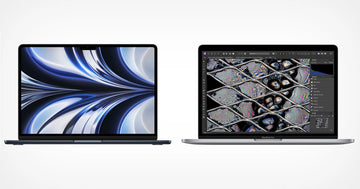
Apple New M2 MacBook Air and MacBook Pro

Maximizing battery life on your MacBook Pro or Air is essential for staying productive on the go. In this article, we will share some tips and tricks to help you get the most out of your device’s battery, including adjusting power settings, closing unused apps, and properly ventilating your device.

1. Reduce screen and keyboard brightness

The MacBook features both a backlit keyboard and screen and increasing the brightness of the light will cause an increase in power consumption. Keeping the screen brightness at its maximum setting will cause the MacBook’s battery to drain more quickly.

On certain MacBook Pro models, the Touch Bar can be used to adjust the brightness. Additionally, the option to automatically adjust the brightness based on ambient light can be disabled in the System Preferences.

2. Close unused apps

Even when apps are not actively in use, they can still have an impact on battery life. To check which apps are consuming the most battery power, you can click on the battery icon in the top right corner of the screen.

If you are not using an app, it is best to close it to preserve battery life. For more detailed information about which apps are consuming the most power, you can use the Activity Monitor on your MacBook.

3. Turn off wireless connections

To conserve battery power, it is advisable to turn off Wi-Fi and Bluetooth if they are not in use. This can be especially beneficial when using your MacBook for activities that require extended battery life, such as watching movies during a long flight. Keep in mind, even when not in use, wireless connections consume energy.

Turning off Wi-Fi and Bluetooth will help prolong your MacBook’s battery life. To disable Bluetooth, you can click on the Bluetooth icon in System Preferences and select the option to turn it off. To turn off Wi-Fi, go to the Network settings.

4. Change power settings

You can extend your MacBook’s battery life by adjusting the power settings. By clicking on the battery icon in the top right corner of the screen, and accessing the Energy Saver preferences panel, you can enable ‘Automatic Graphics Switching’ and turn off ‘Power Nap’. This will prevent the MacBook from checking for new emails or performing other tasks while in sleep mode.

5. Use Airplane mode

Airplane mode is a feature that allows you to turn off all wireless communications on a device before boarding an aircraft. This is a mandatory requirement as it helps prevent interference with the plane’s navigation and communication systems.

There are two ways to turn the “On Airplane Mode:” turning off Wi-Fi and turning off Bluetooth.

Turning off Wi-Fi

  • Click the Apple icon on the left top corner of the screen
  • Navigate and select System Preferences
  • Select Network
  • Click Turn Off Wi-If

Turn off Bluetooth

  • Click the Apple icon on the left top corner of the screen
  • Navigate and select System Preferences
  • Click Bluetooth
  • Click Turn Bluetooth Off

The Airplane mode prevents your MacBook Pro/Air from expending energy, making the battery last longer.

6. Adjust energy preferences

There are different ways to adjust power preferences in a MacBook Pro or Air. Let’s look at each.

  • Reducing display sleep timer

The screen of a Mac can be a significant drain on power. To conserve battery, it is recommended to switch off the display when it is not in use. While you can manually put your Mac’s screen to sleep, it may be more efficient to set an automatic timer to do so.

To adjust the timer:

  • Navigate to System Preferences
  • Click Battery
  • Drag the “Turn display off” after the slider to your desired position

You can also turn on turn on the “Slightly dim the display” option to further conserve the battery.

  • iphone 14
  • Scheduling

The MacBook Pro/Air allows you to schedule the wake, sleep, shutdown, and start-up. By adjusting the settings on your Mac, you can have it automatically shut down at the end of the day and power on when you are ready to start working again.

To set a schedule:

  • Navigate to System Preferences
  • Click Battery
  • Click Schedule
  • Choose your ideal schedule
  • Click Apply
  • Turn off Power Nap

Power Nap is a feature that allows your Mac to perform certain tasks while it is in sleep mode, it will however consume battery power when not connected to a power source.

To change Power Nap settings:

  • Go to System Preferences
  • Click Battery
  • Untick “Enable Power Nap”

This will help prevent draining your battery when you are asleep.

7. Keep your MacBook cool

The battery life of your MacBook can be reduced if it gets too hot, so try to keep it in a cool place and avoid using it on soft surfaces like a bed or couch. Besides, when your MacBook becomes hot, it is likely that a processor-intensive application is running, which can cause an increase in power consumption and drain the battery quickly.

To keep your MacBook cool, close unused tabs, and CPU-intensive apps. Ensure to also use your MacBook on even and cool surfaces.

8. Keep your MacBook well-ventilated

If you’re using your MacBook on a flat surface like a desk, ensure the vents on the bottom of the laptop are unobstructed to ensure proper ventilation.

To ensure proper ventilation and prevent overheating, it is best to elevate your laptop above the surface on which you are working. Laptop stands and wall mounts can be purchased for this purpose, however, it is also possible to improvise by using an object like a book to raise the laptop.

9. Manage your startup items

Unchecking the apps that you don’t need open upon startup can save battery power. To achieve this, follow the following tips:

  • Go to System Preferences
  • Click Users & Groups
  • Select Login Items
  • Uncheck the apps you don’t want automatically turned on once you log in.

10. Disable push email

Push email continuously checks for new messages, which can drain battery life.

Conclusion

As you can see, there are many ways to extend the battery life of your MacBook Pro or Air. Turning off Wi-Fi and Bluetooth as well as ensuring proper ventilation can help extend the lifespan of the battery. By using the tips, you can ensure that your MacBook Pro or Air lasts as long as possible on a single charge.

Mots clés: MacBook Air, MacBook Pro
Précédent
Should You Buy The Galaxy S22 Ultra Now Or Wait For the S23 Ultra?
Suivant
Samsung Galaxy s23 Release Date, Design, Price, Color, Specs, and Leaks (Latest Update)

Articles Liés

Should You Buy iPhone 17 Now or Wait for iPhone 18? The Price Hikes, the Split Launch, and the Fold, Explained

Faut-il acheter l'iPhone 17 maintenant ou attendre l'iPhone 18 ? Les hausses de prix, le lancement scindé et le Fold, expliqués

Why You NEED an iPad Mini in 2026 (Seriously it's worth it)

iPad Mini 8 vs iPad Mini 7 : Faut-il attendre ?

iOS 27 Rolls Out: Performance Fixes, AI Frustrations, and Why Your iPhone Case Still Matters

Déploiement d'iOS 27 : Correctifs de performances, frustrations liées à l'IA, et pourquoi votre coque d'iPhone est toujours importante

The iPhone 17 Air and the eSIM Revolution: A Deep Dive into Apple’s Slimmest Design

L'iPhone 17 Air et la révolution de l'eSIM : plongée au cœur du design le plus fin d'Apple

Laissez un commentaire

Votre adresse email ne sera pas publiée.

Recent Post

Guide d'achat de l'Apple Watch 2026 : Faut-il attendre l'Ultra 4, passer à la Series...

Apple devrait lancer de nouvelles montres en septembre 2026, et...

10 accessoires téléphone que papa utilisera vraiment — guide cadeaux pour la Fête des Pères

Papa utilise toujours une coque fissurée datant de plusieurs années....

Rumeurs sur les AirPods Ultra, AirPods 5 et AirPods Pro 3 : À quoi s'attendre...

Caméras, IA, retard — et le modèle que la plupart...

Nous avons testé la nouvelle collection d’été ESR — voici ce que cela donne réellement...

ESR s’est historiquement concentré sur des accessoires fonctionnels plutôt que...

Meilleures applications de dessin pour iPad Pro en 2026 : de l'amateur au professionnel

En 2026, dessiner sur un iPad ressemble moins à l’utilisation...

Meilleurs accessoires pour iPad Air M4 (2026) : Étuis-claviers ESR Shift pour une productivité optimale

Si vous cherchez des accessoires pour l’iPad Air 2026, le...

Get 20% off with code: BLOG20

Entreprise

  • À propos de nous
  • Notre blog
  • Salle de presse
  • Devenir revendeur

Produits

  • Coques de téléphone
  • iPhone Cases
  • Coques pour iPad
  • Conçu pour MagSafe
  • Productivité
  • Protections d’Écran
  • Chargement sans fil
  • Portefeuilles magnétiques
  • Autres accessoires

Communauté

  • Mon Compte
  • Référer vos amis, gagnez du CashBack
  • Devenir un Super Utilisateur ESR
  • Programme d’Affiliation
  • Réduction étudiante

Assistance

  • Contactez-nous
  • Vidéos d'installation et FAQ
  • Statut de la commande
  • Retour et remboursement
  • Politique de garantie
  • Politique d'expédition
  • Modes de paiement
  • Product Recalls

Options de paiement:
  • American Express
  • JCB
  • Mastercard
  • PayPal
  • Visa
  • Klarna Klarna
  • Afterpay
Excellent 4.6 out of 5 - Review :2580 •

© 2026 ESR All rights reserved.

  • Conditions d'utilisation
  • politique de confidentialité
  • Déclaration légale
  • Politique de cookies
  • Politique d'expédition
  • Retour et remboursement
  • Track Your Order

Panier

Get a 15% off coupon when you

sign up

for free shipping!

$38.00
You're $38.00 away from Free Shipping!

$50.00
You're $50.00 away from Free Shipping!

Benefits applied automatically at checkout

Your Cart is Empty

Sign In / Register to view saved cart items
Shop Now
ESR_IMG

Protect Your iPhone's Camera Control

ESR_IMG

Always Find Your Wallet

ESR_IMG

Drop-Proof FlickLlock, Effortless MagSafe

ESR_IMG

Qi2 Fast Charging on the Go

Total $0.00
Voir le panier

Thank you for choosing to transfer to a human service.

Sorry! The previous responses were from our AI customer service. Since it didn't satisfy you, you've been transferred to a human agent. We'll reply within 24 hours from Mon to Fri and 48 hours on weekends for further help.

Please select the reason for transfer