
Nouveau : des imprimés d’été pour votre téléphone et votre portefeuille. Acheter
Économisez jusqu’à 70 % sur une sélection d’essentiels tech. Acheter
Livraison gratuite pour les commandes de plus de $50
Chariot 0
  • Coques
    • iPhone
    • iPad
    • AirPods
    • Samsung
      iPhone 17🔥
    • iPhone 17e🔥
    • iPhone 17 Pro Max🔥
    • iPhone 17 Pro🔥
    • iPhone Air🔥
    • iPhone 17🔥
    • iPhone 16
    • iPhone 16e
    • iPhone 16 Pro Max
    • iPhone 16 Pro
    • iPhone 16 Plus
    • iPhone 16
    • iPhone 15
    • iPhone 15 Pro Max
    • iPhone 15 Pro
    • iPhone 15 Plus
    • iPhone 15
    • iPhone 14
    • iPhone 14 Pro Max
    • iPhone 14 Pro
    • iPhone 14 Plus
    • iPhone 14
    • iPhone 13
    • iPhone 13 Pro Max
    • iPhone 13 Pro
    • iPhone 13
       
    • iPad Air 13 (2026)🔥
    • iPad Air 11 (2026)🔥
    •  
    • iPad Pro 13 (2025)
    • iPad Pro 11 (2025)
    • iPad 11th Gen (2025)
    • iPad Air 13 (2025)
    • iPad Air 11 (2025)
    •  
    • iPad Pro 13 (2024)
    • iPad Pro 11 (2024)
    • iPad Air 13 (2024)
    • iPad Air 11 (2024)
    • iPad mini 7 (2024)
    •  
    • iPad Pro 12.9 (2022)
    • iPad Pro 11 (2022)
    • iPad Air 5/4 (2022)
    • iPad 10th Gen (2022)
    •  
    • iPad mini 6 (2021)
    • iPad Pro 12.9 (2021)
    • iPad Pro 11 (2021)
    • iPad Pro 11 (2020)
       
    • AirPods Pro 3🔥
    • AirPods 4
    • AirPods Pro (2023/2022/2019)
      Galaxy S26🔥
    • Galaxy S26 Ultra🔥
    • Galaxy S26 Plus🔥
    • Galaxy S26🔥
    • Galaxy S25
    • Galaxy S25 Ultra
    • Galaxy S25+
    • Galaxy S24
    • Galaxy S24 Ultra
    • Galaxy S24+
    • Galaxy S24
    • Galaxy S23
    • Galaxy S23 Ultra
    • Galaxy S23
  • Protecteurs d’écran
    • iPhone
    • iPad
    • Apple Watch
    • Samsung
      iPhone 17🔥
    • iPhone 17e🔥
    • iPhone 17 Pro Max🔥
    • iPhone 17 Pro🔥
    • iPhone Air🔥
    • iPhone 17🔥
    • iPhone 16
    • iPhone 16e
    • iPhone 16 Pro Max
    • iPhone 16 Pro
    • iPhone 16 Plus
    • iPhone 16
    • iPhone 15
    • iPhone 15 Pro Max
    • iPhone 15 Pro
    • iPhone 15 Plus
    • iPhone 15
    • iPhone 14
    • iPhone 14 Pro Max
    • iPhone 14 Pro
    • iPhone 14 Plus
    • iPhone 14
    • iPhone 13
    • iPhone 13 Pro Max
    • iPhone 13/13 Pro
       
    • iPad Air 13 (2026)🔥
    • iPad Air 11 (2026)🔥
    •  
    • iPad Pro 13 (2025)
    • iPad Pro 11 (2025)
    • iPad 11th Gen (2025)
    • iPad Air 13 (2025)
    • iPad Air 11 (2025)
    •  
    • iPad Pro 13 (2024)
    • iPad Pro 11 (2024)
    • iPad Air 13 (2024)
    • iPad Air 11 (2024)
    •  
    • iPad Pro 12.9 (6th/5th/4th/3rd Gen)
    • iPad Pro 11 (4th/3rd/2nd/1st Gen)
    • iPad Air 5/4 (2022)
    • iPad 10th Gen (2022)
       
    • Apple Watch🔥
      Galaxy S26🔥
    • Galaxy S26 Ultra🔥
    • Galaxy S25
    • Galaxy S25 Ultra
    • Galaxy S24
    • Galaxy S24 Ultra
    • Galaxy S23
    • Galaxy S23 Ultra
    • Galaxy S23+
    • Galaxy S23
    • Galaxy S22
    • Galaxy S22 Ultra
  • Claviers iPad & stylets
    • Claviers pour iPad
    • Stylets & souris
      Choisissez votre appareil
    • iPad Air 13 (2026)🔥
    • iPad Air 11 (2026)🔥
    •  
    • iPad Pro 13 (2025)
    • iPad Pro 11 (2025)
    • iPad 11e génération (2025)
    • iPad Air 13 (2025)
    • iPad Air 11 (2025)
    •  
    • iPad Pro 13 (2024)
    • iPad Pro 11 (2024)
    • iPad Air 13 (2024)
    • iPad Air 11 (2024)
    •  
    • iPad Pro 12.9 (6e/5e/4e/3e génération)
    • iPad Pro 11 (4e/3e/2e/1er)
    • iPad Air 5/4 (2022)
    • iPad 10e génération (2022)
       
    • Stylets numériques
    • Souris
  • Chargeurs
    • Chargeurs sans fil & supports
    • Chargeurs voiture et Supports
    Chargeurs sans fil & supports
    • Station de charge magnétique pliable 3-en-1 CryoBoost (25 W) – US Plug-Black

      Station de charge magnétique pliable 3-en-1 CryoBoost (25 W) – US Plug-Black

    • Set de recharge sans fil pour Watch Qi2 3 en 1 (HaloLock) - Grey - US PLUG

      Set de recharge sans fil pour Watch Qi2 3 en 1 (HaloLock) - Grey - US PLUG

    • Station de charge magnétique pliable 3-en-1 CryoBoost (25 W) – US Plug-Black

      Station de charge magnétique pliable 3-en-1 CryoBoost (25 W) – US Plug-Black

    • Pack chargeur magnétique pliable 3-en-1 25 W CryoBoost et chargeur voiture (grille d’aération) – Prise US – Noir

      Pack chargeur magnétique pliable 3-en-1 25 W CryoBoost et chargeur voiture (grille d’aération) – Prise US – Noir

    • Station de charge avec CryoBoost 3-en-1 (25 W, Qi2.2)  - US Plug–Black

      Station de charge avec CryoBoost 3-en-1 (25 W, Qi2.2) - US Plug–Black

    • All Chargeurs sans fil & supports >
    Chargeurs voiture et Supports
    • Chargeur magnétique de voiture OmniLock (25W, CryoBoost, Grille d'aération)  - Black

      Chargeur magnétique de voiture OmniLock (25W, CryoBoost, Grille d'aération) - Black

    • Chargeur de voiture magnétique sans fil 15W (HaloLock) - Black

      Chargeur de voiture magnétique sans fil 15W (HaloLock) - Black

    • Chargeur de voiture sans fil 15W avec CryoBoost (HaloLock)  - Black

      Chargeur de voiture sans fil 15W avec CryoBoost (HaloLock) - Black

    • Chargeur de voiture sans fil pour tableau de bord 15W (HaloLock) - Black

      Chargeur de voiture sans fil pour tableau de bord 15W (HaloLock) - Black

    • ESR Chargeur de Voiture 15W avec MagSafe + CryoBoost - Cool Grey

      ESR Chargeur de Voiture 15W avec MagSafe + CryoBoost - Cool Grey

    • All Chargeurs voiture et Supports >
  • Porte-cartes
  • 🔥Nouveautés🔥
    • 🏝️Collection imprimée d’été🏝️
    • Série Galaxy S26
    • iPhone 17e🔥
    • Série iPad Air 2026
    • Chargement sans fil Qi2 15 W
  • Promotions
  • Support
    • Contactez-nous
    • Rappels de produits
    • Vidéos de configuration et FAQs
    • FAQ générales
    • Statut de la commande
    • Politique de retour et de remboursement
    • Politique de garantie
    • Politique d'expédition
  • Explorer
    • Notre Histoire
    • ESR Blog
    • Salle de presse
Avantages Super User
  • Devenez un Super Utilisateur ESR
  • Offres exclusives Super Utilisateur
  • Parrainez des amis et recevez du Cashback
Mon compte
Se connecter Registre
North America
Europe
Asia Pacific
Middle East
Allemagne
USD $
Arabie saoudite
USD $
Australie
USD $
Autriche
USD $
Bahreïn
USD $
Belgique
USD $
Bulgarie
USD $
Canada
USD $
Corée du Sud
USD $
Croatie
USD $
Danemark
USD $
Émirats arabes unis
USD $
Espagne
USD $
Estonie
USD $
États-Unis
USD $
Finlande
USD $
France
USD $
Grèce
USD $
Hongrie
USD $
Indonésie
USD $
Irlande
USD $
Italie
USD $
Japon
USD $
Jordanie
USD $
Lettonie
USD $
Lituanie
USD $
Luxembourg
USD $
Malaisie
USD $
Mexique
USD $
Norvège
USD $
Nouvelle-Zélande
USD $
Oman
USD $
Pays-Bas
USD $
Philippines
USD $
Pologne
USD $
Portugal
USD $
Qatar
USD $
Roumanie
USD $
Royaume-Uni
USD $
Singapour
USD $
Slovaquie
USD $
Slovénie
USD $
Suède
USD $
Suisse
USD $
Taïwan
USD $
Tchéquie
USD $
Thaïlande
USD $
Viêt Nam
USD $
français
English
  • Coques
    • iPhone
    • iPad
    • AirPods
    • Samsung
      iPhone 17🔥
    • iPhone 17e🔥
    • iPhone 17 Pro Max🔥
    • iPhone 17 Pro🔥
    • iPhone Air🔥
    • iPhone 17🔥
    • iPhone 16
    • iPhone 16e
    • iPhone 16 Pro Max
    • iPhone 16 Pro
    • iPhone 16 Plus
    • iPhone 16
    • iPhone 15
    • iPhone 15 Pro Max
    • iPhone 15 Pro
    • iPhone 15 Plus
    • iPhone 15
    • iPhone 14
    • iPhone 14 Pro Max
    • iPhone 14 Pro
    • iPhone 14 Plus
    • iPhone 14
    • iPhone 13
    • iPhone 13 Pro Max
    • iPhone 13 Pro
    • iPhone 13
       
    • iPad Air 13 (2026)🔥
    • iPad Air 11 (2026)🔥
    •  
    • iPad Pro 13 (2025)
    • iPad Pro 11 (2025)
    • iPad 11th Gen (2025)
    • iPad Air 13 (2025)
    • iPad Air 11 (2025)
    •  
    • iPad Pro 13 (2024)
    • iPad Pro 11 (2024)
    • iPad Air 13 (2024)
    • iPad Air 11 (2024)
    • iPad mini 7 (2024)
    •  
    • iPad Pro 12.9 (2022)
    • iPad Pro 11 (2022)
    • iPad Air 5/4 (2022)
    • iPad 10th Gen (2022)
    •  
    • iPad mini 6 (2021)
    • iPad Pro 12.9 (2021)
    • iPad Pro 11 (2021)
    • iPad Pro 11 (2020)
       
    • AirPods Pro 3🔥
    • AirPods 4
    • AirPods Pro (2023/2022/2019)
      Galaxy S26🔥
    • Galaxy S26 Ultra🔥
    • Galaxy S26 Plus🔥
    • Galaxy S26🔥
    • Galaxy S25
    • Galaxy S25 Ultra
    • Galaxy S25+
    • Galaxy S24
    • Galaxy S24 Ultra
    • Galaxy S24+
    • Galaxy S24
    • Galaxy S23
    • Galaxy S23 Ultra
    • Galaxy S23
  • Protecteurs d’écran
    • iPhone
    • iPad
    • Apple Watch
    • Samsung
      iPhone 17🔥
    • iPhone 17e🔥
    • iPhone 17 Pro Max🔥
    • iPhone 17 Pro🔥
    • iPhone Air🔥
    • iPhone 17🔥
    • iPhone 16
    • iPhone 16e
    • iPhone 16 Pro Max
    • iPhone 16 Pro
    • iPhone 16 Plus
    • iPhone 16
    • iPhone 15
    • iPhone 15 Pro Max
    • iPhone 15 Pro
    • iPhone 15 Plus
    • iPhone 15
    • iPhone 14
    • iPhone 14 Pro Max
    • iPhone 14 Pro
    • iPhone 14 Plus
    • iPhone 14
    • iPhone 13
    • iPhone 13 Pro Max
    • iPhone 13/13 Pro
       
    • iPad Air 13 (2026)🔥
    • iPad Air 11 (2026)🔥
    •  
    • iPad Pro 13 (2025)
    • iPad Pro 11 (2025)
    • iPad 11th Gen (2025)
    • iPad Air 13 (2025)
    • iPad Air 11 (2025)
    •  
    • iPad Pro 13 (2024)
    • iPad Pro 11 (2024)
    • iPad Air 13 (2024)
    • iPad Air 11 (2024)
    •  
    • iPad Pro 12.9 (6th/5th/4th/3rd Gen)
    • iPad Pro 11 (4th/3rd/2nd/1st Gen)
    • iPad Air 5/4 (2022)
    • iPad 10th Gen (2022)
       
    • Apple Watch🔥
      Galaxy S26🔥
    • Galaxy S26 Ultra🔥
    • Galaxy S25
    • Galaxy S25 Ultra
    • Galaxy S24
    • Galaxy S24 Ultra
    • Galaxy S23
    • Galaxy S23 Ultra
    • Galaxy S23+
    • Galaxy S23
    • Galaxy S22
    • Galaxy S22 Ultra
  • Claviers iPad & stylets
    • Claviers pour iPad
    • Stylets & souris
      Choisissez votre appareil
    • iPad Air 13 (2026)🔥
    • iPad Air 11 (2026)🔥
    •  
    • iPad Pro 13 (2025)
    • iPad Pro 11 (2025)
    • iPad 11e génération (2025)
    • iPad Air 13 (2025)
    • iPad Air 11 (2025)
    •  
    • iPad Pro 13 (2024)
    • iPad Pro 11 (2024)
    • iPad Air 13 (2024)
    • iPad Air 11 (2024)
    •  
    • iPad Pro 12.9 (6e/5e/4e/3e génération)
    • iPad Pro 11 (4e/3e/2e/1er)
    • iPad Air 5/4 (2022)
    • iPad 10e génération (2022)
       
    • Stylets numériques
    • Souris
  • Chargeurs
    • Chargeurs sans fil & supports
    • Chargeurs voiture et Supports
    Chargeurs sans fil & supports
    • Station de charge magnétique pliable 3-en-1 CryoBoost (25 W) – US Plug-Black

      Station de charge magnétique pliable 3-en-1 CryoBoost (25 W) – US Plug-Black

    • Set de recharge sans fil pour Watch Qi2 3 en 1 (HaloLock) - Grey - US PLUG

      Set de recharge sans fil pour Watch Qi2 3 en 1 (HaloLock) - Grey - US PLUG

    • Station de charge magnétique pliable 3-en-1 CryoBoost (25 W) – US Plug-Black

      Station de charge magnétique pliable 3-en-1 CryoBoost (25 W) – US Plug-Black

    • Pack chargeur magnétique pliable 3-en-1 25 W CryoBoost et chargeur voiture (grille d’aération) – Prise US – Noir

      Pack chargeur magnétique pliable 3-en-1 25 W CryoBoost et chargeur voiture (grille d’aération) – Prise US – Noir

    • Station de charge avec CryoBoost 3-en-1 (25 W, Qi2.2)  - US Plug–Black

      Station de charge avec CryoBoost 3-en-1 (25 W, Qi2.2) - US Plug–Black

    • All Chargeurs sans fil & supports >
    Chargeurs voiture et Supports
    • Chargeur magnétique de voiture OmniLock (25W, CryoBoost, Grille d'aération)  - Black

      Chargeur magnétique de voiture OmniLock (25W, CryoBoost, Grille d'aération) - Black

    • Chargeur de voiture magnétique sans fil 15W (HaloLock) - Black

      Chargeur de voiture magnétique sans fil 15W (HaloLock) - Black

    • Chargeur de voiture sans fil 15W avec CryoBoost (HaloLock)  - Black

      Chargeur de voiture sans fil 15W avec CryoBoost (HaloLock) - Black

    • Chargeur de voiture sans fil pour tableau de bord 15W (HaloLock) - Black

      Chargeur de voiture sans fil pour tableau de bord 15W (HaloLock) - Black

    • ESR Chargeur de Voiture 15W avec MagSafe + CryoBoost - Cool Grey

      ESR Chargeur de Voiture 15W avec MagSafe + CryoBoost - Cool Grey

    • All Chargeurs voiture et Supports >
  • Porte-cartes
  • 🔥Nouveautés🔥
    • 🏝️Collection imprimée d’été🏝️
    • Série Galaxy S26
    • iPhone 17e🔥
    • Série iPad Air 2026
    • Chargement sans fil Qi2 15 W
  • Promotions
  • Support
    • Contactez-nous
    • Rappels de produits
    • Vidéos de configuration et FAQs
    • FAQ générales
    • Statut de la commande
    • Politique de retour et de remboursement
    • Politique de garantie
    • Politique d'expédition
  • Explorer
    • Notre Histoire
    • ESR Blog
    • Salle de presse
Avantages Super User
  • Devenez un Super Utilisateur ESR
  • Offres exclusives Super Utilisateur
  • Parrainez des amis et recevez du Cashback

Devenez Super User et profitez de récompenses exclusives

  • * 15 % de remise de bienvenue
  • * Gagnez des points à chaque achat
  • * Avantages exclusifs réservés aux membres
Rejoindre maintenant Se connecter
Chariot 0
North America
Europe
Asia Pacific
Middle East
Allemagne
USD $
Arabie saoudite
USD $
Australie
USD $
Autriche
USD $
Bahreïn
USD $
Belgique
USD $
Bulgarie
USD $
Canada
USD $
Corée du Sud
USD $
Croatie
USD $
Danemark
USD $
Émirats arabes unis
USD $
Espagne
USD $
Estonie
USD $
États-Unis
USD $
Finlande
USD $
France
USD $
Grèce
USD $
Hongrie
USD $
Indonésie
USD $
Irlande
USD $
Italie
USD $
Japon
USD $
Jordanie
USD $
Lettonie
USD $
Lituanie
USD $
Luxembourg
USD $
Malaisie
USD $
Mexique
USD $
Norvège
USD $
Nouvelle-Zélande
USD $
Oman
USD $
Pays-Bas
USD $
Philippines
USD $
Pologne
USD $
Portugal
USD $
Qatar
USD $
Roumanie
USD $
Royaume-Uni
USD $
Singapour
USD $
Slovaquie
USD $
Slovénie
USD $
Suède
USD $
Suisse
USD $
Taïwan
USD $
Tchéquie
USD $
Thaïlande
USD $
Viêt Nam
USD $
français
English

Rechercher notre magasin

Devenez Super User et profitez de récompenses exclusives

  • * 15 % de remise de bienvenue
  • * Gagnez des points à chaque achat
  • * Avantages exclusifs réservés aux membres
Rejoindre maintenant Se connecter
Chariot 0
Recherches populaires:
iPad 2026 Case iPhone 17e Galaxy S26 iPad Keyboard
Conseils & Guides

How to Speed Up Macbook Pro/Air?

par Adam sur Sep 01, 2020 (Last Updated:Apr 09, 2025)
How to Speed Up Macbook Pro

So, my boss has been on my neck for quite a while. Pending deadlines needed to be met but I just can’t give up on video games like that.

I’ve got five voicemails from him in the past hour. Isn’t that enough to jolt me out of my game reverie? Hell no! what can? you! that is why I took out time to put this out for you to read.

I got something pretty interesting and I can bet you really would just follow through till the end, unknowingly! You want to know how that is, then read on!

My boss is quite a pain in my dumb-ass and no, it is not what you are thinking! I do not mean to speak ill of him, no, never!

On the flip side, he is just doing his job and anything outside that, he is the coolest guy ever while I am just that techy-obsessed chap who delights in dismantling every gadget here and there just to get in the ‘know-how’ you know, understanding the nitty-gritty therein.

So, on this day I choose to ignore my boss’ calls to write first, yay! For no other reason than to address a problem, one which will be very beneficial to you!

When I first got on this job, chap was so excited! I settled at my desk, full of ecstasy, but that soon faded away as the weeks passed.

I was given this MacBook air to work with and you know the saying, “old habits die hard!” I got it loaded! Video games, movies, and all the other stuffs, you know. Well, the outcome, computer became slower by the weeks that a snail’s pace was faster.

How to Speed Up Macbook Air

First off, yours may not be tied to loading issues, quite understanding, as there are several factors responsible for slowing down your MacBook so, you need to know the real cause of the problem before you go ahead to solve it. Hence, the main purpose for this article.

So, if you find your mac running slowly, you might want to check out a handful of potential threats and the solutions to nip them in the bud.

Let’s decipher!

The most common culprit is the disk space

Your mac may be running slow as a result of lack of hard drive space. What this does is that it overwhelms your computer thereby reducing the performance of your system.

In simpler terms, it ruins the performance of your system. Your computer’s start up disk may be so occupied that it may barely have enough free disk space thus, causing the application you are working with to crash!

Boom! That exactly was my frustration that I began questioning everything around me, inanimate stuffs inclusive.

It was so pathetic that I sucked for days. Why did this even happen in the first place? well, the answer was not far-fetched!

The applications on my mac air crashed because macOS is constantly switching memory to disk especially when it comes to set-ups whose initial RAM is low and I did something that helped me out of that mess!

So, if you ever find yourself in this category, you are not alone. I used the solution below to solve it

Solution

  1. Restart your Mac

Restart your Mac

The first thing you may want to try which of course is the simplest and most effective method without spending a dime is to restart your Mac

Normally, doing this alone helps improve the speed at which your MacBook runs. Why is this? It is because it forcefully quit every background process thus freeing up RAM in the course.

Solution

To do so, click on the apple icon in the top left corner of your screen and hit restart.

  1. Internet connection

Yes, you read right! For what it is worth, I cannot do without the internet connection. My work basically depends on it so, a slow internet connection is same as having a slow computer. Heck! It frustrates the liveliness out of me. So, you may want to check your internet connection. Check!

  1. Speed check

If you successfully load a page despite your computer moving at a snail’s pace, you need to do an internet connection speed test really quick.

Some sites like speedtest.net, testmyspeed.com, comcast speed test and several others can help you with that. Although, sometimes it requires you to pay for an upload and the download speed.

Take a look at your bill or check with your internet service provider (ISP) to see what speeds are meant to be and if you notice a slowdown, read out to your ISP to know if it is a general problem which is also affecting you. you may have to wait on someone else to help correct the issue.

On the other hand, your ISP may render assistance by helping you check and fix your modem connection via remote commands.

Hey buddy, mine is not a poor wi-fi connection, network issue or issues with my computer. Perhaps you put off your updates for so long?  I am guilty of this too. So, what do you do?

Solution

Go to your app store to check for updates on your mac and accept them. Also, you can take out time to check for system updates by locating the apple icon in the top left corner and select “about this mac” then clicking “check for update.”

HARD DRIVE ALMOST FULL

HARD DRIVE ALMOST FULL

Of course, this signifies you are about to reach the storage limit so, check your hard drive speed by clicking the apple icon in the top left corner of the screen then select “about this mac” then move to the “storage” area and wait for the system to calculate how much space you are using.
move to the “storage”

Solution

If it is almost full, click the “manage” button in the top right corner. A pop up will appear thus opening a new window bearing several tools for clearing out the space on your hard drive, also readings on the amount of space every files and applications is occupying.

In other to make disk space available, you would need to part with some oldies, you know those files you no longer need. Those old pictures and unnecessary junkies.

By part, I don’t mean you should delete them. You can as well get an external device for storing them

Sneak peek: while you want to restart your computer, untick the box that gives the option to open your current “open apps and browse tabs” for a quicker restart (provided everything is saved)

TOO MANY APPS RUNNING AT A TIME

While working, here is what I like to do; my headphone is plugged, so I am jamming and nodding my head to the best of drake’s songs on Spotify, concurrently checking my mail and replying messages and playing rounds of video games at almost lunch hour and  a little portion of my screen for netflixing while surfing the net for the latest gadget and its release date and quite a bunch of other stuffs thus, slowing down my mac.

solution

If you are like me, what you need to do is to close those apps and tabs you are not using at the moment. The apps opened appears at the bottom tool bar of your screen with a small dot just below the icon of the app.

You can easily right click the app and click “quit” to close them out.

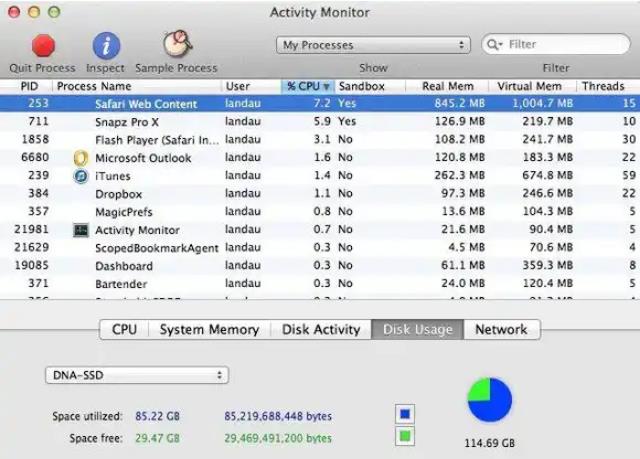
You can also make use of your mac’s activity monitor. I call it the “triage approach” to find out what is using the most memory or CPU. A note of warning here, not all are to be closed! So, if you have no idea what some are, it is best to just keep them opened.

MAC RESTARTED WITH LOTS OF APPS OPENED

Open several apps and run a risk of your computer moving at a snail’s pace. If you ask me, I learnt my lesson the hard way. If your computer is set to auto-launch your apps, restart fewer apps with the solution below

solution

Go to the apple icon in the upper left corner of your screen and select “system preferences” then choose “users and groups” next, switch to “login items” and check the “hide” box next to those apps you don’t want to launch each time you turn on your mac or restart it.

Also, go to the settings of individual apps and disable the auto launch with restart function.

OVERLOADED CACHE

Although cache helps you browse the internet quicker but those temporary files gathered from the sites you visit does more harm than good. So, clear them out.

You don’t have to be scared to delete them. Afterall, you stand to lose nothing.

There you have it, several methods to try out so, just pick your best fit. Meticulous enough? I hope you found my sneak peek (bonus tip).

It is time I listened to my boss’ voicemails else, he’d have my head.

Goodluck in speeding up your MacBook!

Cheers!

Précédent
10 Apple Pencil 1/2 Tips and Tricks You Should Know About
Suivant
11 iPad Pro Tipps und Tricks, die du kennen solltest

Articles Liés

Should You Buy the First iPhone Ultra/Fold — or Wait for Generation Two?

Faut-il acheter le premier iPhone Ultra/Fold, ou attendre la deuxième génération ?

Samsung Wallpaper Size Guide: How to Download, Customize, and Protect Your Perfect Phone Wallpaper

Guide des tailles de fond d'écran Samsung : Comment télécharger, personnaliser et protéger le fond d'écran parfait pour votre téléphone

The Complete Director’s Vlogging Kit: Best Smartphone Setups for Every Budget (2026 Guide)

Le kit de vlogging complet du réalisateur : Les meilleures configurations de smartphone pour tous les budgets (Guide 2026)

Samsung Galaxy S26 vs. S25: Should You Trade In Your S25 Today?

Samsung Galaxy S26 vs S25 : faut-il échanger votre S25 aujourd’hui ?

Laissez un commentaire

Votre adresse email ne sera pas publiée.

Recent Post

Guide d'achat de l'Apple Watch 2026 : Faut-il attendre l'Ultra 4, passer à la Series...

Apple devrait lancer de nouvelles montres en septembre 2026, et...

10 accessoires téléphone que papa utilisera vraiment — guide cadeaux pour la Fête des Pères

Papa utilise toujours une coque fissurée datant de plusieurs années....

Rumeurs sur les AirPods Ultra, AirPods 5 et AirPods Pro 3 : À quoi s'attendre...

Caméras, IA, un retard — et le modèle que la...

Nous avons testé la nouvelle collection d’été ESR — voici ce que cela donne réellement...

ESR s’est historiquement concentré sur des accessoires fonctionnels plutôt que...

Meilleures applications de dessin pour iPad Pro en 2026 : de l'amateur au professionnel

En 2026, dessiner sur un iPad ressemble moins à l’utilisation...

Meilleurs accessoires pour iPad Air M4 (2026) : Étuis-claviers ESR Shift pour une productivité optimale

Si vous cherchez des accessoires pour l’iPad Air 2026, le...

Get 20% off with code: BLOG20

Entreprise

  • À propos de nous
  • Notre blog
  • Salle de presse
  • Devenir revendeur

Produits

  • Coques de téléphone
  • iPhone Cases
  • Coques pour iPad
  • Conçu pour MagSafe
  • Productivité
  • Protections d’Écran
  • Chargement sans fil
  • Portefeuilles magnétiques
  • Autres accessoires

Communauté

  • Mon Compte
  • Référer vos amis, gagnez du CashBack
  • Devenir un Super Utilisateur ESR
  • Programme d’Affiliation
  • Réduction étudiante

Assistance

  • Contactez-nous
  • Vidéos d'installation et FAQ
  • Statut de la commande
  • Retour et remboursement
  • Politique de garantie
  • Politique d'expédition
  • Modes de paiement
  • Product Recalls

Options de paiement:
  • American Express
  • JCB
  • Mastercard
  • PayPal
  • Visa
  • Klarna Klarna
  • Afterpay
Excellent 4.6 out of 5 - Review :2584 •

© 2026 ESR All rights reserved.

  • Conditions d'utilisation
  • politique de confidentialité
  • Déclaration légale
  • Politique de cookies
  • Politique d'expédition
  • Retour et remboursement
  • Track Your Order

Panier

Get a 15% off coupon when you

sign up

for free shipping!

$38.00
You're $38.00 away from Free Shipping!

$50.00
You're $50.00 away from Free Shipping!

Benefits applied automatically at checkout

Your Cart is Empty

Sign In / Register to view saved cart items
Shop Now
ESR_IMG

Protect Your iPhone's Camera Control

ESR_IMG

Always Find Your Wallet

ESR_IMG

Drop-Proof FlickLlock, Effortless MagSafe

ESR_IMG

Qi2 Fast Charging on the Go

Total $0.00
Voir le panier

Thank you for choosing to transfer to a human service.

Sorry! The previous responses were from our AI customer service. Since it didn't satisfy you, you've been transferred to a human agent. We'll reply within 24 hours from Mon to Fri and 48 hours on weekends for further help.

Please select the reason for transfer