


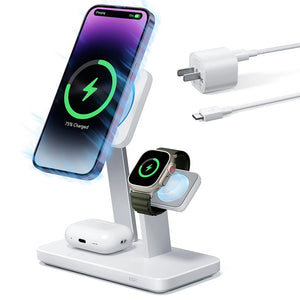





Travel charging gets awkward when one product has to do two different jobs. A foldable 3-in-1 charger is excellent on a hotel nightstand: it holds an iPhone, Apple Watch and AirPods in one place and uses one outlet. It cannot follow you around a conference hall, and it will not charge an iPad or MacBook. Separate chargers cover those tasks, but bringing a full set can replace one station with a handful of bricks and cables. Start with the trip, not the product count: do the devices mostly stay on a nightstand or desk, and are you packing only an iPhone or also an iPad or MacBook?
Driving? See ESR’s Xtend 100W car charger guide. For airline battery rules, printable packing lists and the rest of the bag, see the travel tech checklist.
The short answer
| Trip | First choice | What to watch |
|---|---|---|
| iPhone only | Existing wall charger and matching cable | A 3-in-1 adds little without Watch or AirPods |
| iPhone, Watch and AirPods, hotel nights | Foldable 3-in-1 charger | The phone must stay on the pad while charging |
| Those three devices plus an iPad or MacBook Air | ESR travel kit or a capable separate USB-C charger | One spare USB-C port; power is shared |
| MacBook Pro under sustained heavy load | A higher-output laptop charger, with the station as optional | 45W may not keep pace with heavy workloads |
| Need to keep using the iPhone while it charges | A wired charger and cable | Wireless charging requires the phone to stay on the pad |
What a 3-in-1 station does well
On a short trip, the most useful thing about a foldable station is not that it has three charging surfaces. It is that three devices stop competing for bedside space and wall outlets. The phone sits on the magnetic pad, the Apple Watch uses its own charging module, and the AirPods case goes on the rear pad. You can set everything down at night and pick it up charged in the morning.
For Watch owners, A standard USB-C cable will not charge a Watch; it needs Apple’s magnetic Watch charging cable or a dedicated station module like this one. That is why a charging station is worth considering for Watch owners even if the phone and AirPods have other charging options.
The ESR CryoBoost 3-in-1 supports iPhone 12 and later; Qi2 25W on iPhone 16 (not 16e) and later, 15W on iPhone 12–15. The station also supports the listed AirPods and Apple Watch models, but its wireless pad is not designed for Android phones such as Google, Motorola or OnePlus.
It includes a built-in cooling fan. At Qi2 25W, iPhone wireless charging generates heat; Apple’s thermal protection can reduce charging speed when the phone gets too warm. The fan is designed to manage heat during high-speed charging. The Watch module is an Apple charging module with a 5W output.
The station’s limit is just as relevant. It is a fixed charging point, not a portable battery. The phone also needs to stay on the pad during wireless charging. If you need to navigate, take a call on the move, or charge away from a wall outlet, a wired charger or a power bank serves a different need.

ESR CryoBoost 25W Foldable 3-in-1 Charging Station
A foldable station for iPhone, Apple Watch and AirPods, with Qi2 25W on compatible newer iPhones, a built-in cooling fan and a 5W Apple Watch charging module.
When you also need to charge an iPad or laptop
Check what you already have first. If your current USB-C wall charger outputs enough for the job (20W or more is fine for an iPhone, 45W or above starts to matter for a MacBook Air), you may only need to add the station for overnight Watch and AirPods consolidation. A capable charger you already own costs nothing extra and takes up no additional space.
Add a separate wired charger. If your existing charger is a low-output phone brick or the wrong connector, the Xtend 45W retractable charger has a built-in 95cm USB-C cable, a second USB-C port, and supports MacBook Air, iPad and compatible phones over USB-C. It removes at least one loose cable from the bag. Its single-port output reaches up to 60W, sustained for roughly the first 20 minutes before stepping down; when both ports are active, they share up to 45W total. ESR’s Xtend 45W guide covers the port layout and power behavior in detail.

ESR Xtend 45W Retractable Charger
A USB-C wall charger with a built-in 95cm retractable cable and a second USB-C port for MacBook Air, iPad and compatible phones.
Use the travel kit. The ESR travel charging kit combines the station with the Xtend 45W and changes how they connect. The Xtend’s built-in cable powers the station directly, so the setup runs from one wall outlet. The station handles iPhone, Watch and AirPods wirelessly; the Xtend’s remaining USB-C port charges one additional device such as an iPad or MacBook Air. Both outputs share available power when both are active.
How the two setups compare in practice:
| Your existing charger + 3-in-1 | 3-in-1 + Xtend (kit) | |
|---|---|---|
| Wall outlets needed | Two (one per charger) | One |
| Wired devices simultaneously | Depends on existing charger | One extra via Xtend second port |
| Loose cables added | Existing cable(s) + station input | Station input only (Xtend cable built in) |
| Best for | Already own a capable charger | Want a matched, compact pair from one outlet |
What the travel kit changes
The kit keeps the foldable station and replaces the charger normally packaged with it—the standalone package includes a 50W adapter—with the Xtend 45W. The Xtend becomes the station’s power source, not a separate accessory.
In the standalone setup, the station and any wired charger each need their own plug. In the kit, the Xtend provides power to the station and has one USB-C port left for a wired connection to an iPad, MacBook Air or another compatible device. The whole setup, station plus one wired device, runs from a single outlet. A phone-only traveler does not need that consolidation, and neither does someone whose MacBook Pro needs a higher-output supply for sustained performance.
For a laptop doing demanding work while plugged in, use the charger rated for that workload. The Xtend can power compatible MacBook models. In ESR’s internal lab tests (devices static, 25°C), an Xtend charged a MacBook Air M4 to 50% in 33 minutes, compared to 45 minutes with an Anker 45W charger. A busy MacBook Pro running demanding tasks can draw more than 45W, so the Xtend has a ceiling worth checking against your specific model before travel.
When the station and a second device draw power at the same time, the charger scans both connections every five minutes and reassigns between three output modes—10W+35W, 25W+20W or 35W+10W—based on what each device is pulling at that moment. A MacBook Air actively charging can claim the 35W share; the station then runs on the remaining 10W. If the phone charges slowly at night, unplugging the second device restores full available power to the station.

ESR CryoBoost Foldable 3-in-1 Travel Charging Kit
A travel setup that combines the foldable 3-in-1 station with the Xtend 45W so the station and one additional wired USB-C device can run from one wall outlet.
What your trip looks like
A hotel-centered trip with a phone, Watch and AirPods
The 3-in-1 station is the simplest fit. One outlet, no separate charging pad or Watch cable. Bring a wired charger only if you also need to charge the phone while using it.
A work trip with an iPad or MacBook Air
The travel kit makes sense if your charging day ends mostly at a nightstand or desk. The station holds the three smaller devices overnight; the Xtend’s spare output handles the tablet or laptop. Expect available power to be shared when both outputs are active, not split into two independent full-power connections.
A MacBook Pro trip with long working sessions
Put the laptop’s own higher-output charger first. The 3-in-1 remains useful for the phone, Watch and AirPods, while the laptop charger handles sustained workload. This is a two-charger trip, but each charger has a clear job.
For road trips, see ESR’s [Xtend 100W car charger guide] linked above.
Compatibility at a glance
| Device | Foldable 3-in-1 station | Xtend 45W charger |
|---|---|---|
| iPhone | iPhone 12 through 18(Pro/Pro Max/iPhone Duo); up to Qi2 25W with iOS 26 or later | iPhone 12 and later, including 17e and 16e |
| Apple Watch | All listed Apple Watch models | Series 12–7, SE, Ultra 4 and Ultra, using its charging cable |
| AirPods | All listed AirPods models | All AirPods with wireless charging case |
| iPad | No wireless iPad charging; no wired USB-C output on the station | iPad Pro, Air and iPad, 2020–2025 |
| Mac | Not charged by the station | MacBook Pro and MacBook Air, 2020–2025 |
| Android phone | Not supported for wireless charging | Galaxy S21–S27, Z Fold 5–7 and A54–A56; Google Pixel 6–10 |
The Xtend also supports other compatible USB-C laptops, tablets and devices. Charging rate depends on the device, cable and number of connected devices.
Before you choose
Count outlets, not devices. The standalone 3-in-1 and a wired charger each need their own plug. The travel kit runs both from one outlet, but leaves only one USB-C port for a second device. If two people or two laptops need independent fast charging, a multi-port charger may cover more ground.
Plug and voltage. The Xtend 45W is US Plug; a JP Plug version is available separately. Its electrical input is rated 100–240V, covering international voltages. For the UK, Europe, Australia or other regions with different socket shapes, a plug adapter is needed, not a voltage converter.
FAQ
Will an iPhone 13, 14 or 15 charge faster on a 25W station?
No. Qi2 25W applies to the iPhone 16 (not the 16e) and later models, including the iPhone 17, iPhone Duo, iPhone Air and iPhone 18 Pro and Pro Max. The iPhone 12 through 15 top out at 15W on a magnetic charger, so the station still works for them, just at that lower speed. If you carry one of those phones, the reasons to buy are the Watch and AirPods spots and the single outlet, not speed.
How fast does the Apple Watch charge on the station?
The Watch module is an Apple charging module with a 5W output, so plan on an overnight top-up rather than a quick charge before you leave. Apple’s fast-charge page specifies its own USB-C Magnetic Fast Charging Cable for fast charging, so if you want that speed, bring the cable that came with your Watch.
What wattage does my MacBook need?
Apple’s recommended adapter varies by model and size: roughly 30W to 70W for the MacBook Air, and 61W up to 140W for the MacBook Pro. Any USB-C adapter with USB Power Delivery will charge a Mac, higher or lower than that number. A lower one charges more slowly and can fall behind under heavy work, and a higher one won’t make the Mac charge faster. Apple’s “Use a power adapter with your Mac” page lists the recommended adapter for each model.
Can I carry the kit on a plane, and does it count as a power bank?
No battery is inside the kit, so the rules for spare lithium batteries don’t apply to it. They do apply to any power bank you pack alongside: carry-on only, 100Wh or less per battery, and 101–160Wh only with airline approval. Several airlines, including Lufthansa Group, Emirates and Qantas, now restrict using a power bank in flight. Check the rules of the airline that operates your flight.
Why won’t my AirPods charge on the rear pad?
The pad charges the case, so the case has to support wireless charging. Apple’s own MagSafe charger page draws the same line, listing AirPods “with a wireless charging case.” If yours doesn’t, charge it with the cable that came in the box.
My phone seems slow on the station. What should I check?
Start with the model: only the iPhone 16 (not the 16e) and later get 25W. Then check the power source. Apple pairs 25W magnetic charging with a 30W adapter, and with the kit, anything plugged into the Xtend’s second port shares the available power with the station. Unplug the second device and test again.
If a second device is plugged into the Xtend’s spare port, it may be drawing the larger share: the charger cycles between three allocation modes (10W+35W, 25W+20W, 35W+10W) every five minutes. A MacBook Air at the second port can pull up to 35W of the available 45W, leaving 10W for the station. Disconnecting the second device while the station charges overnight is the simplest fix.
For most Apple travelers, the choice follows the trip: the station alone for hotel-centered nights with an iPhone, Watch and AirPods; the ESR travel charging kit when an iPad or MacBook Air also needs a wired connection from the same outlet. If you prefer to buy each piece separately, the CryoBoost 3-in-1 and the Xtend 45W are both available on their own.


