
Gerade erschienen: Sommerprints für dein Smartphone und Wallet. Shoppen
Spare bis zu 70 % auf ausgewählte Tech-Essentials &Öffne unsere mystery box für nur 29,99 $ Shoppen
Kostenloser Versand ab 50 $ Bestellwert
Wagen 0
  • Hüllen
    • iPhone
    • iPad
    • AirPods
    • Samsung
      iPhone 17🔥
    • iPhone 17e🔥
    • iPhone 17 Pro Max🔥
    • iPhone 17 Pro🔥
    • iPhone Air🔥
    • iPhone 17🔥
    • iPhone 16
    • iPhone 16e
    • iPhone 16 Pro Max
    • iPhone 16 Pro
    • iPhone 16 Plus
    • iPhone 16
    • iPhone 15
    • iPhone 15 Pro Max
    • iPhone 15 Pro
    • iPhone 15 Plus
    • iPhone 15
    • iPhone 14
    • iPhone 14 Pro Max
    • iPhone 14 Pro
    • iPhone 14 Plus
    • iPhone 14
    • iPhone 13
    • iPhone 13 Pro Max
    • iPhone 13 Pro
    • iPhone 13
       
    • iPad Air 13 (2026)🔥
    • iPad Air 11 (2026)🔥
    •  
    • iPad Pro 13 (2025)
    • iPad Pro 11 (2025)
    • iPad 11th Gen (2025)
    • iPad Air 13 (2025)
    • iPad Air 11 (2025)
    •  
    • iPad Pro 13 (2024)
    • iPad Pro 11 (2024)
    • iPad Air 13 (2024)
    • iPad Air 11 (2024)
    • iPad mini 7 (2024)
    •  
    • iPad Pro 12.9 (2022)
    • iPad Pro 11 (2022)
    • iPad Air 5/4 (2022)
    • iPad 10th Gen (2022)
    •  
    • iPad mini 6 (2021)
    • iPad Pro 12.9 (2021)
    • iPad Pro 11 (2021)
    • iPad Pro 11 (2020)
       
    • AirPods Pro 3🔥
    • AirPods 4
    • AirPods Pro (2023/2022/2019)
      Galaxy S26🔥
    • Galaxy S26 Ultra🔥
    • Galaxy S26 Plus🔥
    • Galaxy S26🔥
    • Galaxy S25
    • Galaxy S25 Ultra
    • Galaxy S25+
    • Galaxy S24
    • Galaxy S24 Ultra
    • Galaxy S24+
    • Galaxy S24
    • Galaxy S23
    • Galaxy S23 Ultra
    • Galaxy S23
  • Displayschutzfolien
    • iPhone
    • iPad
    • Apple Watch
    • Samsung
      iPhone 17🔥
    • iPhone 17e🔥
    • iPhone 17 Pro Max🔥
    • iPhone 17 Pro🔥
    • iPhone Air🔥
    • iPhone 17🔥
    • iPhone 16
    • iPhone 16e
    • iPhone 16 Pro Max
    • iPhone 16 Pro
    • iPhone 16 Plus
    • iPhone 16
    • iPhone 15
    • iPhone 15 Pro Max
    • iPhone 15 Pro
    • iPhone 15 Plus
    • iPhone 15
    • iPhone 14
    • iPhone 14 Pro Max
    • iPhone 14 Pro
    • iPhone 14 Plus
    • iPhone 14
    • iPhone 13
    • iPhone 13 Pro Max
    • iPhone 13/13 Pro
       
    • iPad Air 13 (2026)🔥
    • iPad Air 11 (2026)🔥
    •  
    • iPad Pro 13 (2025)
    • iPad Pro 11 (2025)
    • iPad 11th Gen (2025)
    • iPad Air 13 (2025)
    • iPad Air 11 (2025)
    •  
    • iPad Pro 13 (2024)
    • iPad Pro 11 (2024)
    • iPad Air 13 (2024)
    • iPad Air 11 (2024)
    •  
    • iPad Pro 12.9 (6th/5th/4th/3rd Gen)
    • iPad Pro 11 (4th/3rd/2nd/1st Gen)
    • iPad Air 5/4 (2022)
    • iPad 10th Gen (2022)
       
    • Apple Watch🔥
      Galaxy S26🔥
    • Galaxy S26 Ultra🔥
    • Galaxy S25
    • Galaxy S25 Ultra
    • Galaxy S24
    • Galaxy S24 Ultra
    • Galaxy S23
    • Galaxy S23 Ultra
    • Galaxy S23+
    • Galaxy S23
    • Galaxy S22
    • Galaxy S22 Ultra
  • iPad Tastaturen & Stifte
    • Tastaturen für iPad
    • Stifte & Mäuse
      Wähle dein Gerät
    • iPad Air 13 (2026)🔥
    • iPad Air 11 (2026)🔥
    •  
    • iPad Pro 13 (2025)
    • iPad Pro 11 (2025)
    • iPad 11. Generation (2025)
    • iPad Air 13 (2025)
    • iPad Air 11 (2025)
    •  
    • iPad Pro 13 (2024)
    • iPad Pro 11 (2024)
    • iPad Air 13 (2024)
    • iPad Air 11 (2024)
    •  
    • iPad Pro 12.9 (6./5./4./3. Generation)
    • iPad Pro 11″ (4./3./2./1. Generation)
    • iPad Air 5/4 (2022)
    • iPad 10. Generation (2022)
       
    • Digitale Stifte
    • Mäuse
  • Ladegeräte
    • Kabellose Ladegeräte & Halterungen
    • Auto-Ladegeräte & Halterungen
    Kabellose Ladegeräte & Halterungen
    • ESR CryoBoost Klappbare 3-in-1 Magnet-Ladestation (25W) – US Plug-Black

      ESR CryoBoost Klappbare 3-in-1 Magnet-Ladestation (25W) – US Plug-Black

    • 3-in-1 Magnetische Ladestation (15W)- Grey - US PLUG

      3-in-1 Magnetische Ladestation (15W)- Grey - US PLUG

    • ESR CryoBoost Klappbare 3-in-1 Magnet-Ladestation (25W) – US Plug-Black

      ESR CryoBoost Klappbare 3-in-1 Magnet-Ladestation (25W) – US Plug-Black

    • 25W CryoBoost Klappbares 3-in-1 Magnet-Ladegerät und Auto-Ladegerät (Lüftungshalterung) Set– US-Stecker – Schwarz

      25W CryoBoost Klappbares 3-in-1 Magnet-Ladegerät und Auto-Ladegerät (Lüftungshalterung) Set– US-Stecker – Schwarz

    • CryoBoost 3-in-1 Magnetische Ladestation (25W, Qi2.2)  - US Plug–Black

      CryoBoost 3-in-1 Magnetische Ladestation (25W, Qi2.2) - US Plug–Black

    • All Kabellose Ladegeräte & Halterungen >
    Auto-Ladegeräte & Halterungen
    • OmniLock Magnet-Autoladegerät (25W, CryoBoost, Lüftungsschlitz) - Black

      OmniLock Magnet-Autoladegerät (25W, CryoBoost, Lüftungsschlitz) - Black

    • Magnetisches kabelloses 15W Autoladegerät (HaloLock) - Black

      Magnetisches kabelloses 15W Autoladegerät (HaloLock) - Black

    • 15W kabelloses Autoladegerät mit CryoBoost (HaloLock)  - Black

      15W kabelloses Autoladegerät mit CryoBoost (HaloLock) - Black

    • 15W Kabelloses Armaturenbrett Autoladegerät (HaloLock) - Black

      15W Kabelloses Armaturenbrett Autoladegerät (HaloLock) - Black

    • 15W Autoladegerät mit MagSafe + CryoBoost - Cool Grey

      15W Autoladegerät mit MagSafe + CryoBoost - Cool Grey

    • All Auto-Ladegeräte & Halterungen >
  • Wallets
  • 🔥Neuheiten🔥
    • 🏝️Sommer Print-Kollektion🏝️
    • Galaxy S26 Serie🔥
    • iPhone 17e🔥
    • iPad Air 2026 Serie🔥
    • 25W Qi2 Kabelloses Laden
  • Sale
  • Support
    • Kontakt
    • Produktrückrufe
    • Produktvideos und FAQs
    • Allgemeine FAQ
    • Bestellstatus
    • Rückgabe & Erstattungsrichtlinie
    • Garantie Politik
    • Versand Politik
  • Entdecken
    • Über ESR
    • ESR Blog
    • Nachrichtenbereich
Super-User-Vorteile
  • Werde ESR Super-User
  • Exklusive Super-User-Angebote
  • Freunde werben & Cashback sichern
Mein Konto
Anmeldung Registrieren
North America
Europe
Asia Pacific
Middle East
Australien
USD $
Bahrain
USD $
Belgien
USD $
Bulgarien
USD $
Dänemark
USD $
Deutschland
USD $
Estland
USD $
Finnland
USD $
Frankreich
USD $
Griechenland
USD $
Indonesien
USD $
Irland
USD $
Italien
USD $
Japan
USD $
Jordanien
USD $
Kanada
USD $
Katar
USD $
Kroatien
USD $
Lettland
USD $
Litauen
USD $
Luxemburg
USD $
Malaysia
USD $
Mexiko
USD $
Neuseeland
USD $
Niederlande
USD $
Norwegen
USD $
Österreich
USD $
Oman
USD $
Philippinen
USD $
Polen
USD $
Portugal
USD $
Rumänien
USD $
Saudi-Arabien
USD $
Schweden
USD $
Schweiz
USD $
Singapur
USD $
Slowakei
USD $
Slowenien
USD $
Spanien
USD $
Südkorea
USD $
Taiwan
USD $
Thailand
USD $
Tschechien
USD $
Ungarn
USD $
Vereinigte Arabische Emirate
USD $
Vereinigte Staaten
USD $
Vereinigtes Königreich
USD $
Vietnam
USD $
Deutsch
English
  • Hüllen
    • iPhone
    • iPad
    • AirPods
    • Samsung
      iPhone 17🔥
    • iPhone 17e🔥
    • iPhone 17 Pro Max🔥
    • iPhone 17 Pro🔥
    • iPhone Air🔥
    • iPhone 17🔥
    • iPhone 16
    • iPhone 16e
    • iPhone 16 Pro Max
    • iPhone 16 Pro
    • iPhone 16 Plus
    • iPhone 16
    • iPhone 15
    • iPhone 15 Pro Max
    • iPhone 15 Pro
    • iPhone 15 Plus
    • iPhone 15
    • iPhone 14
    • iPhone 14 Pro Max
    • iPhone 14 Pro
    • iPhone 14 Plus
    • iPhone 14
    • iPhone 13
    • iPhone 13 Pro Max
    • iPhone 13 Pro
    • iPhone 13
       
    • iPad Air 13 (2026)🔥
    • iPad Air 11 (2026)🔥
    •  
    • iPad Pro 13 (2025)
    • iPad Pro 11 (2025)
    • iPad 11th Gen (2025)
    • iPad Air 13 (2025)
    • iPad Air 11 (2025)
    •  
    • iPad Pro 13 (2024)
    • iPad Pro 11 (2024)
    • iPad Air 13 (2024)
    • iPad Air 11 (2024)
    • iPad mini 7 (2024)
    •  
    • iPad Pro 12.9 (2022)
    • iPad Pro 11 (2022)
    • iPad Air 5/4 (2022)
    • iPad 10th Gen (2022)
    •  
    • iPad mini 6 (2021)
    • iPad Pro 12.9 (2021)
    • iPad Pro 11 (2021)
    • iPad Pro 11 (2020)
       
    • AirPods Pro 3🔥
    • AirPods 4
    • AirPods Pro (2023/2022/2019)
      Galaxy S26🔥
    • Galaxy S26 Ultra🔥
    • Galaxy S26 Plus🔥
    • Galaxy S26🔥
    • Galaxy S25
    • Galaxy S25 Ultra
    • Galaxy S25+
    • Galaxy S24
    • Galaxy S24 Ultra
    • Galaxy S24+
    • Galaxy S24
    • Galaxy S23
    • Galaxy S23 Ultra
    • Galaxy S23
  • Displayschutzfolien
    • iPhone
    • iPad
    • Apple Watch
    • Samsung
      iPhone 17🔥
    • iPhone 17e🔥
    • iPhone 17 Pro Max🔥
    • iPhone 17 Pro🔥
    • iPhone Air🔥
    • iPhone 17🔥
    • iPhone 16
    • iPhone 16e
    • iPhone 16 Pro Max
    • iPhone 16 Pro
    • iPhone 16 Plus
    • iPhone 16
    • iPhone 15
    • iPhone 15 Pro Max
    • iPhone 15 Pro
    • iPhone 15 Plus
    • iPhone 15
    • iPhone 14
    • iPhone 14 Pro Max
    • iPhone 14 Pro
    • iPhone 14 Plus
    • iPhone 14
    • iPhone 13
    • iPhone 13 Pro Max
    • iPhone 13/13 Pro
       
    • iPad Air 13 (2026)🔥
    • iPad Air 11 (2026)🔥
    •  
    • iPad Pro 13 (2025)
    • iPad Pro 11 (2025)
    • iPad 11th Gen (2025)
    • iPad Air 13 (2025)
    • iPad Air 11 (2025)
    •  
    • iPad Pro 13 (2024)
    • iPad Pro 11 (2024)
    • iPad Air 13 (2024)
    • iPad Air 11 (2024)
    •  
    • iPad Pro 12.9 (6th/5th/4th/3rd Gen)
    • iPad Pro 11 (4th/3rd/2nd/1st Gen)
    • iPad Air 5/4 (2022)
    • iPad 10th Gen (2022)
       
    • Apple Watch🔥
      Galaxy S26🔥
    • Galaxy S26 Ultra🔥
    • Galaxy S25
    • Galaxy S25 Ultra
    • Galaxy S24
    • Galaxy S24 Ultra
    • Galaxy S23
    • Galaxy S23 Ultra
    • Galaxy S23+
    • Galaxy S23
    • Galaxy S22
    • Galaxy S22 Ultra
  • iPad Tastaturen & Stifte
    • Tastaturen für iPad
    • Stifte & Mäuse
      Wähle dein Gerät
    • iPad Air 13 (2026)🔥
    • iPad Air 11 (2026)🔥
    •  
    • iPad Pro 13 (2025)
    • iPad Pro 11 (2025)
    • iPad 11. Generation (2025)
    • iPad Air 13 (2025)
    • iPad Air 11 (2025)
    •  
    • iPad Pro 13 (2024)
    • iPad Pro 11 (2024)
    • iPad Air 13 (2024)
    • iPad Air 11 (2024)
    •  
    • iPad Pro 12.9 (6./5./4./3. Generation)
    • iPad Pro 11″ (4./3./2./1. Generation)
    • iPad Air 5/4 (2022)
    • iPad 10. Generation (2022)
       
    • Digitale Stifte
    • Mäuse
  • Ladegeräte
    • Kabellose Ladegeräte & Halterungen
    • Auto-Ladegeräte & Halterungen
    Kabellose Ladegeräte & Halterungen
    • ESR CryoBoost Klappbare 3-in-1 Magnet-Ladestation (25W) – US Plug-Black

      ESR CryoBoost Klappbare 3-in-1 Magnet-Ladestation (25W) – US Plug-Black

    • 3-in-1 Magnetische Ladestation (15W)- Grey - US PLUG

      3-in-1 Magnetische Ladestation (15W)- Grey - US PLUG

    • ESR CryoBoost Klappbare 3-in-1 Magnet-Ladestation (25W) – US Plug-Black

      ESR CryoBoost Klappbare 3-in-1 Magnet-Ladestation (25W) – US Plug-Black

    • 25W CryoBoost Klappbares 3-in-1 Magnet-Ladegerät und Auto-Ladegerät (Lüftungshalterung) Set– US-Stecker – Schwarz

      25W CryoBoost Klappbares 3-in-1 Magnet-Ladegerät und Auto-Ladegerät (Lüftungshalterung) Set– US-Stecker – Schwarz

    • CryoBoost 3-in-1 Magnetische Ladestation (25W, Qi2.2)  - US Plug–Black

      CryoBoost 3-in-1 Magnetische Ladestation (25W, Qi2.2) - US Plug–Black

    • All Kabellose Ladegeräte & Halterungen >
    Auto-Ladegeräte & Halterungen
    • OmniLock Magnet-Autoladegerät (25W, CryoBoost, Lüftungsschlitz) - Black

      OmniLock Magnet-Autoladegerät (25W, CryoBoost, Lüftungsschlitz) - Black

    • Magnetisches kabelloses 15W Autoladegerät (HaloLock) - Black

      Magnetisches kabelloses 15W Autoladegerät (HaloLock) - Black

    • 15W kabelloses Autoladegerät mit CryoBoost (HaloLock)  - Black

      15W kabelloses Autoladegerät mit CryoBoost (HaloLock) - Black

    • 15W Kabelloses Armaturenbrett Autoladegerät (HaloLock) - Black

      15W Kabelloses Armaturenbrett Autoladegerät (HaloLock) - Black

    • 15W Autoladegerät mit MagSafe + CryoBoost - Cool Grey

      15W Autoladegerät mit MagSafe + CryoBoost - Cool Grey

    • All Auto-Ladegeräte & Halterungen >
  • Wallets
  • 🔥Neuheiten🔥
    • 🏝️Sommer Print-Kollektion🏝️
    • Galaxy S26 Serie🔥
    • iPhone 17e🔥
    • iPad Air 2026 Serie🔥
    • 25W Qi2 Kabelloses Laden
  • Sale
  • Support
    • Kontakt
    • Produktrückrufe
    • Produktvideos und FAQs
    • Allgemeine FAQ
    • Bestellstatus
    • Rückgabe & Erstattungsrichtlinie
    • Garantie Politik
    • Versand Politik
  • Entdecken
    • Über ESR
    • ESR Blog
    • Nachrichtenbereich
Super-User-Vorteile
  • Werde ESR Super-User
  • Exklusive Super-User-Angebote
  • Freunde werben & Cashback sichern

Werden Sie Super User und sichern Sie sich exklusive Prämien

  • * 15 % Willkommensrabatt
  • * Punkte bei jedem Einkauf sammeln
  • * Exklusive Mitgliedervorteile
Jetzt beitreten Einloggen
Wagen 0
North America
Europe
Asia Pacific
Middle East
Australien
USD $
Bahrain
USD $
Belgien
USD $
Bulgarien
USD $
Dänemark
USD $
Deutschland
USD $
Estland
USD $
Finnland
USD $
Frankreich
USD $
Griechenland
USD $
Indonesien
USD $
Irland
USD $
Italien
USD $
Japan
USD $
Jordanien
USD $
Kanada
USD $
Katar
USD $
Kroatien
USD $
Lettland
USD $
Litauen
USD $
Luxemburg
USD $
Malaysia
USD $
Mexiko
USD $
Neuseeland
USD $
Niederlande
USD $
Norwegen
USD $
Österreich
USD $
Oman
USD $
Philippinen
USD $
Polen
USD $
Portugal
USD $
Rumänien
USD $
Saudi-Arabien
USD $
Schweden
USD $
Schweiz
USD $
Singapur
USD $
Slowakei
USD $
Slowenien
USD $
Spanien
USD $
Südkorea
USD $
Taiwan
USD $
Thailand
USD $
Tschechien
USD $
Ungarn
USD $
Vereinigte Arabische Emirate
USD $
Vereinigte Staaten
USD $
Vereinigtes Königreich
USD $
Vietnam
USD $
Deutsch
English

Durchsuchen Sie unseren Shop

Werden Sie Super User und sichern Sie sich exklusive Prämien

  • * 15 % Willkommensrabatt
  • * Punkte bei jedem Einkauf sammeln
  • * Exklusive Mitgliedervorteile
Jetzt beitreten Einloggen
Wagen 0
beliebte Suchanfragen:
iPad 2026 Case iPhone 17e Galaxy S26 iPad Keyboard
How Tos

How to Transfer Contacts from iPhone to iPhone [Detailed Guide]

von Deb Hazarika An Jun 30, 2020 (Last Updated:Apr 09, 2025)
How to Transfer Contacts from iPhone to iPhone

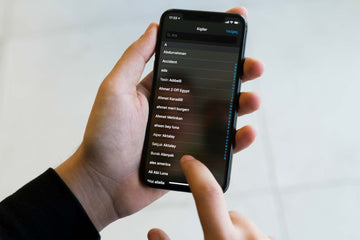
You have finally got your new iPhone and can’t wait to get started! Sure, there is a rush of excitement, but you have still got to set it up and transfer your stuff from your old iPhone. If you have a lot of contacts to transfer and you are unsure of where to start, let us chip in and help you out here.

With the new iPhones that run iOS 10 or later, the option to use iCloud to backup your existing files should come up as soon as you power on your new device. If not, we’ve still got your back. Read on for more ways to transfer your contacts.

 QUICK TIP: If you choose this option to transfer your contacts to the new device, don’t forget to make sure your phone is connected to your Wi-Fi. Using mobile data might drain out your allowed usage limit pretty soon!

Let’s talk about how to transfer contacts from an existing iPhone to a new iPhone.

There are a few easy steps to follow when you are transferring your contacts to a new iPhone:

Transfer Contacts from iPhone to new iPhone

  1. On the old iPhone you were using, make sure you are connected to your Wi-Fi. Now go to SETTINGS and check if you are logged in to your Apple ID. A quick way to check is to see if your name and/or picture appears at the top of your Settings app,

If not, you will have to log in to your Apple ID, which is the same email address and password that you use to get an app from the App Store or buy a movie or song from iTunes.

  1. Once you’ve made sure that you are logged in, click on your name and then choose the option that says iCloud. Make sure that the “Contacts” toggle is ON and green.

Next, scroll down lower and look for an option that says “iCloud Backup”. Check that it’s ON.

You should be able to see a blue “Back Up Now” option. Tap on that.  The time that this will take varies and depends on how much data you’re backing up and also how what your internet speed is.

  1. Once that is done, when you are setting up your new device, you will be asked for your Apple ID login details. Login using the same Apple ID that you used on your old phone.
  2. When prompted to choose between “Restore from iCloud backup” or “Set up as a new iPhone”, choose the Restore from iCloud backup option. A list of recent backups may pop up. Choose the latest backup. How long this takes will again depend on how fast your wi-fi connection is. Once this is done, your phone will restart and be ready for you to use.

Transfer your contacts using iCloud

If you have already set up your new iPhone and just your contacts without having to reset your device and start over, you can use iCloud and get this done quickly.

  1. Check to see that both your old and new phone are logged into the same Apple ID account. You can do this by checking the names and pictures on the top when you open the Settings app on your phones.
  2. On both your phones, open the iCloud App by tapping on your name. Ensure that the Contacts toggle in on. Check the image above to see where the Contacts toggle button is.
  3. A message will pop up asking about Merging contacts. Tap on Merge.

This process should synchronize both phones and contacts from your old phone will start appearing in your new iPhone now.

Using iTunes

Using iTunes to transfer your contacts is a relatively less used process because you’ll need a Computer and both your phones and a cable to plug your phone into the computer. If you choose to use this method, these are the steps you will need to follow:

  1. Ensure that your laptop or PC has the latest iTunes version on it. Open iTunes.
  2. After you plug in your old iPhone into the computer, Grant Access to your iPhone if a message pops up on your computer screen.
  3. On the top toolbar, you will see an icon of a phone. Click on that icon.
  4. On the left sidebar in iTunes, you will see an “Info” tab under Settings.
  5. Now check the Sync Contacts box on the top part of the screen and then scroll down and click on the “Sync” button at the bottom.
  6. After the sync is complete, unplug your old iPhone and plug in your new iPhone.
  7. Repeat steps 3 & 4 with your new iPhone.
  8. Ensure that the “Sync Contacts” box is checked.
  9. Scroll down lower to the “Advanced” tab and click on Replace Information on this iPhone.
  10. Next, click on “Contacts”. This will start the process of replacing the contacts you have now with the contacts that you had synched from your old iPhone.

Have You Lost or Broken Your Old Phone?

We’ve all been there, and accidents always happen. So if you’ve got a new phone only because you lost or broke your old one, does that mean that your contacts are lost? No Sir.

With any luck, your old phone will have been backed up to iCloud anyway. If you set up iCloud while setting up an iPhone, the device should have made a backup every night when you put your iPhone on the charge.

You could also log into your iCloud on a computer and see your contacts online.

Transfer your contacts using iCloud

Several third-party apps might be able to help transfer contacts too. However, they are not usually free and can become a more expensive option compared to the methods listed above. Only consider buying a third-party app on the rare occasion that the above-listed methods do not work for your device.

Stichworte: iPhone 12 Setup
Vorherige
How to Make My Phone’s Data Connection Faster?
Nächste
How to Clear iPhone Storage & Free Up Space!

In Verbindung stehende Artikel

phone protection for college students with big deal

So schützt du dein Handy im Studium: Was jeder Erstsemester wissen muss

Why You Need a Phone Stand

Warum Sie einen Telefonständer brauchen (und wie Sie den richtigen auswählen)

AirPods Pro 3 and 2 Protection Guide 2026

AirPods Pro 3 und 2 Schutz-Guide 2026: Intelligente Alltagstipps gegen Herausfallen der Buds

esr find-my magsafe wallet:never worry about the lost your wallet

Wie man sein verlorenes Wallet findet: Von altbewährten Lösungen bis hin zur modernen Technik

Hinterlasse einen Kommentar

Deine Email-Adresse wird nicht veröffentlicht.

Recent Post

Apple Watch Kaufberatung 2026: Solltest du auf die Ultra 4 warten, zur Series 12 wechseln...

Apple wird voraussichtlich im September 2026 neue Uhren auf den...

10 Handy-Accessoires, die Papa wirklich benutzt — Vatertags-Geschenkguide

Dein Dad nutzt immer noch eine kaputte Hülle von vor...

AirPods Ultra vs. AirPods 5 vs. AirPods Pro 3: Welche solltest du 2026 kaufen?

Kameras, KI, eine Verzögerung – und das Modell, auf das...

Wir haben die neue Sommerkollektion von ESR getestet – und so ist es, damit zu...

ESR hat sich historisch eher auf funktionale Accessoires als auf...

Die besten Zeichen-Apps für das iPad Pro 2026: Vom Hobbykünstler zum Profi

2026 fühlt sich Zeichnen auf dem iPad weniger wie Tablet-Nutzung...

Die besten Zubehörteile für das M4 iPad Air (2026): ESR Shift Tastatur-Cases für ultimative Produktivität

Wenn du dir Zubehör für das iPad Air 2026 anschaust,...

Get 20% off with code: BLOG20

Unternehmen

  • Über ESR
  • Unser Blog
  • Pressebereich
  • Händler werden

Produkte

  • Schutzhüllen
  • iPhone Cases
  • iPad-Hüllen
  • Entwickelt für MagSafe
  • iPad-Produktivität
  • Schutzfolien
  • Kabelloses Laden
  • Geldbörse und Zubehör
  • Weitere Zubehörteile

Community

  • Mein Konto
  • Freunde empfehlen, CashBack verdienen
  • Werde ESR Super User
  • Affiliate Programm
  • Student Discount

Support

  • Kontaktieren Sie uns
  • Einrichtungsvideos und FAQs
  • Bestellstatus
  • Rückgabe und Rückerstattung
  • Garantiebestimmungen
  • Versandbedingungen
  • Zahlungsmethoden
  • Product Recalls

Zahlungsmöglichkeiten:
  • American Express
  • JCB
  • Mastercard
  • PayPal
  • Visa
  • Klarna Klarna
  • Afterpay
Excellent 4.6 out of 5 - Review :2580 •

© 2026 ESR All rights reserved.

  • Nutzungsbedingungen
  • Datenschutzrichtlinie
  • Rechtliche Erklärung
  • Cookie-Richtlinie
  • Versand Politik
  • Rückgabe und Rückerstattung
  • Track Your Order

Einkaufswagen

Get a 15% off coupon when you

sign up

for free shipping!

$38.00
You're $38.00 away from Free Shipping!

$50.00
You're $50.00 away from Free Shipping!

Benefits applied automatically at checkout

Your Cart is Empty

Sign In / Register to view saved cart items
Shop Now
ESR_IMG

Protect Your iPhone's Camera Control

ESR_IMG

Always Find Your Wallet

ESR_IMG

Drop-Proof FlickLlock, Effortless MagSafe

ESR_IMG

Qi2 Fast Charging on the Go

Zwischensumme $0.00
Warenkorb ansehen

Thank you for choosing to transfer to a human service.

Sorry! The previous responses were from our AI customer service. Since it didn't satisfy you, you've been transferred to a human agent. We'll reply within 24 hours from Mon to Fri and 48 hours on weekends for further help.

Please select the reason for transfer