Just launched: Tough Cases for Kids Drop-proof protection for everyday play. Shop now >
15 % Rabatt mit BTS15 | 20 % auf 2 Produkte mit BTS20 | Super User: 25 % auf 2 Produkte mit BTS25 Shoppen
Kostenloser Versand ab 50 $ Bestellwert

Werden Sie Super User und sichern Sie sich exklusive Prämien

  • * 15 % Willkommensrabatt
  • * Punkte bei jedem Einkauf sammeln
  • * Exklusive Mitgliedervorteile
Jetzt beitreten Einloggen
  • Werde ESR Super-User
  • Exklusive Super-User-Angebote
  • Freunde werben & Cashback sichern
Wagen 0
  • Hüllen
    • iPhone
    • iPad
    • AirPods
    • Samsung
    • iPhone 2026🔥
    • iPhone 17🔥
    • iPhone 17e🔥
    • iPhone 17 Pro Max
    • iPhone 17 Pro
    • iPhone Air
    • iPhone 17
    • iPhone 16
    • iPhone 16e
    • iPhone 16 Pro Max
    • iPhone 16 Pro
    • iPhone 16 Plus
    • iPhone 16
    • iPhone 15
    • iPhone 15 Pro Max
    • iPhone 15 Pro
    • iPhone 15 Plus
    • iPhone 15
    • iPhone 14
    • iPhone 14 Pro Max
    • iPhone 14 Pro
    • iPhone 14 Plus
    • iPhone 14
    • iPhone 13
    • iPhone 13 Pro Max
    • iPhone 13 Pro
    • iPhone 13
       
    • iPad Cases for Kids 🧸
    • iPad Air 13 (2026)🔥
    • iPad Air 11 (2026)🔥
    •  
    • iPad Pro 13 (2025)
    • iPad Pro 11 (2025)
    • iPad 11th Gen (2025)
    • iPad Air 13 (2025)
    • iPad Air 11 (2025)
    •  
    • iPad Pro 13 (2024)
    • iPad Pro 11 (2024)
    • iPad Air 13 (2024)
    • iPad Air 11 (2024)
    • iPad mini 7 (2024)
    •  
    • iPad Pro 12.9 (2022)
    • iPad Pro 11 (2022)
    • iPad Air 5/4 (2022)
    • iPad 10th Gen (2022)
    •  
    • iPad mini 6 (2021)
    • iPad Pro 12.9 (2021)
    • iPad Pro 11 (2021)
    • iPad Pro 11 (2020)
       
    • AirPods Pro 3🔥
    • AirPods 4
    • AirPods Pro (2023/2022/2019)
      Galaxy S26🔥
    • Galaxy S26 Ultra🔥
    • Galaxy S26 Plus🔥
    • Galaxy S26🔥
    • Galaxy S25
    • Galaxy S25 Ultra
    • Galaxy S25+
    • Galaxy S24
    • Galaxy S24 Ultra
    • Galaxy S24+
    • Galaxy S24
    • Galaxy S23
    • Galaxy S23 Ultra
    • Galaxy S23
  • Displayschutzfolien
    • iPhone
    • iPad
    • Apple Watch
    • Samsung
    • iPhone 2026🔥
    • iPhone 17🔥
    • iPhone 17e🔥
    • iPhone 17 Pro Max
    • iPhone 17 Pro
    • iPhone Air
    • iPhone 17
    • iPhone 16
    • iPhone 16e
    • iPhone 16 Pro Max
    • iPhone 16 Pro
    • iPhone 16 Plus
    • iPhone 16
    • iPhone 15
    • iPhone 15 Pro Max
    • iPhone 15 Pro
    • iPhone 15 Plus
    • iPhone 15
    • iPhone 14
    • iPhone 14 Pro Max
    • iPhone 14 Pro
    • iPhone 14 Plus
    • iPhone 14
    • iPhone 13
    • iPhone 13 Pro Max
    • iPhone 13/13 Pro
       
    • iPad Air 13 (2026)🔥
    • iPad Air 11 (2026)🔥
    •  
    • iPad Pro 13 (2025)
    • iPad Pro 11 (2025)
    • iPad 11th Gen (2025)
    • iPad Air 13 (2025)
    • iPad Air 11 (2025)
    •  
    • iPad Pro 13 (2024)
    • iPad Pro 11 (2024)
    • iPad Air 13 (2024)
    • iPad Air 11 (2024)
    •  
    • iPad Pro 12.9 (6th/5th/4th/3rd Gen)
    • iPad Pro 11 (4th/3rd/2nd/1st Gen)
    • iPad Air 5/4 (2022)
    • iPad 10th Gen (2022)
       
    • Apple Watch Sport Band🔥
    • Apple Watch Cases & Screen Protectors🔥
      Galaxy S26🔥
    • Galaxy S26 Ultra🔥
    • Galaxy S25
    • Galaxy S25 Ultra
    • Galaxy S24
    • Galaxy S24 Ultra
    • Galaxy S23
    • Galaxy S23 Ultra
    • Galaxy S23+
    • Galaxy S23
    • Galaxy S22
    • Galaxy S22 Ultra
  • iPad Tastaturen & Stifte
    • Tastaturen für iPad
    • Stifte & Mäuse
      Wähle dein Gerät
    • iPad Air 13 (2026)🔥
    • iPad Air 11 (2026)🔥
    •  
    • iPad Pro 13 (2025)
    • iPad Pro 11 (2025)
    • iPad 11. Generation (2025)
    • iPad Air 13 (2025)
    • iPad Air 11 (2025)
    •  
    • iPad Pro 13 (2024)
    • iPad Pro 11 (2024)
    • iPad Air 13 (2024)
    • iPad Air 11 (2024)
    •  
    • iPad Pro 12.9 (6./5./4./3. Generation)
    • iPad Pro 11″ (4./3./2./1. Generation)
    • iPad Air 5/4 (2022)
    • iPad 10. Generation (2022)
       
    • Digitale Stifte
    • Mäuse
  • Ladegeräte
    • Ladegerät mit einziehbarem Kabel
    • Kabellose Ladegeräte & Halterungen
    • Auto-Ladegeräte & Halterungen
    • Xtend 45W Einziehbares Ladegerät - US - Weiß- Schwarz

      Xtend 45W Einziehbares Ladegerät - US - Weiß- Schwarz

    • Xtend 100 W Einziehbares Autoladegerät mit Doppelkabel - Schwarz

      Xtend 100 W Einziehbares Autoladegerät mit Doppelkabel - Schwarz

    • 65W 5 in 1 Ladestation (HaloLock) - UK Plug

      65W 5 in 1 Ladestation (HaloLock) - UK Plug

    • All Ladegerät mit einziehbarem Kabel >
    • ESR CryoBoost Klappbare 3-in-1 Magnet-Ladestation (25W) – US Plug-Black

      ESR CryoBoost Klappbare 3-in-1 Magnet-Ladestation (25W) – US Plug-Black

    • CryoBoost 3-in-1 Magnetische Ladestation (25W, Qi2.2)  - US Plug–Black

      CryoBoost 3-in-1 Magnetische Ladestation (25W, Qi2.2) - US Plug–Black

    • Cyclone 25W Magnet-Ladepad mit CryoBoost - Silber - 1 Set

      Cyclone 25W Magnet-Ladepad mit CryoBoost - Silber - 1 Set

    • 65W 5 in 1 Ladestation (HaloLock) - UK Plug

      65W 5 in 1 Ladestation (HaloLock) - UK Plug

    • All Kabellose Ladegeräte & Halterungen >
    • OmniLock Magnet-Autoladegerät (25W, CryoBoost, Lüftungsschlitz) - Black

      OmniLock Magnet-Autoladegerät (25W, CryoBoost, Lüftungsschlitz) - Black

    • Magnetische kabellose Auto Ladegerät Halterung (HaloLock) - Black

      Magnetische kabellose Auto Ladegerät Halterung (HaloLock) - Black

    • Kabelloses Autoladegerät mit CryoBoost™ (HaloLock) - Wireless Charger with 36W Adapter

      Kabelloses Autoladegerät mit CryoBoost™ (HaloLock) - Wireless Charger with 36W Adapter

    • Kabelloses Autoladegerät mit CryoBoost™ (HaloLock) - Wireless Charger

      Kabelloses Autoladegerät mit CryoBoost™ (HaloLock) - Wireless Charger

    • All Auto-Ladegeräte & Halterungen >
  • Wallets
  • 🔥Neuheiten🔥
    • iPad Cases for Kids 🧸
    • Apple Watch Sport Band🔥
    • 🏝️Sommer Print-Kollektion🏝️
  • ✏️Back-to-School-Angebote✏️
    • Back-to-School-Angebote für iPad
    • Back-to-School-Angebote für Handys
    • Back-to-School-Angebote für Ladegeräte
    • Final Sale
  • Support
    • Kontakt
    • Produktrückrufe
    • Produktvideos und FAQs
    • Allgemeine FAQ
    • Bestellstatus
    • Rückgabe & Erstattungsrichtlinie
    • Garantie Politik
    • Versand Politik
  • Entdecken
    • Über ESR
    • ESR Blog
    • Nachrichtenbereich
Super-User-Vorteile
  • Werde ESR Super-User
  • Exklusive Super-User-Angebote
  • Freunde werben & Cashback sichern
Mein Konto
Anmeldung Registrieren

Select Your Country/Region

Global
  • Global
North America
  • Vereinigte Staaten
  • Kanada
Europe
  • Europa
  • Norwegen
  • Schweiz
  • Vereinigtes Königreich
Asia-Pacific
  • Australien
  • Japan

Preferred Language

Changing language will not affect your selected region

  • Hüllen
    • iPhone
    • iPad
    • AirPods
    • Samsung
    • iPhone 2026🔥
    • iPhone 17🔥
    • iPhone 17e🔥
    • iPhone 17 Pro Max
    • iPhone 17 Pro
    • iPhone Air
    • iPhone 17
    • iPhone 16
    • iPhone 16e
    • iPhone 16 Pro Max
    • iPhone 16 Pro
    • iPhone 16 Plus
    • iPhone 16
    • iPhone 15
    • iPhone 15 Pro Max
    • iPhone 15 Pro
    • iPhone 15 Plus
    • iPhone 15
    • iPhone 14
    • iPhone 14 Pro Max
    • iPhone 14 Pro
    • iPhone 14 Plus
    • iPhone 14
    • iPhone 13
    • iPhone 13 Pro Max
    • iPhone 13 Pro
    • iPhone 13
       
    • iPad Cases for Kids 🧸
    • iPad Air 13 (2026)🔥
    • iPad Air 11 (2026)🔥
    •  
    • iPad Pro 13 (2025)
    • iPad Pro 11 (2025)
    • iPad 11th Gen (2025)
    • iPad Air 13 (2025)
    • iPad Air 11 (2025)
    •  
    • iPad Pro 13 (2024)
    • iPad Pro 11 (2024)
    • iPad Air 13 (2024)
    • iPad Air 11 (2024)
    • iPad mini 7 (2024)
    •  
    • iPad Pro 12.9 (2022)
    • iPad Pro 11 (2022)
    • iPad Air 5/4 (2022)
    • iPad 10th Gen (2022)
    •  
    • iPad mini 6 (2021)
    • iPad Pro 12.9 (2021)
    • iPad Pro 11 (2021)
    • iPad Pro 11 (2020)
       
    • AirPods Pro 3🔥
    • AirPods 4
    • AirPods Pro (2023/2022/2019)
      Galaxy S26🔥
    • Galaxy S26 Ultra🔥
    • Galaxy S26 Plus🔥
    • Galaxy S26🔥
    • Galaxy S25
    • Galaxy S25 Ultra
    • Galaxy S25+
    • Galaxy S24
    • Galaxy S24 Ultra
    • Galaxy S24+
    • Galaxy S24
    • Galaxy S23
    • Galaxy S23 Ultra
    • Galaxy S23
  • Displayschutzfolien
    • iPhone
    • iPad
    • Apple Watch
    • Samsung
    • iPhone 2026🔥
    • iPhone 17🔥
    • iPhone 17e🔥
    • iPhone 17 Pro Max
    • iPhone 17 Pro
    • iPhone Air
    • iPhone 17
    • iPhone 16
    • iPhone 16e
    • iPhone 16 Pro Max
    • iPhone 16 Pro
    • iPhone 16 Plus
    • iPhone 16
    • iPhone 15
    • iPhone 15 Pro Max
    • iPhone 15 Pro
    • iPhone 15 Plus
    • iPhone 15
    • iPhone 14
    • iPhone 14 Pro Max
    • iPhone 14 Pro
    • iPhone 14 Plus
    • iPhone 14
    • iPhone 13
    • iPhone 13 Pro Max
    • iPhone 13/13 Pro
       
    • iPad Air 13 (2026)🔥
    • iPad Air 11 (2026)🔥
    •  
    • iPad Pro 13 (2025)
    • iPad Pro 11 (2025)
    • iPad 11th Gen (2025)
    • iPad Air 13 (2025)
    • iPad Air 11 (2025)
    •  
    • iPad Pro 13 (2024)
    • iPad Pro 11 (2024)
    • iPad Air 13 (2024)
    • iPad Air 11 (2024)
    •  
    • iPad Pro 12.9 (6th/5th/4th/3rd Gen)
    • iPad Pro 11 (4th/3rd/2nd/1st Gen)
    • iPad Air 5/4 (2022)
    • iPad 10th Gen (2022)
       
    • Apple Watch Sport Band🔥
    • Apple Watch Cases & Screen Protectors🔥
      Galaxy S26🔥
    • Galaxy S26 Ultra🔥
    • Galaxy S25
    • Galaxy S25 Ultra
    • Galaxy S24
    • Galaxy S24 Ultra
    • Galaxy S23
    • Galaxy S23 Ultra
    • Galaxy S23+
    • Galaxy S23
    • Galaxy S22
    • Galaxy S22 Ultra
  • iPad Tastaturen & Stifte
    • Tastaturen für iPad
    • Stifte & Mäuse
      Wähle dein Gerät
    • iPad Air 13 (2026)🔥
    • iPad Air 11 (2026)🔥
    •  
    • iPad Pro 13 (2025)
    • iPad Pro 11 (2025)
    • iPad 11. Generation (2025)
    • iPad Air 13 (2025)
    • iPad Air 11 (2025)
    •  
    • iPad Pro 13 (2024)
    • iPad Pro 11 (2024)
    • iPad Air 13 (2024)
    • iPad Air 11 (2024)
    •  
    • iPad Pro 12.9 (6./5./4./3. Generation)
    • iPad Pro 11″ (4./3./2./1. Generation)
    • iPad Air 5/4 (2022)
    • iPad 10. Generation (2022)
       
    • Digitale Stifte
    • Mäuse
  • Ladegeräte
    • Ladegerät mit einziehbarem Kabel
    • Kabellose Ladegeräte & Halterungen
    • Auto-Ladegeräte & Halterungen
    • Xtend 45W Einziehbares Ladegerät - US - Weiß- Schwarz

      Xtend 45W Einziehbares Ladegerät - US - Weiß- Schwarz

    • Xtend 100 W Einziehbares Autoladegerät mit Doppelkabel - Schwarz

      Xtend 100 W Einziehbares Autoladegerät mit Doppelkabel - Schwarz

    • 65W 5 in 1 Ladestation (HaloLock) - UK Plug

      65W 5 in 1 Ladestation (HaloLock) - UK Plug

    • All Ladegerät mit einziehbarem Kabel >
    • ESR CryoBoost Klappbare 3-in-1 Magnet-Ladestation (25W) – US Plug-Black

      ESR CryoBoost Klappbare 3-in-1 Magnet-Ladestation (25W) – US Plug-Black

    • CryoBoost 3-in-1 Magnetische Ladestation (25W, Qi2.2)  - US Plug–Black

      CryoBoost 3-in-1 Magnetische Ladestation (25W, Qi2.2) - US Plug–Black

    • Cyclone 25W Magnet-Ladepad mit CryoBoost - Silber - 1 Set

      Cyclone 25W Magnet-Ladepad mit CryoBoost - Silber - 1 Set

    • 65W 5 in 1 Ladestation (HaloLock) - UK Plug

      65W 5 in 1 Ladestation (HaloLock) - UK Plug

    • All Kabellose Ladegeräte & Halterungen >
    • OmniLock Magnet-Autoladegerät (25W, CryoBoost, Lüftungsschlitz) - Black

      OmniLock Magnet-Autoladegerät (25W, CryoBoost, Lüftungsschlitz) - Black

    • Magnetische kabellose Auto Ladegerät Halterung (HaloLock) - Black

      Magnetische kabellose Auto Ladegerät Halterung (HaloLock) - Black

    • Kabelloses Autoladegerät mit CryoBoost™ (HaloLock) - Wireless Charger with 36W Adapter

      Kabelloses Autoladegerät mit CryoBoost™ (HaloLock) - Wireless Charger with 36W Adapter

    • Kabelloses Autoladegerät mit CryoBoost™ (HaloLock) - Wireless Charger

      Kabelloses Autoladegerät mit CryoBoost™ (HaloLock) - Wireless Charger

    • All Auto-Ladegeräte & Halterungen >
  • Wallets
  • 🔥Neuheiten🔥
    • iPad Cases for Kids 🧸
    • Apple Watch Sport Band🔥
    • 🏝️Sommer Print-Kollektion🏝️
  • ✏️Back-to-School-Angebote✏️
    • Back-to-School-Angebote für iPad
    • Back-to-School-Angebote für Handys
    • Back-to-School-Angebote für Ladegeräte
    • Final Sale
  • Support
    • Kontakt
    • Produktrückrufe
    • Produktvideos und FAQs
    • Allgemeine FAQ
    • Bestellstatus
    • Rückgabe & Erstattungsrichtlinie
    • Garantie Politik
    • Versand Politik
  • Entdecken
    • Über ESR
    • ESR Blog
    • Nachrichtenbereich

Werden Sie Super User und sichern Sie sich exklusive Prämien

  • * 15 % Willkommensrabatt
  • * Punkte bei jedem Einkauf sammeln
  • * Exklusive Mitgliedervorteile
Jetzt beitreten Einloggen
  • Werde ESR Super-User
  • Exklusive Super-User-Angebote
  • Freunde werben & Cashback sichern
Wagen 0

Select Your Country/Region

Global
  • Global
North America
  • Vereinigte Staaten
  • Kanada
Europe
  • Europa
  • Norwegen
  • Schweiz
  • Vereinigtes Königreich
Asia-Pacific
  • Australien
  • Japan

Preferred Language

Changing language will not affect your selected region

Durchsuchen Sie unseren Shop

Wagen 0
beliebte Suchanfragen:
iPad 2026 Hülle iPhone 17e Atelier Hülle iPad Tastatur
How Tos

How to Make My Phone’s Data Connection Faster?

von Jessica An Apr 30, 2020 (Last Updated:Apr 09, 2025)
How to Make My Phone’s Data Connection Faster

It’s a known fact that we live in a digital economy where technology is the sole backbone. The internet is a major tool in making people’s life much more convenient which is why almost everyone relies on it. In all too many instances, the speed of your mobile data can vary and sometimes act a little slower than you would ideally want. For example, when you’re using Facebook or Instagram and your news feed is taking too long to load.


Although it’s very easy to feel upset or frustrated in the spur of the moment, luckily there are some tips you can use to speed up your data connection. In most instances, these tips will most likely boost slow data connection.

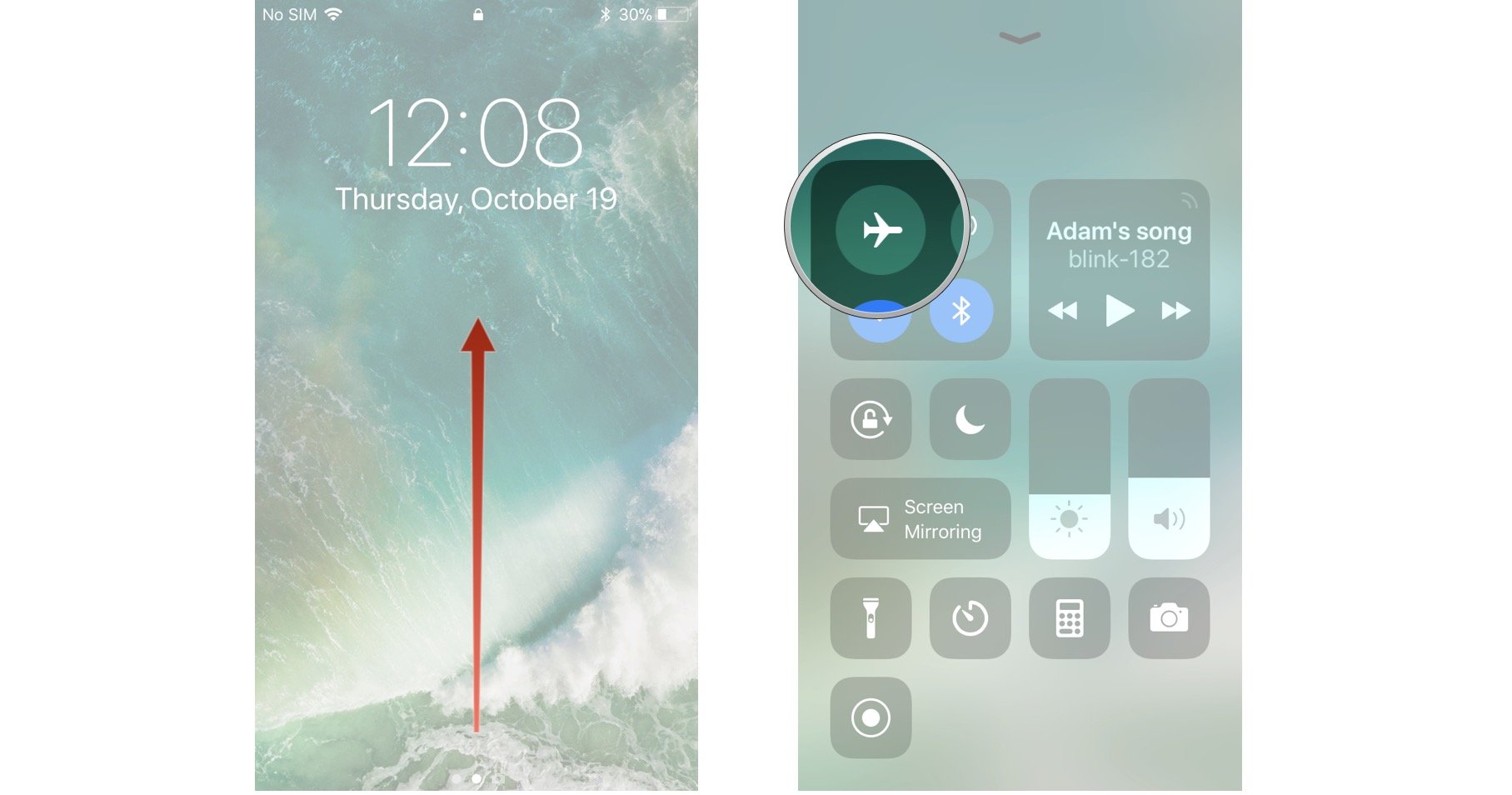
  • Turning on Airplane mode

How to turn on Airplane Mode on iPhone and iPad | iMore
A trial and tested approach, which works in most instances, is to switch your phone to airplane mode.
For android users, swipe down from the top of your screen to bring down the notification tray and just tap on the airplane mode button.
For iPhone users, Swipe up from the bottom of the screen and for iPhone X series users, swipe down from the top-right corner of the screen. Just tap on the airplane mode button. It’s a good idea to wait for something between 30-60 seconds before turning airplane mode off because it takes a short while to kick-start and speed up your data connection.


  • Restarting your Phone

Secret trick to speed up your iPhone in 2 presses without ...If airplane mode fails to boost slow data connection, you can always take things up a notch and restart your phone altogether.
Android users can press and hold the power button or the power button and volume down button simultaneously to display the on-screen menu to tap the restart button. If a restart button isn’t available, simply press and hold the power button till the screen goes black, and then turns on again.
For iPhone users, simply press and hold the home button till a power slider is displayed. Then just use the sleep/wake button to turn it back on. For iPhone X-series users, use the side button along with the volume up or volume down button till the power slider is displayed. Once turned off, use the side button to power on again.


  • Removing your SIM card

How to remove the SIM card from a Samsung Galaxy S10 - Business ...Another option to speed up your data connection is to remove your SIM card while the phone is turned on. You will need a SIM card tool which usually comes with the phone. However, a paper clip or a common pin will suffice too. Remove the SIM card to check for any damages. If all is okay, insert it back in. For phones with an eSIM such as the iPhone XS, XR, Pixel 3, etc., there won’t be a possibility to remove an embedded sim. The next best option is to restart your phone as described above.


  • Change your location
    This hack might be a little inconvenient because it’ll ask you to move from one place to another. Sometimes being in a building or being surrounded by buildings can choke signals. If that is the case, you might have to walk a small distance to a spot which allows better signals and by default, allow you to boost slow data connection.


  • Disable Data Saver/Low Data Mode

Check the cellular data usage on your iPhone and iPad - Apple AtbalstsBoth, Android and iOS phones have been designed to reduce data usage. Although it’s a good tool if your data package is limited, it can sometimes cause a slow data connection. Give it a try to disable this setting and experiment if it enhances your data connection speed.
For android phones, just go to Settings > Network & internet > Data Saver.
For iPhone users you can find and toggle the Low data mode option in Settings > Cellular > Cellular Data Options.
If your data usage is a concern for you, it’s a good idea to turn this setting back on once you’re done using a faster data connection speed. This will help you to check if this setting was a factor limiting your data speed.


  • Disconnect from VPN
    Although VPNs give the benefit of privacy and anonymity while browsing, it can also take a toll on your mobile data speed. Check to see if you’re connected to a VPN if you’re experiencing slower speeds on your mobile data. If you’re connected, disconnect. There’s a good probability that you will experience an improvement in your mobile data speed almost instantly. You can always reconnect to your VPN once you’re done.


  • Reset your Phone’s Network settings

What Happens When you Reset Network Settings on Android and iOSThis tip although can help, but will also cause you a slight inconvenience as it’ll reset all your paired Bluetooth devices and Wi-Fi access points. So, it’s better to use this option as a last resort.
For android users, you’ll be able to toggle the reset network settings option through Settings > System > Advanced > Reset options > Reset Wi-Fi, mobile & Bluetooth. There’s a possibility that you’ll find this in a different location depending on the phone you’re using, but rest assured, you’ll find this option in your settings.
For iPhone users, you can reset network settings by going to Settings > General > Reset > Reset Network Settings. This will trigger a prompt to enter your passcode. Enter that and you’re good to go.


  • Call your network Operator
    If all else fails, simply call your network operator. There’s always the possibility of an outage or some other technical difficulty on their end. If the problem indeed turns out to be on their end, they’ll be able to help in one for or the other. If nothing else, it’ll provide the validation that the problem is on their end and not yours, which in a frustrating situation like this, can provide some ease of comfort.

There’s also always the option of investing in a signal booster to speed up your data connection, if you’re living in an area which has low connectivity in general. However, the only downside of this is the cost as network boosters are a one-time investment. Prices can variate from $399 to $999 depending on the coverage.

Vorherige
How to Disinfect Phone During Coronavirus Disease?
Nächste
How to Transfer Contacts from iPhone to iPhone [Detailed Guide]

In Verbindung stehende Artikel

How to Change an Apple Watch Band Safely — No Tools Needed

Apple Watch Armband sicher wechseln – ganz ohne Werkzeug

choose the right Apple Watch band

So finden Sie das beste Apple Watch Armband für Ihren Stil und Ihr tägliches Leben

Leather iPhone Case Scratches and Stains: How to Fix Them

Leder-iPhone-Hüllen im Alltag: Kratzer, Flecken und die nächste Generation von Materialien

phone protection for college students with big deal

So schützt du dein Handy im Studium: Was jeder Erstsemester wissen muss

Hinterlasse einen Kommentar

Deine Email-Adresse wird nicht veröffentlicht.

Recent Post

Apple Watch Armband für Sport und Outdoor: Wasserfest, schweißresistent und sicherer Halt

Apple Watch Sportarmbänder sind beim Sport und bei Outdoor-Aktivitäten größeren...

Apple Watch 2026 Kaufguide: Solltest du auf die Ultra 4 warten, zur Series 12 wechseln...

Apple wird voraussichtlich im September 2026 neue Watches vorstellen, und...

10 Handy-Accessoires, die Papa wirklich benutzt — Vatertags-Geschenkguide

Dein Dad nutzt immer noch eine kaputte Hülle von vor...

AirPods Ultra vs. AirPods 5 vs. AirPods Pro 3: Welche solltest du 2026 kaufen?

Kameras, KI, eine Verzögerung – und das Modell, auf das...

Wir haben die neue Sommerkollektion von ESR getestet – und so ist es, damit zu...

ESR hat sich historisch eher auf funktionale Accessoires als auf...

Die besten Zeichen-Apps für das iPad Pro 2026: Vom Hobbykünstler zum Profi

2026 fühlt sich Zeichnen auf dem iPad weniger wie Tablet-Nutzung...

Get 20% off with code: BLOG20

product.title

Kamera Schutzfolie aus Gehärtetem Glas für iPad Pro 13"/11" (2024) und 12,9″/11″ (2022/2021/2020) - 2 Pack

$9.80
Learn More
product.title

iPhone 14 Pro/14 Pro Max HD-Kamera Schutzfolie aus Gehärtetem Glas - 1 Set

$10.89
Learn More
product.title

iPad Air 11'' (2025/2024), Air 10,9'' (5./4. Generation) Zero Weiche Hülle - Clear

$10.89
Learn More

Unternehmen

  • Über ESR
  • Unser Blog
  • Pressebereich
  • Händler werden

Produkte

  • Schutzhüllen
  • iPhone Cases
  • iPad-Hüllen
  • Entwickelt für MagSafe
  • iPad-Produktivität
  • Schutzfolien
  • Kabelloses Laden
  • Geldbörse und Zubehör
  • Weitere Zubehörteile

Community

  • Mein Konto
  • Freunde empfehlen, CashBack verdienen
  • Werde ESR Super User
  • Affiliate Programm
  • Student Discount

Support

  • Kontaktieren Sie uns
  • Einrichtungsvideos und FAQs
  • Bestellstatus
  • Rückgabe und Rückerstattung
  • Garantiebestimmungen
  • Versandbedingungen
  • Zahlungsmethoden
  • Product Recalls

Zahlungsmöglichkeiten:
  • American Express
  • JCB
  • Mastercard
  • PayPal
  • Visa
  • Klarna Klarna
  • Afterpay
Hervorragend – 4,6 von 5 Sternen – Bewertungen:2594 •

© 2026 ESR All rights reserved.

  • Nutzungsbedingungen
  • Datenschutzrichtlinie
  • Rechtliche Erklärung
  • Cookie-Richtlinie
  • Versand Politik
  • Rückgabe und Rückerstattung
  • Track Your Order

Einkaufswagen

Get a 15% off coupon when you

sign up

for free shipping!

$38.00
You're $38.00 away from Free Shipping!

$50.00
You're $50.00 away from Free Shipping!

Benefits applied automatically at checkout

Your Cart is Empty

Sign In / Register to view saved cart items
Shop Now
ESR_IMG

Protect Your iPhone's Camera Control

ESR_IMG

Always Find Your Wallet

ESR_IMG

Drop-Proof FlickLlock, Effortless MagSafe

ESR_IMG

Qi2 Fast Charging on the Go

Zwischensumme $0.00
Warenkorb ansehen

Thank you for choosing to transfer to a human service.

Sorry! The previous responses were from our AI customer service. Since it didn't satisfy you, you've been transferred to a human agent. We'll reply within 24 hours from Mon to Fri and 48 hours on weekends for further help.

Please select the reason for transfer