Just launched: Summer prints for your phone and wallet. Shop now
Save 15% with code BTS15 | 20% off any 2 with code BTS20 | 25% off any 2 with code BTS25 for Super Users Shop now
Save up to 70% on selected tech essentials Shop now
Free shipping on all orders over $50

Become a Super User for Exclusive Rewards

  • - 15% Welcome Discount
  • - Earn Points for Every Purchase
  • - Exclusive Member Benefits
Join Now Sign In
  • Become an ESR Super User
  • Super User Exclusive Deals
  • Refer a Friend
Cart 0
  • Cases
    • iPhone
    • iPad
    • AirPods
    • Samsung
      iPhone 17🔥
    • iPhone 17e🔥
    • iPhone 17 Pro Max🔥
    • iPhone 17 Pro🔥
    • iPhone Air🔥
    • iPhone 17🔥
    • iPhone 16
    • iPhone 16e
    • iPhone 16 Pro Max
    • iPhone 16 Pro
    • iPhone 16 Plus
    • iPhone 16
    • iPhone 15
    • iPhone 15 Pro Max
    • iPhone 15 Pro
    • iPhone 15 Plus
    • iPhone 15
    • iPhone 14
    • iPhone 14 Pro Max
    • iPhone 14 Pro
    • iPhone 14 Plus
    • iPhone 14
    • iPhone 13
    • iPhone 13 Pro Max
    • iPhone 13 Pro
    • iPhone 13
       
    • iPad Air 13 (2026)🔥
    • iPad Air 11 (2026)🔥
    •  
    • iPad Pro 13 (2025)
    • iPad Pro 11 (2025)
    • iPad 11th Gen (2025)
    • iPad Air 13 (2025)
    • iPad Air 11 (2025)
    •  
    • iPad Pro 13 (2024)
    • iPad Pro 11 (2024)
    • iPad Air 13 (2024)
    • iPad Air 11 (2024)
    • iPad mini 7 (2024)
    •  
    • iPad Pro 12.9 (2022)
    • iPad Pro 11 (2022)
    • iPad Air 5/4 (2022)
    • iPad 10th Gen (2022)
    •  
    • iPad mini 6 (2021)
    • iPad Pro 12.9 (2021)
    • iPad Pro 11 (2021)
    • iPad Pro 11 (2020)
       
    • AirPods Pro 3🔥
    • AirPods 4
    • AirPods Pro (2023/2022/2019)
      Galaxy S26🔥
    • Galaxy S26 Ultra🔥
    • Galaxy S26 Plus🔥
    • Galaxy S26🔥
    • Galaxy S25
    • Galaxy S25 Ultra
    • Galaxy S25+
    • Galaxy S24
    • Galaxy S24 Ultra
    • Galaxy S24+
    • Galaxy S24
    • Galaxy S23
    • Galaxy S23 Ultra
    • Galaxy S23
  • Screen Protectors
    • iPhone
    • iPad
    • Apple Watch
    • Samsung
      iPhone 17🔥
    • iPhone 17e🔥
    • iPhone 17 Pro Max🔥
    • iPhone 17 Pro🔥
    • iPhone Air🔥
    • iPhone 17🔥
    • iPhone 16
    • iPhone 16e
    • iPhone 16 Pro Max
    • iPhone 16 Pro
    • iPhone 16 Plus
    • iPhone 16
    • iPhone 15
    • iPhone 15 Pro Max
    • iPhone 15 Pro
    • iPhone 15 Plus
    • iPhone 15
    • iPhone 14
    • iPhone 14 Pro Max
    • iPhone 14 Pro
    • iPhone 14 Plus
    • iPhone 14
    • iPhone 13
    • iPhone 13 Pro Max
    • iPhone 13/13 Pro
       
    • iPad Air 13 (2026)🔥
    • iPad Air 11 (2026)🔥
    •  
    • iPad Pro 13 (2025)
    • iPad Pro 11 (2025)
    • iPad 11th Gen (2025)
    • iPad Air 13 (2025)
    • iPad Air 11 (2025)
    •  
    • iPad Pro 13 (2024)
    • iPad Pro 11 (2024)
    • iPad Air 13 (2024)
    • iPad Air 11 (2024)
    •  
    • iPad Pro 12.9 (6th/5th/4th/3rd Gen)
    • iPad Pro 11 (4th/3rd/2nd/1st Gen)
    • iPad Air 5/4 (2022)
    • iPad 10th Gen (2022)
       
    • Apple Watch Sport Band🔥
    • Apple Watch Cases & Screen Protectors🔥
      Galaxy S26🔥
    • Galaxy S26 Ultra🔥
    • Galaxy S25
    • Galaxy S25 Ultra
    • Galaxy S24
    • Galaxy S24 Ultra
    • Galaxy S23
    • Galaxy S23 Ultra
    • Galaxy S23+
    • Galaxy S23
    • Galaxy S22
    • Galaxy S22 Ultra
  • iPad Keyboards & Stylus
    • Keyboards for iPad
    • Styluses & Mice
      Choose Your Device
    • iPad Air 13 (2026)🔥
    • iPad Air 11 (2026)🔥
    •  
    • iPad Pro 13 (2025)
    • iPad Pro 11 (2025)
    • iPad 11th Gen (2025)
    • iPad Air 13 (2025)
    • iPad Air 11 (2025)
    •  
    • iPad Pro 13 (2024)
    • iPad Pro 11 (2024)
    • iPad Air 13 (2024)
    • iPad Air 11 (2024)
    •  
    • iPad Pro 12.9 (6th/5th/4th/3rd)
    • iPad Pro 11 (4th/3rd/2nd/1st)
    • iPad Air 5/4 (2022)
    • iPad 10th Gen (2022)
       
    • Stylus
    • Wireless Mouse
  • Chargers
    • Wireless Chargers & Stands
    • Car Chargers & Mounts
    • CryoBoost Foldable 3-in-1 Magnetic Charging Station  (25W) – US Plug-Black

      CryoBoost Foldable 3-in-1 Magnetic Charging Station (25W) – US Plug-Black

    • CryoBoost Foldable 3-in-1 Magnetic Charging Station  (25W) – US Plug-Frosted Graphite

      CryoBoost Foldable 3-in-1 Magnetic Charging Station (25W) – US Plug-Frosted Graphite

    • CryoBoost 3-in-1 Magnetic Charging Station (25W, Qi2.2)  - US Plug–Black

      CryoBoost 3-in-1 Magnetic Charging Station (25W, Qi2.2) - US Plug–Black

    • Universal Ring 360 (HaloLock) - Black-2 Pack

      Universal Ring 360 (HaloLock) - Black-2 Pack

    • 25W CryoBoost Foldable 3-in-1 Magnetic Charger and Car Charger (Air Vent)  Bundle– US Plug-Black

      25W CryoBoost Foldable 3-in-1 Magnetic Charger and Car Charger (Air Vent) Bundle– US Plug-Black

    • CryoBoost Foldable 3-in-1 Magnetic Charging Station  (25W) – EU Plug-Black

      CryoBoost Foldable 3-in-1 Magnetic Charging Station (25W) – EU Plug-Black

    • CryoBoost Foldable 3-in-1 Magnetic Charging Station  (25W) – US Plug-White

      CryoBoost Foldable 3-in-1 Magnetic Charging Station (25W) – US Plug-White

    • CryoBoost Foldable 3-in-1 Magnetic Charging Station  (25W) – JP Plug-White

      CryoBoost Foldable 3-in-1 Magnetic Charging Station (25W) – JP Plug-White

    • CryoBoost 3-in-1 Magnetic Charging Station (25W, Qi2.2)  - EU Plug–Black

      CryoBoost 3-in-1 Magnetic Charging Station (25W, Qi2.2) - EU Plug–Black

    • All Wireless Chargers & Stands >
    • OmniLock Magnetic Car Charger (25W, CryoBoost, Air Vent) - Black

      OmniLock Magnetic Car Charger (25W, CryoBoost, Air Vent) - Black

    • Magnetic Wireless Car Charger (HaloLock) - Black

      Magnetic Wireless Car Charger (HaloLock) - Black

    • Wireless Car Charger with CryoBoost™ (HaloLock) - Wireless Charger with 36W Adapter

      Wireless Car Charger with CryoBoost™ (HaloLock) - Wireless Charger with 36W Adapter

    • Wireless Car Charger with CryoBoost™ (HaloLock) - Wireless Charger

      Wireless Car Charger with CryoBoost™ (HaloLock) - Wireless Charger

    • OmniLock Magnetic Car Mount (Air Vent) - Black

      OmniLock Magnetic Car Mount (Air Vent) - Black

    • Magnetic Car Phone Mount (HaloLock) - Metallic Grey

      Magnetic Car Phone Mount (HaloLock) - Metallic Grey

    • Dashboard Car Phone Mount (HaloLock) - Black

      Dashboard Car Phone Mount (HaloLock) - Black

    • 15W Car Charger with MagSafe + CryoBoost - Cool Grey

      15W Car Charger with MagSafe + CryoBoost - Cool Grey

    • Magnetic Wireless Car Charger and 25W CryoBoost Foldable 3-in-1 Charger Bundle - US Plug–Black

      Magnetic Wireless Car Charger and 25W CryoBoost Foldable 3-in-1 Charger Bundle - US Plug–Black

    • All Car Chargers & Mounts >
  • Wallets
  • 🔥New Arrivals🔥
    • Apple Watch Sport Band🔥
    • 🏝️Summer Print Collection🏝️
    • Galaxy S26 Series🔥
    • iPhone 17e🔥
    • iPad Air 2026 Series🔥
    • 25W Qi2 Wireless Charging
  • ✏️Back to School Deals✏️
    • Back to School Deals for iPad
    • Back to School Deals for Phones
    • Back to School Deals for Chargers
    • Final Sale
  • Support
    • Contact Us
    • Product Recalls
    • Product Videos & FAQs
    • General FAQ
    • Order Status
    • Return and Refund Policy
    • Warranty Policy
    • Shipping Policy
  • Explore
    • About Us
    • ESR Blog
    • Newsroom
Super User Benefits
  • Become an ESR Super User
  • Super User Exclusive Deals
  • Refer a Friend
My Account
Log in Register

Select Your Country/Region

Global
  • Global
North America
  • United States
  • Canada
Europe
  • Europe
  • Norway
  • Switzerland
  • United Kingdom
Asia-Pacific
  • Australia
  • Japan

Preferred Language

Changing language will not affect your selected region

  • Cases
    • iPhone
    • iPad
    • AirPods
    • Samsung
      iPhone 17🔥
    • iPhone 17e🔥
    • iPhone 17 Pro Max🔥
    • iPhone 17 Pro🔥
    • iPhone Air🔥
    • iPhone 17🔥
    • iPhone 16
    • iPhone 16e
    • iPhone 16 Pro Max
    • iPhone 16 Pro
    • iPhone 16 Plus
    • iPhone 16
    • iPhone 15
    • iPhone 15 Pro Max
    • iPhone 15 Pro
    • iPhone 15 Plus
    • iPhone 15
    • iPhone 14
    • iPhone 14 Pro Max
    • iPhone 14 Pro
    • iPhone 14 Plus
    • iPhone 14
    • iPhone 13
    • iPhone 13 Pro Max
    • iPhone 13 Pro
    • iPhone 13
       
    • iPad Air 13 (2026)🔥
    • iPad Air 11 (2026)🔥
    •  
    • iPad Pro 13 (2025)
    • iPad Pro 11 (2025)
    • iPad 11th Gen (2025)
    • iPad Air 13 (2025)
    • iPad Air 11 (2025)
    •  
    • iPad Pro 13 (2024)
    • iPad Pro 11 (2024)
    • iPad Air 13 (2024)
    • iPad Air 11 (2024)
    • iPad mini 7 (2024)
    •  
    • iPad Pro 12.9 (2022)
    • iPad Pro 11 (2022)
    • iPad Air 5/4 (2022)
    • iPad 10th Gen (2022)
    •  
    • iPad mini 6 (2021)
    • iPad Pro 12.9 (2021)
    • iPad Pro 11 (2021)
    • iPad Pro 11 (2020)
       
    • AirPods Pro 3🔥
    • AirPods 4
    • AirPods Pro (2023/2022/2019)
      Galaxy S26🔥
    • Galaxy S26 Ultra🔥
    • Galaxy S26 Plus🔥
    • Galaxy S26🔥
    • Galaxy S25
    • Galaxy S25 Ultra
    • Galaxy S25+
    • Galaxy S24
    • Galaxy S24 Ultra
    • Galaxy S24+
    • Galaxy S24
    • Galaxy S23
    • Galaxy S23 Ultra
    • Galaxy S23
  • Screen Protectors
    • iPhone
    • iPad
    • Apple Watch
    • Samsung
      iPhone 17🔥
    • iPhone 17e🔥
    • iPhone 17 Pro Max🔥
    • iPhone 17 Pro🔥
    • iPhone Air🔥
    • iPhone 17🔥
    • iPhone 16
    • iPhone 16e
    • iPhone 16 Pro Max
    • iPhone 16 Pro
    • iPhone 16 Plus
    • iPhone 16
    • iPhone 15
    • iPhone 15 Pro Max
    • iPhone 15 Pro
    • iPhone 15 Plus
    • iPhone 15
    • iPhone 14
    • iPhone 14 Pro Max
    • iPhone 14 Pro
    • iPhone 14 Plus
    • iPhone 14
    • iPhone 13
    • iPhone 13 Pro Max
    • iPhone 13/13 Pro
       
    • iPad Air 13 (2026)🔥
    • iPad Air 11 (2026)🔥
    •  
    • iPad Pro 13 (2025)
    • iPad Pro 11 (2025)
    • iPad 11th Gen (2025)
    • iPad Air 13 (2025)
    • iPad Air 11 (2025)
    •  
    • iPad Pro 13 (2024)
    • iPad Pro 11 (2024)
    • iPad Air 13 (2024)
    • iPad Air 11 (2024)
    •  
    • iPad Pro 12.9 (6th/5th/4th/3rd Gen)
    • iPad Pro 11 (4th/3rd/2nd/1st Gen)
    • iPad Air 5/4 (2022)
    • iPad 10th Gen (2022)
       
    • Apple Watch Sport Band🔥
    • Apple Watch Cases & Screen Protectors🔥
      Galaxy S26🔥
    • Galaxy S26 Ultra🔥
    • Galaxy S25
    • Galaxy S25 Ultra
    • Galaxy S24
    • Galaxy S24 Ultra
    • Galaxy S23
    • Galaxy S23 Ultra
    • Galaxy S23+
    • Galaxy S23
    • Galaxy S22
    • Galaxy S22 Ultra
  • iPad Keyboards & Stylus
    • Keyboards for iPad
    • Styluses & Mice
      Choose Your Device
    • iPad Air 13 (2026)🔥
    • iPad Air 11 (2026)🔥
    •  
    • iPad Pro 13 (2025)
    • iPad Pro 11 (2025)
    • iPad 11th Gen (2025)
    • iPad Air 13 (2025)
    • iPad Air 11 (2025)
    •  
    • iPad Pro 13 (2024)
    • iPad Pro 11 (2024)
    • iPad Air 13 (2024)
    • iPad Air 11 (2024)
    •  
    • iPad Pro 12.9 (6th/5th/4th/3rd)
    • iPad Pro 11 (4th/3rd/2nd/1st)
    • iPad Air 5/4 (2022)
    • iPad 10th Gen (2022)
       
    • Stylus
    • Wireless Mouse
  • Chargers
    • Wireless Chargers & Stands
    • Car Chargers & Mounts
    • CryoBoost Foldable 3-in-1 Magnetic Charging Station  (25W) – US Plug-Black

      CryoBoost Foldable 3-in-1 Magnetic Charging Station (25W) – US Plug-Black

    • CryoBoost Foldable 3-in-1 Magnetic Charging Station  (25W) – US Plug-Frosted Graphite

      CryoBoost Foldable 3-in-1 Magnetic Charging Station (25W) – US Plug-Frosted Graphite

    • CryoBoost 3-in-1 Magnetic Charging Station (25W, Qi2.2)  - US Plug–Black

      CryoBoost 3-in-1 Magnetic Charging Station (25W, Qi2.2) - US Plug–Black

    • Universal Ring 360 (HaloLock) - Black-2 Pack

      Universal Ring 360 (HaloLock) - Black-2 Pack

    • 25W CryoBoost Foldable 3-in-1 Magnetic Charger and Car Charger (Air Vent)  Bundle– US Plug-Black

      25W CryoBoost Foldable 3-in-1 Magnetic Charger and Car Charger (Air Vent) Bundle– US Plug-Black

    • CryoBoost Foldable 3-in-1 Magnetic Charging Station  (25W) – EU Plug-Black

      CryoBoost Foldable 3-in-1 Magnetic Charging Station (25W) – EU Plug-Black

    • CryoBoost Foldable 3-in-1 Magnetic Charging Station  (25W) – US Plug-White

      CryoBoost Foldable 3-in-1 Magnetic Charging Station (25W) – US Plug-White

    • CryoBoost Foldable 3-in-1 Magnetic Charging Station  (25W) – JP Plug-White

      CryoBoost Foldable 3-in-1 Magnetic Charging Station (25W) – JP Plug-White

    • CryoBoost 3-in-1 Magnetic Charging Station (25W, Qi2.2)  - EU Plug–Black

      CryoBoost 3-in-1 Magnetic Charging Station (25W, Qi2.2) - EU Plug–Black

    • All Wireless Chargers & Stands >
    • OmniLock Magnetic Car Charger (25W, CryoBoost, Air Vent) - Black

      OmniLock Magnetic Car Charger (25W, CryoBoost, Air Vent) - Black

    • Magnetic Wireless Car Charger (HaloLock) - Black

      Magnetic Wireless Car Charger (HaloLock) - Black

    • Wireless Car Charger with CryoBoost™ (HaloLock) - Wireless Charger with 36W Adapter

      Wireless Car Charger with CryoBoost™ (HaloLock) - Wireless Charger with 36W Adapter

    • Wireless Car Charger with CryoBoost™ (HaloLock) - Wireless Charger

      Wireless Car Charger with CryoBoost™ (HaloLock) - Wireless Charger

    • OmniLock Magnetic Car Mount (Air Vent) - Black

      OmniLock Magnetic Car Mount (Air Vent) - Black

    • Magnetic Car Phone Mount (HaloLock) - Metallic Grey

      Magnetic Car Phone Mount (HaloLock) - Metallic Grey

    • Dashboard Car Phone Mount (HaloLock) - Black

      Dashboard Car Phone Mount (HaloLock) - Black

    • 15W Car Charger with MagSafe + CryoBoost - Cool Grey

      15W Car Charger with MagSafe + CryoBoost - Cool Grey

    • Magnetic Wireless Car Charger and 25W CryoBoost Foldable 3-in-1 Charger Bundle - US Plug–Black

      Magnetic Wireless Car Charger and 25W CryoBoost Foldable 3-in-1 Charger Bundle - US Plug–Black

    • All Car Chargers & Mounts >
  • Wallets
  • 🔥New Arrivals🔥
    • Apple Watch Sport Band🔥
    • 🏝️Summer Print Collection🏝️
    • Galaxy S26 Series🔥
    • iPhone 17e🔥
    • iPad Air 2026 Series🔥
    • 25W Qi2 Wireless Charging
  • ✏️Back to School Deals✏️
    • Back to School Deals for iPad
    • Back to School Deals for Phones
    • Back to School Deals for Chargers
    • Final Sale
  • Support
    • Contact Us
    • Product Recalls
    • Product Videos & FAQs
    • General FAQ
    • Order Status
    • Return and Refund Policy
    • Warranty Policy
    • Shipping Policy
  • Explore
    • About Us
    • ESR Blog
    • Newsroom

Become a Super User for Exclusive Rewards

  • - 15% Welcome Discount
  • - Earn Points for Every Purchase
  • - Exclusive Member Benefits
Join Now Sign In
  • Become an ESR Super User
  • Super User Exclusive Deals
  • Refer a Friend
Cart 0

Select Your Country/Region

Global
  • Global
North America
  • United States
  • Canada
Europe
  • Europe
  • Norway
  • Switzerland
  • United Kingdom
Asia-Pacific
  • Australia
  • Japan

Preferred Language

Changing language will not affect your selected region

Search our store

Cart 0
Popular Searches:
iPad 2026 Case iPhone 17e Atelier Case iPad Keyboard
How To

How to Transfer Contacts from iPhone to iPhone [Detailed Guide]

by Deb Hazarika on Jun 30, 2020 (Last Updated:Apr 09, 2025)
How to Transfer Contacts from iPhone to iPhone

You have finally got your new iPhone and can’t wait to get started! Sure, there is a rush of excitement, but you have still got to set it up and transfer your stuff from your old iPhone. If you have a lot of contacts to transfer and you are unsure of where to start, let us chip in and help you out here.

With the new iPhones that run iOS 10 or later, the option to use iCloud to backup your existing files should come up as soon as you power on your new device. If not, we’ve still got your back. Read on for more ways to transfer your contacts.

 QUICK TIP: If you choose this option to transfer your contacts to the new device, don’t forget to make sure your phone is connected to your Wi-Fi. Using mobile data might drain out your allowed usage limit pretty soon!

Let’s talk about how to transfer contacts from an existing iPhone to a new iPhone.

There are a few easy steps to follow when you are transferring your contacts to a new iPhone:

Transfer Contacts from iPhone to new iPhone

  1. On the old iPhone you were using, make sure you are connected to your Wi-Fi. Now go to SETTINGS and check if you are logged in to your Apple ID. A quick way to check is to see if your name and/or picture appears at the top of your Settings app,

If not, you will have to log in to your Apple ID, which is the same email address and password that you use to get an app from the App Store or buy a movie or song from iTunes.

  1. Once you’ve made sure that you are logged in, click on your name and then choose the option that says iCloud. Make sure that the “Contacts” toggle is ON and green.

Next, scroll down lower and look for an option that says “iCloud Backup”. Check that it’s ON.

You should be able to see a blue “Back Up Now” option. Tap on that.  The time that this will take varies and depends on how much data you’re backing up and also how what your internet speed is.

  1. Once that is done, when you are setting up your new device, you will be asked for your Apple ID login details. Login using the same Apple ID that you used on your old phone.
  2. When prompted to choose between “Restore from iCloud backup” or “Set up as a new iPhone”, choose the Restore from iCloud backup option. A list of recent backups may pop up. Choose the latest backup. How long this takes will again depend on how fast your wi-fi connection is. Once this is done, your phone will restart and be ready for you to use.

Transfer your contacts using iCloud

If you have already set up your new iPhone and just your contacts without having to reset your device and start over, you can use iCloud and get this done quickly.

  1. Check to see that both your old and new phone are logged into the same Apple ID account. You can do this by checking the names and pictures on the top when you open the Settings app on your phones.
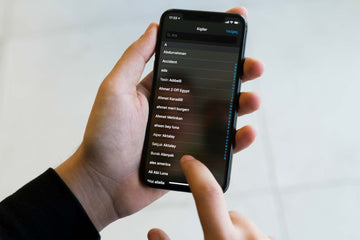
  2. On both your phones, open the iCloud App by tapping on your name. Ensure that the Contacts toggle in on. Check the image above to see where the Contacts toggle button is.
  3. A message will pop up asking about Merging contacts. Tap on Merge.

This process should synchronize both phones and contacts from your old phone will start appearing in your new iPhone now.

Using iTunes

Using iTunes to transfer your contacts is a relatively less used process because you’ll need a Computer and both your phones and a cable to plug your phone into the computer. If you choose to use this method, these are the steps you will need to follow:

  1. Ensure that your laptop or PC has the latest iTunes version on it. Open iTunes.
  2. After you plug in your old iPhone into the computer, Grant Access to your iPhone if a message pops up on your computer screen.
  3. On the top toolbar, you will see an icon of a phone. Click on that icon.
  4. On the left sidebar in iTunes, you will see an “Info” tab under Settings.
  5. Now check the Sync Contacts box on the top part of the screen and then scroll down and click on the “Sync” button at the bottom.
  6. After the sync is complete, unplug your old iPhone and plug in your new iPhone.
  7. Repeat steps 3 & 4 with your new iPhone.
  8. Ensure that the “Sync Contacts” box is checked.
  9. Scroll down lower to the “Advanced” tab and click on Replace Information on this iPhone.
  10. Next, click on “Contacts”. This will start the process of replacing the contacts you have now with the contacts that you had synched from your old iPhone.

Have You Lost or Broken Your Old Phone?

We’ve all been there, and accidents always happen. So if you’ve got a new phone only because you lost or broke your old one, does that mean that your contacts are lost? No Sir.

With any luck, your old phone will have been backed up to iCloud anyway. If you set up iCloud while setting up an iPhone, the device should have made a backup every night when you put your iPhone on the charge.

You could also log into your iCloud on a computer and see your contacts online.

Transfer your contacts using iCloud

Several third-party apps might be able to help transfer contacts too. However, they are not usually free and can become a more expensive option compared to the methods listed above. Only consider buying a third-party app on the rare occasion that the above-listed methods do not work for your device.

Tags: iPhone 12 Setup
Previous
How to Make My Phone’s Data Connection Faster?
Next
How to Clear iPhone Storage & Free Up Space!

Related Articles

How to Change an Apple Watch Band Safely — No Tools Needed

How to Change an Apple Watch Band Safely — No Tools Needed

choose the right Apple Watch band

How to Choose the Best Apple Watch Band for Your Style and Daily Life

Leather iPhone Case Scratches and Stains: How to Fix Them

iPhone Leather Cases and Everyday Wear: Scratches, Stains, and the Next-Gen Solution

phone protection for college students with big deal

How To Keep Your Phone Safe at School: What Every Freshman Needs to Know

Leave a Comment

Your email address will not be published.

Recent Post

Apple Watch Band for Sport and Outdoor Use: Water-Resistant, Sweat-Resistant, and Built to Stay Secure

Apple Watch sport bands face greater demands than everyday straps...

Apple Watch 2026 Buying Guide: Should You Wait for Ultra 4, Jump to Series 12,...

Apple is expected to launch new watches in September 2026....

10 Gifts Dad Will Use — Father's Day Phone Accessories Gift Guide

Dad’s still using a cracked case from years ago. He...

AirPods Ultra vs AirPods 5 vs AirPods Pro 3: What’s Confirmed and What’s Still Rumored

Cameras, AI, a delay — and the model most people...

We Tested ESR's New Summer Collection — Here's What It's Actually Like to Live With

ESR has historically focused on functional accessories rather than expressive...

Best iPad Pro Drawing Apps in 2026: From Hobbyist to Pro

In 2026, drawing on an iPad feels less like using...

Get 20% off with code: BLOG20

product.title

iPad Pro 13"/11" (2024) and 12.9″/11″ (2022/2021/2020) Tempered-Glass Camera Lens Protector - 2 Pack

$8.99 $15.99
Learn More
product.title

iPad Air 11" (2024) Magnetic Privacy Screen Protector - 1 Pack

$9.99
Learn More
product.title

iPhone 14 Pro/14 Pro Max Tempered-Glass Lens Protectors - 1 Set

$9.99
Learn More

Company

  • About Us
  • Our Blog
  • Newsroom
  • Become a Reseller

Products

  • Shockproof Phone Cases
  • iPhone Cases
  • iPad Cases
  • AirPods Cases
  • Productivity
  • Screen Protectors
  • Wireless Charging
  • Magnetic Wallets
  • Other Accessories

Community

  • My Account
  • Refer a Friend
  • Become an ESR Super User
  • Affiliate Program
  • Student Discount

Support

  • Contact Us
  • Setup Videos & FAQs
  • Order Status
  • Return and Refund
  • Warranty Policy
  • Shipping Policy
  • Payment Methods
  • Product Recalls

Payment options:
  • American Express
  • JCB
  • Mastercard
  • PayPal
  • Visa
  • Klarna Klarna
  • Afterpay
Excellent 4.6 out of 5 - Review :2594 •

© 2026 ESR All rights reserved.

  • Terms of Use
  • Privacy Policy
  • Legal Declaration
  • Cookie Policy
  • Shipping Policy
  • Return and Refund
  • Track Your Order

Shopping Cart

Get a 15% off coupon when you

sign up

for free shipping!

$38.00
You're $38.00 away from Free Shipping!

$50.00
You're $50.00 away from Free Shipping!

Benefits applied automatically at checkout

Your Cart is Empty

Sign In / Register to view saved cart items
Shop Now
ESR_IMG

Protect Your iPhone's Camera Control

ESR_IMG

Always Find Your Wallet

ESR_IMG

Drop-Proof FlickLlock, Effortless MagSafe

ESR_IMG

Qi2 Fast Charging on the Go

Subtotal $0.00
View Cart

Thank you for choosing to transfer to a human service.

Sorry! The previous responses were from our AI customer service. Since it didn't satisfy you, you've been transferred to a human agent. We'll reply within 24 hours from Mon to Fri and 48 hours on weekends for further help.

Please select the reason for transfer