
20 % de réduction sur tout avec le code FINAL20 | 25 % dès 2 articles avec le code FINAL25 Tirez maintenant
Livraison gratuite pour les commandes de plus de $50
Cart 0
  • Designed for MagSafe
    • All MagSafe Products
      • Wireless Charging
      • Car Charger & Mounts
      • Charging Stands
      • MagSafe Cases
      • MagSafe Wallets
      • Power Banks
      • MagSafe Rings & Wall Mounts
      • Best MagSafe Bundles
    • Magsafe in Life
      • Desk Charging
      • Auto Accessories
      • Travel Essentials
      • Workspace Power
      • Find My Technology
      • Gift Guide
  • Protection By Device
    • All Cases
      • iPhone🔥
      • iPad🔥
      • AirPods🔥
      • Samsung
    • Screen Protection
      • iPhone🔥
      • iPad🔥
      • Apple Watch🔥
      • Samsung
    • iPad Productivity
      • Keyboards🔥
      • Styluses
    • Accessories
      • All Accessories
      • iPhone 17🔥
      • iPhone 17 Pro Max🔥
      • iPhone 17 Pro🔥
      • iPhone Air🔥
      • iPhone 17🔥
      • iPhone 16
      • iPhone 16e
      • iPhone 16 Pro Max
      • iPhone 16 Pro
      • iPhone 16 Plus
      • iPhone 16
      • iPhone 15
      • iPhone 15 Pro Max
      • iPhone 15 Pro
      • iPhone 15 Plus
      • iPhone 15
      • iPhone 14
      • iPhone 14 Pro Max
      • iPhone 14 Pro
      • iPhone 14 Plus
      • iPhone 14
      • iPhone 13
      • iPhone 13 Pro Max
      • iPhone 13 Pro
      • iPhone 13
      • Choose Your Device
      • iPad Pro 13 (2025)🔥
      • iPad Pro 11 (2025)🔥
      • iPad 11th Gen (2025)
      • iPad Air 13 (2025)
      • iPad Air 11 (2025)
      •  
      • iPad Pro 13 (2024)
      • iPad Pro 11 (2024)
      • iPad Air 13 (2024)
      • iPad Air 11 (2024)
      • iPad mini 7 (2024)
      •  
      • iPad Pro 12.9 (2022)
      • iPad Pro 11 (2022)
      • iPad Air 5/4 (2022)
      • iPad 10th Gen (2022)
      •  
      • iPad mini 6 (2021)
      • iPad Pro 12.9 (2021)
      • iPad Pro 11 (2021)
      • iPad Pro 11 (2020)
      • Choose Your Device
      • AirPods Pro 3🔥
      • AirPods 4
      • AirPods Pro (2023/2022/2019)
      • AirPods 3
      • Galaxy S25
      • Galaxy S25 Ultra
      • Galaxy S25+
      • Galaxy S24
      • Galaxy S24 Ultra
      • Galaxy S24+
      • Galaxy S24
      • Galaxy S23
      • Galaxy S23 Ultra
      • Galaxy S23
      • iPhone 17🔥
      • iPhone 17 Pro Max🔥
      • iPhone 17 Pro🔥
      • iPhone Air🔥
      • iPhone 17🔥
      • iPhone 16
      • iPhone 16e
      • iPhone 16 Pro Max
      • iPhone 16 Pro
      • iPhone 16 Plus
      • iPhone 16
      • iPhone 15
      • iPhone 15 Pro Max
      • iPhone 15 Pro
      • iPhone 15 Plus
      • iPhone 15
      • iPhone 14
      • iPhone 14 Pro Max
      • iPhone 14 Pro
      • iPhone 14 Plus
      • iPhone 14
      • iPhone 13
      • iPhone 13 Pro Max
      • iPhone 13/13 Pro
      • Choose Your Device
      • iPad Pro 13 (2025)🔥
      • iPad Pro 11 (2025)🔥
      • iPad 11th Gen (2025)
      • iPad Air 13 (2025)
      • iPad Air 11 (2025)
      •  
      • iPad Pro 13 (2024)
      • iPad Pro 11 (2024)
      • iPad Air 13 (2024)
      • iPad Air 11 (2024)
      •  
      • iPad Pro 12.9 (6th/5th/4th/3rd Gen)
      • iPad Pro 11 (4th/3rd/2nd/1st Gen)
      • iPad Air 5/4 (2022)
      • iPad 10th Gen (2022)
      •  
      •  
      • Apple Watch🔥
      • Galaxy S25
      • Galaxy S25 Ultra
      • Galaxy S24
      • Galaxy S24 Ultra
      • Galaxy S23
      • Galaxy S23 Ultra
      • Galaxy S23+
      • Galaxy S23
      • Galaxy S22
      • Galaxy S22 Ultra
      • Choose Your Device
      • iPad Pro 13 (2025)🔥
      • iPad Pro 11 (2025)🔥
      • iPad 11th Gen (2025)
      • iPad Air 13 (2025)
      • iPad Air 11 (2025)
      •  
      • iPad Pro 13 (2024)
      • iPad Pro 11 (2024)
      • iPad Air 13 (2024)
      • iPad Air 11 (2024)
      •  
      • iPad Pro 12.9 (6th/5th/4th/3rd)
      • iPad Pro 11 (4th/3rd/2nd/1st)
      • iPad Air 5/4 (2022)
      • iPad 10th Gen (2022)
      •  
      • Styluses
      •  
      • Magnetic Wallet
      • MagSafe Rings & Mounts
      • Other Accessories
  • Black Friday🔥
  • New Arrival
    • iPad Pro 2025🔥
    • iPhone 17 Series🔥
    • AirPods Pro 3🔥
    • 15W Qi2 Wireless Charging
    • iPad 2025 Series
  • Super User
    • Become an ESR Super User
    • Members’ Exclusive Deals
    • Refer Friends for CashBack
    • My Orders
  • Support
    • Contact Us
    • Product Videos & FAQs
    • General FAQ
    • Order Status
    • Return and Refund Policy
    • Warranty Policy
    • Shipping Policy
  • Explore
    • About Us
    • ESR Blog
    • Newsroom
    • Become a Reseller
My Account
Log in Register
North America
Europe
Asia Pacific
Middle East
Australia
USD $
Austria
USD $
Bahrain
USD $
Belgium
USD $
Bulgaria
USD $
Canada
USD $
Croatia
USD $
Czechia
USD $
Denmark
USD $
Estonia
USD $
Finland
USD $
France
USD $
Germany
USD $
Greece
USD $
Hungary
USD $
Indonesia
USD $
Ireland
USD $
Italy
USD $
Japan
USD $
Jordan
USD $
Latvia
USD $
Lithuania
USD $
Luxembourg
USD $
Malaysia
USD $
Mexico
USD $
Netherlands
USD $
New Zealand
USD $
Norway
USD $
Oman
USD $
Philippines
USD $
Poland
USD $
Portugal
USD $
Qatar
USD $
Romania
USD $
Saudi Arabia
USD $
Singapore
USD $
Slovakia
USD $
Slovenia
USD $
South Korea
USD $
Spain
USD $
Sweden
USD $
Switzerland
USD $
Taiwan
USD $
Thailand
USD $
Türkiye
USD $
United Arab Emirates
USD $
United Kingdom
USD $
United States
USD $
Vietnam
USD $
français
Deutsch
English
  • Designed for MagSafe
    • All MagSafe Products
      • Wireless Charging
      • Car Charger & Mounts
      • Charging Stands
      • MagSafe Cases
      • MagSafe Wallets
      • Power Banks
      • MagSafe Rings & Wall Mounts
      • Best MagSafe Bundles
    • Magsafe in Life
      • Desk Charging
      • Auto Accessories
      • Travel Essentials
      • Workspace Power
      • Find My Technology
      • Gift Guide
    • Wireless Charging
      • OmniLock Magnetic Car Charger (25W, CryoBoost, Air Vent) - Black

      • Qi2 Wireless Car Charger with CryoBoost (HaloLock) - Black

      • CryoBoost Foldable 3-in-1 Magnetic Charging Station (25W) – US Plug-Black

      • CryoBoost 3-in-1 Magnetic Charging Station (25W, Qi2.2) - EU Plug–Black

      • All Wireless Charging >
      Car Charger & Mounts
      • OmniLock Magnetic Car Charger (25W, CryoBoost, Air Vent) - Black

      • Qi2 Wireless Car Charger with CryoBoost (HaloLock) - Black

      • Qi2 Magnetic Wireless Car Charger(Halolock) - Black

      • 15W Car Charger with MagSafe + CryoBoost - Cool Grey

      • All Car Charger & Mounts >
      Charging Stands
      • CryoBoost Foldable 3-in-1 Magnetic Charging Station (25W) – US Plug-Black

      • Qi2 3-in-1 Wireless Charging Station with CryoBoost (HaloLock) - Black - US Plug

      • 25W 3-in-1 Wireless Charger with MagSafe + CryoBoost - US Plug

      • 3-in-1 Magnetic Charging Station (15W)- Black - EU PLUG

      • All Charging Stands >
      MagSafe Cases
      • iPhone 17 Pro Max Classic Hybrid Magnetic Case (Camera Control, Stash Stand) - Clear

      • iPhone 17 Pro Max Bundle Classic Hybrid Magnetic Case (Camera Control, Stash Stand) and Armorite Pro Screen Protector - Clear

      • iPhone 17 Pro Max Bundle Classic Hybrid Magnetic Case (Camera Control, Stash Stand) and Armorite Screen Protector - Frosted Green

      • iPhone 17 Pro Max Bundle Classic Hybrid Magnetic Case (Camera Control, Stash Stand) and Magnetic Charging Pad (Qi2) - Frosted Black

      • All MagSafe Cases >
      MagSafe Wallets
      • Geo Magnetic Wallet Stand (Grip) - Midnight Black

      • Geo Wallet Boost (HaloLock) - Black

      • Geo Magnetic Wallet Stand - Black

      • Classic Magnetic Wallet Stand for 5 cards - Midnight Black

      • All MagSafe Wallets >
      Power Banks
      • HaloLock MagSlim Wireless Power Bank (15W, 10,000 mAh, Kickstand) - Black

      • Qi2 MagSlim Power Bank (5K) - Black

      • All Power Banks >
      MagSafe Rings & Wall Mounts
      • Universal Ring (HaloLock) - Black/Silver-4 Pack

      • Universal Ring 360 (HaloLock) - White-2 Pack

      • All MagSafe Rings & Wall Mounts >
      Best MagSafe Bundles
      • MagSafe Charger with CryoBoost Everyday Bundle - EU Plug

      • Qi2 Car Charger and Qi2 Portable Charger Bundle - Black

      • Qi2 Magnetic Wireless Car Charger Bundle - Black

      • Qi2 Wireless Charger Everyday Bundle - Black

      • All Best MagSafe Bundles >
      Desk Charging
      • 25W 3-in-1 Wireless Charger with MagSafe + CryoBoost - US Plug

      • CryoBoost Foldable 3-in-1 Magnetic Charging Station (25W) – US Plug-Black

      • Qi2 3-in-1 Wireless Charging Station with CryoBoost (HaloLock) - Black - US Plug

      • Magnetic Charging Pad (15W)- Black - 1 Set

      • All Desk Charging >
      Auto Accessories
      • OmniLock Magnetic Car Charger (25W, CryoBoost, Air Vent) - Black

      • Qi2 Wireless Car Charger with CryoBoost (HaloLock) - Black

      • Qi2 Magnetic Wireless Car Charger(Halolock) - Black

      • 15W Car Charger with MagSafe + CryoBoost - Cool Grey

      • All Auto Accessories >
      Travel Essentials
      • CryoBoost Foldable 3-in-1 Magnetic Charging Station (25W) – US Plug-Black

      • OmniLock Magnetic Car Charger (25W, CryoBoost, Air Vent) - Black

      • Qi2 Wireless Car Charger with CryoBoost (HaloLock) - Black

      • Qi2 Dashboard Wireless Car Charger (HaloLock) - Black

      • All Travel Essentials >
      Workspace Power
      • iPad Air 11” (2024) Rebound Magnetic Keyboard Case 360 - US Layout-Black

      • 25W 3-in-1 Wireless Charger with MagSafe + CryoBoost - US Plug

      • iPad Pro 13” (2024) Rebound Magnetic Keyboard Case 360 - US Layout-Black

      • iPad Air 11" (M2) 2024 Shift Keyboard Case (Detachable) -US Layout-Dark Gray

      • All Workspace Power >
      Find My Technology
      • Geo Magnetic Wallet Stand (Grip) - Midnight Black

      • Geo Wallet Boost (HaloLock) - Black Carbon Fiber

      • Geo Wallet with Find My - Black Carbon Fiber

      • Geo Digital Pencil with Built-in Find My - White

      • All Find My Technology >
      Gift Guide
      • Geo Magnetic Wallet Stand (Grip) - Midnight Black

      • Geo Wallet Boost (HaloLock) - Brown

      • iPhone 17 Pro Max Cyber Tough Magnetic Case (Camera Control, Stash Stand) with Wallet Stand Bundle - Orange

      • iPhone 17 Pro Max Bundle Classic Hybrid Magnetic Case (Camera Control, Stash Stand) and Magnetic Charging Pad (Qi2) - Clear

      • All Gift Guide >
  • Protection By Device
    • All Cases
      • iPhone🔥
      • iPad🔥
      • AirPods🔥
      • Samsung
    • Screen Protection
      • iPhone🔥
      • iPad🔥
      • Apple Watch🔥
      • Samsung
    • iPad Productivity
      • Keyboards🔥
      • Styluses
    • Accessories
      • All Accessories
      • iPhone 17🔥
      • iPhone 17 Pro Max🔥
      • iPhone 17 Pro🔥
      • iPhone Air🔥
      • iPhone 17🔥
      • iPhone 16
      • iPhone 16e
      • iPhone 16 Pro Max
      • iPhone 16 Pro
      • iPhone 16 Plus
      • iPhone 16
      • iPhone 15
      • iPhone 15 Pro Max
      • iPhone 15 Pro
      • iPhone 15 Plus
      • iPhone 15
      • iPhone 14
      • iPhone 14 Pro Max
      • iPhone 14 Pro
      • iPhone 14 Plus
      • iPhone 14
      • iPhone 13
      • iPhone 13 Pro Max
      • iPhone 13 Pro
      • iPhone 13
      • Choose Your Device
      • iPad Pro 13 (2025)🔥
      • iPad Pro 11 (2025)🔥
      • iPad 11th Gen (2025)
      • iPad Air 13 (2025)
      • iPad Air 11 (2025)
      •  
      • iPad Pro 13 (2024)
      • iPad Pro 11 (2024)
      • iPad Air 13 (2024)
      • iPad Air 11 (2024)
      • iPad mini 7 (2024)
      •  
      • iPad Pro 12.9 (2022)
      • iPad Pro 11 (2022)
      • iPad Air 5/4 (2022)
      • iPad 10th Gen (2022)
      •  
      • iPad mini 6 (2021)
      • iPad Pro 12.9 (2021)
      • iPad Pro 11 (2021)
      • iPad Pro 11 (2020)
      • Choose Your Device
      • AirPods Pro 3🔥
      • AirPods 4
      • AirPods Pro (2023/2022/2019)
      • AirPods 3
      • Galaxy S25
      • Galaxy S25 Ultra
      • Galaxy S25+
      • Galaxy S24
      • Galaxy S24 Ultra
      • Galaxy S24+
      • Galaxy S24
      • Galaxy S23
      • Galaxy S23 Ultra
      • Galaxy S23
      • iPhone 17🔥
      • iPhone 17 Pro Max🔥
      • iPhone 17 Pro🔥
      • iPhone Air🔥
      • iPhone 17🔥
      • iPhone 16
      • iPhone 16e
      • iPhone 16 Pro Max
      • iPhone 16 Pro
      • iPhone 16 Plus
      • iPhone 16
      • iPhone 15
      • iPhone 15 Pro Max
      • iPhone 15 Pro
      • iPhone 15 Plus
      • iPhone 15
      • iPhone 14
      • iPhone 14 Pro Max
      • iPhone 14 Pro
      • iPhone 14 Plus
      • iPhone 14
      • iPhone 13
      • iPhone 13 Pro Max
      • iPhone 13/13 Pro
      • Choose Your Device
      • iPad Pro 13 (2025)🔥
      • iPad Pro 11 (2025)🔥
      • iPad 11th Gen (2025)
      • iPad Air 13 (2025)
      • iPad Air 11 (2025)
      •  
      • iPad Pro 13 (2024)
      • iPad Pro 11 (2024)
      • iPad Air 13 (2024)
      • iPad Air 11 (2024)
      •  
      • iPad Pro 12.9 (6th/5th/4th/3rd Gen)
      • iPad Pro 11 (4th/3rd/2nd/1st Gen)
      • iPad Air 5/4 (2022)
      • iPad 10th Gen (2022)
      •  
      •  
      • Apple Watch🔥
      • Galaxy S25
      • Galaxy S25 Ultra
      • Galaxy S24
      • Galaxy S24 Ultra
      • Galaxy S23
      • Galaxy S23 Ultra
      • Galaxy S23+
      • Galaxy S23
      • Galaxy S22
      • Galaxy S22 Ultra
      • Choose Your Device
      • iPad Pro 13 (2025)🔥
      • iPad Pro 11 (2025)🔥
      • iPad 11th Gen (2025)
      • iPad Air 13 (2025)
      • iPad Air 11 (2025)
      •  
      • iPad Pro 13 (2024)
      • iPad Pro 11 (2024)
      • iPad Air 13 (2024)
      • iPad Air 11 (2024)
      •  
      • iPad Pro 12.9 (6th/5th/4th/3rd)
      • iPad Pro 11 (4th/3rd/2nd/1st)
      • iPad Air 5/4 (2022)
      • iPad 10th Gen (2022)
      •  
      • Styluses
      •  
      • Magnetic Wallet
      • MagSafe Rings & Mounts
      • Other Accessories
  • Black Friday🔥
  • New Arrival
    • iPad Pro 2025🔥
    • iPhone 17 Series🔥
    • AirPods Pro 3🔥
    • 15W Qi2 Wireless Charging
    • iPad 2025 Series
  • Super User
    • Become an ESR Super User
    • Members’ Exclusive Deals
    • Refer Friends for CashBack
    • My Orders
  • Support
    • Contact Us
    • Product Videos & FAQs
    • General FAQ
    • Order Status
    • Return and Refund Policy
    • Warranty Policy
    • Shipping Policy
  • Explore
    • About Us
    • ESR Blog
    • Newsroom
    • Become a Reseller
Account Cart 0
North America
Europe
Asia Pacific
Middle East
Australia
USD $
Austria
USD $
Bahrain
USD $
Belgium
USD $
Bulgaria
USD $
Canada
USD $
Croatia
USD $
Czechia
USD $
Denmark
USD $
Estonia
USD $
Finland
USD $
France
USD $
Germany
USD $
Greece
USD $
Hungary
USD $
Indonesia
USD $
Ireland
USD $
Italy
USD $
Japan
USD $
Jordan
USD $
Latvia
USD $
Lithuania
USD $
Luxembourg
USD $
Malaysia
USD $
Mexico
USD $
Netherlands
USD $
New Zealand
USD $
Norway
USD $
Oman
USD $
Philippines
USD $
Poland
USD $
Portugal
USD $
Qatar
USD $
Romania
USD $
Saudi Arabia
USD $
Singapore
USD $
Slovakia
USD $
Slovenia
USD $
South Korea
USD $
Spain
USD $
Sweden
USD $
Switzerland
USD $
Taiwan
USD $
Thailand
USD $
Türkiye
USD $
United Arab Emirates
USD $
United Kingdom
USD $
United States
USD $
Vietnam
USD $
français
Deutsch
English

Search our store

Account Cart 0
Popular Searches:
iPad 2025 iPhone 16 camera control Qi2 Wireless Charging Magnetic Wallet
The BFCM celebration continues!
20% off all items and 25% off for 2+ The BFCM celebration continues!
20% off all items and 25% off for 2+

It’s Not Over Yet

The BFCM celebration continues!
20% off all items and 25% off for 2+

The BFCM celebration continues!
20% off all items and 25% off for 2+

Shop now
How To

Why is My iPhone Camera Blinking and How to Stop It?

by Jessica on Nov 02, 2023
Why is My iPhone Camera Blinking and How to Stop It.docx

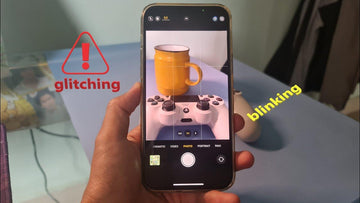
Indeed, it can be quite frustrating and even annoying when your iPhone camera unexpectedly begins to blink. This annoyance is further exacerbated when you’re attempting to capture a precious and unforgettable moment, only to find that your camera refuses to cooperate. Whether it is the rear-facing or front-facing camera, this iPhone camera blinking issue can hinder your ability to capture that perfect shot.

However, this issue is not without a fix. There are several measures you can take to troubleshoot iPhone camera flickering and restore your device to its normal functioning state. This guide contains all you need to know should you find yourself battling with a blinking iPhone camera. Continue reading to find the reasons why is my camera glitching and effective solutions to resolve this issue.

How to Stop Your iPhone Camera Blinking

1. Close Any Camera-related App

If you experience iPhone camera flashing, it is crucial to make sure that no other camera-related applications are running in the background. This is because some applications have the potential to interfere with the smooth functioning of your device’s camera, causing it to blink or malfunction.

Solution: This can be done by double-clicking the home button on your device, which will bring up a list of currently open applications. From there, simply swipe up on any camera-related app windows to close them.

2. Try Clearing Cache and Data

Many apps store caches during use. This can eat up your iPhone’s memory and cause technical problems, for example, the iPhone camera keeps blinking and won’t take picture.

Solution: By clearing the cache and data stored by your apps, you can free up memory space on your device, which can lead to improved performance and a smoother user experience. Besides, it’s also important to regularly clear the cache and data stored by various apps.

3. Deactivate Macro Mode

The automatic activation of Macro mode on the iPhone 13 Pro, iPhone 14 Pro, and iPhone 15 Pro models occurs when a subject is in close proximity, facilitating the capture of intricately detailed and sharp images. However, occasional challenges arise when the iPhone’s focus falters, resulting in erratic switching between the Wide and Ultra Wide lenses, thereby causing the camera to blink.

Solution: To resolve this, you can deactivate the automatic Macro Mode. It will solve the problem that your iPhone camera shakes.

4. Lock the Camera

iPhone camera blinking could be due to your iPhone’s inability to select the optimal lens for capturing. In order to prevent the camera from constantly switching during recording, it is necessary to lock it in place.

Solution: To do this, navigate to the Settings menu, select Camera, and then choose the Record Video option. From there, you can enable the Lock Camera feature, which will ensure a stable and uninterrupted recording experience.

5. Balance the Exposure

In some cases, blinking issues with your iPhone camera may not be directly caused by the camera itself, but rather by the lighting conditions in the room. The presence of LED or fluorescent lights, for instance, could potentially interfere with the camera’s shutter rate. When faced with low-light situations, your iPhone camera automatically adjusts its exposure settings in order to achieve the desired balance. As a result, you might observe instances of flashing or blinking.

Solution: In order to resolve this problem, you can modify the exposure settings of your iPhone camera. This method can basically solve your iPhone camera blinking problem.

6. Turn Off Live Photos

One of the features of your iPhone is that it captures moments 1.5 seconds before and after you take a photo using Live Photos. However, this feature can sometimes interfere with your regular still photos.

Solution: To resolve this, you can open the Camera in Photo mode and simply tap the Live Photos button, which is represented by a circle icon located at the top right corner of the screen, and turn it off.

7. Try Restarting Your iPhone

The iPhone camera may experience blinking when there are glitches within the camera application itself.

Solution: You can restart the iPhone, allowing the device to recalibrate and potentially resolve any temporary bugs.

8. Enabling/Disabling Flash and HDR

When the flash is activated on the camera, it has the potential to cause the iPhone camera blinking.

Solution 1: To prevent this from happening, you can take the following steps: access the Camera app and tap on the icon of a lightning bolt located in the top left corner.

Solution 2: Additionally, if you are using HDR mode, disabling it could also be beneficial. You can do this by opening the Settings app and navigating to the Camera section. Then, locate the disable the HDR Option.

9. Possible Component Damage

There are various factors that can contribute to the iPhone camera blinking problem, including potential damage to the internal components of the iPhone. This can encompass a range of issues such as faulty batteries, impaired wiring, or even a malfunctioning lens.

Solution:  To effectively diagnose and address these potential problems, it is recommended to bring your device to an Apple Store or an authorized service provider. In certain cases, it might be necessary to replace specific parts in order to resolve the issue at hand.

More Useful Tips to Solve iPhone Camera Blinking

1. Your Camera May Be Dirty

Before using your camera, it is important to inspect your camera lenses and sensors for any dirt or debris that may have accumulated. To do this, ensure you have a soft, slightly damp cloth that is free from lint, ideally, a cloth specifically designed for cleaning lenses. Also, lens protectors like this tempered glass lens protector will shield your iPhone 15 camera from dust and other things that can cause damage.

2. Try Reset Camera App

To reset your Camera app, simply swipe upwards from the bottom of your screen and locate the camera app. Then You can reset it. It’s important to note that by doing this, any personalized settings you have configured will be erased. However, there is no need to worry as you can easily reconfigure them later on.

3. Update Your iOS

Each time a new iOS update is released, it comes with a multitude of exciting features and improvements designed to enhance the overall performance and stability of the system apps on your iPhone. It is highly recommended to regularly install these updates in order to ensure the smooth functioning of your device.

4. Contact Apple Support

If all the above is resolving the issue with your iPhone, it is possible that there is a hardware problem specifically related to your camera. The malfunctioning optical stabilization mechanism could be the cause of the camera blinking. Additionally, if your iPhone has been exposed to water or moisture, this could result in damage to the camera module and subsequent malfunctioning. As a solution, I recommend reaching out to Apple Support to have your iPhone physically examined.

  • iphone 14

Conclusion

iPhone camera blinking can undoubtedly be a bothersome situation; however, it is typically not too difficult to resolve. By adhering to the aforementioned tips, you should be able to rectify the issue and have your camera functioning smoothly once more. In the event that none of the troubleshooting methods prove successful, it is advisable to seek the assistance of a professional. By following these simple steps, you will be able to once again capture high-quality photos and videos with your iPhone camera without blinking.

Tags: iPhone
Previous
Can I Charge My iPhone With My Apple Watch Charger?
Next
How to Fix MacBook USB-C Port Not Working?

Related Articles

Why Keyboard Cases matter for College Students?

The Ultimate Student Guide to Choosing the Best iPad Pro Keyboard Case for College

How to Take a Screenshot on iPhone: Apple’s Hidden Tricks Revealed?

How to Take a Screenshot on iPhone: Apple’s Hidden Tricks Revealed?

When Is the Right Time to Buy a New iPad in 2025 and Beyond?

When Is the Right Time to Buy a New iPad in 2025 and Beyond?

CES-2025-Accessory-Revolution-Scratch-Proof-MacBook-Cases-Magnetic-iPad-Keyboards-Save-Students-200

CES 2025 Accessory Revolution: Scratch-Proof MacBook Cases × Magnetic iPad Keyboards Save Students $200

Leave a Comment

Your email address will not be published.

Recent Post

iPhone 17 + Apple Watch Ultra 3 + AirPods Pro 3: The 6 Best Qi2.2...

Keeping track of a different charger, plug, and cable for...

The Ultimate Dilemma: Phone Wallet Case vs. Separate Combo? (Solved)

Carrying a phone and a regular wallet can sometimes feel...

Beyond iPad Skins: The Best iPad Accessories for Work-From-Home & Home Entertainment

When your iPad doubles as both your workstation and your...

Black Friday 2025: The 5 Must-Have iPad Pro Accessories for Power Users

Black Friday 2025 is the perfect time to upgrade your...

ESR 2025 iPad Accessories Black Friday Deals: Save Big on iPad Air

Black Friday and Cyber Monday 2025 sales bring the biggest...

Best iPad Pro Keyboard Cases: Top Picks with Pencil Holder for Enhanced Efficiency

Many iPad Pro users find it challenging to perform professional...

Get 20% off with code: BLOG20

Entreprise

  • About Us
  • Our Blog
  • Newsroom
  • Become a Reseller

Produits

  • Designed for MagSafe
  • Protective Phone Cases
  • iPad Cases
  • Screen Protectors
  • Wireless Charging
  • Productivity
  • Magnetic Wallets
  • Other Accessories

Communauté

  • My Account
  • Refer a Friend for Cash Back
  • Become an ESR Super User
  • Affiliate Program
  • Student Discount

Assistance

  • Contact Us
  • Setup Videos & FAQs
  • Order Status
  • Return and Refund
  • Warranty Policy
  • Shipping Policy
  • Payment Methods
  • Product Recalls

Payment options:
  • American Express
  • Diners Club
  • Discover
  • JCB
  • Mastercard
  • PayPal
  • Visa
  • Klarna Klarna
  • Afterpay
© 2025 ESR All rights reserved.
  • Terms of Use
  • Privacy Policy
  • Legal Declaration
  • Cookie Policy
  • Shipping Policy
  • Return and Refund
  • Track Your Order

Shopping Cart

Get a 15% off coupon when you

sign up

for free shipping!

$38.00
You're $38.00 away from Free Shipping!

$50.00
You're $50.00 away from Free Shipping!

Benefits applied automatically at checkout

Your Cart is Empty

Sign In / Register to view saved cart items
Shop Now
ESR_IMG

Protect Your iPhone's Camera Control

ESR_IMG

Always Find Your Wallet

ESR_IMG

Drop-Proof FlickLlock, Effortless MagSafe

ESR_IMG

Qi2 Fast Charging on the Go

Subtotal $0.00
View Cart

Thank you for choosing to transfer to a human service.

Sorry! The previous responses were from our AI customer service. Since it didn't satisfy you, you've been transferred to a human agent. We'll reply within 24 hours from Mon to Fri and 48 hours on weekends for further help.

Please select the reason for transfer