
Just launched: Summer prints for your phone and wallet. Shop now
Save up to 70% on selected tech essentials & Unlock our mystery box for just $29.99 Shop now
Free shipping on all orders over $50
Cart 0
  • Protection By Device
    • All Cases
      • iPhone🔥
      • iPad🔥
      • AirPods
      • Samsung🔥
    • Screen Protection
      • iPhone
      • iPad🔥
      • Apple Watch
      • Samsung🔥
    • iPad Productivity
      • Keyboards🔥
      • Styluses
    • Accessories
      • All Accessories
      • iPhone 17🔥
      • iPhone 17e🔥
      • iPhone 17 Pro Max🔥
      • iPhone 17 Pro🔥
      • iPhone Air🔥
      • iPhone 17🔥
      • iPhone 16
      • iPhone 16e
      • iPhone 16 Pro Max
      • iPhone 16 Pro
      • iPhone 16 Plus
      • iPhone 16
      • iPhone 15
      • iPhone 15 Pro Max
      • iPhone 15 Pro
      • iPhone 15 Plus
      • iPhone 15
      • iPhone 14
      • iPhone 14 Pro Max
      • iPhone 14 Pro
      • iPhone 14 Plus
      • iPhone 14
      • iPhone 13
      • iPhone 13 Pro Max
      • iPhone 13 Pro
      • iPhone 13
      • Choose Your Device
      • iPad Air 13 (2026)🔥
      • iPad Air 11 (2026)🔥
      •  
      • iPad Pro 13 (2025)
      • iPad Pro 11 (2025)
      • iPad 11th Gen (2025)
      • iPad Air 13 (2025)
      • iPad Air 11 (2025)
      •  
      • iPad Pro 13 (2024)
      • iPad Pro 11 (2024)
      • iPad Air 13 (2024)
      • iPad Air 11 (2024)
      • iPad mini 7 (2024)
      •  
      • iPad Pro 12.9 (2022)
      • iPad Pro 11 (2022)
      • iPad Air 5/4 (2022)
      • iPad 10th Gen (2022)
      •  
      • iPad mini 6 (2021)
      • iPad Pro 12.9 (2021)
      • iPad Pro 11 (2021)
      • iPad Pro 11 (2020)
      • Choose Your Device
      • AirPods Pro 3🔥
      • AirPods 4
      • AirPods Pro (2023/2022/2019)
      • Galaxy S26🔥
      • Galaxy S26 Ultra🔥
      • Galaxy S26 Plus🔥
      • Galaxy S26🔥
      • Galaxy S25
      • Galaxy S25 Ultra
      • Galaxy S25+
      • Galaxy S24
      • Galaxy S24 Ultra
      • Galaxy S24+
      • Galaxy S24
      • Galaxy S23
      • Galaxy S23 Ultra
      • Galaxy S23
      • iPhone 17🔥
      • iPhone 17e🔥
      • iPhone 17 Pro Max🔥
      • iPhone 17 Pro🔥
      • iPhone Air🔥
      • iPhone 17🔥
      • iPhone 16
      • iPhone 16e
      • iPhone 16 Pro Max
      • iPhone 16 Pro
      • iPhone 16 Plus
      • iPhone 16
      • iPhone 15
      • iPhone 15 Pro Max
      • iPhone 15 Pro
      • iPhone 15 Plus
      • iPhone 15
      • iPhone 14
      • iPhone 14 Pro Max
      • iPhone 14 Pro
      • iPhone 14 Plus
      • iPhone 14
      • iPhone 13
      • iPhone 13 Pro Max
      • iPhone 13/13 Pro
      • Choose Your Device
      • iPad Air 13 (2026)🔥
      • iPad Air 11 (2026)🔥
      •  
      • iPad Pro 13 (2025)
      • iPad Pro 11 (2025)
      • iPad 11th Gen (2025)
      • iPad Air 13 (2025)
      • iPad Air 11 (2025)
      •  
      • iPad Pro 13 (2024)
      • iPad Pro 11 (2024)
      • iPad Air 13 (2024)
      • iPad Air 11 (2024)
      •  
      • iPad Pro 12.9 (6th/5th/4th/3rd Gen)
      • iPad Pro 11 (4th/3rd/2nd/1st Gen)
      • iPad Air 5/4 (2022)
      • iPad 10th Gen (2022)
      •  
      •  
      • Apple Watch🔥
      • Galaxy S26🔥
      • Galaxy S26 Ultra🔥
      • Galaxy S25
      • Galaxy S25 Ultra
      • Galaxy S24
      • Galaxy S24 Ultra
      • Galaxy S23
      • Galaxy S23 Ultra
      • Galaxy S23+
      • Galaxy S23
      • Galaxy S22
      • Galaxy S22 Ultra
      • Choose Your Device
      • iPad Air 13 (2026)🔥
      • iPad Air 11 (2026)🔥
      •  
      • iPad Pro 13 (2025)
      • iPad Pro 11 (2025)
      • iPad 11th Gen (2025)
      • iPad Air 13 (2025)
      • iPad Air 11 (2025)
      •  
      • iPad Pro 13 (2024)
      • iPad Pro 11 (2024)
      • iPad Air 13 (2024)
      • iPad Air 11 (2024)
      •  
      • iPad Pro 12.9 (6th/5th/4th/3rd)
      • iPad Pro 11 (4th/3rd/2nd/1st)
      • iPad Air 5/4 (2022)
      • iPad 10th Gen (2022)
      •  
      • Styluses
      •  
      • Magnetic Wallet
      • MagSafe Rings & Mounts
      • Other Accessories
  • MagSafe Chargers & Wallets
    • All MagSafe Products
      • Wireless Charging
      • Car Charger & Mounts
      • Charging Stands
      • MagSafe Wallets
      • MagSafe Rings & Wall Mounts
      • Best MagSafe Bundles
  • Keyboard
    • iPad Air 11 (2026)🔥
    • iPad Air 13 (2026)🔥
    • iPad Pro 13 (2025)
    • iPad Pro 11 (2025)
    • iPad 11th Gen (2025)
    • iPad Air 13 (2025)
    • iPad Air 11 (2025)
    • iPad Pro 13 (2024)
    • iPad Pro 11 (2024)
    • iPad Air 13 (2024)
    • iPad Air 11 (2024)
    • iPad Pro 12.9 (6th/5th/4th/3rd)
    • iPad Pro 11 (4th/3rd/2nd/1st)
    • iPad Air 5/4 (2022)
    • iPad 10th Gen (2022)
    • Styluses
    • Wireless Mouse
  • 🔥New Arrival🔥
    • 🏝️Summer Print Collection🏝️
    • Galaxy S26 Series🔥
    • iPhone 17e🔥
    • iPad Air 2026 Series🔥
    • 25W Qi2 Wireless Charging
  • Sale
  • Super User
    • Become an ESR Super User
    • Members' Exclusive Deals
    • Refer Friends for CashBack
    • My Orders
  • Support
    • Contact Us
    • Product Videos & FAQs
    • General FAQ
    • Order Status
    • Return and Refund Policy
    • Warranty Policy
    • Shipping Policy
  • Explore
    • About Us
    • ESR Blog
    • Newsroom
    • Become a Reseller
  • Product Recalls
My Account
Log in Register
North America
Europe
Asia Pacific
Middle East
Australia
USD $
Austria
USD $
Bahrain
USD $
Belgium
USD $
Bulgaria
USD $
Canada
USD $
Croatia
USD $
Czechia
USD $
Denmark
USD $
Estonia
USD $
Finland
USD $
France
USD $
Germany
USD $
Greece
USD $
Hungary
USD $
Indonesia
USD $
Ireland
USD $
Italy
USD $
Japan
USD $
Jordan
USD $
Latvia
USD $
Lithuania
USD $
Luxembourg
USD $
Malaysia
USD $
Mexico
USD $
Netherlands
USD $
New Zealand
USD $
Norway
USD $
Oman
USD $
Philippines
USD $
Poland
USD $
Portugal
USD $
Qatar
USD $
Romania
USD $
Saudi Arabia
USD $
Singapore
USD $
Slovakia
USD $
Slovenia
USD $
South Korea
USD $
Spain
USD $
Sweden
USD $
Switzerland
USD $
Taiwan
USD $
Thailand
USD $
United Arab Emirates
USD $
United Kingdom
USD $
United States
USD $
Vietnam
USD $
English
français
  • Protection By Device
    • All Cases
      • iPhone🔥
      • iPad🔥
      • AirPods
      • Samsung🔥
    • Screen Protection
      • iPhone
      • iPad🔥
      • Apple Watch
      • Samsung🔥
    • iPad Productivity
      • Keyboards🔥
      • Styluses
    • Accessories
      • All Accessories
      • iPhone 17🔥
      • iPhone 17e🔥
      • iPhone 17 Pro Max🔥
      • iPhone 17 Pro🔥
      • iPhone Air🔥
      • iPhone 17🔥
      • iPhone 16
      • iPhone 16e
      • iPhone 16 Pro Max
      • iPhone 16 Pro
      • iPhone 16 Plus
      • iPhone 16
      • iPhone 15
      • iPhone 15 Pro Max
      • iPhone 15 Pro
      • iPhone 15 Plus
      • iPhone 15
      • iPhone 14
      • iPhone 14 Pro Max
      • iPhone 14 Pro
      • iPhone 14 Plus
      • iPhone 14
      • iPhone 13
      • iPhone 13 Pro Max
      • iPhone 13 Pro
      • iPhone 13
      • Choose Your Device
      • iPad Air 13 (2026)🔥
      • iPad Air 11 (2026)🔥
      •  
      • iPad Pro 13 (2025)
      • iPad Pro 11 (2025)
      • iPad 11th Gen (2025)
      • iPad Air 13 (2025)
      • iPad Air 11 (2025)
      •  
      • iPad Pro 13 (2024)
      • iPad Pro 11 (2024)
      • iPad Air 13 (2024)
      • iPad Air 11 (2024)
      • iPad mini 7 (2024)
      •  
      • iPad Pro 12.9 (2022)
      • iPad Pro 11 (2022)
      • iPad Air 5/4 (2022)
      • iPad 10th Gen (2022)
      •  
      • iPad mini 6 (2021)
      • iPad Pro 12.9 (2021)
      • iPad Pro 11 (2021)
      • iPad Pro 11 (2020)
      • Choose Your Device
      • AirPods Pro 3🔥
      • AirPods 4
      • AirPods Pro (2023/2022/2019)
      • Galaxy S26🔥
      • Galaxy S26 Ultra🔥
      • Galaxy S26 Plus🔥
      • Galaxy S26🔥
      • Galaxy S25
      • Galaxy S25 Ultra
      • Galaxy S25+
      • Galaxy S24
      • Galaxy S24 Ultra
      • Galaxy S24+
      • Galaxy S24
      • Galaxy S23
      • Galaxy S23 Ultra
      • Galaxy S23
      • iPhone 17🔥
      • iPhone 17e🔥
      • iPhone 17 Pro Max🔥
      • iPhone 17 Pro🔥
      • iPhone Air🔥
      • iPhone 17🔥
      • iPhone 16
      • iPhone 16e
      • iPhone 16 Pro Max
      • iPhone 16 Pro
      • iPhone 16 Plus
      • iPhone 16
      • iPhone 15
      • iPhone 15 Pro Max
      • iPhone 15 Pro
      • iPhone 15 Plus
      • iPhone 15
      • iPhone 14
      • iPhone 14 Pro Max
      • iPhone 14 Pro
      • iPhone 14 Plus
      • iPhone 14
      • iPhone 13
      • iPhone 13 Pro Max
      • iPhone 13/13 Pro
      • Choose Your Device
      • iPad Air 13 (2026)🔥
      • iPad Air 11 (2026)🔥
      •  
      • iPad Pro 13 (2025)
      • iPad Pro 11 (2025)
      • iPad 11th Gen (2025)
      • iPad Air 13 (2025)
      • iPad Air 11 (2025)
      •  
      • iPad Pro 13 (2024)
      • iPad Pro 11 (2024)
      • iPad Air 13 (2024)
      • iPad Air 11 (2024)
      •  
      • iPad Pro 12.9 (6th/5th/4th/3rd Gen)
      • iPad Pro 11 (4th/3rd/2nd/1st Gen)
      • iPad Air 5/4 (2022)
      • iPad 10th Gen (2022)
      •  
      •  
      • Apple Watch🔥
      • Galaxy S26🔥
      • Galaxy S26 Ultra🔥
      • Galaxy S25
      • Galaxy S25 Ultra
      • Galaxy S24
      • Galaxy S24 Ultra
      • Galaxy S23
      • Galaxy S23 Ultra
      • Galaxy S23+
      • Galaxy S23
      • Galaxy S22
      • Galaxy S22 Ultra
      • Choose Your Device
      • iPad Air 13 (2026)🔥
      • iPad Air 11 (2026)🔥
      •  
      • iPad Pro 13 (2025)
      • iPad Pro 11 (2025)
      • iPad 11th Gen (2025)
      • iPad Air 13 (2025)
      • iPad Air 11 (2025)
      •  
      • iPad Pro 13 (2024)
      • iPad Pro 11 (2024)
      • iPad Air 13 (2024)
      • iPad Air 11 (2024)
      •  
      • iPad Pro 12.9 (6th/5th/4th/3rd)
      • iPad Pro 11 (4th/3rd/2nd/1st)
      • iPad Air 5/4 (2022)
      • iPad 10th Gen (2022)
      •  
      • Styluses
      •  
      • Magnetic Wallet
      • MagSafe Rings & Mounts
      • Other Accessories
  • MagSafe Chargers & Wallets
    • All MagSafe Products
      • Wireless Charging
      • Car Charger & Mounts
      • Charging Stands
      • MagSafe Wallets
      • MagSafe Rings & Wall Mounts
      • Best MagSafe Bundles
    • Wireless Charging
      • CryoBoost Foldable 3-in-1 Magnetic Charging Station (25W) – US Plug-Black

      • 3-in-1 Magnetic Charging Station (15W) - Grey - US PLUG

      • 15W Car Charger with MagSafe + CryoBoost - Cool Grey

      • CryoBoost 3-in-1 Magnetic Charging Station (25W, Qi2.2) - US Plug–Black

      • All Wireless Charging >
      Car Charger & Mounts
      • OmniLock Magnetic Car Charger (25W, CryoBoost, Air Vent) - Black

      • 15W Magnetic Wireless Car Charger(Halolock) - Black

      • 15W Dashboard Wireless Car Charger (HaloLock) - Black

      • OmniLock Magnetic Car Mount (Suction Cup) - Black

      • All Car Charger & Mounts >
      Charging Stands
      • 100W 6-in-1 Charging Station with MagSafe + CryoBoost - US Plug

      • 25W 3-in-1 Wireless Charger with MagSafe + CryoBoost - US Plug

      • 3-in-1 Magnetic Charging Station (15W) - Titanium - US PLUG

      • 3-in-1 Magnetic Charging Station (15W) - Grey - US PLUG

      • All Charging Stands >
      MagSafe Wallets
      • Geo Magnetic Wallet Stand (Grip) - Midnight Black

      • Classic Magnetic Wallet - Tropical Paradise

      • Geo Wallet with Find My - Black Carbon Fiber

      • Classic Magnetic Wallet Stand for 5 cards - Midnight Black

      • All MagSafe Wallets >
      MagSafe Rings & Wall Mounts
      • Universal Ring (HaloLock) - Black/Silver-4 Pack

      • Universal Ring 360 (HaloLock) - White-2 Pack

      • All MagSafe Rings & Wall Mounts >
      Best MagSafe Bundles
      • iPhone 16 Pro Max Everyday-Carry Bundle - Clear

      • iPhone 16 Pro Everyday-Carry Bundle - Clear

      • Cyber FlickLock Everyday-Carry Bundle for AirPods Pro (2023/2022/2019) - Black

      • Cyber FlickLock Everyday-Carry Bundle for AirPods Pro (2023/2022/2019) - Forest Green

      • All Best MagSafe Bundles >
  • Keyboard
    • iPad Air 11 (2026)🔥
    • iPad Air 13 (2026)🔥
    • iPad Pro 13 (2025)
    • iPad Pro 11 (2025)
    • iPad 11th Gen (2025)
    • iPad Air 13 (2025)
    • iPad Air 11 (2025)
    • iPad Pro 13 (2024)
    • iPad Pro 11 (2024)
    • iPad Air 13 (2024)
    • iPad Air 11 (2024)
    • iPad Pro 12.9 (6th/5th/4th/3rd)
    • iPad Pro 11 (4th/3rd/2nd/1st)
    • iPad Air 5/4 (2022)
    • iPad 10th Gen (2022)
    • Styluses
    • Wireless Mouse
  • 🔥New Arrival🔥
    • 🏝️Summer Print Collection🏝️
    • Galaxy S26 Series🔥
    • iPhone 17e🔥
    • iPad Air 2026 Series🔥
    • 25W Qi2 Wireless Charging
  • Sale
  • Super User
    • Become an ESR Super User
    • Members' Exclusive Deals
    • Refer Friends for CashBack
    • My Orders
  • Support
    • Contact Us
    • Product Videos & FAQs
    • General FAQ
    • Order Status
    • Return and Refund Policy
    • Warranty Policy
    • Shipping Policy
  • Explore
    • About Us
    • ESR Blog
    • Newsroom
    • Become a Reseller
  • Product Recalls
Account Cart 0
North America
Europe
Asia Pacific
Middle East
Australia
USD $
Austria
USD $
Bahrain
USD $
Belgium
USD $
Bulgaria
USD $
Canada
USD $
Croatia
USD $
Czechia
USD $
Denmark
USD $
Estonia
USD $
Finland
USD $
France
USD $
Germany
USD $
Greece
USD $
Hungary
USD $
Indonesia
USD $
Ireland
USD $
Italy
USD $
Japan
USD $
Jordan
USD $
Latvia
USD $
Lithuania
USD $
Luxembourg
USD $
Malaysia
USD $
Mexico
USD $
Netherlands
USD $
New Zealand
USD $
Norway
USD $
Oman
USD $
Philippines
USD $
Poland
USD $
Portugal
USD $
Qatar
USD $
Romania
USD $
Saudi Arabia
USD $
Singapore
USD $
Slovakia
USD $
Slovenia
USD $
South Korea
USD $
Spain
USD $
Sweden
USD $
Switzerland
USD $
Taiwan
USD $
Thailand
USD $
United Arab Emirates
USD $
United Kingdom
USD $
United States
USD $
Vietnam
USD $
English
français

Search our store

Account Cart 0
Popular Searches:
iPad 2026 Case iPhone 17e Galaxy S26 iPad Keyboard
Tips & Guides

How to Transfer Apps from Android to New iPhone? (Detailed Guide)

by Adam on Jul 05, 2020 (Last Updated:Apr 09, 2025)
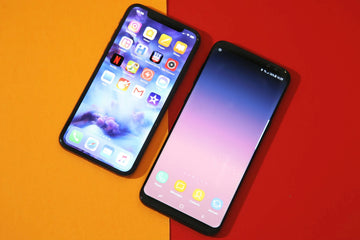
Transfer Apps from Android to New iPhone

If you have just bought the new iPhone, you might be worried about existing data on your Android device. All those special memories like photos, videos, and even your favorite games are obviously so important for you – you don’t want to lose all of that. Right? We have good news for you.

Transferring data from Android to iPhone is now easier than ever. We have come up with a detailed guide on how you can transfer your data to your new iPhone safely.

  1. Set up your new iPhone by using “Move to iOS App”

  • Get started by turning on your iPhone and navigate through the startup menu by selecting your language, activation of WiFi, and configuring your passcode or Touch ID.
  • A screen of “Apps and Data” appears in startup navigation. Select the option of move data from Android.
  • Download “Move to iOS App” on your Android phone from Google Play Store.

Move to iOS App

  • Launch it, and allow it access to your messages, contacts, and any other data that you would like to transfer. Agree to all terms and conditions, then a page with “Find Your Code” Tap “Next”.
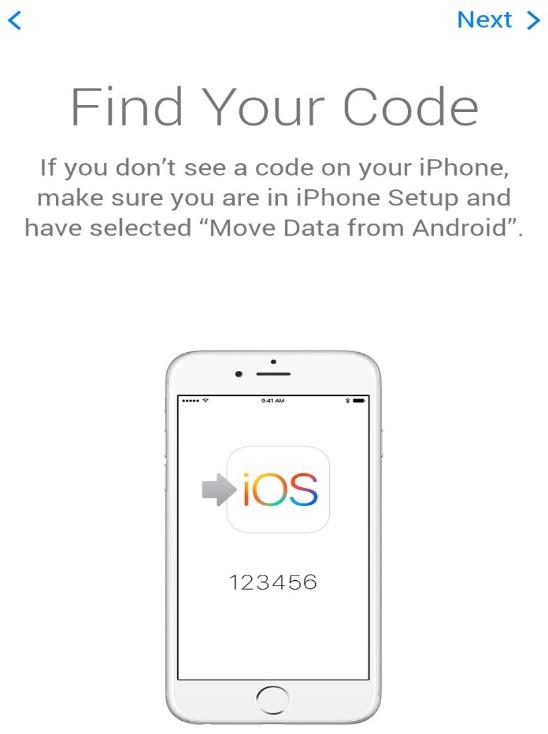
Find Your Code

  • Tap continue on “Move data from Android” screen on your iPhone. A 6 digit code will appear on your iPhone after some time.
  • Enter the iPhone code on Android phone. A screen of transfer data will appear.

Move data from Android

  • Set both devices aside and wait for the transfer completion process patiently. The transfer will be complete when the transfer bar on your iPhone disappears.

Note: Remember not to use other apps on Android when the transfer is still in process. If you do so, the transfer process will not work.

  • After the loading bar is finished on your iPhone tap “Done” on Android – all your data is now safely and easily transferred by this wonderful app.
  1. Transfer your contacts by using sim card

Want to move your contacts to the new iPhone? You can back up your contacts from the Android sim card and move them to your iPhone effortlessly.

Note: Remember that a sim card of the same size should be used in both devices.

Follow these following steps:

  • Go to your “Contacts” app on Android device.
  • Tap on “Import/Export” from contacts setting.

contacts setting

  • Tap “Export to Sim”.
  • Select contacts from the phone you want to export to sim card.
  • Wait for the export process to be completed.

Export to Sim

  • Remove the sim card and insert it into the new iPhone after the export process completes successfully.
  • Now tap the iPhone “Settings”.
  • Tap “Contacts” and then tap “Import Sim contacts”.
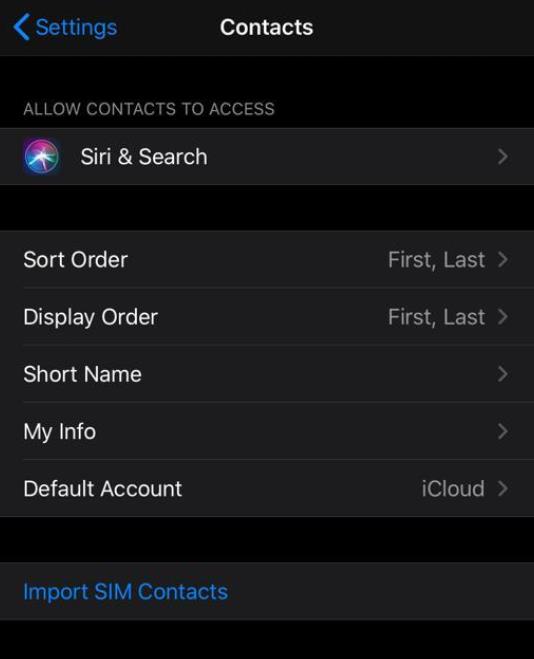
Import Sim contacts

  • When the import process is completed, your Android contacts will now be available in the Contacts on the iPhone.
  1. Transfer contacts by using your Google Account ID

You can also use your Google account to move your contacts from Android to new iPhone securely. Follow the following instructions:

  • Back up your contacts to Google account on your Android device. This backup usually occurs automatically for every Google Account user.
  • Transfer photos and videos to new iPhone
    You can also backup contacts manually be going to “Settings” then “Accounts” and then tap the Google account you want to sync then tap “Synch Contacts”.

Synch Contacts

  • Next go to “Settings” in your iPhone then tap “Passwords and Accounts” – add your Gmail account ID and password.
  • Tap the Contacts to turn it ON (green position).

Passwords and Accounts

  • The contacts you have added in your Google account from Android are now synced easily to your iPhone.
  • Your iPhone address book is also in sync with your Google account. Any change you make to your contacts data here will automatically backup to Google account.

4. Transfer photos and videos to new iPhone

By using data transferring apps

  • For transferring your photos and videos, you have to install a common data-transfer app on both your devices. We recommend downloading PhotoSync as it is easily available and regularly updated on both android and iPhone devices.
  • Install this app on both devices and follow out the instructions carefully for moving files to the iPhone.

By using data transferring apps

By using Google Photos App

  • You can have access to your Android videos and photos on the iPhone by using the Google Photos app. This app is usually built-in most android devices. If not, download it from Play Store.
  • Now back up your gallery on this app. Download the same app on the iPhone and sign in to your Google account.

By using Google Photos App

  • Now you have complete access to view all your files without saving each file on your phone. If you want to save a file, simply tap the three-dot icon on the right side of the screen and save the file to your device.

By using PC with iTunes

The other alternative option for moving photos from Android to iPhone is by using a computer with iTunes.

  • Move the selected videos and pictures to your computer, then sync them with iTunes. Now sync your new iPhone with iTunes.
  • Connect your Android device with the PC. Next, select the photos and videos that you want to move. Make a separate folder for these files on your desktop for simplicity.
  • Now connect your iPhone to your computer. Open iTunes and then click your iPhone.
  • Select the folder in which you have saved your photos from the android device. Click apply, and all your photos and videos will be successfully transferred to your new iPhone.

We hope this detailed guide has been able to show you how effortless it is to transfer apps and data from Android to the new iPhone.

Tags: iPhone 12 Setup
Previous
How to get Fortnite on Samsung (Download & Install Guide)
Next
Stop Using Emojis Wrong! iPhone Emoji Meanings 2026: Avoid Social Awkwardness

Related Articles

Samsung Wallpaper Size Guide: How to Download, Customize, and Protect Your Perfect Phone Wallpaper

Samsung Wallpaper Size Guide: How to Download, Customize, and Protect Your Perfect Phone Wallpaper

The Complete Director’s Vlogging Kit: Best Smartphone Setups for Every Budget (2026 Guide)

The Complete Director’s Vlogging Kit: Best Smartphone Setups for Every Budget (2026 Guide)

Samsung Galaxy S26 vs. S25: Should You Trade In Your S25 Today?

Samsung Galaxy S26 vs. S25: Should You Trade In Your S25 Today?

what-is-the-ipad-wallpaper-size

iPad Wallpaper Size Chart – All Models 2026 + Legacy (Air, Pro, Standard iPad (Entry-level))

Leave a Comment

Your email address will not be published.

Recent Post

AirPods Ultra vs AirPods 5 vs AirPods Pro 3 Rumors: What to Expect in 2026

Cameras, AI, a delay — and the model most people...

We Tested ESR's New Summer Collection — Here's What It's Actually Like to Live With

ESR has historically focused on functional accessories rather than expressive...

Best iPad Pro Drawing Apps in 2026: From Hobbyist to Pro

In 2026, drawing on an iPad feels less like using...

M4 iPad Air’s Best Accessories (2026): ESR Shift Keyboard Cases for Ultimate Productivity

If you are looking at iPad Air 2026 accessories, the...

Premium Protection, Student Budget: Why ESR is the Smart Alternative for Your iPad Air M4

With the launch of the new iPad Air M4, many...

Best Screen Protectors for the iPhone 17e: Compatibility, Privacy, and Tempered Glass Guide

The iPhone 17e features a sleek design and a high-value...

Get 20% off with code: BLOG20

Company

  • About Us
  • Our Blog
  • Newsroom
  • Become a Reseller

Products

  • Shockproof Phone Cases
  • iPhone Cases
  • iPad Cases
  • AirPods Cases
  • Productivity
  • Screen Protectors
  • Wireless Charging
  • Magnetic Wallets
  • Other Accessories

Community

  • My Account
  • Refer a Friend for Cash Back
  • Become an ESR Super User
  • Affiliate Program
  • Student Discount

Support

  • Contact Us
  • Setup Videos & FAQs
  • Order Status
  • Return and Refund
  • Warranty Policy
  • Shipping Policy
  • Payment Methods
  • Product Recalls

Payment options:
  • American Express
  • JCB
  • Mastercard
  • PayPal
  • Visa
  • Klarna Klarna
  • Afterpay
Excellent 4.6 out of 5 - Review :2573 •

© 2026 ESR All rights reserved.

  • Terms of Use
  • Privacy Policy
  • Legal Declaration
  • Cookie Policy
  • Shipping Policy
  • Return and Refund
  • Track Your Order

Shopping Cart

Get a 15% off coupon when you

sign up

for free shipping!

$38.00
You're $38.00 away from Free Shipping!

$50.00
You're $50.00 away from Free Shipping!

Benefits applied automatically at checkout

Your Cart is Empty

Sign In / Register to view saved cart items
Shop Now
ESR_IMG

Protect Your iPhone's Camera Control

ESR_IMG

Always Find Your Wallet

ESR_IMG

Drop-Proof FlickLlock, Effortless MagSafe

ESR_IMG

Qi2 Fast Charging on the Go

Subtotal $0.00
View Cart

Thank you for choosing to transfer to a human service.

Sorry! The previous responses were from our AI customer service. Since it didn't satisfy you, you've been transferred to a human agent. We'll reply within 24 hours from Mon to Fri and 48 hours on weekends for further help.

Please select the reason for transfer