

Just launched: Summer prints for your phone and wallet. Shop now
Save up to 70% on selected tech essentials & Unlock our mystery box for just $29.99 Shop now
Free shipping on all orders over $50
Cart 0
  • Protection By Device
    • All Cases
      • iPhone🔥
      • iPad🔥
      • AirPods
      • Samsung🔥
    • Screen Protection
      • iPhone
      • iPad🔥
      • Apple Watch
      • Samsung🔥
    • iPad Productivity
      • Keyboards🔥
      • Styluses
    • Accessories
      • All Accessories
      • iPhone 17🔥
      • iPhone 17e🔥
      • iPhone 17 Pro Max🔥
      • iPhone 17 Pro🔥
      • iPhone Air🔥
      • iPhone 17🔥
      • iPhone 16
      • iPhone 16e
      • iPhone 16 Pro Max
      • iPhone 16 Pro
      • iPhone 16 Plus
      • iPhone 16
      • iPhone 15
      • iPhone 15 Pro Max
      • iPhone 15 Pro
      • iPhone 15 Plus
      • iPhone 15
      • iPhone 14
      • iPhone 14 Pro Max
      • iPhone 14 Pro
      • iPhone 14 Plus
      • iPhone 14
      • iPhone 13
      • iPhone 13 Pro Max
      • iPhone 13 Pro
      • iPhone 13
      • Choose Your Device
      • iPad Air 13 (2026)🔥
      • iPad Air 11 (2026)🔥
      •  
      • iPad Pro 13 (2025)
      • iPad Pro 11 (2025)
      • iPad 11th Gen (2025)
      • iPad Air 13 (2025)
      • iPad Air 11 (2025)
      •  
      • iPad Pro 13 (2024)
      • iPad Pro 11 (2024)
      • iPad Air 13 (2024)
      • iPad Air 11 (2024)
      • iPad mini 7 (2024)
      •  
      • iPad Pro 12.9 (2022)
      • iPad Pro 11 (2022)
      • iPad Air 5/4 (2022)
      • iPad 10th Gen (2022)
      •  
      • iPad mini 6 (2021)
      • iPad Pro 12.9 (2021)
      • iPad Pro 11 (2021)
      • iPad Pro 11 (2020)
      • Choose Your Device
      • AirPods Pro 3🔥
      • AirPods 4
      • AirPods Pro (2023/2022/2019)
      • Galaxy S26🔥
      • Galaxy S26 Ultra🔥
      • Galaxy S26 Plus🔥
      • Galaxy S26🔥
      • Galaxy S25
      • Galaxy S25 Ultra
      • Galaxy S25+
      • Galaxy S24
      • Galaxy S24 Ultra
      • Galaxy S24+
      • Galaxy S24
      • Galaxy S23
      • Galaxy S23 Ultra
      • Galaxy S23
      • iPhone 17🔥
      • iPhone 17e🔥
      • iPhone 17 Pro Max🔥
      • iPhone 17 Pro🔥
      • iPhone Air🔥
      • iPhone 17🔥
      • iPhone 16
      • iPhone 16e
      • iPhone 16 Pro Max
      • iPhone 16 Pro
      • iPhone 16 Plus
      • iPhone 16
      • iPhone 15
      • iPhone 15 Pro Max
      • iPhone 15 Pro
      • iPhone 15 Plus
      • iPhone 15
      • iPhone 14
      • iPhone 14 Pro Max
      • iPhone 14 Pro
      • iPhone 14 Plus
      • iPhone 14
      • iPhone 13
      • iPhone 13 Pro Max
      • iPhone 13/13 Pro
      • Choose Your Device
      • iPad Air 13 (2026)🔥
      • iPad Air 11 (2026)🔥
      •  
      • iPad Pro 13 (2025)
      • iPad Pro 11 (2025)
      • iPad 11th Gen (2025)
      • iPad Air 13 (2025)
      • iPad Air 11 (2025)
      •  
      • iPad Pro 13 (2024)
      • iPad Pro 11 (2024)
      • iPad Air 13 (2024)
      • iPad Air 11 (2024)
      •  
      • iPad Pro 12.9 (6th/5th/4th/3rd Gen)
      • iPad Pro 11 (4th/3rd/2nd/1st Gen)
      • iPad Air 5/4 (2022)
      • iPad 10th Gen (2022)
      •  
      •  
      • Apple Watch🔥
      • Galaxy S26🔥
      • Galaxy S26 Ultra🔥
      • Galaxy S25
      • Galaxy S25 Ultra
      • Galaxy S24
      • Galaxy S24 Ultra
      • Galaxy S23
      • Galaxy S23 Ultra
      • Galaxy S23+
      • Galaxy S23
      • Galaxy S22
      • Galaxy S22 Ultra
      • Choose Your Device
      • iPad Air 13 (2026)🔥
      • iPad Air 11 (2026)🔥
      •  
      • iPad Pro 13 (2025)
      • iPad Pro 11 (2025)
      • iPad 11th Gen (2025)
      • iPad Air 13 (2025)
      • iPad Air 11 (2025)
      •  
      • iPad Pro 13 (2024)
      • iPad Pro 11 (2024)
      • iPad Air 13 (2024)
      • iPad Air 11 (2024)
      •  
      • iPad Pro 12.9 (6th/5th/4th/3rd)
      • iPad Pro 11 (4th/3rd/2nd/1st)
      • iPad Air 5/4 (2022)
      • iPad 10th Gen (2022)
      •  
      • Styluses
      •  
      • Magnetic Wallet
      • MagSafe Rings & Mounts
      • Other Accessories
  • MagSafe Chargers & Wallets
    • All MagSafe Products
      • Wireless Charging
      • Car Charger & Mounts
      • Charging Stands
      • MagSafe Wallets
      • MagSafe Rings & Wall Mounts
      • Best MagSafe Bundles
  • Keyboard
    • iPad Air 11 (2026)🔥
    • iPad Air 13 (2026)🔥
    • iPad Pro 13 (2025)
    • iPad Pro 11 (2025)
    • iPad 11th Gen (2025)
    • iPad Air 13 (2025)
    • iPad Air 11 (2025)
    • iPad Pro 13 (2024)
    • iPad Pro 11 (2024)
    • iPad Air 13 (2024)
    • iPad Air 11 (2024)
    • iPad Pro 12.9 (6th/5th/4th/3rd)
    • iPad Pro 11 (4th/3rd/2nd/1st)
    • iPad Air 5/4 (2022)
    • iPad 10th Gen (2022)
    • Styluses
    • Wireless Mouse
  • 🔥New Arrival🔥
    • 🏝️Summer Print Collection🏝️
    • Galaxy S26 Series🔥
    • iPhone 17e🔥
    • iPad Air 2026 Series🔥
    • 25W Qi2 Wireless Charging
  • Sale
  • Super User
    • Become an ESR Super User
    • Members' Exclusive Deals
    • Refer Friends for CashBack
    • My Orders
  • Support
    • Contact Us
    • Product Videos & FAQs
    • General FAQ
    • Order Status
    • Return and Refund Policy
    • Warranty Policy
    • Shipping Policy
  • Explore
    • About Us
    • ESR Blog
    • Newsroom
    • Become a Reseller
  • Product Recalls
My Account
Log in Register
North America
Europe
Asia Pacific
Middle East
Australia
USD $
Austria
USD $
Bahrain
USD $
Belgium
USD $
Bulgaria
USD $
Canada
USD $
Croatia
USD $
Czechia
USD $
Denmark
USD $
Estonia
USD $
Finland
USD $
France
USD $
Germany
USD $
Greece
USD $
Hungary
USD $
Indonesia
USD $
Ireland
USD $
Italy
USD $
Japan
USD $
Jordan
USD $
Latvia
USD $
Lithuania
USD $
Luxembourg
USD $
Malaysia
USD $
Mexico
USD $
Netherlands
USD $
New Zealand
USD $
Norway
USD $
Oman
USD $
Philippines
USD $
Poland
USD $
Portugal
USD $
Qatar
USD $
Romania
USD $
Saudi Arabia
USD $
Singapore
USD $
Slovakia
USD $
Slovenia
USD $
South Korea
USD $
Spain
USD $
Sweden
USD $
Switzerland
USD $
Taiwan
USD $
Thailand
USD $
United Arab Emirates
USD $
United Kingdom
USD $
United States
USD $
Vietnam
USD $
English
  • Protection By Device
    • All Cases
      • iPhone🔥
      • iPad🔥
      • AirPods
      • Samsung🔥
    • Screen Protection
      • iPhone
      • iPad🔥
      • Apple Watch
      • Samsung🔥
    • iPad Productivity
      • Keyboards🔥
      • Styluses
    • Accessories
      • All Accessories
      • iPhone 17🔥
      • iPhone 17e🔥
      • iPhone 17 Pro Max🔥
      • iPhone 17 Pro🔥
      • iPhone Air🔥
      • iPhone 17🔥
      • iPhone 16
      • iPhone 16e
      • iPhone 16 Pro Max
      • iPhone 16 Pro
      • iPhone 16 Plus
      • iPhone 16
      • iPhone 15
      • iPhone 15 Pro Max
      • iPhone 15 Pro
      • iPhone 15 Plus
      • iPhone 15
      • iPhone 14
      • iPhone 14 Pro Max
      • iPhone 14 Pro
      • iPhone 14 Plus
      • iPhone 14
      • iPhone 13
      • iPhone 13 Pro Max
      • iPhone 13 Pro
      • iPhone 13
      • Choose Your Device
      • iPad Air 13 (2026)🔥
      • iPad Air 11 (2026)🔥
      •  
      • iPad Pro 13 (2025)
      • iPad Pro 11 (2025)
      • iPad 11th Gen (2025)
      • iPad Air 13 (2025)
      • iPad Air 11 (2025)
      •  
      • iPad Pro 13 (2024)
      • iPad Pro 11 (2024)
      • iPad Air 13 (2024)
      • iPad Air 11 (2024)
      • iPad mini 7 (2024)
      •  
      • iPad Pro 12.9 (2022)
      • iPad Pro 11 (2022)
      • iPad Air 5/4 (2022)
      • iPad 10th Gen (2022)
      •  
      • iPad mini 6 (2021)
      • iPad Pro 12.9 (2021)
      • iPad Pro 11 (2021)
      • iPad Pro 11 (2020)
      • Choose Your Device
      • AirPods Pro 3🔥
      • AirPods 4
      • AirPods Pro (2023/2022/2019)
      • Galaxy S26🔥
      • Galaxy S26 Ultra🔥
      • Galaxy S26 Plus🔥
      • Galaxy S26🔥
      • Galaxy S25
      • Galaxy S25 Ultra
      • Galaxy S25+
      • Galaxy S24
      • Galaxy S24 Ultra
      • Galaxy S24+
      • Galaxy S24
      • Galaxy S23
      • Galaxy S23 Ultra
      • Galaxy S23
      • iPhone 17🔥
      • iPhone 17e🔥
      • iPhone 17 Pro Max🔥
      • iPhone 17 Pro🔥
      • iPhone Air🔥
      • iPhone 17🔥
      • iPhone 16
      • iPhone 16e
      • iPhone 16 Pro Max
      • iPhone 16 Pro
      • iPhone 16 Plus
      • iPhone 16
      • iPhone 15
      • iPhone 15 Pro Max
      • iPhone 15 Pro
      • iPhone 15 Plus
      • iPhone 15
      • iPhone 14
      • iPhone 14 Pro Max
      • iPhone 14 Pro
      • iPhone 14 Plus
      • iPhone 14
      • iPhone 13
      • iPhone 13 Pro Max
      • iPhone 13/13 Pro
      • Choose Your Device
      • iPad Air 13 (2026)🔥
      • iPad Air 11 (2026)🔥
      •  
      • iPad Pro 13 (2025)
      • iPad Pro 11 (2025)
      • iPad 11th Gen (2025)
      • iPad Air 13 (2025)
      • iPad Air 11 (2025)
      •  
      • iPad Pro 13 (2024)
      • iPad Pro 11 (2024)
      • iPad Air 13 (2024)
      • iPad Air 11 (2024)
      •  
      • iPad Pro 12.9 (6th/5th/4th/3rd Gen)
      • iPad Pro 11 (4th/3rd/2nd/1st Gen)
      • iPad Air 5/4 (2022)
      • iPad 10th Gen (2022)
      •  
      •  
      • Apple Watch🔥
      • Galaxy S26🔥
      • Galaxy S26 Ultra🔥
      • Galaxy S25
      • Galaxy S25 Ultra
      • Galaxy S24
      • Galaxy S24 Ultra
      • Galaxy S23
      • Galaxy S23 Ultra
      • Galaxy S23+
      • Galaxy S23
      • Galaxy S22
      • Galaxy S22 Ultra
      • Choose Your Device
      • iPad Air 13 (2026)🔥
      • iPad Air 11 (2026)🔥
      •  
      • iPad Pro 13 (2025)
      • iPad Pro 11 (2025)
      • iPad 11th Gen (2025)
      • iPad Air 13 (2025)
      • iPad Air 11 (2025)
      •  
      • iPad Pro 13 (2024)
      • iPad Pro 11 (2024)
      • iPad Air 13 (2024)
      • iPad Air 11 (2024)
      •  
      • iPad Pro 12.9 (6th/5th/4th/3rd)
      • iPad Pro 11 (4th/3rd/2nd/1st)
      • iPad Air 5/4 (2022)
      • iPad 10th Gen (2022)
      •  
      • Styluses
      •  
      • Magnetic Wallet
      • MagSafe Rings & Mounts
      • Other Accessories
  • MagSafe Chargers & Wallets
    • All MagSafe Products
      • Wireless Charging
      • Car Charger & Mounts
      • Charging Stands
      • MagSafe Wallets
      • MagSafe Rings & Wall Mounts
      • Best MagSafe Bundles
    • Wireless Charging
      • CryoBoost Foldable 3-in-1 Magnetic Charging Station (25W) – US Plug-Black

      • 3-in-1 Magnetic Charging Station (15W) - Grey - US PLUG

      • 25W CryoBoost Foldable 3-in-1 Magnetic Charger and Car Charger (Air Vent) Bundle– US Plug-Black

      • CryoBoost 3-in-1 Magnetic Charging Station (25W, Qi2.2) - US Plug–Black

      • All Wireless Charging >
      Car Charger & Mounts
      • OmniLock Magnetic Car Charger (25W, CryoBoost, Air Vent) - Black

      • 15W Magnetic Wireless Car Charger(Halolock) - Black

      • 15W Dashboard Wireless Car Charger (HaloLock) - Black

      • OmniLock Magnetic Car Mount (Suction Cup) - Black

      • All Car Charger & Mounts >
      Charging Stands
      • 100W 6-in-1 Charging Station with MagSafe + CryoBoost - US Plug

      • 25W 3-in-1 Wireless Charger with MagSafe + CryoBoost - US Plug

      • 3-in-1 Magnetic Charging Station (15W) - Grey - US PLUG

      • 15W 3-in-1 Wireless Charging Station with CryoBoost (HaloLock) & Car Charger (Air Vent)  Bundle - Black - US Plug

      • All Charging Stands >
      MagSafe Wallets
      • Geo Magnetic Wallet Stand (Grip) - Midnight Black

      • Classic Magnetic Wallet - Tropical Paradise

      • Geo Wallet with Find My - Black Carbon Fiber

      • 25W CryoBoost Foldable 3-in-1 Magnetic Charger and Wallet Stand Bundle - US Plug-Black

      • All MagSafe Wallets >
      MagSafe Rings & Wall Mounts
      • Universal Ring (HaloLock) - Black/Silver-4 Pack

      • Universal Ring 360 (HaloLock) - White-2 Pack

      • All MagSafe Rings & Wall Mounts >
      Best MagSafe Bundles
      • iPhone 16 Pro Max Everyday-Carry Bundle - Clear

      • iPhone 16 Pro Everyday-Carry Bundle - Clear

      • Cyber FlickLock Everyday-Carry Bundle for AirPods Pro (2023/2022/2019) - Black

      • Cyber FlickLock Everyday-Carry Bundle for AirPods Pro (2023/2022/2019) - Forest Green

      • All Best MagSafe Bundles >
  • Keyboard
    • iPad Air 11 (2026)🔥
    • iPad Air 13 (2026)🔥
    • iPad Pro 13 (2025)
    • iPad Pro 11 (2025)
    • iPad 11th Gen (2025)
    • iPad Air 13 (2025)
    • iPad Air 11 (2025)
    • iPad Pro 13 (2024)
    • iPad Pro 11 (2024)
    • iPad Air 13 (2024)
    • iPad Air 11 (2024)
    • iPad Pro 12.9 (6th/5th/4th/3rd)
    • iPad Pro 11 (4th/3rd/2nd/1st)
    • iPad Air 5/4 (2022)
    • iPad 10th Gen (2022)
    • Styluses
    • Wireless Mouse
  • 🔥New Arrival🔥
    • 🏝️Summer Print Collection🏝️
    • Galaxy S26 Series🔥
    • iPhone 17e🔥
    • iPad Air 2026 Series🔥
    • 25W Qi2 Wireless Charging
  • Sale
  • Super User
    • Become an ESR Super User
    • Members' Exclusive Deals
    • Refer Friends for CashBack
    • My Orders
  • Support
    • Contact Us
    • Product Videos & FAQs
    • General FAQ
    • Order Status
    • Return and Refund Policy
    • Warranty Policy
    • Shipping Policy
  • Explore
    • About Us
    • ESR Blog
    • Newsroom
    • Become a Reseller
  • Product Recalls
Account Cart 0
North America
Europe
Asia Pacific
Middle East
Australia
USD $
Austria
USD $
Bahrain
USD $
Belgium
USD $
Bulgaria
USD $
Canada
USD $
Croatia
USD $
Czechia
USD $
Denmark
USD $
Estonia
USD $
Finland
USD $
France
USD $
Germany
USD $
Greece
USD $
Hungary
USD $
Indonesia
USD $
Ireland
USD $
Italy
USD $
Japan
USD $
Jordan
USD $
Latvia
USD $
Lithuania
USD $
Luxembourg
USD $
Malaysia
USD $
Mexico
USD $
Netherlands
USD $
New Zealand
USD $
Norway
USD $
Oman
USD $
Philippines
USD $
Poland
USD $
Portugal
USD $
Qatar
USD $
Romania
USD $
Saudi Arabia
USD $
Singapore
USD $
Slovakia
USD $
Slovenia
USD $
South Korea
USD $
Spain
USD $
Sweden
USD $
Switzerland
USD $
Taiwan
USD $
Thailand
USD $
United Arab Emirates
USD $
United Kingdom
USD $
United States
USD $
Vietnam
USD $
English

Search our store

Account Cart 0
Popular Searches:
iPad 2026 Case iPhone 17e Galaxy S26 iPad Keyboard
How To

How Do I Free Up Space When My iPhone Storage is Full?

by Jessica on Jul 10, 2020 (Last Updated:Apr 09, 2025)
How Do I Free Up Space When My iPhone Storage is Full?-2

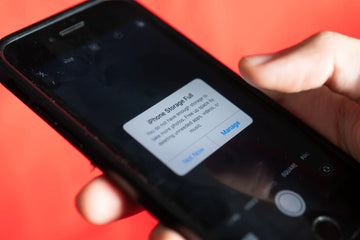
If you are an iPhone user, then you must know the struggle when your storage is full. It feels like a curse when the iPhone storage is full and you have to free up space. There are many ways to keep space in your phone regularly by deleting an excessive amount of junk including extra videos, photos, and applications.

We often procrastinate until our phone shows us notifications of “storage full”. Isn’t it better to keep your phone clean rather panicking at an important event when you are about to capture the special moments but you cannot? It is okay! It happens with many of us. So if you are searching for ways to clean up your iPhone to get some extra space, then you have come to the right place. In these articles, we have brought some essential tips to free up space on your iPhone.  By implementing these tips, you are not going to worry about running out of storage space on your iPhone. So let’s head over to the space recovering process for your iPhone:


Photos and Videos Storage in iPhone:

The first thing to do is to check your phone for extra videos and photos as they take a lot of space. While taking pictures and videos, we just keep going on without deleting the blurred or unwanted shots. So with time passing by, these videos and photos grow into massive data and before we do anything, our storage is full. As the iPhone gets upgraded, the cameras get better and better taking high definition pictures. For example, if you want to record a slow-motion video on your phone, it is going to take at least 240 frames/sec.

Enable iCloud Photo Library:

The most effective way of keeping your pictures and videos saved is to enable the iCloud on your phone. iCloud Photo Library is an option on your iPhone that will allow you to free up space immediately. Even if you have an iPad, you can keep your iCloud Photo Library on. If you do not have enough storage in your iCloud Photo Library, then you need to purchase some space as it is only going to make your life easy.

So how do you enable the iCloud Photo Library?

Here are the steps to enable the option:

– Select “Settings” option in your iPhone

– Click on the “Photos & Camera”

– Now switch the option to “ON” for iCloud Photo Library

– Do not forget to select the option for “Optimise iPhone Storage”

free up space when my iPhone storage is fullfree up space when my iPhone storage is full-1free up space when my iPhone storage is full-2


Other Applications:

For storing photos and videos, there are other apps as well that you can use on your iPhone. These applications include Google Drive, Dropbox, Flickr, and etc. This way you can store this massive data by uploading on a cloud without any tension. If a free app is your preference, then “Google Photos” is a great option as it offers unlimited space. Another option you can go for is “Flickr” that will offer you the first 1TB for free (which is huge) after that you have to buy some storage space. Furthermore, “Dropbox” is another great option for you to upload the images and videos automatically. Phone storage going full is common so it needs to be taken care of from the very start instead of panicking at the last moment.


Clear out Unwanted Apps:

What is the point of keeping applications on your iPhone when you are not using it? Deleting unused applications will also make enough storage space in your phone but you have to be regular. This is another common habit among mobile phone users. We often install applications but forget to delete them if we are not using them. These unwanted apps take lots of space on our phones. Being an iOS user, the apps that you download, both free and paid, can be easily re-downloaded. Every iOS user has a must Apple ID and these apps are always saved in your account from where you can download the apps again if needed. You will not have to repay for the paid apps. From time to time, do check your home screen for the apps that you are using and the ones that are of no use. You will find a bunch of apps in the folders on your home screen as well.

Common apps like Facebook, Instagram, etc have lots of caches saved that we are unaware of. Make sure to uninstall and then reinstall these apps as well. This will clear all the hidden data from your iPhone. Here are the steps to unload when your iPhone storage is full.

– Click on the “Settings”

– Go to “General” option

– Now choose “iPhone Storage”

– Choose an app and you will see an option of “Delete app”

This process is not going to take much of your time. You just need to incorporate this into your routine so that your iPhone does not reach to the full storage.

free up space when my iPhone storage is full-5

free up space when my iPhone storage is full-1-6

free up space when my iPhone storage is full-1-7

Offload:

Another useful option that you will find in the “Settings” option in your iPhone/iPad is “Offload App”. It is another way to free up space in your phone in just a few seconds. This option allows you to disable a certain app that you are not currently using. This way the app won’t run on the backend of your phone. There will be not caches or hidden data once you disable the app. Your home screen will still be having those apps. This way you will be able to clear out unwanted data. If you feel like using these apps again, you can just simply tap on them to enable.


Other Ways to Free up Space when your iPhone Storage is full:

There are other ways that you can follow regularly along with deleting unwanted apps, pictures, and videos.

  • Get rid of old messages:Regular texting and whatsapping can lead to excessive storage that we often do not pay attention to. Removing these unwanted chats and messages thread from your iPhone will also give you plenty of space. The messages you get do not only have texts but also videos and images. So make sure to go through your chats regularly.
  • iTunes music and video storage:To free up storage in your iPhone/iPad, make sure to keep removing songs and videos from your iTunes. If you have paid for the music or videos, iTunes allows you to re-download them without any extra cost. This way you will be able to keep excessive space on your iPhone. It is important to delete the data including music, images, and videos that you are not currently using.
  • Purchase space:We are pretty sure that all the steps and ways mentioned above will provide you plenty of space on your iPhone. If your iPhone storage is full, all these methods will make a massive amount of space on your iPhone or iPad. But in case, you have tried all these things and still, you do not have much space, then we would recommend you to buy extra space. This is the backup option that you can do if the other methods fail.
Previous
How to Connect AirPods with Your Macbook Air/Pro?
Next
4 Simple Ways to Fix Your iPhone Cannot Connect to WiFi

Related Articles

AirPods Pro 3 and 2 Protection Guide 2026

AirPods Pro 3 and 2 Protection Guide 2026: Stop Buds Falling Out with Smarter Daily Habits

esr find-my magsafe wallet:never worry about the lost your wallet

How to Find Your Lost Wallet: From Old-School Solutions to the Modern Fix

10 Fixes to Solve iPad Battery Draining Fast

How to Solve iPad Battery Draining Fast - 10 Fixes You Should Know

keep iPhone Battery health

The Great Wireless Charging Debate: Is It Really Harming Your iPhone Battery?

Leave a Comment

Your email address will not be published.

Recent Post

AirPods Ultra vs AirPods 5 vs AirPods Pro 3 Rumors: What to Expect in 2026

Cameras, AI, a delay — and the model most people...

We Tested ESR's New Summer Collection — Here's What It's Actually Like to Live With

ESR has historically focused on functional accessories rather than expressive...

Best iPad Pro Drawing Apps in 2026: From Hobbyist to Pro

In 2026, drawing on an iPad feels less like using...

M4 iPad Air’s Best Accessories (2026): ESR Shift Keyboard Cases for Ultimate Productivity

If you are looking at iPad Air 2026 accessories, the...

Premium Protection, Student Budget: Why ESR is the Smart Alternative for Your iPad Air M4

With the launch of the new iPad Air M4, many...

Best Screen Protectors for the iPhone 17e: Compatibility, Privacy, and Tempered Glass Guide

The iPhone 17e features a sleek design and a high-value...

Get 20% off with code: BLOG20

Company

  • About Us
  • Our Blog
  • Newsroom
  • Become a Reseller

Products

  • Shockproof Phone Cases
  • iPhone Cases
  • iPad Cases
  • AirPods Cases
  • Productivity
  • Screen Protectors
  • Wireless Charging
  • Magnetic Wallets
  • Other Accessories

Community

  • My Account
  • Refer a Friend for Cash Back
  • Become an ESR Super User
  • Affiliate Program
  • Student Discount

Support

  • Contact Us
  • Setup Videos & FAQs
  • Order Status
  • Return and Refund
  • Warranty Policy
  • Shipping Policy
  • Payment Methods
  • Product Recalls

Payment options:
  • American Express
  • JCB
  • Mastercard
  • PayPal
  • Visa
  • Klarna Klarna
  • Afterpay
Excellent 4.6 out of 5 - Review :2573 •

© 2026 ESR All rights reserved.

  • Terms of Use
  • Privacy Policy
  • Legal Declaration
  • Cookie Policy
  • Shipping Policy
  • Return and Refund
  • Track Your Order

Shopping Cart

Get a 15% off coupon when you

sign up

for free shipping!

$38.00
You're $38.00 away from Free Shipping!

$50.00
You're $50.00 away from Free Shipping!

Benefits applied automatically at checkout

Your Cart is Empty

Sign In / Register to view saved cart items
Shop Now
ESR_IMG

Protect Your iPhone's Camera Control

ESR_IMG

Always Find Your Wallet

ESR_IMG

Drop-Proof FlickLlock, Effortless MagSafe

ESR_IMG

Qi2 Fast Charging on the Go

Subtotal $0.00
View Cart

Thank you for choosing to transfer to a human service.

Sorry! The previous responses were from our AI customer service. Since it didn't satisfy you, you've been transferred to a human agent. We'll reply within 24 hours from Mon to Fri and 48 hours on weekends for further help.

Please select the reason for transfer