

20% off sitewide with code FINAL20 | 25% off any 2 or more with code FINAL25 Shop now
Free shipping on all orders over $38
Wagen 0
  • Entwickelt für MagSafe
    • Alle MagSafe-Produkte
      • Kabelloses Laden
      • Autoladegeräte und Halterungen
      • Ladeständer
      • MagSafe-Hüllen
      • MagSafe-Geldbörsen
      • Powerbanks
      • MagSafe Ringe & Wandhalterungen
      • Beste MagSafe Bündel
    • MagSafe für den Alltag
      • Desktop-Ladegeräte
      • Autoladegeräte
      • Reise-Essentials
      • Arbeitsplatz-Ladegeräte
      • Wo ist?-Technologie
      • Geschenk Guide
  • Schutz nach Gerät
    • Alle Hüllen
      • iPhone🔥
      • iPad🔥
      • AirPods🔥
      • Samsung
    • Displayschutz
      • iPhone🔥
      • iPad🔥
      • Apple Watch🔥
      • Samsung
    • Produktivität mit iPad
      • Tastaturen
      • Eingabestifte
    • Zubehör
      • Alle Zubehörteile
      • iPhone 17🔥
      • iPhone 17 Pro Max🔥
      • iPhone 17 Pro🔥
      • iPhone Air🔥
      • iPhone 17🔥
      • iPhone 16
      • iPhone 16e
      • iPhone 16 Pro Max
      • iPhone 16 Pro
      • iPhone 16 Plus
      • iPhone 16
      • iPhone 15
      • iPhone 15 Pro Max
      • iPhone 15 Pro
      • iPhone 15 Plus
      • iPhone 15
      • iPhone 14
      • iPhone 14 Pro Max
      • iPhone 14 Pro
      • iPhone 14 Plus
      • iPhone 14
      • iPhone 13
      • iPhone 13 Pro Max
      • iPhone 13 Pro
      • iPhone 13
      • Wählen Sie Ihr Gerät
      • iPad Pro 13 (2025)🔥
      • iPad Pro 11 (2025)🔥
      • iPad 11th Gen (2025)
      • iPad Air 13 (2025)
      • iPad Air 11 (2025)
      •  
      • iPad Pro 13 (2024)
      • iPad Pro 11 (2024)
      • iPad Air 13 (2024)
      • iPad Air 11 (2024)
      • iPad mini 7 (2024)
      •  
      • iPad Pro 12.9 (2022)
      • iPad Pro 11 (2022)
      • iPad Air 5/4 (2022)
      • iPad 10th Gen (2022)
      •  
      • iPad mini 6 (2021)
      • iPad Pro 12.9 (2021)
      • iPad Pro 11 (2021)
      • iPad Pro 11 (2020)
      • Wählen Sie Ihr Gerät
      • AirPods Pro 3🔥
      • AirPods 4
      • AirPods Pro (2023/2022/2019)
      • AirPods 3
      • Galaxy S25
      • Galaxy S25 Ultra
      • Galaxy S25+
      • Galaxy S24
      • Galaxy S24 Ultra
      • Galaxy S24+
      • Galaxy S24
      • Galaxy S23
      • Galaxy S23 Ultra
      • Galaxy S23
      • iPhone 17🔥
      • iPhone 17 Pro Max🔥
      • iPhone 17 Pro🔥
      • iPhone Air🔥
      • iPhone 17🔥
      • iPhone 16
      • iPhone 16e
      • iPhone 16 Pro Max
      • iPhone 16 Pro
      • iPhone 16 Plus
      • iPhone 16
      • iPhone 15
      • iPhone 15 Pro Max
      • iPhone 15 Pro
      • iPhone 15 Plus
      • iPhone 15
      • iPhone 14
      • iPhone 14 Pro Max
      • iPhone 14 Pro
      • iPhone 14 Plus
      • iPhone 14
      • iPhone 13
      • iPhone 13 Pro Max
      • iPhone 13/13 Pro
      • Wählen Sie Ihr Gerät
      • iPad Pro 13 (2025)🔥
      • iPad Pro 11 (2025)🔥
      • iPad 11th Gen (2025)
      • iPad Air 13 (2025)
      • iPad Air 11 (2025)
      •  
      • iPad Pro 13 (2024)
      • iPad Pro 11 (2024)
      • iPad Air 13 (2024)
      • iPad Air 11 (2024)
      •  
      • iPad Pro 12.9 (6th/5th/4th/3rd Gen)
      • iPad Pro 11 (4th/3rd/2nd/1st Gen)
      • iPad Air 5/4 (2022)
      • iPad 10th Gen (2022)
      •  
      •  
      • Apple Watch🔥
      • Galaxy S25
      • Galaxy S25 Ultra
      • Galaxy S24
      • Galaxy S24 Ultra
      • Galaxy S23
      • Galaxy S23 Ultra
      • Galaxy S23+
      • Galaxy S23
      • Galaxy S22
      • Galaxy S22 Ultra
      • Wählen Sie Ihr Gerät
      • iPad Pro 13 (2025)🔥
      • iPad Pro 11 (2025)🔥
      • iPad 11th Gen (2025)
      • iPad Air 13 (2025)
      • iPad Air 11 (2025)
      •  
      • iPad Pro 13 (2024)
      • iPad Pro 11 (2024)
      • iPad Air 13 (2024)
      • iPad Air 11 (2024)
      •  
      • iPad Pro 12.9 (6th/5th/4th/3rd)
      • iPad Pro 11 (4th/3rd/2nd/1st)
      • iPad Air 5/4 (2022)
      • iPad 10th Gen (2022)
      •  
      • Eingabestifte
      •  
      • Magnetische Geldbörse
      • MagSafe Ringe & Halterungen
      • Weitere Zubehörteile
  • Tastatur
    • iPad Pro 13 (2025)🔥
    • iPad Pro 11 (2025)🔥
    • iPad 11th Gen (2025)
    • iPad Air 13 (2025)
    • iPad Air 11 (2025)
    • iPad Pro 13 (2024)
    • iPad Pro 11 (2024)
    • iPad Air 13 (2024)
    • iPad Air 11 (2024)
    • iPad Pro 12.9 (6th/5th/4th/3rd)
    • iPad Pro 11 (4th/3rd/2nd/1st)
    • iPad Air 5/4 (2022)
    • iPad 10th Gen (2022)
    • Eingabestifte
    • Wireless Mouse🔥
  • Angebote
  • Neuheiten🔥
    • iPad Pro 2025 🔥
    • iPhone 17 Serie🔥
    • AirPods Pro 3🔥
    • 15W Qi2 Kabelloses Laden
    • iPad 2025
  • Super-Nutzer
    • Werden Sie ein ESR Super-Nutzer
    • Exklusive Angebote für Mitglieder
    • Freunde empfehlen, CashBack verdienen
    • Meine Bestellungen
  • Support
    • Kontakt
    • Produktvideos und FAQs
    • Allgemeine FAQs
    • Bestellstatus
    • Rückgabe & Erstattungsrichtlinie
    • Garantie Politik
    • Versand Politik
  • Entdecken
    • Über ESR
    • ESR Blog
    • Nachrichtenbereich
    • Werden Sie Händler
  • Product Recalls
Mein Konto
Anmeldung Registrieren
North America
Europe
Asia Pacific
Middle East
Australien
USD $
Bahrain
USD $
Belgien
USD $
Bulgarien
USD $
Dänemark
USD $
Deutschland
USD $
Estland
USD $
Finnland
USD $
Frankreich
USD $
Griechenland
USD $
Indonesien
USD $
Irland
USD $
Italien
USD $
Japan
USD $
Jordanien
USD $
Kanada
USD $
Katar
USD $
Kroatien
USD $
Lettland
USD $
Litauen
USD $
Luxemburg
USD $
Malaysia
USD $
Mexiko
USD $
Neuseeland
USD $
Niederlande
USD $
Norwegen
USD $
Österreich
USD $
Oman
USD $
Philippinen
USD $
Polen
USD $
Portugal
USD $
Rumänien
USD $
Saudi-Arabien
USD $
Schweden
USD $
Schweiz
USD $
Singapur
USD $
Slowakei
USD $
Slowenien
USD $
Spanien
USD $
Südkorea
USD $
Taiwan
USD $
Thailand
USD $
Tschechien
USD $
Türkei
USD $
Ungarn
USD $
Vereinigte Arabische Emirate
USD $
Vereinigte Staaten
USD $
Vereinigtes Königreich
USD $
Vietnam
USD $
English
Deutsch
français
  • Entwickelt für MagSafe
    • Alle MagSafe-Produkte
      • Kabelloses Laden
      • Autoladegeräte und Halterungen
      • Ladeständer
      • MagSafe-Hüllen
      • MagSafe-Geldbörsen
      • Powerbanks
      • MagSafe Ringe & Wandhalterungen
      • Beste MagSafe Bündel
    • MagSafe für den Alltag
      • Desktop-Ladegeräte
      • Autoladegeräte
      • Reise-Essentials
      • Arbeitsplatz-Ladegeräte
      • Wo ist?-Technologie
      • Geschenk Guide
    • Kabelloses Laden
      • CryoBoost 3-in-1 Magnetische Ladestation (25W, Qi2.2) - US Plug–Black

      • OmniLock Magnet-Autoladegerät (25W, CryoBoost, Lüftungsschlitz) - Black

      • Qi2 kabelloses Autoladegerät mit CryoBoost (HaloLock) - Black

      • ESR CryoBoost Klappbare 3-in-1 Magnet-Ladestation (25W) – US Plug-Black

      • All Kabelloses Laden >
      Autoladegeräte und Halterungen
      • OmniLock Magnet-Autoladegerät (25W, CryoBoost, Lüftungsschlitz) - Black

      • Qi2 kabelloses Autoladegerät mit CryoBoost (HaloLock) - Black

      • Magnetisches kabelloses Qi2 Autoladegerät (HaloLock) - Black

      • 15W Autoladegerät mit MagSafe + CryoBoost - Cool Grey

      • All Autoladegeräte und Halterungen >
      Ladeständer
      • CryoBoost 3-in-1 Magnetische Ladestation (25W, Qi2.2) - US Plug–White

      • ESR CryoBoost Klappbare 3-in-1 Magnet-Ladestation (25W) – US Plug-Black

      • Qi2 3 in 1 kabellose Ladestation mit CryoBoost (HaloLock) - Black - US Plug

      • Qi2 3 in 1 kabelloses Reiseladeset mit Hülle - Black - US Plug

      • All Ladeständer >
      MagSafe-Hüllen
      • iPhone 17 Pro Max Classic Hybrid Magnet-Hülle (Kamerasteuerung, Stash-Ständer) - Clear

      • iPhone 17 Pro Max Bundle: Classic Hybrid Magnet-Hülle (Kamerasteuerung, Stash-Ständer) & Armorite Pro Panzerglas - Clear

      • iPhone 17 Pro Max Bundle Classic Hybrid Magnet-Hülle (Kamerasteuerung, Stash Ständer) & Armorite Displayschutz - Frosted Green

      • iPhone 17 Pro Max Bundle Classic Hybrid Magnet-Hülle (Kamerasteuerung, Stash Ständer) & Magnetisches Ladepad (Qi2) - Frosted Black

      • All MagSafe-Hüllen >
      MagSafe-Geldbörsen
      • Geo Magnet-Wallet-Ständer (Grip) - Midnight Black

      • Geo Wallet Boost (HaloLock) - Black

      • Geo Magnet-Wallet-Ständer - Black

      • ESR Classic Magnet-Wallet-Ständer - Midnight Black

      • All MagSafe-Geldbörsen >
      Powerbanks
      • HaloLock MagSlim 15W kabellose Powerbank (10.000 mAh, mit Ständer) - Black

      • Qi2 MagSlim Powerbank (5K) - Black

      • Qi2 MagSlim Powerbank (10K) - Blue

      • All Powerbanks >
      MagSafe Ringe & Wandhalterungen
      • Universal Ring (HaloLock) - Black/Silver-4 Pack

      • Universal Ring 360 (HaloLock) - White-2 Pack

      • All MagSafe Ringe & Wandhalterungen >
      Beste MagSafe Bündel
      • MagSafe Lade-Bundle für Zuhause, Auto & Arbeit mit „Wo ist“-Wallet - US Plug

      • MagSafe Lade-Bundle für Zuhause, Auto & Büro mit Magnet Wallet - US Plug

      • MagSafe Reiseladegerät Bundle mit „Wo ist?“ Wallet - US Plug

      • MagSafe Ladegerät mit CryoBoost Alltags Bundle - EU Plug

      • All Beste MagSafe Bündel >
      Desktop-Ladegeräte
      • CryoBoost 3-in-1 Magnetische Ladestation (25W, Qi2.2) - US Plug–Black

      • 25W 3 in 1 kabelloses Ladegerät mit MagSafe + CryoBoost - US Plug

      • 65W 5 in 1 Ladestation (HaloLock) - US Plug

      • ESR CryoBoost Klappbare 3-in-1 Magnet-Ladestation (25W) – US Plug-Black

      • All Desktop-Ladegeräte >
      Autoladegeräte
      • OmniLock Magnet-Autoladegerät (25W, CryoBoost, Lüftungsschlitz) - Black

      • Qi2 kabelloses Autoladegerät mit CryoBoost (HaloLock) - Black

      • Magnetisches kabelloses Qi2 Autoladegerät (HaloLock) - Black

      • 15W Autoladegerät mit MagSafe + CryoBoost - Cool Grey

      • All Autoladegeräte >
      Reise-Essentials
      • ESR CryoBoost Klappbare 3-in-1 Magnet-Ladestation (25W) – US Plug-Black

      • OmniLock Magnet-Autoladegerät (25W, CryoBoost, Lüftungsschlitz) - Black

      • Qi2 kabelloses Autoladegerät mit CryoBoost (HaloLock) - Black

      • Qi2 3 in 1 kabelloses Reiseladeset mit Hülle - Black - US Plug

      • All Reise-Essentials >
      Arbeitsplatz-Ladegeräte
      • iPad Air 11" (2024) Rebound Magnetische Tastatur Hülle 360 - US Layout-Black

      • 25W 3 in 1 kabelloses Ladegerät mit MagSafe + CryoBoost - US Plug

      • iPad Pro 13" (2024) Rebound Magnetische Tastatur Hülle 360 - US Layout-Black

      • 65W 5 in 1 Ladestation (HaloLock) - US Plug

      • All Arbeitsplatz-Ladegeräte >
      Wo ist?-Technologie
      • Geo Magnet-Wallet-Ständer (Grip) - Midnight Black

      • Geo Wallet Boost (HaloLock) - Black Carbon Fiber

      • Geo Wallet mit „Wo ist?“ - Black Carbon Fiber

      • Geo Digital Pencil mit integriertem „Wo ist?“ - White

      • All Wo ist?-Technologie >
      Geschenk Guide
      • Geo Magnet-Wallet-Ständer (Grip) - Midnight Black

      • Geo Wallet Boost (HaloLock) - Brown

      • iPhone 17 Pro Max Cyber Tough Magnet-Hülle (Kameraschutz, Stash-Ständer) mit Wallet-Stand Bundle - Orange

      • CryoBoost 3-in-1 Magnetische Ladestation (25W, Qi2.2) - US Plug–Black

      • All Geschenk Guide >
  • Schutz nach Gerät
    • Alle Hüllen
      • iPhone🔥
      • iPad🔥
      • AirPods🔥
      • Samsung
    • Displayschutz
      • iPhone🔥
      • iPad🔥
      • Apple Watch🔥
      • Samsung
    • Produktivität mit iPad
      • Tastaturen
      • Eingabestifte
    • Zubehör
      • Alle Zubehörteile
      • iPhone 17🔥
      • iPhone 17 Pro Max🔥
      • iPhone 17 Pro🔥
      • iPhone Air🔥
      • iPhone 17🔥
      • iPhone 16
      • iPhone 16e
      • iPhone 16 Pro Max
      • iPhone 16 Pro
      • iPhone 16 Plus
      • iPhone 16
      • iPhone 15
      • iPhone 15 Pro Max
      • iPhone 15 Pro
      • iPhone 15 Plus
      • iPhone 15
      • iPhone 14
      • iPhone 14 Pro Max
      • iPhone 14 Pro
      • iPhone 14 Plus
      • iPhone 14
      • iPhone 13
      • iPhone 13 Pro Max
      • iPhone 13 Pro
      • iPhone 13
      • Wählen Sie Ihr Gerät
      • iPad Pro 13 (2025)🔥
      • iPad Pro 11 (2025)🔥
      • iPad 11th Gen (2025)
      • iPad Air 13 (2025)
      • iPad Air 11 (2025)
      •  
      • iPad Pro 13 (2024)
      • iPad Pro 11 (2024)
      • iPad Air 13 (2024)
      • iPad Air 11 (2024)
      • iPad mini 7 (2024)
      •  
      • iPad Pro 12.9 (2022)
      • iPad Pro 11 (2022)
      • iPad Air 5/4 (2022)
      • iPad 10th Gen (2022)
      •  
      • iPad mini 6 (2021)
      • iPad Pro 12.9 (2021)
      • iPad Pro 11 (2021)
      • iPad Pro 11 (2020)
      • Wählen Sie Ihr Gerät
      • AirPods Pro 3🔥
      • AirPods 4
      • AirPods Pro (2023/2022/2019)
      • AirPods 3
      • Galaxy S25
      • Galaxy S25 Ultra
      • Galaxy S25+
      • Galaxy S24
      • Galaxy S24 Ultra
      • Galaxy S24+
      • Galaxy S24
      • Galaxy S23
      • Galaxy S23 Ultra
      • Galaxy S23
      • iPhone 17🔥
      • iPhone 17 Pro Max🔥
      • iPhone 17 Pro🔥
      • iPhone Air🔥
      • iPhone 17🔥
      • iPhone 16
      • iPhone 16e
      • iPhone 16 Pro Max
      • iPhone 16 Pro
      • iPhone 16 Plus
      • iPhone 16
      • iPhone 15
      • iPhone 15 Pro Max
      • iPhone 15 Pro
      • iPhone 15 Plus
      • iPhone 15
      • iPhone 14
      • iPhone 14 Pro Max
      • iPhone 14 Pro
      • iPhone 14 Plus
      • iPhone 14
      • iPhone 13
      • iPhone 13 Pro Max
      • iPhone 13/13 Pro
      • Wählen Sie Ihr Gerät
      • iPad Pro 13 (2025)🔥
      • iPad Pro 11 (2025)🔥
      • iPad 11th Gen (2025)
      • iPad Air 13 (2025)
      • iPad Air 11 (2025)
      •  
      • iPad Pro 13 (2024)
      • iPad Pro 11 (2024)
      • iPad Air 13 (2024)
      • iPad Air 11 (2024)
      •  
      • iPad Pro 12.9 (6th/5th/4th/3rd Gen)
      • iPad Pro 11 (4th/3rd/2nd/1st Gen)
      • iPad Air 5/4 (2022)
      • iPad 10th Gen (2022)
      •  
      •  
      • Apple Watch🔥
      • Galaxy S25
      • Galaxy S25 Ultra
      • Galaxy S24
      • Galaxy S24 Ultra
      • Galaxy S23
      • Galaxy S23 Ultra
      • Galaxy S23+
      • Galaxy S23
      • Galaxy S22
      • Galaxy S22 Ultra
      • Wählen Sie Ihr Gerät
      • iPad Pro 13 (2025)🔥
      • iPad Pro 11 (2025)🔥
      • iPad 11th Gen (2025)
      • iPad Air 13 (2025)
      • iPad Air 11 (2025)
      •  
      • iPad Pro 13 (2024)
      • iPad Pro 11 (2024)
      • iPad Air 13 (2024)
      • iPad Air 11 (2024)
      •  
      • iPad Pro 12.9 (6th/5th/4th/3rd)
      • iPad Pro 11 (4th/3rd/2nd/1st)
      • iPad Air 5/4 (2022)
      • iPad 10th Gen (2022)
      •  
      • Eingabestifte
      •  
      • Magnetische Geldbörse
      • MagSafe Ringe & Halterungen
      • Weitere Zubehörteile
  • Tastatur
    • iPad Pro 13 (2025)🔥
    • iPad Pro 11 (2025)🔥
    • iPad 11th Gen (2025)
    • iPad Air 13 (2025)
    • iPad Air 11 (2025)
    • iPad Pro 13 (2024)
    • iPad Pro 11 (2024)
    • iPad Air 13 (2024)
    • iPad Air 11 (2024)
    • iPad Pro 12.9 (6th/5th/4th/3rd)
    • iPad Pro 11 (4th/3rd/2nd/1st)
    • iPad Air 5/4 (2022)
    • iPad 10th Gen (2022)
    • Eingabestifte
    • Wireless Mouse🔥
  • Angebote
  • Neuheiten🔥
    • iPad Pro 2025 🔥
    • iPhone 17 Serie🔥
    • AirPods Pro 3🔥
    • 15W Qi2 Kabelloses Laden
    • iPad 2025
  • Super-Nutzer
    • Werden Sie ein ESR Super-Nutzer
    • Exklusive Angebote für Mitglieder
    • Freunde empfehlen, CashBack verdienen
    • Meine Bestellungen
  • Support
    • Kontakt
    • Produktvideos und FAQs
    • Allgemeine FAQs
    • Bestellstatus
    • Rückgabe & Erstattungsrichtlinie
    • Garantie Politik
    • Versand Politik
  • Entdecken
    • Über ESR
    • ESR Blog
    • Nachrichtenbereich
    • Werden Sie Händler
  • Product Recalls
Konto Wagen 0
North America
Europe
Asia Pacific
Middle East
Australien
USD $
Bahrain
USD $
Belgien
USD $
Bulgarien
USD $
Dänemark
USD $
Deutschland
USD $
Estland
USD $
Finnland
USD $
Frankreich
USD $
Griechenland
USD $
Indonesien
USD $
Irland
USD $
Italien
USD $
Japan
USD $
Jordanien
USD $
Kanada
USD $
Katar
USD $
Kroatien
USD $
Lettland
USD $
Litauen
USD $
Luxemburg
USD $
Malaysia
USD $
Mexiko
USD $
Neuseeland
USD $
Niederlande
USD $
Norwegen
USD $
Österreich
USD $
Oman
USD $
Philippinen
USD $
Polen
USD $
Portugal
USD $
Rumänien
USD $
Saudi-Arabien
USD $
Schweden
USD $
Schweiz
USD $
Singapur
USD $
Slowakei
USD $
Slowenien
USD $
Spanien
USD $
Südkorea
USD $
Taiwan
USD $
Thailand
USD $
Tschechien
USD $
Türkei
USD $
Ungarn
USD $
Vereinigte Arabische Emirate
USD $
Vereinigte Staaten
USD $
Vereinigtes Königreich
USD $
Vietnam
USD $
English
Deutsch
français

Durchsuchen Sie unseren Shop

Konto Wagen 0
beliebte Suchanfragen:
iPad 2025 iPhone 16 camera control Qi2 Wireless Charging Magnetic Wallet
The BFCM celebration continues!
20% off all items and 25% off for 2+ The BFCM celebration continues!
20% off all items and 25% off for 2+

It’s Not Over Yet

The BFCM celebration continues!
20% off all items and 25% off for 2+

The BFCM celebration continues!
20% off all items and 25% off for 2+

Shop now
How Tos

How to Fix MacBook USB-C Port Not Working?

von Sandy An Nov 02, 2023
how to fix macbook usb-c port not working

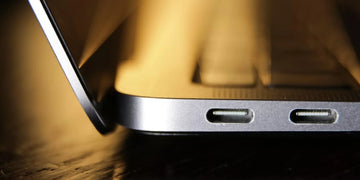
In the realm of modern computing devices, the USB-C port has emerged as a dominant conduit for the transmission of both data and power in and out of our devices. These devices often feature only a handful of these ports, making them an indispensable element of our computer’s functionality. In particular, the USB-C ports on the MacBook assume a paramount significance, as they enable us to connect various peripherals and accessories through the utilization of a USB-C hub.

However, despite the exceptional quality of these MacBooks, unforeseen circumstances can arise, leading to the unfortunate MacBook USB-C port not working. Thankfully, in this comprehensive article, we will guide you through a series of troubleshooting measures that are essential to restore the functionality of your USB-C ports.

Troubleshooting MacBook USB-C Port Not Working

Without any further ado, let’s delve into a more detailed examination of the various issues that MacBook Pro users often come across in relation to their USB-C ports.

1. Data Transfer Problem

One frequent indication of the Mac USB-C port not working is experiencing challenges when transferring data. For instance, the transfer process can progress at an inexplicably sluggish pace, abruptly halt before the transfer finishes, or may not even begin at all.

2. Charging Problem

The MacBook charge port not working problem tends to manifest in two different scenarios. Firstly, there are instances where the MacBook fails to acknowledge the presence of a charger when it is connected to the USB-C port. Secondly, even in cases where the charger is recognized, the charging process is either noticeably slower than expected or abruptly ceases at random intervals.

3. Fluctuating Connectivity

On certain occasions, the USB-C port might display fluctuating connectivity. Meaning that it will connect at some point, and suddenly it appears disconnected without any evident cause, only to unexpectedly reconnect once more.

4. External USB-C Device Problem

The MacBook may encounter difficulties in acknowledging or establishing a connection with external devices that are linked through the USB-C port.

MacBook USB-C Port Not Working: 13 Reasons Why

  1. Your MacBook ports may be dirty
  2. Your USB may not be properly connected
  3. Your USB device may not be in order
  4. Low-quality cables
  5. USB ports could be the culprit
  6. Outdated software and firmware
  7. Unsupported adapters
  8. Overheating
  9. Bad battery practices
  10. Minor glitches
  11. Physical damage
  12. Issues with the System Management Controller (SMC)
  13. Issues with Non Volatile Random Access Memory (NVRAM)

MacBook Port Not Working: 13 Corresponding Solutions

1. Keep Your MacBook Ports Clean

Dust, lint, and various tiny particles have the potential to effortlessly infiltrate your USB-C ports, leading to MacBook USB-C port not working problems. To prevent such issues, it is advisable to periodically clean these ports using either a can of compressed air, a soft brush, or an anti-static brush. It is crucial to exercise caution and refrain from inserting any rigid objects into the port, as this could potentially result in damaging it.

2. Check Physical Connection

It is important to double-check that the USB-C cable is securely connected to both your MacBook and the peripheral device.

3. Check the USB Device

Ensure that your USB device is not faulty by checking it. To access information about your USB device on a Mac:

  • Click on the Apple icon located in the top left corner of your screen.
  • Navigate to the “About This Mac” option and click on it. From there, you will be presented with a window displaying an overview of your Mac’s specifications.
  • Click on either the “More Info” or “System Report” button to gather more detailed information about your USB device.

By doing so, you will be able to confirm whether your USB device is listed and ensure that there are no errors present.

4. Use High-Quality Cables

To avoid encountering MacBook port not working problems, it is essential to consistently utilize high-quality or Apple-certified cables that adhere to USB-C standards. It is worth noting that inexpensive, generic products may lead to complications, such as hindered data transfer or charging capabilities, as they might not conform to the appropriate standards and specifications.

5. Confirm Your USB Ports are working

You can connect the USB-C device to an alternative port on your MacBook. If the device functions properly when connected to a different port, it is probable that the initial port is experiencing functionality issues. If you want to eliminate USB problems on your MacBook, then this 8-in-1 Portable USB-C Hub is a highly recommended and certified product that you don’t want to pass on.

6. Update Your Software and Firmware

To ensure optimal performance and compatibility with USB-C devices, it is important to keep your MacBook’s software up-to-date. This is because newer updates often come with bug fixes and improved compatibility features. It is possible that any issues you may encounter with the USB-C ports are a result of having outdated drivers and/or firmware, which can be resolved by simply updating them.

7. Use Recommended Power Adapters

If your power adapter is not good or strong enough, your MacBook may fail to receive power through the USB-C port.

8. Limit Overheating

Excessive heat has the potential to cause harm to the internal components of your MacBook, such as the USB-C ports. To avoid this, it is recommended that your MacBook is in a cool and properly ventilated environment and allow it at regular intervals for cooling down and dissipating heat.

9. Maintain Good Battery Practices

In order to further safeguard your MacBook and its USB-C port from potential harm, it is highly advised to adhere to proper battery management. It is advisable to refrain from allowing your MacBook to reach its full charging capacity of 100% and still keep it connected to a power source continuously. This can lead to excessive heat generation within the device, thereby resulting in potential damage.

10. Reboot MacBook

If you are experiencing any minor issues with the USB-C ports on your MacBook, one simple solution that often helps is to restart your device. Once the restart is complete, you can then reconnect your USB-C device and see if the MacBook USB-C port not working problem has been resolved.

11. Avoid Physical Damage

To protect your MacBook from physical harm, it is crucial to avoid exerting excessive force while inserting or removing the USB-C cable as it may lead to potential damage to the port’s delicate connectors. Additionally, when your MacBook is not in use, make sure it is stored securely to minimize the risk of accidental damage. Furthermore, it is advisable to handle the USB-C cables with care, ensuring gentle connection and disconnection to prevent any unnecessary wear and tear.

12. Reset the SMC

The System Management Controller (SMC) of your Mac holds power management responsibilities. By resetting the SMC, you can effectively address a range of problems, such as those related to the USB-C port.

13. Reset the NVRAM

The Non-volatile Random Access Memory (NVRAM) is a repository of various data types such as your sound preferences and temporal zone details. Should the NVRAM become encumbered or antiquated, the USB-C port on your Macintosh may cease to function.

  • iphone 14

Conclusion

Experiencing a sudden MacBook USB-C port not working prob can greatly impact its ability to be productive. There are several factors that could be causing this issue and there are also multiple methods available to address the problem of MacBook USB-C ports not working. By implementing the effective solutions listed in this article, you can ensure that your MacBook remains in optimal performance and that your work continues without any disruptions.

Stichworte: MacBook Pro
Vorherige
Why is My iPhone Camera Blinking and How to Stop It?
Nächste
Why Does My Phone Stop Charging At 80%?

In Verbindung stehende Artikel

Why Keyboard Cases matter for College Students?

Der ultimative Studenten-Guide: So wählst du das beste iPad Pro Keyboard Case fürs College

How to Take a Screenshot on iPhone: Apple’s Hidden Tricks Revealed?

Wie man einen Screenshot auf dem iPhone macht: Apples versteckte Tricks enthüllt?

When Is the Right Time to Buy a New iPad in 2025 and Beyond?

Wann ist der richtige Zeitpunkt, um im Jahr 2025 und darüber hinaus ein neues iPad zu kaufen?

CES-2025-Accessory-Revolution-Scratch-Proof-MacBook-Cases-Magnetic-iPad-Keyboards-Save-Students-200

CES 2025 Zubehör-Revolution: Kratzfeste MacBook-Hüllen × magnetische iPad-Tastaturen sparen Studenten 200 $

Hinterlasse einen Kommentar

Deine Email-Adresse wird nicht veröffentlicht.

Recent Post

iPhone 17 + Apple Watch Ultra 3 + AirPods Pro 3: Die 6 besten Qi2.2...

Für jedes Gerät ein eigenes Ladegerät, einen eigenen Stecker und...

Die ultimative Entscheidung: Handyhülle mit Wallet oder separates Case-&-Wallet-Duo? (Gelöst)

Ein Handy und ein herkömmliches Portemonnaie gleichzeitig mit sich herumzutragen,...

Mehr als nur iPad-Schutzfolien: Das beste iPad-Zubehör für Homeoffice und Unterhaltung zu Hause

Wenn dein iPad sowohl dein Arbeitsplatz als auch dein Unterhaltungszentrum...

Black Friday 2025: Die 5 unverzichtbaren iPad Pro-Zubehörteile für Power-User

Black Friday 2025 ist die perfekte Gelegenheit, dein iPad Pro...

ESR 2025 iPad-Zubehör Black Friday Angebote: Riesige Rabatte auf iPad Air

Die Black Friday- und Cyber Monday-Angebote 2025 bieten die größten...

Die besten iPad-Pro-Tastaturhüllen: Top-Empfehlungen mit Stifthalter für mehr Produktivität

Viele iPad-Pro-Nutzer stehen vor der Herausforderung, das Gerät für professionelle...

Get 20% off with code: BLOG20

Company

  • Über ESR
  • Unser Blog
  • Pressebereich
  • Händler werden

Products

  • Entwickelt für MagSafe
  • Schutzhüllen
  • iPad-Hüllen
  • Schutzfolien
  • Kabelloses Laden
  • iPad-Produktivität
  • Geldbörse und Zubehör
  • Weitere Zubehörteile

Community

  • Mein Konto
  • Freunde empfehlen, CashBack verdienen
  • Werde ESR Super User
  • Affiliate Programm
  • Student Discount

Support

  • Kontaktieren Sie uns
  • Einrichtungsvideos und FAQs
  • Bestellstatus
  • Rückgabe und Rückerstattung
  • Garantiebestimmungen
  • Versandbedingungen
  • Zahlungsmethoden
  • Product Recalls

Zahlungsmöglichkeiten:
  • American Express
  • Diners Club
  • Discover
  • JCB
  • Mastercard
  • PayPal
  • Visa
  • Klarna Klarna
  • Afterpay
© 2025 ESR All rights reserved.
  • Nutzungsbedingungen
  • Datenschutzrichtlinie
  • Rechtliche Erklärung
  • Cookie-Richtlinie
  • Versand Politik
  • Rückgabe und Rückerstattung
  • Track Your Order

Einkaufswagen

Get a 15% off coupon when you

sign up

for free shipping!

$38.00
You're $38.00 away from Free Shipping!

$50.00
You're $50.00 away from Free Shipping!

Benefits applied automatically at checkout

Your Cart is Empty

Sign In / Register to view saved cart items
Shop Now
ESR_IMG

Protect Your iPhone's Camera Control

ESR_IMG

Always Find Your Wallet

ESR_IMG

Drop-Proof FlickLlock, Effortless MagSafe

ESR_IMG

Qi2 Fast Charging on the Go

Zwischensumme $0.00
Warenkorb ansehen

Thank you for choosing to transfer to a human service.

Sorry! The previous responses were from our AI customer service. Since it didn't satisfy you, you've been transferred to a human agent. We'll reply within 24 hours from Mon to Fri and 48 hours on weekends for further help.

Please select the reason for transfer