
20% off sitewide with code FINAL20 | 25% off any 2 or more with code FINAL25 Shop now
Free shipping on all orders over $50
Wagen 0
  • Entwickelt für MagSafe
    • Alle MagSafe-Produkte
      • Kabelloses Laden
      • Autoladegeräte und Halterungen
      • Ladeständer
      • MagSafe-Hüllen
      • MagSafe-Geldbörsen
      • Powerbanks
      • MagSafe Ringe & Wandhalterungen
      • Beste MagSafe Bündel
    • MagSafe für den Alltag
      • Desktop-Ladegeräte
      • Autoladegeräte
      • Reise-Essentials
      • Arbeitsplatz-Ladegeräte
      • Wo ist?-Technologie
      • Geschenk Guide
  • Schutz nach Gerät
    • Alle Hüllen
      • iPhone🔥
      • iPad🔥
      • AirPods🔥
      • Samsung
    • Displayschutz
      • iPhone🔥
      • iPad🔥
      • Apple Watch🔥
      • Samsung
    • Produktivität mit iPad
      • Tastaturen
      • Eingabestifte
    • Zubehör
      • Alle Zubehörteile
      • iPhone 17🔥
      • iPhone 17 Pro Max🔥
      • iPhone 17 Pro🔥
      • iPhone Air🔥
      • iPhone 17🔥
      • iPhone 16
      • iPhone 16e
      • iPhone 16 Pro Max
      • iPhone 16 Pro
      • iPhone 16 Plus
      • iPhone 16
      • iPhone 15
      • iPhone 15 Pro Max
      • iPhone 15 Pro
      • iPhone 15 Plus
      • iPhone 15
      • iPhone 14
      • iPhone 14 Pro Max
      • iPhone 14 Pro
      • iPhone 14 Plus
      • iPhone 14
      • iPhone 13
      • iPhone 13 Pro Max
      • iPhone 13 Pro
      • iPhone 13
      • Wählen Sie Ihr Gerät
      • iPad Pro 13 (2025)🔥
      • iPad Pro 11 (2025)🔥
      • iPad 11th Gen (2025)
      • iPad Air 13 (2025)
      • iPad Air 11 (2025)
      •  
      • iPad Pro 13 (2024)
      • iPad Pro 11 (2024)
      • iPad Air 13 (2024)
      • iPad Air 11 (2024)
      • iPad mini 7 (2024)
      •  
      • iPad Pro 12.9 (2022)
      • iPad Pro 11 (2022)
      • iPad Air 5/4 (2022)
      • iPad 10th Gen (2022)
      •  
      • iPad mini 6 (2021)
      • iPad Pro 12.9 (2021)
      • iPad Pro 11 (2021)
      • iPad Pro 11 (2020)
      • Wählen Sie Ihr Gerät
      • AirPods Pro 3🔥
      • AirPods 4
      • AirPods Pro (2023/2022/2019)
      • AirPods 3
      • Galaxy S25
      • Galaxy S25 Ultra
      • Galaxy S25+
      • Galaxy S24
      • Galaxy S24 Ultra
      • Galaxy S24+
      • Galaxy S24
      • Galaxy S23
      • Galaxy S23 Ultra
      • Galaxy S23
      • iPhone 17🔥
      • iPhone 17 Pro Max🔥
      • iPhone 17 Pro🔥
      • iPhone Air🔥
      • iPhone 17🔥
      • iPhone 16
      • iPhone 16e
      • iPhone 16 Pro Max
      • iPhone 16 Pro
      • iPhone 16 Plus
      • iPhone 16
      • iPhone 15
      • iPhone 15 Pro Max
      • iPhone 15 Pro
      • iPhone 15 Plus
      • iPhone 15
      • iPhone 14
      • iPhone 14 Pro Max
      • iPhone 14 Pro
      • iPhone 14 Plus
      • iPhone 14
      • iPhone 13
      • iPhone 13 Pro Max
      • iPhone 13/13 Pro
      • Wählen Sie Ihr Gerät
      • iPad Pro 13 (2025)🔥
      • iPad Pro 11 (2025)🔥
      • iPad 11th Gen (2025)
      • iPad Air 13 (2025)
      • iPad Air 11 (2025)
      •  
      • iPad Pro 13 (2024)
      • iPad Pro 11 (2024)
      • iPad Air 13 (2024)
      • iPad Air 11 (2024)
      •  
      • iPad Pro 12.9 (6th/5th/4th/3rd Gen)
      • iPad Pro 11 (4th/3rd/2nd/1st Gen)
      • iPad Air 5/4 (2022)
      • iPad 10th Gen (2022)
      •  
      •  
      • Apple Watch🔥
      • Galaxy S25
      • Galaxy S25 Ultra
      • Galaxy S24
      • Galaxy S24 Ultra
      • Galaxy S23
      • Galaxy S23 Ultra
      • Galaxy S23+
      • Galaxy S23
      • Galaxy S22
      • Galaxy S22 Ultra
      • Wählen Sie Ihr Gerät
      • iPad Pro 13 (2025)🔥
      • iPad Pro 11 (2025)🔥
      • iPad 11th Gen (2025)
      • iPad Air 13 (2025)
      • iPad Air 11 (2025)
      •  
      • iPad Pro 13 (2024)
      • iPad Pro 11 (2024)
      • iPad Air 13 (2024)
      • iPad Air 11 (2024)
      •  
      • iPad Pro 12.9 (6th/5th/4th/3rd)
      • iPad Pro 11 (4th/3rd/2nd/1st)
      • iPad Air 5/4 (2022)
      • iPad 10th Gen (2022)
      •  
      • Eingabestifte
      •  
      • Magnetische Geldbörse
      • MagSafe Ringe & Halterungen
      • Weitere Zubehörteile
  • Tastatur
    • iPad Pro 13 (2025)🔥
    • iPad Pro 11 (2025)🔥
    • iPad 11th Gen (2025)
    • iPad Air 13 (2025)
    • iPad Air 11 (2025)
    • iPad Pro 13 (2024)
    • iPad Pro 11 (2024)
    • iPad Air 13 (2024)
    • iPad Air 11 (2024)
    • iPad Pro 12.9 (6th/5th/4th/3rd)
    • iPad Pro 11 (4th/3rd/2nd/1st)
    • iPad Air 5/4 (2022)
    • iPad 10th Gen (2022)
    • Eingabestifte
    • Wireless Mouse🔥
  • Angebote
  • Neuheiten🔥
    • iPad Pro 2025 🔥
    • iPhone 17 Serie🔥
    • AirPods Pro 3🔥
    • 15W Qi2 Kabelloses Laden
    • iPad 2025
  • Super-Nutzer
    • Werden Sie ein ESR Super-Nutzer
    • Exklusive Angebote für Mitglieder
    • Freunde empfehlen, CashBack verdienen
    • Meine Bestellungen
  • Support
    • Kontakt
    • Produktvideos und FAQs
    • Allgemeine FAQs
    • Bestellstatus
    • Rückgabe & Erstattungsrichtlinie
    • Garantie Politik
    • Versand Politik
  • Entdecken
    • Über ESR
    • ESR Blog
    • Nachrichtenbereich
    • Werden Sie Händler
  • Product Recalls
Mein Konto
Anmeldung Registrieren
North America
Europe
Asia Pacific
Middle East
Australien
USD $
Bahrain
USD $
Belgien
USD $
Bulgarien
USD $
Dänemark
USD $
Deutschland
USD $
Estland
USD $
Finnland
USD $
Frankreich
USD $
Griechenland
USD $
Indonesien
USD $
Irland
USD $
Italien
USD $
Japan
USD $
Jordanien
USD $
Kanada
USD $
Katar
USD $
Kroatien
USD $
Lettland
USD $
Litauen
USD $
Luxemburg
USD $
Malaysia
USD $
Mexiko
USD $
Neuseeland
USD $
Niederlande
USD $
Norwegen
USD $
Österreich
USD $
Oman
USD $
Philippinen
USD $
Polen
USD $
Portugal
USD $
Rumänien
USD $
Saudi-Arabien
USD $
Schweden
USD $
Schweiz
USD $
Singapur
USD $
Slowakei
USD $
Slowenien
USD $
Spanien
USD $
Südkorea
USD $
Taiwan
USD $
Thailand
USD $
Tschechien
USD $
Türkei
USD $
Ungarn
USD $
Vereinigte Arabische Emirate
USD $
Vereinigte Staaten
USD $
Vereinigtes Königreich
USD $
Vietnam
USD $
English
Deutsch
français
  • Entwickelt für MagSafe
    • Alle MagSafe-Produkte
      • Kabelloses Laden
      • Autoladegeräte und Halterungen
      • Ladeständer
      • MagSafe-Hüllen
      • MagSafe-Geldbörsen
      • Powerbanks
      • MagSafe Ringe & Wandhalterungen
      • Beste MagSafe Bündel
    • MagSafe für den Alltag
      • Desktop-Ladegeräte
      • Autoladegeräte
      • Reise-Essentials
      • Arbeitsplatz-Ladegeräte
      • Wo ist?-Technologie
      • Geschenk Guide
    • Kabelloses Laden
      • CryoBoost 3-in-1 Magnetische Ladestation (25W, Qi2.2) - US Plug–Black

      • OmniLock Magnet-Autoladegerät (25W, CryoBoost, Lüftungsschlitz) - Black

      • Qi2 kabelloses Autoladegerät mit CryoBoost (HaloLock) - Black

      • CryoBoost 3-in-1 Magnetische Ladestation (25W, Qi2.2) - EU Plug–Black

      • All Kabelloses Laden >
      Autoladegeräte und Halterungen
      • OmniLock Magnet-Autoladegerät (25W, CryoBoost, Lüftungsschlitz) - Black

      • Qi2 kabelloses Autoladegerät mit CryoBoost (HaloLock) - Black

      • Magnetisches kabelloses Qi2 Autoladegerät (HaloLock) - Black

      • OmniLock Magnet-Autohalterung (Saugnapf) - Black

      • All Autoladegeräte und Halterungen >
      Ladeständer
      • CryoBoost 3-in-1 Magnetische Ladestation (25W, Qi2.2) - US Plug–White

      • 3-in-1 Magnetische Ladestation (15W) - Black - EU PLUG

      • 3-in-1 Kabelloses Ladeset für Watch (HaloLock) - Black - eu-plug

      • Magnetisches Ladepad (15W) - Black - 1 Set

      • All Ladeständer >
      MagSafe-Hüllen
      • iPhone 17 Pro Max Classic Hybrid Magnet-Hülle (Kamerasteuerung, Stash-Ständer) - Clear

      • iPhone 17 Pro Max Bundle: Classic Hybrid Magnet-Hülle (Kamerasteuerung, Stash-Ständer) & Armorite Pro Panzerglas - Clear

      • iPhone 17 Pro Max Bundle Classic Hybrid Magnet-Hülle (Kamerasteuerung, Stash Ständer) & Armorite Displayschutz - Frosted Green

      • iPhone 17 Pro Max Bundle Classic Hybrid Magnet-Hülle (Kamerasteuerung, Stash Ständer) & Magnetisches Ladepad (Qi2) - Frosted Black

      • All MagSafe-Hüllen >
      MagSafe-Geldbörsen
      • Geo Magnet-Wallet-Ständer (Grip) - Midnight Black

      • Geo Wallet Boost (HaloLock) - Black

      • Geo Magnet-Wallet-Ständer - Black

      • ESR Classic Magnet-Wallet-Ständer - Midnight Black

      • All MagSafe-Geldbörsen >
      Powerbanks
      • HaloLock MagSlim 15W kabellose Powerbank (10.000 mAh, mit Ständer) - Black

      • Qi2 MagSlim Powerbank (5K) - Black

      • Qi2 MagSlim Powerbank (10K) - Blue

      • All Powerbanks >
      MagSafe Ringe & Wandhalterungen
      • Universal Ring (HaloLock) - Black/Silver-4 Pack

      • Universal Ring 360 (HaloLock) - White-2 Pack

      • All MagSafe Ringe & Wandhalterungen >
      Beste MagSafe Bündel
      • MagSafe Ladegerät mit CryoBoost Alltags Bundle - EU Plug

      • Qi2 Autoladegerät und tragbares Qi2 Ladegerät im Bundle - Black

      • Qi2 Magnetisches kabelloses Autoladegerät Bundle - Black

      • Qi2 kabelloses Ladegerät Alltags Bundle - Black

      • All Beste MagSafe Bündel >
      Desktop-Ladegeräte
      • CryoBoost 3-in-1 Magnetische Ladestation (25W, Qi2.2) - US Plug–Black

      • Magnetisches Ladepad (15W) - Black - 1 Set

      • 3-in-1 Magnetische Ladestation (15W) - Black - EU PLUG

      • CryoBoost 3-in-1 Magnetische Ladestation (25W, Qi2.2) - EU Plug–Black

      • All Desktop-Ladegeräte >
      Autoladegeräte
      • OmniLock Magnet-Autoladegerät (25W, CryoBoost, Lüftungsschlitz) - Black

      • Qi2 kabelloses Autoladegerät mit CryoBoost (HaloLock) - Black

      • Magnetisches kabelloses Qi2 Autoladegerät (HaloLock) - Black

      • OmniLock Magnet-Autohalterung (Saugnapf) - Black

      • All Autoladegeräte >
      Reise-Essentials
      • OmniLock Magnet-Autoladegerät (25W, CryoBoost, Lüftungsschlitz) - Black

      • Qi2 kabelloses Autoladegerät mit CryoBoost (HaloLock) - Black

      • Qi2 MagSlim Powerbank (10K) - Blue

      • Qi2 Kabelloses Armaturenbrett Autoladegerät (HaloLock) - Black

      • All Reise-Essentials >
      Arbeitsplatz-Ladegeräte
      • Digital Pencil für iPad - Dark Silver

      • CryoBoost 3-in-1 Magnetische Ladestation (25W, Qi2.2) - US Plug–Black

      • CryoBoost 3-in-1 Magnetische Ladestation (25W, Qi2.2) - EU Plug–Black

      • iPad Air 13" (2025) Rebound Magnetische Tastatur Hülle 360 - UK Layout-Black

      • All Arbeitsplatz-Ladegeräte >
      Wo ist?-Technologie
      • Geo Magnet-Wallet-Ständer (Grip) - Midnight Black

      • Geo Wallet Boost (HaloLock) - Black Carbon Fiber

      • Geo Wallet mit „Wo ist?“ - Black Carbon Fiber

      • Geo Digital Pencil mit integriertem „Wo ist?“ - White

      • All Wo ist?-Technologie >
      Geschenk Guide
      • Geo Magnet-Wallet-Ständer (Grip) - Midnight Black

      • Geo Wallet Boost (HaloLock) - Brown

      • iPhone 17 Pro Max Cyber Tough Magnet-Hülle (Kameraschutz, Stash-Ständer) mit Wallet-Stand Bundle - Orange

      • CryoBoost 3-in-1 Magnetische Ladestation (25W, Qi2.2) - US Plug–Black

      • All Geschenk Guide >
  • Schutz nach Gerät
    • Alle Hüllen
      • iPhone🔥
      • iPad🔥
      • AirPods🔥
      • Samsung
    • Displayschutz
      • iPhone🔥
      • iPad🔥
      • Apple Watch🔥
      • Samsung
    • Produktivität mit iPad
      • Tastaturen
      • Eingabestifte
    • Zubehör
      • Alle Zubehörteile
      • iPhone 17🔥
      • iPhone 17 Pro Max🔥
      • iPhone 17 Pro🔥
      • iPhone Air🔥
      • iPhone 17🔥
      • iPhone 16
      • iPhone 16e
      • iPhone 16 Pro Max
      • iPhone 16 Pro
      • iPhone 16 Plus
      • iPhone 16
      • iPhone 15
      • iPhone 15 Pro Max
      • iPhone 15 Pro
      • iPhone 15 Plus
      • iPhone 15
      • iPhone 14
      • iPhone 14 Pro Max
      • iPhone 14 Pro
      • iPhone 14 Plus
      • iPhone 14
      • iPhone 13
      • iPhone 13 Pro Max
      • iPhone 13 Pro
      • iPhone 13
      • Wählen Sie Ihr Gerät
      • iPad Pro 13 (2025)🔥
      • iPad Pro 11 (2025)🔥
      • iPad 11th Gen (2025)
      • iPad Air 13 (2025)
      • iPad Air 11 (2025)
      •  
      • iPad Pro 13 (2024)
      • iPad Pro 11 (2024)
      • iPad Air 13 (2024)
      • iPad Air 11 (2024)
      • iPad mini 7 (2024)
      •  
      • iPad Pro 12.9 (2022)
      • iPad Pro 11 (2022)
      • iPad Air 5/4 (2022)
      • iPad 10th Gen (2022)
      •  
      • iPad mini 6 (2021)
      • iPad Pro 12.9 (2021)
      • iPad Pro 11 (2021)
      • iPad Pro 11 (2020)
      • Wählen Sie Ihr Gerät
      • AirPods Pro 3🔥
      • AirPods 4
      • AirPods Pro (2023/2022/2019)
      • AirPods 3
      • Galaxy S25
      • Galaxy S25 Ultra
      • Galaxy S25+
      • Galaxy S24
      • Galaxy S24 Ultra
      • Galaxy S24+
      • Galaxy S24
      • Galaxy S23
      • Galaxy S23 Ultra
      • Galaxy S23
      • iPhone 17🔥
      • iPhone 17 Pro Max🔥
      • iPhone 17 Pro🔥
      • iPhone Air🔥
      • iPhone 17🔥
      • iPhone 16
      • iPhone 16e
      • iPhone 16 Pro Max
      • iPhone 16 Pro
      • iPhone 16 Plus
      • iPhone 16
      • iPhone 15
      • iPhone 15 Pro Max
      • iPhone 15 Pro
      • iPhone 15 Plus
      • iPhone 15
      • iPhone 14
      • iPhone 14 Pro Max
      • iPhone 14 Pro
      • iPhone 14 Plus
      • iPhone 14
      • iPhone 13
      • iPhone 13 Pro Max
      • iPhone 13/13 Pro
      • Wählen Sie Ihr Gerät
      • iPad Pro 13 (2025)🔥
      • iPad Pro 11 (2025)🔥
      • iPad 11th Gen (2025)
      • iPad Air 13 (2025)
      • iPad Air 11 (2025)
      •  
      • iPad Pro 13 (2024)
      • iPad Pro 11 (2024)
      • iPad Air 13 (2024)
      • iPad Air 11 (2024)
      •  
      • iPad Pro 12.9 (6th/5th/4th/3rd Gen)
      • iPad Pro 11 (4th/3rd/2nd/1st Gen)
      • iPad Air 5/4 (2022)
      • iPad 10th Gen (2022)
      •  
      •  
      • Apple Watch🔥
      • Galaxy S25
      • Galaxy S25 Ultra
      • Galaxy S24
      • Galaxy S24 Ultra
      • Galaxy S23
      • Galaxy S23 Ultra
      • Galaxy S23+
      • Galaxy S23
      • Galaxy S22
      • Galaxy S22 Ultra
      • Wählen Sie Ihr Gerät
      • iPad Pro 13 (2025)🔥
      • iPad Pro 11 (2025)🔥
      • iPad 11th Gen (2025)
      • iPad Air 13 (2025)
      • iPad Air 11 (2025)
      •  
      • iPad Pro 13 (2024)
      • iPad Pro 11 (2024)
      • iPad Air 13 (2024)
      • iPad Air 11 (2024)
      •  
      • iPad Pro 12.9 (6th/5th/4th/3rd)
      • iPad Pro 11 (4th/3rd/2nd/1st)
      • iPad Air 5/4 (2022)
      • iPad 10th Gen (2022)
      •  
      • Eingabestifte
      •  
      • Magnetische Geldbörse
      • MagSafe Ringe & Halterungen
      • Weitere Zubehörteile
  • Tastatur
    • iPad Pro 13 (2025)🔥
    • iPad Pro 11 (2025)🔥
    • iPad 11th Gen (2025)
    • iPad Air 13 (2025)
    • iPad Air 11 (2025)
    • iPad Pro 13 (2024)
    • iPad Pro 11 (2024)
    • iPad Air 13 (2024)
    • iPad Air 11 (2024)
    • iPad Pro 12.9 (6th/5th/4th/3rd)
    • iPad Pro 11 (4th/3rd/2nd/1st)
    • iPad Air 5/4 (2022)
    • iPad 10th Gen (2022)
    • Eingabestifte
    • Wireless Mouse🔥
  • Angebote
  • Neuheiten🔥
    • iPad Pro 2025 🔥
    • iPhone 17 Serie🔥
    • AirPods Pro 3🔥
    • 15W Qi2 Kabelloses Laden
    • iPad 2025
  • Super-Nutzer
    • Werden Sie ein ESR Super-Nutzer
    • Exklusive Angebote für Mitglieder
    • Freunde empfehlen, CashBack verdienen
    • Meine Bestellungen
  • Support
    • Kontakt
    • Produktvideos und FAQs
    • Allgemeine FAQs
    • Bestellstatus
    • Rückgabe & Erstattungsrichtlinie
    • Garantie Politik
    • Versand Politik
  • Entdecken
    • Über ESR
    • ESR Blog
    • Nachrichtenbereich
    • Werden Sie Händler
  • Product Recalls
Konto Wagen 0
North America
Europe
Asia Pacific
Middle East
Australien
USD $
Bahrain
USD $
Belgien
USD $
Bulgarien
USD $
Dänemark
USD $
Deutschland
USD $
Estland
USD $
Finnland
USD $
Frankreich
USD $
Griechenland
USD $
Indonesien
USD $
Irland
USD $
Italien
USD $
Japan
USD $
Jordanien
USD $
Kanada
USD $
Katar
USD $
Kroatien
USD $
Lettland
USD $
Litauen
USD $
Luxemburg
USD $
Malaysia
USD $
Mexiko
USD $
Neuseeland
USD $
Niederlande
USD $
Norwegen
USD $
Österreich
USD $
Oman
USD $
Philippinen
USD $
Polen
USD $
Portugal
USD $
Rumänien
USD $
Saudi-Arabien
USD $
Schweden
USD $
Schweiz
USD $
Singapur
USD $
Slowakei
USD $
Slowenien
USD $
Spanien
USD $
Südkorea
USD $
Taiwan
USD $
Thailand
USD $
Tschechien
USD $
Türkei
USD $
Ungarn
USD $
Vereinigte Arabische Emirate
USD $
Vereinigte Staaten
USD $
Vereinigtes Königreich
USD $
Vietnam
USD $
English
Deutsch
français

Durchsuchen Sie unseren Shop

Konto Wagen 0
beliebte Suchanfragen:
iPad 2025 iPhone 16 camera control Qi2 Wireless Charging Magnetic Wallet
The BFCM celebration continues!
20% off all items and 25% off for 2+ The BFCM celebration continues!
20% off all items and 25% off for 2+

It’s Not Over Yet

The BFCM celebration continues!
20% off all items and 25% off for 2+

The BFCM celebration continues!
20% off all items and 25% off for 2+

Shop now
How Tos

Why is My iPhone Camera Blinking and How to Stop It?

von Jessica An Nov 02, 2023
Why is My iPhone Camera Blinking and How to Stop It.docx

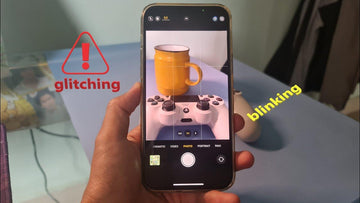
Indeed, it can be quite frustrating and even annoying when your iPhone camera unexpectedly begins to blink. This annoyance is further exacerbated when you’re attempting to capture a precious and unforgettable moment, only to find that your camera refuses to cooperate. Whether it is the rear-facing or front-facing camera, this iPhone camera blinking issue can hinder your ability to capture that perfect shot.

However, this issue is not without a fix. There are several measures you can take to troubleshoot iPhone camera flickering and restore your device to its normal functioning state. This guide contains all you need to know should you find yourself battling with a blinking iPhone camera. Continue reading to find the reasons why is my camera glitching and effective solutions to resolve this issue.

How to Stop Your iPhone Camera Blinking

1. Close Any Camera-related App

If you experience iPhone camera flashing, it is crucial to make sure that no other camera-related applications are running in the background. This is because some applications have the potential to interfere with the smooth functioning of your device’s camera, causing it to blink or malfunction.

Solution: This can be done by double-clicking the home button on your device, which will bring up a list of currently open applications. From there, simply swipe up on any camera-related app windows to close them.

2. Try Clearing Cache and Data

Many apps store caches during use. This can eat up your iPhone’s memory and cause technical problems, for example, the iPhone camera keeps blinking and won’t take picture.

Solution: By clearing the cache and data stored by your apps, you can free up memory space on your device, which can lead to improved performance and a smoother user experience. Besides, it’s also important to regularly clear the cache and data stored by various apps.

3. Deactivate Macro Mode

The automatic activation of Macro mode on the iPhone 13 Pro, iPhone 14 Pro, and iPhone 15 Pro models occurs when a subject is in close proximity, facilitating the capture of intricately detailed and sharp images. However, occasional challenges arise when the iPhone’s focus falters, resulting in erratic switching between the Wide and Ultra Wide lenses, thereby causing the camera to blink.

Solution: To resolve this, you can deactivate the automatic Macro Mode. It will solve the problem that your iPhone camera shakes.

4. Lock the Camera

iPhone camera blinking could be due to your iPhone’s inability to select the optimal lens for capturing. In order to prevent the camera from constantly switching during recording, it is necessary to lock it in place.

Solution: To do this, navigate to the Settings menu, select Camera, and then choose the Record Video option. From there, you can enable the Lock Camera feature, which will ensure a stable and uninterrupted recording experience.

5. Balance the Exposure

In some cases, blinking issues with your iPhone camera may not be directly caused by the camera itself, but rather by the lighting conditions in the room. The presence of LED or fluorescent lights, for instance, could potentially interfere with the camera’s shutter rate. When faced with low-light situations, your iPhone camera automatically adjusts its exposure settings in order to achieve the desired balance. As a result, you might observe instances of flashing or blinking.

Solution: In order to resolve this problem, you can modify the exposure settings of your iPhone camera. This method can basically solve your iPhone camera blinking problem.

6. Turn Off Live Photos

One of the features of your iPhone is that it captures moments 1.5 seconds before and after you take a photo using Live Photos. However, this feature can sometimes interfere with your regular still photos.

Solution: To resolve this, you can open the Camera in Photo mode and simply tap the Live Photos button, which is represented by a circle icon located at the top right corner of the screen, and turn it off.

7. Try Restarting Your iPhone

The iPhone camera may experience blinking when there are glitches within the camera application itself.

Solution: You can restart the iPhone, allowing the device to recalibrate and potentially resolve any temporary bugs.

8. Enabling/Disabling Flash and HDR

When the flash is activated on the camera, it has the potential to cause the iPhone camera blinking.

Solution 1: To prevent this from happening, you can take the following steps: access the Camera app and tap on the icon of a lightning bolt located in the top left corner.

Solution 2: Additionally, if you are using HDR mode, disabling it could also be beneficial. You can do this by opening the Settings app and navigating to the Camera section. Then, locate the disable the HDR Option.

9. Possible Component Damage

There are various factors that can contribute to the iPhone camera blinking problem, including potential damage to the internal components of the iPhone. This can encompass a range of issues such as faulty batteries, impaired wiring, or even a malfunctioning lens.

Solution:  To effectively diagnose and address these potential problems, it is recommended to bring your device to an Apple Store or an authorized service provider. In certain cases, it might be necessary to replace specific parts in order to resolve the issue at hand.

More Useful Tips to Solve iPhone Camera Blinking

1. Your Camera May Be Dirty

Before using your camera, it is important to inspect your camera lenses and sensors for any dirt or debris that may have accumulated. To do this, ensure you have a soft, slightly damp cloth that is free from lint, ideally, a cloth specifically designed for cleaning lenses. Also, lens protectors like this tempered glass lens protector will shield your iPhone 15 camera from dust and other things that can cause damage.

2. Try Reset Camera App

To reset your Camera app, simply swipe upwards from the bottom of your screen and locate the camera app. Then You can reset it. It’s important to note that by doing this, any personalized settings you have configured will be erased. However, there is no need to worry as you can easily reconfigure them later on.

3. Update Your iOS

Each time a new iOS update is released, it comes with a multitude of exciting features and improvements designed to enhance the overall performance and stability of the system apps on your iPhone. It is highly recommended to regularly install these updates in order to ensure the smooth functioning of your device.

4. Contact Apple Support

If all the above is resolving the issue with your iPhone, it is possible that there is a hardware problem specifically related to your camera. The malfunctioning optical stabilization mechanism could be the cause of the camera blinking. Additionally, if your iPhone has been exposed to water or moisture, this could result in damage to the camera module and subsequent malfunctioning. As a solution, I recommend reaching out to Apple Support to have your iPhone physically examined.

  • iphone 14

Conclusion

iPhone camera blinking can undoubtedly be a bothersome situation; however, it is typically not too difficult to resolve. By adhering to the aforementioned tips, you should be able to rectify the issue and have your camera functioning smoothly once more. In the event that none of the troubleshooting methods prove successful, it is advisable to seek the assistance of a professional. By following these simple steps, you will be able to once again capture high-quality photos and videos with your iPhone camera without blinking.

Stichworte: iPhone
Vorherige
Can I Charge My iPhone With My Apple Watch Charger?
Nächste
How to Fix MacBook USB-C Port Not Working?

In Verbindung stehende Artikel

Why Keyboard Cases matter for College Students?

Der ultimative Studenten-Guide: So wählst du das beste iPad Pro Keyboard Case fürs College

How to Take a Screenshot on iPhone: Apple’s Hidden Tricks Revealed?

Wie man einen Screenshot auf dem iPhone macht: Apples versteckte Tricks enthüllt?

When Is the Right Time to Buy a New iPad in 2025 and Beyond?

Wann ist der richtige Zeitpunkt, um im Jahr 2025 und darüber hinaus ein neues iPad zu kaufen?

CES-2025-Accessory-Revolution-Scratch-Proof-MacBook-Cases-Magnetic-iPad-Keyboards-Save-Students-200

CES 2025 Zubehör-Revolution: Kratzfeste MacBook-Hüllen × magnetische iPad-Tastaturen sparen Studenten 200 $

Hinterlasse einen Kommentar

Deine Email-Adresse wird nicht veröffentlicht.

Recent Post

iPhone 17 + Apple Watch Ultra 3 + AirPods Pro 3: Die 6 besten Qi2.2...

Für jedes Gerät ein eigenes Ladegerät, einen eigenen Stecker und...

Die ultimative Entscheidung: Handyhülle mit Wallet oder separates Case-&-Wallet-Duo? (Gelöst)

Ein Handy und ein herkömmliches Portemonnaie gleichzeitig mit sich herumzutragen,...

Mehr als nur iPad-Schutzfolien: Das beste iPad-Zubehör für Homeoffice und Unterhaltung zu Hause

Wenn dein iPad sowohl dein Arbeitsplatz als auch dein Unterhaltungszentrum...

Black Friday 2025: Die 5 unverzichtbaren iPad Pro-Zubehörteile für Power-User

Black Friday 2025 ist die perfekte Gelegenheit, dein iPad Pro...

ESR 2025 iPad-Zubehör Black Friday Angebote: Riesige Rabatte auf iPad Air

Die Black Friday- und Cyber Monday-Angebote 2025 bieten die größten...

Die besten iPad-Pro-Tastaturhüllen: Top-Empfehlungen mit Stifthalter für mehr Produktivität

Viele iPad-Pro-Nutzer stehen vor der Herausforderung, das Gerät für professionelle...

Get 20% off with code: BLOG20

Company

  • Über ESR
  • Unser Blog
  • Pressebereich
  • Händler werden

Products

  • Entwickelt für MagSafe
  • Schutzhüllen
  • iPad-Hüllen
  • Schutzfolien
  • Kabelloses Laden
  • iPad-Produktivität
  • Geldbörse und Zubehör
  • Weitere Zubehörteile

Community

  • Mein Konto
  • Freunde empfehlen, CashBack verdienen
  • Werde ESR Super User
  • Affiliate Programm
  • Student Discount

Support

  • Kontaktieren Sie uns
  • Einrichtungsvideos und FAQs
  • Bestellstatus
  • Rückgabe und Rückerstattung
  • Garantiebestimmungen
  • Versandbedingungen
  • Zahlungsmethoden
  • Product Recalls

Zahlungsmöglichkeiten:
  • American Express
  • Diners Club
  • Discover
  • JCB
  • Mastercard
  • PayPal
  • Visa
  • Klarna Klarna
  • Afterpay
© 2025 ESR All rights reserved.
  • Nutzungsbedingungen
  • Datenschutzrichtlinie
  • Rechtliche Erklärung
  • Cookie-Richtlinie
  • Versand Politik
  • Rückgabe und Rückerstattung
  • Track Your Order

Einkaufswagen

Get a 15% off coupon when you

sign up

for free shipping!

$38.00
You're $38.00 away from Free Shipping!

$50.00
You're $50.00 away from Free Shipping!

Benefits applied automatically at checkout

Your Cart is Empty

Sign In / Register to view saved cart items
Shop Now
ESR_IMG

Protect Your iPhone's Camera Control

ESR_IMG

Always Find Your Wallet

ESR_IMG

Drop-Proof FlickLlock, Effortless MagSafe

ESR_IMG

Qi2 Fast Charging on the Go

Zwischensumme $0.00
Warenkorb ansehen

Thank you for choosing to transfer to a human service.

Sorry! The previous responses were from our AI customer service. Since it didn't satisfy you, you've been transferred to a human agent. We'll reply within 24 hours from Mon to Fri and 48 hours on weekends for further help.

Please select the reason for transfer