
Just launched: Tough Cases for Kids Drop-proof protection for everyday play. Shop now >
15 % Rabatt mit BTS15 | 20 % auf 2 Produkte mit BTS20 | Super User: 25 % auf 2 Produkte mit BTS25 Shoppen
Kostenloser Versand ab 50 $ Bestellwert

Werden Sie Super User und sichern Sie sich exklusive Prämien

  • * 15 % Willkommensrabatt
  • * Punkte bei jedem Einkauf sammeln
  • * Exklusive Mitgliedervorteile
Jetzt beitreten Einloggen
  • Werde ESR Super-User
  • Exklusive Super-User-Angebote
  • Freunde werben & Cashback sichern
Wagen 0
  • Hüllen
    • iPhone
    • iPad
    • AirPods
    • Samsung
      iPhone 17🔥
    • iPhone 17e🔥
    • iPhone 17 Pro Max🔥
    • iPhone 17 Pro🔥
    • iPhone Air🔥
    • iPhone 17🔥
    • iPhone 16
    • iPhone 16e
    • iPhone 16 Pro Max
    • iPhone 16 Pro
    • iPhone 16 Plus
    • iPhone 16
    • iPhone 15
    • iPhone 15 Pro Max
    • iPhone 15 Pro
    • iPhone 15 Plus
    • iPhone 15
    • iPhone 14
    • iPhone 14 Pro Max
    • iPhone 14 Pro
    • iPhone 14 Plus
    • iPhone 14
    • iPhone 13
    • iPhone 13 Pro Max
    • iPhone 13 Pro
    • iPhone 13
       
    • iPad Cases for Kids 🧸
    • iPad Air 13 (2026)🔥
    • iPad Air 11 (2026)🔥
    •  
    • iPad Pro 13 (2025)
    • iPad Pro 11 (2025)
    • iPad 11th Gen (2025)
    • iPad Air 13 (2025)
    • iPad Air 11 (2025)
    •  
    • iPad Pro 13 (2024)
    • iPad Pro 11 (2024)
    • iPad Air 13 (2024)
    • iPad Air 11 (2024)
    • iPad mini 7 (2024)
    •  
    • iPad Pro 12.9 (2022)
    • iPad Pro 11 (2022)
    • iPad Air 5/4 (2022)
    • iPad 10th Gen (2022)
    •  
    • iPad mini 6 (2021)
    • iPad Pro 12.9 (2021)
    • iPad Pro 11 (2021)
    • iPad Pro 11 (2020)
       
    • AirPods Pro 3🔥
    • AirPods 4
    • AirPods Pro (2023/2022/2019)
      Galaxy S26🔥
    • Galaxy S26 Ultra🔥
    • Galaxy S26 Plus🔥
    • Galaxy S26🔥
    • Galaxy S25
    • Galaxy S25 Ultra
    • Galaxy S25+
    • Galaxy S24
    • Galaxy S24 Ultra
    • Galaxy S24+
    • Galaxy S24
    • Galaxy S23
    • Galaxy S23 Ultra
    • Galaxy S23
  • Displayschutzfolien
    • iPhone
    • iPad
    • Apple Watch
    • Samsung
      iPhone 17🔥
    • iPhone 17e🔥
    • iPhone 17 Pro Max🔥
    • iPhone 17 Pro🔥
    • iPhone Air🔥
    • iPhone 17🔥
    • iPhone 16
    • iPhone 16e
    • iPhone 16 Pro Max
    • iPhone 16 Pro
    • iPhone 16 Plus
    • iPhone 16
    • iPhone 15
    • iPhone 15 Pro Max
    • iPhone 15 Pro
    • iPhone 15 Plus
    • iPhone 15
    • iPhone 14
    • iPhone 14 Pro Max
    • iPhone 14 Pro
    • iPhone 14 Plus
    • iPhone 14
    • iPhone 13
    • iPhone 13 Pro Max
    • iPhone 13/13 Pro
       
    • iPad Air 13 (2026)🔥
    • iPad Air 11 (2026)🔥
    •  
    • iPad Pro 13 (2025)
    • iPad Pro 11 (2025)
    • iPad 11th Gen (2025)
    • iPad Air 13 (2025)
    • iPad Air 11 (2025)
    •  
    • iPad Pro 13 (2024)
    • iPad Pro 11 (2024)
    • iPad Air 13 (2024)
    • iPad Air 11 (2024)
    •  
    • iPad Pro 12.9 (6th/5th/4th/3rd Gen)
    • iPad Pro 11 (4th/3rd/2nd/1st Gen)
    • iPad Air 5/4 (2022)
    • iPad 10th Gen (2022)
       
    • Apple Watch Sport Band🔥
    • Apple Watch Cases & Screen Protectors🔥
      Galaxy S26🔥
    • Galaxy S26 Ultra🔥
    • Galaxy S25
    • Galaxy S25 Ultra
    • Galaxy S24
    • Galaxy S24 Ultra
    • Galaxy S23
    • Galaxy S23 Ultra
    • Galaxy S23+
    • Galaxy S23
    • Galaxy S22
    • Galaxy S22 Ultra
  • iPad Tastaturen & Stifte
    • Tastaturen für iPad
    • Stifte & Mäuse
      Wähle dein Gerät
    • iPad Air 13 (2026)🔥
    • iPad Air 11 (2026)🔥
    •  
    • iPad Pro 13 (2025)
    • iPad Pro 11 (2025)
    • iPad 11. Generation (2025)
    • iPad Air 13 (2025)
    • iPad Air 11 (2025)
    •  
    • iPad Pro 13 (2024)
    • iPad Pro 11 (2024)
    • iPad Air 13 (2024)
    • iPad Air 11 (2024)
    •  
    • iPad Pro 12.9 (6./5./4./3. Generation)
    • iPad Pro 11″ (4./3./2./1. Generation)
    • iPad Air 5/4 (2022)
    • iPad 10. Generation (2022)
       
    • Digitale Stifte
    • Mäuse
  • Ladegeräte
    • Ladegerät mit einziehbarem Kabel
    • Kabellose Ladegeräte & Halterungen
    • Auto-Ladegeräte & Halterungen
    • Xtend 45W Einziehbares Ladegerät - US - Weiß- Schwarz

      Xtend 45W Einziehbares Ladegerät - US - Weiß- Schwarz

    • Xtend 100 W Einziehbares Autoladegerät mit Doppelkabel - Schwarz

      Xtend 100 W Einziehbares Autoladegerät mit Doppelkabel - Schwarz

    • 65W 5 in 1 Ladestation (HaloLock) - UK Plug

      65W 5 in 1 Ladestation (HaloLock) - UK Plug

    • All Ladegerät mit einziehbarem Kabel >
    • ESR CryoBoost Klappbare 3-in-1 Magnet-Ladestation (25W) – US Plug-Black

      ESR CryoBoost Klappbare 3-in-1 Magnet-Ladestation (25W) – US Plug-Black

    • CryoBoost 3-in-1 Magnetische Ladestation (25W, Qi2.2)  - US Plug–Black

      CryoBoost 3-in-1 Magnetische Ladestation (25W, Qi2.2) - US Plug–Black

    • Cyclone 25W Magnet-Ladepad mit CryoBoost - Silber - 1 Set

      Cyclone 25W Magnet-Ladepad mit CryoBoost - Silber - 1 Set

    • 65W 5 in 1 Ladestation (HaloLock) - UK Plug

      65W 5 in 1 Ladestation (HaloLock) - UK Plug

    • All Kabellose Ladegeräte & Halterungen >
    • OmniLock Magnet-Autoladegerät (25W, CryoBoost, Lüftungsschlitz) - Black

      OmniLock Magnet-Autoladegerät (25W, CryoBoost, Lüftungsschlitz) - Black

    • Magnetische kabellose Auto Ladegerät Halterung (HaloLock) - Black

      Magnetische kabellose Auto Ladegerät Halterung (HaloLock) - Black

    • Kabelloses Autoladegerät mit CryoBoost™ (HaloLock) - Wireless Charger with 36W Adapter

      Kabelloses Autoladegerät mit CryoBoost™ (HaloLock) - Wireless Charger with 36W Adapter

    • Kabelloses Autoladegerät mit CryoBoost™ (HaloLock) - Wireless Charger

      Kabelloses Autoladegerät mit CryoBoost™ (HaloLock) - Wireless Charger

    • All Auto-Ladegeräte & Halterungen >
  • Wallets
  • 🔥Neuheiten🔥
    • iPad Cases for Kids 🧸
    • Apple Watch Sport Band🔥
    • 🏝️Sommer Print-Kollektion🏝️
  • ✏️Back-to-School-Angebote✏️
    • Back-to-School-Angebote für iPad
    • Back-to-School-Angebote für Handys
    • Back-to-School-Angebote für Ladegeräte
    • Final Sale
  • Support
    • Kontakt
    • Produktrückrufe
    • Produktvideos und FAQs
    • Allgemeine FAQ
    • Bestellstatus
    • Rückgabe & Erstattungsrichtlinie
    • Garantie Politik
    • Versand Politik
  • Entdecken
    • Über ESR
    • ESR Blog
    • Nachrichtenbereich
Super-User-Vorteile
  • Werde ESR Super-User
  • Exklusive Super-User-Angebote
  • Freunde werben & Cashback sichern
Mein Konto
Anmeldung Registrieren

Select Your Country/Region

Global
  • Global
North America
  • Vereinigte Staaten
  • Kanada
Europe
  • Europa
  • Norwegen
  • Schweiz
  • Vereinigtes Königreich
Asia-Pacific
  • Australien
  • Japan

Preferred Language

Changing language will not affect your selected region

  • Hüllen
    • iPhone
    • iPad
    • AirPods
    • Samsung
      iPhone 17🔥
    • iPhone 17e🔥
    • iPhone 17 Pro Max🔥
    • iPhone 17 Pro🔥
    • iPhone Air🔥
    • iPhone 17🔥
    • iPhone 16
    • iPhone 16e
    • iPhone 16 Pro Max
    • iPhone 16 Pro
    • iPhone 16 Plus
    • iPhone 16
    • iPhone 15
    • iPhone 15 Pro Max
    • iPhone 15 Pro
    • iPhone 15 Plus
    • iPhone 15
    • iPhone 14
    • iPhone 14 Pro Max
    • iPhone 14 Pro
    • iPhone 14 Plus
    • iPhone 14
    • iPhone 13
    • iPhone 13 Pro Max
    • iPhone 13 Pro
    • iPhone 13
       
    • iPad Cases for Kids 🧸
    • iPad Air 13 (2026)🔥
    • iPad Air 11 (2026)🔥
    •  
    • iPad Pro 13 (2025)
    • iPad Pro 11 (2025)
    • iPad 11th Gen (2025)
    • iPad Air 13 (2025)
    • iPad Air 11 (2025)
    •  
    • iPad Pro 13 (2024)
    • iPad Pro 11 (2024)
    • iPad Air 13 (2024)
    • iPad Air 11 (2024)
    • iPad mini 7 (2024)
    •  
    • iPad Pro 12.9 (2022)
    • iPad Pro 11 (2022)
    • iPad Air 5/4 (2022)
    • iPad 10th Gen (2022)
    •  
    • iPad mini 6 (2021)
    • iPad Pro 12.9 (2021)
    • iPad Pro 11 (2021)
    • iPad Pro 11 (2020)
       
    • AirPods Pro 3🔥
    • AirPods 4
    • AirPods Pro (2023/2022/2019)
      Galaxy S26🔥
    • Galaxy S26 Ultra🔥
    • Galaxy S26 Plus🔥
    • Galaxy S26🔥
    • Galaxy S25
    • Galaxy S25 Ultra
    • Galaxy S25+
    • Galaxy S24
    • Galaxy S24 Ultra
    • Galaxy S24+
    • Galaxy S24
    • Galaxy S23
    • Galaxy S23 Ultra
    • Galaxy S23
  • Displayschutzfolien
    • iPhone
    • iPad
    • Apple Watch
    • Samsung
      iPhone 17🔥
    • iPhone 17e🔥
    • iPhone 17 Pro Max🔥
    • iPhone 17 Pro🔥
    • iPhone Air🔥
    • iPhone 17🔥
    • iPhone 16
    • iPhone 16e
    • iPhone 16 Pro Max
    • iPhone 16 Pro
    • iPhone 16 Plus
    • iPhone 16
    • iPhone 15
    • iPhone 15 Pro Max
    • iPhone 15 Pro
    • iPhone 15 Plus
    • iPhone 15
    • iPhone 14
    • iPhone 14 Pro Max
    • iPhone 14 Pro
    • iPhone 14 Plus
    • iPhone 14
    • iPhone 13
    • iPhone 13 Pro Max
    • iPhone 13/13 Pro
       
    • iPad Air 13 (2026)🔥
    • iPad Air 11 (2026)🔥
    •  
    • iPad Pro 13 (2025)
    • iPad Pro 11 (2025)
    • iPad 11th Gen (2025)
    • iPad Air 13 (2025)
    • iPad Air 11 (2025)
    •  
    • iPad Pro 13 (2024)
    • iPad Pro 11 (2024)
    • iPad Air 13 (2024)
    • iPad Air 11 (2024)
    •  
    • iPad Pro 12.9 (6th/5th/4th/3rd Gen)
    • iPad Pro 11 (4th/3rd/2nd/1st Gen)
    • iPad Air 5/4 (2022)
    • iPad 10th Gen (2022)
       
    • Apple Watch Sport Band🔥
    • Apple Watch Cases & Screen Protectors🔥
      Galaxy S26🔥
    • Galaxy S26 Ultra🔥
    • Galaxy S25
    • Galaxy S25 Ultra
    • Galaxy S24
    • Galaxy S24 Ultra
    • Galaxy S23
    • Galaxy S23 Ultra
    • Galaxy S23+
    • Galaxy S23
    • Galaxy S22
    • Galaxy S22 Ultra
  • iPad Tastaturen & Stifte
    • Tastaturen für iPad
    • Stifte & Mäuse
      Wähle dein Gerät
    • iPad Air 13 (2026)🔥
    • iPad Air 11 (2026)🔥
    •  
    • iPad Pro 13 (2025)
    • iPad Pro 11 (2025)
    • iPad 11. Generation (2025)
    • iPad Air 13 (2025)
    • iPad Air 11 (2025)
    •  
    • iPad Pro 13 (2024)
    • iPad Pro 11 (2024)
    • iPad Air 13 (2024)
    • iPad Air 11 (2024)
    •  
    • iPad Pro 12.9 (6./5./4./3. Generation)
    • iPad Pro 11″ (4./3./2./1. Generation)
    • iPad Air 5/4 (2022)
    • iPad 10. Generation (2022)
       
    • Digitale Stifte
    • Mäuse
  • Ladegeräte
    • Ladegerät mit einziehbarem Kabel
    • Kabellose Ladegeräte & Halterungen
    • Auto-Ladegeräte & Halterungen
    • Xtend 45W Einziehbares Ladegerät - US - Weiß- Schwarz

      Xtend 45W Einziehbares Ladegerät - US - Weiß- Schwarz

    • Xtend 100 W Einziehbares Autoladegerät mit Doppelkabel - Schwarz

      Xtend 100 W Einziehbares Autoladegerät mit Doppelkabel - Schwarz

    • 65W 5 in 1 Ladestation (HaloLock) - UK Plug

      65W 5 in 1 Ladestation (HaloLock) - UK Plug

    • All Ladegerät mit einziehbarem Kabel >
    • ESR CryoBoost Klappbare 3-in-1 Magnet-Ladestation (25W) – US Plug-Black

      ESR CryoBoost Klappbare 3-in-1 Magnet-Ladestation (25W) – US Plug-Black

    • CryoBoost 3-in-1 Magnetische Ladestation (25W, Qi2.2)  - US Plug–Black

      CryoBoost 3-in-1 Magnetische Ladestation (25W, Qi2.2) - US Plug–Black

    • Cyclone 25W Magnet-Ladepad mit CryoBoost - Silber - 1 Set

      Cyclone 25W Magnet-Ladepad mit CryoBoost - Silber - 1 Set

    • 65W 5 in 1 Ladestation (HaloLock) - UK Plug

      65W 5 in 1 Ladestation (HaloLock) - UK Plug

    • All Kabellose Ladegeräte & Halterungen >
    • OmniLock Magnet-Autoladegerät (25W, CryoBoost, Lüftungsschlitz) - Black

      OmniLock Magnet-Autoladegerät (25W, CryoBoost, Lüftungsschlitz) - Black

    • Magnetische kabellose Auto Ladegerät Halterung (HaloLock) - Black

      Magnetische kabellose Auto Ladegerät Halterung (HaloLock) - Black

    • Kabelloses Autoladegerät mit CryoBoost™ (HaloLock) - Wireless Charger with 36W Adapter

      Kabelloses Autoladegerät mit CryoBoost™ (HaloLock) - Wireless Charger with 36W Adapter

    • Kabelloses Autoladegerät mit CryoBoost™ (HaloLock) - Wireless Charger

      Kabelloses Autoladegerät mit CryoBoost™ (HaloLock) - Wireless Charger

    • All Auto-Ladegeräte & Halterungen >
  • Wallets
  • 🔥Neuheiten🔥
    • iPad Cases for Kids 🧸
    • Apple Watch Sport Band🔥
    • 🏝️Sommer Print-Kollektion🏝️
  • ✏️Back-to-School-Angebote✏️
    • Back-to-School-Angebote für iPad
    • Back-to-School-Angebote für Handys
    • Back-to-School-Angebote für Ladegeräte
    • Final Sale
  • Support
    • Kontakt
    • Produktrückrufe
    • Produktvideos und FAQs
    • Allgemeine FAQ
    • Bestellstatus
    • Rückgabe & Erstattungsrichtlinie
    • Garantie Politik
    • Versand Politik
  • Entdecken
    • Über ESR
    • ESR Blog
    • Nachrichtenbereich

Werden Sie Super User und sichern Sie sich exklusive Prämien

  • * 15 % Willkommensrabatt
  • * Punkte bei jedem Einkauf sammeln
  • * Exklusive Mitgliedervorteile
Jetzt beitreten Einloggen
  • Werde ESR Super-User
  • Exklusive Super-User-Angebote
  • Freunde werben & Cashback sichern
Wagen 0

Select Your Country/Region

Global
  • Global
North America
  • Vereinigte Staaten
  • Kanada
Europe
  • Europa
  • Norwegen
  • Schweiz
  • Vereinigtes Königreich
Asia-Pacific
  • Australien
  • Japan

Preferred Language

Changing language will not affect your selected region

Durchsuchen Sie unseren Shop

Wagen 0
beliebte Suchanfragen:
iPad 2026 Hülle iPhone 17e Atelier Hülle iPad Tastatur
Neue Technik & Geräte

How To Fix iPad Pro 12.9 Battery Drain Issues in 2024

von Sandy An Dec 28, 2022 (Last Updated:Apr 09, 2025)
M2-iPad-Pro

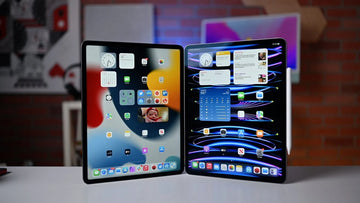
Just like other recent iPads, an iPad Pro 2022’s battery should last a minimum of ten hours if used moderately. Being Apple’s most advanced tablet in the market, the tech giant wasn’t economical in the battery department. While the 11-inch version packs an impressive 7538mAh capacity, the much bigger iPad Pro 12.9-inch features a whopping 10,758mAh battery. And according to Apple, these two devices should run a whole day after a single charge.

For most people, however, these impressive battery capacities do not translate to much usage time. They complain that the iPad Pro drains its battery faster than expected. Perhaps, you have the same experience, making you search for a solution online. You can discover what the issue is from this article and consequently fix it. So, let’s start with the troubleshooting process.

Turn Off Your iPad Pro

I will guess you’ve tried this method, but if you haven’t, it is an agelong trick that works to fix many iPad issues. Switching off your iPad will terminate several background processes that take their toll on your device’s battery. Alternatively, you can also reboot the system to achieve the same aim.

To restart, reboot, or switch off your iPad Pro, you can go to Settings and switch it off or press the volume and top buttons simultaneously until the Apple logo appears. If this method works, then it’s probably a problem with the iPad’s functionalities and not the battery. If it doesn’t, you can proceed to try out the next step.

Monitor Your iPad’s Usage

Sometimes, what you consider a quick drain of your iPad’s battery is only a reflection of how you use it. To decipher whether it’s your heavy usage that is causing the battery to drain quickly, close all applications and browsers and note the battery percentage at that time. After 30 minutes, check the battery level again. If you notice a significant drop in the percentage, it’s either of two things: the battery needs a replacement or you need to adjust some settings.

In the case of a faulty battery, you will have to contact Apple through their phone lines. But if the product is still new, it’s time to adjust some settings to maximise the battery life. See these settings below.

Check For Background Apps

An app may be draining your iPad unknown to you, and such often runs in the background. The only way to find out is to head to Settings and select the Battery option. There, you will find the apps taking up much of your device’s battery capacity. If they are apps you no longer use, you can delete them.

However, if you regularly use those battery-draining apps, you can turn them off, so they don’t continue to run in the background. You may want to restart after this procedure to make everything perfect.

Turn Off Background App Refresh

Apps that constantly refresh in the background utilize your iPad’s battery to do so. It’s OK to leave it this way if you’ve got no problems with your battery. However, if you notice your battery quickly drains, turning off this automatic refresh can greatly make a difference. Your apps will still work normally but only update when you use them. Here is how to turn off this function.

  • Go to Settingson your iPad and choose General
  • When you toggle on the General, you will see the Background App Refresh
  • Toggle on the refresh option and switch off those apps you don’t constantly use.

Reduce Screen Brightness

The brighter your iPad’s screen is, the more energy it requires to sustain it. Except during the day, you don’t need an extremely bright-screened device. As such, reducing the brightness and even opting for Dark Mode can significantly improve your battery’s longevity. Here is how to reduce your screen brightness and change to Dark Mode on iPad Pro.

  • Head to Settings and tap Display.
  • Adjust the brightness level to a lower level to reduce the stress on your battery.
  • You can also select Dark Mode under the Appearance

Check Your Auto Lock Services

The Auto-lock function of your iPad helps to automatically lock your device after a set time when not in use. Locking your iPad ensures that on-screen displays and functions are non-functional, and you can save the power they would have used. When setting the time for auto lock, I advise that you select 5 minutes, as that gives a reasonable timeframe to decide if you still want to do something or not.

Save 25% OFF iPad Pro 12.9 Accessories with code: ESRBLOG

iPad Pro 12.9 Rebound Magnetic Keyboard Case
$132.99$189.99
iPad Pro 12.9 (2021/2020/2018) Paper-Feel Screen Protector
$22.49$29.99
iPad Pro 12.9 2021 Classic Protection Bundle
$23.09$30.79
iPad Pro 12.9 2021 Project Zero Soft Pencil Case
$14.99$19.99
iPad Pro 12.9″ 2021 Rebound Hybrid Case 360
$34.49$45.99
iPad Pro 12.9 (2021/2020/2018) Rebound Hybrid Case Pro
$26.99$35.99
iPad Pro 12.9 (2021/2020/2018) Tempered-Glass Screen Protector
$13.49$17.99
iPad Pro 12.9 & 11 (2021/2020) Camera Lens Protector
$11.99$15.99

Turn Off Location Services For Apps That Don’t Need Them

Location services are among the notable battery-draining functions in iPads. It relies on GPS functions to detect the exact location at a time. While this function is incredibly useful, you may not need it all the time. That aside, not all apps need this functionality. You can save energy by switching off this function for apps that don’t need it. You can do this by following these simple steps.

  • Locate Settings on your iPad and choose the Privacy option
  • Under Privacy, you will the Location Services option.
  • Toggle on it and switch off this service for apps you think don’t need them. Even if the app needs it to function at a later time, you can always enable it then.

Switch Off Connections When Not In Use

Bluetooth and WiFi are two important apps that make using an iPad fun. However, they take significant energy to function. The good thing is that we don’t always use them. Nonetheless, many people switch these things on all day long. If you are having battery issues, you will save a lot of energy by switching them off when not in use.

Conclusion

It is not normal for your new iPad to drain its battery in less than 10 hours. If it’s not because of a software problem, it is either because the battery is faulty or you need to adjust some settings.

I’m sure the troubleshooting tips in this article will help elongate your iPad Pro 2022 battery. However, if there are no improvements, you should not hesitate to contact Apple immediately for a professional fix.

You May Also Like to Read:

The Best iPad Pro 12.9 Keyboard Cases 

How To Pick The Best Keyboard Case For The iPad Pro 12.9

Stichworte: iPad Pro, iPad Pro 11, iPad Pro 12.9
Vorherige
5 Signs Your iPad Needs A Replacement
Nächste
Should You Buy The Galaxy S22 Ultra Now Or Wait For the S23 Ultra?

In Verbindung stehende Artikel

Experience ESR at IFA 2026

ESR auf der IFA 2026: Erleben Sie unser komplettes mobiles Ökosystem in Berlin

iPhone 18 seires battery capacity

iPhone 18 Akku-Leak: Was sich wirklich ändert (und was nicht)

Should You Buy iPhone 17 Now or Wait for iPhone 18? The Price Hikes, the Split Launch, and the Fold, Explained

Sollten Sie jetzt das iPhone 17 kaufen oder auf das iPhone 18 warten? Preiserhöhungen, der geteilte Launch und das Fold, erklärt

Why You NEED an iPad Mini in 2026 (Seriously it's worth it)

iPad mini 8: Release, OLED und neue Farben erwartet – Ist ein Upgrade vom iPad mini 7 sinnvoll?

Hinterlasse einen Kommentar

Deine Email-Adresse wird nicht veröffentlicht.

Recent Post

Apple Watch Armband für Sport und Outdoor: Wasserfest, schweißresistent und sicherer Halt

Apple Watch Sportarmbänder sind beim Sport und bei Outdoor-Aktivitäten größeren...

Apple Watch 2026 Kaufguide: Solltest du auf die Ultra 4 warten, zur Series 12 wechseln...

Apple wird voraussichtlich im September 2026 neue Watches vorstellen, und...

10 Handy-Accessoires, die Papa wirklich benutzt — Vatertags-Geschenkguide

Dein Dad nutzt immer noch eine kaputte Hülle von vor...

AirPods Ultra vs. AirPods 5 vs. AirPods Pro 3: Welche solltest du 2026 kaufen?

Kameras, KI, eine Verzögerung – und das Modell, auf das...

Wir haben die neue Sommerkollektion von ESR getestet – und so ist es, damit zu...

ESR hat sich historisch eher auf funktionale Accessoires als auf...

Die besten Zeichen-Apps für das iPad Pro 2026: Vom Hobbykünstler zum Profi

2026 fühlt sich Zeichnen auf dem iPad weniger wie Tablet-Nutzung...

Get 20% off with code: BLOG20

product.title

Kamera Schutzfolie aus Gehärtetem Glas für iPad Pro 13"/11" (2024) und 12,9″/11″ (2022/2021/2020) - 2 Pack

$9.80
Learn More
product.title

iPhone 14 Pro/14 Pro Max HD-Kamera Schutzfolie aus Gehärtetem Glas - 1 Set

$10.89
Learn More
product.title

iPad Air 11'' (2025/2024), Air 10,9'' (5./4. Generation) Zero Weiche Hülle - Clear

$10.89
Learn More

Unternehmen

  • Über ESR
  • Unser Blog
  • Pressebereich
  • Händler werden

Produkte

  • Schutzhüllen
  • iPhone Cases
  • iPad-Hüllen
  • Entwickelt für MagSafe
  • iPad-Produktivität
  • Schutzfolien
  • Kabelloses Laden
  • Geldbörse und Zubehör
  • Weitere Zubehörteile

Community

  • Mein Konto
  • Freunde empfehlen, CashBack verdienen
  • Werde ESR Super User
  • Affiliate Programm
  • Student Discount

Support

  • Kontaktieren Sie uns
  • Einrichtungsvideos und FAQs
  • Bestellstatus
  • Rückgabe und Rückerstattung
  • Garantiebestimmungen
  • Versandbedingungen
  • Zahlungsmethoden
  • Product Recalls

Zahlungsmöglichkeiten:
  • American Express
  • JCB
  • Mastercard
  • PayPal
  • Visa
  • Klarna Klarna
  • Afterpay
Hervorragend – 4,6 von 5 Sternen – Bewertungen:2594 •

© 2026 ESR All rights reserved.

  • Nutzungsbedingungen
  • Datenschutzrichtlinie
  • Rechtliche Erklärung
  • Cookie-Richtlinie
  • Versand Politik
  • Rückgabe und Rückerstattung
  • Track Your Order

Einkaufswagen

Get a 15% off coupon when you

sign up

for free shipping!

$38.00
You're $38.00 away from Free Shipping!

$50.00
You're $50.00 away from Free Shipping!

Benefits applied automatically at checkout

Your Cart is Empty

Sign In / Register to view saved cart items
Shop Now
ESR_IMG

Protect Your iPhone's Camera Control

ESR_IMG

Always Find Your Wallet

ESR_IMG

Drop-Proof FlickLlock, Effortless MagSafe

ESR_IMG

Qi2 Fast Charging on the Go

Zwischensumme $0.00
Warenkorb ansehen

Thank you for choosing to transfer to a human service.

Sorry! The previous responses were from our AI customer service. Since it didn't satisfy you, you've been transferred to a human agent. We'll reply within 24 hours from Mon to Fri and 48 hours on weekends for further help.

Please select the reason for transfer