
Just launched: Tough Cases for Kids Drop-proof protection for everyday play. Shop now >
15 % Rabatt mit BTS15 | 20 % auf 2 Produkte mit BTS20 | Super User: 25 % auf 2 Produkte mit BTS25 Shoppen
Kostenloser Versand ab 50 $ Bestellwert

Werden Sie Super User und sichern Sie sich exklusive Prämien

  • * 15 % Willkommensrabatt
  • * Punkte bei jedem Einkauf sammeln
  • * Exklusive Mitgliedervorteile
Jetzt beitreten Einloggen
  • Werde ESR Super-User
  • Exklusive Super-User-Angebote
  • Freunde werben & Cashback sichern
Wagen 0
  • Hüllen
    • iPhone
    • iPad
    • AirPods
    • Samsung
      iPhone 17🔥
    • iPhone 17e🔥
    • iPhone 17 Pro Max🔥
    • iPhone 17 Pro🔥
    • iPhone Air🔥
    • iPhone 17🔥
    • iPhone 16
    • iPhone 16e
    • iPhone 16 Pro Max
    • iPhone 16 Pro
    • iPhone 16 Plus
    • iPhone 16
    • iPhone 15
    • iPhone 15 Pro Max
    • iPhone 15 Pro
    • iPhone 15 Plus
    • iPhone 15
    • iPhone 14
    • iPhone 14 Pro Max
    • iPhone 14 Pro
    • iPhone 14 Plus
    • iPhone 14
    • iPhone 13
    • iPhone 13 Pro Max
    • iPhone 13 Pro
    • iPhone 13
       
    • iPad Cases for Kids 🧸
    • iPad Air 13 (2026)🔥
    • iPad Air 11 (2026)🔥
    •  
    • iPad Pro 13 (2025)
    • iPad Pro 11 (2025)
    • iPad 11th Gen (2025)
    • iPad Air 13 (2025)
    • iPad Air 11 (2025)
    •  
    • iPad Pro 13 (2024)
    • iPad Pro 11 (2024)
    • iPad Air 13 (2024)
    • iPad Air 11 (2024)
    • iPad mini 7 (2024)
    •  
    • iPad Pro 12.9 (2022)
    • iPad Pro 11 (2022)
    • iPad Air 5/4 (2022)
    • iPad 10th Gen (2022)
    •  
    • iPad mini 6 (2021)
    • iPad Pro 12.9 (2021)
    • iPad Pro 11 (2021)
    • iPad Pro 11 (2020)
       
    • AirPods Pro 3🔥
    • AirPods 4
    • AirPods Pro (2023/2022/2019)
      Galaxy S26🔥
    • Galaxy S26 Ultra🔥
    • Galaxy S26 Plus🔥
    • Galaxy S26🔥
    • Galaxy S25
    • Galaxy S25 Ultra
    • Galaxy S25+
    • Galaxy S24
    • Galaxy S24 Ultra
    • Galaxy S24+
    • Galaxy S24
    • Galaxy S23
    • Galaxy S23 Ultra
    • Galaxy S23
  • Displayschutzfolien
    • iPhone
    • iPad
    • Apple Watch
    • Samsung
      iPhone 17🔥
    • iPhone 17e🔥
    • iPhone 17 Pro Max🔥
    • iPhone 17 Pro🔥
    • iPhone Air🔥
    • iPhone 17🔥
    • iPhone 16
    • iPhone 16e
    • iPhone 16 Pro Max
    • iPhone 16 Pro
    • iPhone 16 Plus
    • iPhone 16
    • iPhone 15
    • iPhone 15 Pro Max
    • iPhone 15 Pro
    • iPhone 15 Plus
    • iPhone 15
    • iPhone 14
    • iPhone 14 Pro Max
    • iPhone 14 Pro
    • iPhone 14 Plus
    • iPhone 14
    • iPhone 13
    • iPhone 13 Pro Max
    • iPhone 13/13 Pro
       
    • iPad Air 13 (2026)🔥
    • iPad Air 11 (2026)🔥
    •  
    • iPad Pro 13 (2025)
    • iPad Pro 11 (2025)
    • iPad 11th Gen (2025)
    • iPad Air 13 (2025)
    • iPad Air 11 (2025)
    •  
    • iPad Pro 13 (2024)
    • iPad Pro 11 (2024)
    • iPad Air 13 (2024)
    • iPad Air 11 (2024)
    •  
    • iPad Pro 12.9 (6th/5th/4th/3rd Gen)
    • iPad Pro 11 (4th/3rd/2nd/1st Gen)
    • iPad Air 5/4 (2022)
    • iPad 10th Gen (2022)
       
    • Apple Watch Sport Band🔥
    • Apple Watch Cases & Screen Protectors🔥
      Galaxy S26🔥
    • Galaxy S26 Ultra🔥
    • Galaxy S25
    • Galaxy S25 Ultra
    • Galaxy S24
    • Galaxy S24 Ultra
    • Galaxy S23
    • Galaxy S23 Ultra
    • Galaxy S23+
    • Galaxy S23
    • Galaxy S22
    • Galaxy S22 Ultra
  • iPad Tastaturen & Stifte
    • Tastaturen für iPad
    • Stifte & Mäuse
      Wähle dein Gerät
    • iPad Air 13 (2026)🔥
    • iPad Air 11 (2026)🔥
    •  
    • iPad Pro 13 (2025)
    • iPad Pro 11 (2025)
    • iPad 11. Generation (2025)
    • iPad Air 13 (2025)
    • iPad Air 11 (2025)
    •  
    • iPad Pro 13 (2024)
    • iPad Pro 11 (2024)
    • iPad Air 13 (2024)
    • iPad Air 11 (2024)
    •  
    • iPad Pro 12.9 (6./5./4./3. Generation)
    • iPad Pro 11″ (4./3./2./1. Generation)
    • iPad Air 5/4 (2022)
    • iPad 10. Generation (2022)
       
    • Digitale Stifte
    • Mäuse
  • Ladegeräte
    • Ladegerät mit einziehbarem Kabel
    • Kabellose Ladegeräte & Halterungen
    • Auto-Ladegeräte & Halterungen
    • Xtend 45W Einziehbares Ladegerät - US - Weiß- Schwarz

      Xtend 45W Einziehbares Ladegerät - US - Weiß- Schwarz

    • Xtend 100 W Einziehbares Autoladegerät mit Doppelkabel - Schwarz

      Xtend 100 W Einziehbares Autoladegerät mit Doppelkabel - Schwarz

    • 65W 5 in 1 Ladestation (HaloLock) - UK Plug

      65W 5 in 1 Ladestation (HaloLock) - UK Plug

    • All Ladegerät mit einziehbarem Kabel >
    • ESR CryoBoost Klappbare 3-in-1 Magnet-Ladestation (25W) – US Plug-Black

      ESR CryoBoost Klappbare 3-in-1 Magnet-Ladestation (25W) – US Plug-Black

    • CryoBoost 3-in-1 Magnetische Ladestation (25W, Qi2.2)  - US Plug–Black

      CryoBoost 3-in-1 Magnetische Ladestation (25W, Qi2.2) - US Plug–Black

    • Cyclone 25W Magnet-Ladepad mit CryoBoost - Silber - 1 Set

      Cyclone 25W Magnet-Ladepad mit CryoBoost - Silber - 1 Set

    • 65W 5 in 1 Ladestation (HaloLock) - UK Plug

      65W 5 in 1 Ladestation (HaloLock) - UK Plug

    • All Kabellose Ladegeräte & Halterungen >
    • OmniLock Magnet-Autoladegerät (25W, CryoBoost, Lüftungsschlitz) - Black

      OmniLock Magnet-Autoladegerät (25W, CryoBoost, Lüftungsschlitz) - Black

    • Magnetische kabellose Auto Ladegerät Halterung (HaloLock) - Black

      Magnetische kabellose Auto Ladegerät Halterung (HaloLock) - Black

    • Kabelloses Autoladegerät mit CryoBoost™ (HaloLock) - Wireless Charger with 36W Adapter

      Kabelloses Autoladegerät mit CryoBoost™ (HaloLock) - Wireless Charger with 36W Adapter

    • Kabelloses Autoladegerät mit CryoBoost™ (HaloLock) - Wireless Charger

      Kabelloses Autoladegerät mit CryoBoost™ (HaloLock) - Wireless Charger

    • All Auto-Ladegeräte & Halterungen >
  • Wallets
  • 🔥Neuheiten🔥
    • iPad Cases for Kids 🧸
    • Apple Watch Sport Band🔥
    • 🏝️Sommer Print-Kollektion🏝️
  • ✏️Back-to-School-Angebote✏️
    • Back-to-School-Angebote für iPad
    • Back-to-School-Angebote für Handys
    • Back-to-School-Angebote für Ladegeräte
    • Final Sale
  • Support
    • Kontakt
    • Produktrückrufe
    • Produktvideos und FAQs
    • Allgemeine FAQ
    • Bestellstatus
    • Rückgabe & Erstattungsrichtlinie
    • Garantie Politik
    • Versand Politik
  • Entdecken
    • Über ESR
    • ESR Blog
    • Nachrichtenbereich
Super-User-Vorteile
  • Werde ESR Super-User
  • Exklusive Super-User-Angebote
  • Freunde werben & Cashback sichern
Mein Konto
Anmeldung Registrieren

Select Your Country/Region

Global
  • Global
North America
  • Vereinigte Staaten
  • Kanada
Europe
  • Europa
  • Norwegen
  • Schweiz
  • Vereinigtes Königreich
Asia-Pacific
  • Australien
  • Japan

Preferred Language

Changing language will not affect your selected region

  • Hüllen
    • iPhone
    • iPad
    • AirPods
    • Samsung
      iPhone 17🔥
    • iPhone 17e🔥
    • iPhone 17 Pro Max🔥
    • iPhone 17 Pro🔥
    • iPhone Air🔥
    • iPhone 17🔥
    • iPhone 16
    • iPhone 16e
    • iPhone 16 Pro Max
    • iPhone 16 Pro
    • iPhone 16 Plus
    • iPhone 16
    • iPhone 15
    • iPhone 15 Pro Max
    • iPhone 15 Pro
    • iPhone 15 Plus
    • iPhone 15
    • iPhone 14
    • iPhone 14 Pro Max
    • iPhone 14 Pro
    • iPhone 14 Plus
    • iPhone 14
    • iPhone 13
    • iPhone 13 Pro Max
    • iPhone 13 Pro
    • iPhone 13
       
    • iPad Cases for Kids 🧸
    • iPad Air 13 (2026)🔥
    • iPad Air 11 (2026)🔥
    •  
    • iPad Pro 13 (2025)
    • iPad Pro 11 (2025)
    • iPad 11th Gen (2025)
    • iPad Air 13 (2025)
    • iPad Air 11 (2025)
    •  
    • iPad Pro 13 (2024)
    • iPad Pro 11 (2024)
    • iPad Air 13 (2024)
    • iPad Air 11 (2024)
    • iPad mini 7 (2024)
    •  
    • iPad Pro 12.9 (2022)
    • iPad Pro 11 (2022)
    • iPad Air 5/4 (2022)
    • iPad 10th Gen (2022)
    •  
    • iPad mini 6 (2021)
    • iPad Pro 12.9 (2021)
    • iPad Pro 11 (2021)
    • iPad Pro 11 (2020)
       
    • AirPods Pro 3🔥
    • AirPods 4
    • AirPods Pro (2023/2022/2019)
      Galaxy S26🔥
    • Galaxy S26 Ultra🔥
    • Galaxy S26 Plus🔥
    • Galaxy S26🔥
    • Galaxy S25
    • Galaxy S25 Ultra
    • Galaxy S25+
    • Galaxy S24
    • Galaxy S24 Ultra
    • Galaxy S24+
    • Galaxy S24
    • Galaxy S23
    • Galaxy S23 Ultra
    • Galaxy S23
  • Displayschutzfolien
    • iPhone
    • iPad
    • Apple Watch
    • Samsung
      iPhone 17🔥
    • iPhone 17e🔥
    • iPhone 17 Pro Max🔥
    • iPhone 17 Pro🔥
    • iPhone Air🔥
    • iPhone 17🔥
    • iPhone 16
    • iPhone 16e
    • iPhone 16 Pro Max
    • iPhone 16 Pro
    • iPhone 16 Plus
    • iPhone 16
    • iPhone 15
    • iPhone 15 Pro Max
    • iPhone 15 Pro
    • iPhone 15 Plus
    • iPhone 15
    • iPhone 14
    • iPhone 14 Pro Max
    • iPhone 14 Pro
    • iPhone 14 Plus
    • iPhone 14
    • iPhone 13
    • iPhone 13 Pro Max
    • iPhone 13/13 Pro
       
    • iPad Air 13 (2026)🔥
    • iPad Air 11 (2026)🔥
    •  
    • iPad Pro 13 (2025)
    • iPad Pro 11 (2025)
    • iPad 11th Gen (2025)
    • iPad Air 13 (2025)
    • iPad Air 11 (2025)
    •  
    • iPad Pro 13 (2024)
    • iPad Pro 11 (2024)
    • iPad Air 13 (2024)
    • iPad Air 11 (2024)
    •  
    • iPad Pro 12.9 (6th/5th/4th/3rd Gen)
    • iPad Pro 11 (4th/3rd/2nd/1st Gen)
    • iPad Air 5/4 (2022)
    • iPad 10th Gen (2022)
       
    • Apple Watch Sport Band🔥
    • Apple Watch Cases & Screen Protectors🔥
      Galaxy S26🔥
    • Galaxy S26 Ultra🔥
    • Galaxy S25
    • Galaxy S25 Ultra
    • Galaxy S24
    • Galaxy S24 Ultra
    • Galaxy S23
    • Galaxy S23 Ultra
    • Galaxy S23+
    • Galaxy S23
    • Galaxy S22
    • Galaxy S22 Ultra
  • iPad Tastaturen & Stifte
    • Tastaturen für iPad
    • Stifte & Mäuse
      Wähle dein Gerät
    • iPad Air 13 (2026)🔥
    • iPad Air 11 (2026)🔥
    •  
    • iPad Pro 13 (2025)
    • iPad Pro 11 (2025)
    • iPad 11. Generation (2025)
    • iPad Air 13 (2025)
    • iPad Air 11 (2025)
    •  
    • iPad Pro 13 (2024)
    • iPad Pro 11 (2024)
    • iPad Air 13 (2024)
    • iPad Air 11 (2024)
    •  
    • iPad Pro 12.9 (6./5./4./3. Generation)
    • iPad Pro 11″ (4./3./2./1. Generation)
    • iPad Air 5/4 (2022)
    • iPad 10. Generation (2022)
       
    • Digitale Stifte
    • Mäuse
  • Ladegeräte
    • Ladegerät mit einziehbarem Kabel
    • Kabellose Ladegeräte & Halterungen
    • Auto-Ladegeräte & Halterungen
    • Xtend 45W Einziehbares Ladegerät - US - Weiß- Schwarz

      Xtend 45W Einziehbares Ladegerät - US - Weiß- Schwarz

    • Xtend 100 W Einziehbares Autoladegerät mit Doppelkabel - Schwarz

      Xtend 100 W Einziehbares Autoladegerät mit Doppelkabel - Schwarz

    • 65W 5 in 1 Ladestation (HaloLock) - UK Plug

      65W 5 in 1 Ladestation (HaloLock) - UK Plug

    • All Ladegerät mit einziehbarem Kabel >
    • ESR CryoBoost Klappbare 3-in-1 Magnet-Ladestation (25W) – US Plug-Black

      ESR CryoBoost Klappbare 3-in-1 Magnet-Ladestation (25W) – US Plug-Black

    • CryoBoost 3-in-1 Magnetische Ladestation (25W, Qi2.2)  - US Plug–Black

      CryoBoost 3-in-1 Magnetische Ladestation (25W, Qi2.2) - US Plug–Black

    • Cyclone 25W Magnet-Ladepad mit CryoBoost - Silber - 1 Set

      Cyclone 25W Magnet-Ladepad mit CryoBoost - Silber - 1 Set

    • 65W 5 in 1 Ladestation (HaloLock) - UK Plug

      65W 5 in 1 Ladestation (HaloLock) - UK Plug

    • All Kabellose Ladegeräte & Halterungen >
    • OmniLock Magnet-Autoladegerät (25W, CryoBoost, Lüftungsschlitz) - Black

      OmniLock Magnet-Autoladegerät (25W, CryoBoost, Lüftungsschlitz) - Black

    • Magnetische kabellose Auto Ladegerät Halterung (HaloLock) - Black

      Magnetische kabellose Auto Ladegerät Halterung (HaloLock) - Black

    • Kabelloses Autoladegerät mit CryoBoost™ (HaloLock) - Wireless Charger with 36W Adapter

      Kabelloses Autoladegerät mit CryoBoost™ (HaloLock) - Wireless Charger with 36W Adapter

    • Kabelloses Autoladegerät mit CryoBoost™ (HaloLock) - Wireless Charger

      Kabelloses Autoladegerät mit CryoBoost™ (HaloLock) - Wireless Charger

    • All Auto-Ladegeräte & Halterungen >
  • Wallets
  • 🔥Neuheiten🔥
    • iPad Cases for Kids 🧸
    • Apple Watch Sport Band🔥
    • 🏝️Sommer Print-Kollektion🏝️
  • ✏️Back-to-School-Angebote✏️
    • Back-to-School-Angebote für iPad
    • Back-to-School-Angebote für Handys
    • Back-to-School-Angebote für Ladegeräte
    • Final Sale
  • Support
    • Kontakt
    • Produktrückrufe
    • Produktvideos und FAQs
    • Allgemeine FAQ
    • Bestellstatus
    • Rückgabe & Erstattungsrichtlinie
    • Garantie Politik
    • Versand Politik
  • Entdecken
    • Über ESR
    • ESR Blog
    • Nachrichtenbereich

Werden Sie Super User und sichern Sie sich exklusive Prämien

  • * 15 % Willkommensrabatt
  • * Punkte bei jedem Einkauf sammeln
  • * Exklusive Mitgliedervorteile
Jetzt beitreten Einloggen
  • Werde ESR Super-User
  • Exklusive Super-User-Angebote
  • Freunde werben & Cashback sichern
Wagen 0

Select Your Country/Region

Global
  • Global
North America
  • Vereinigte Staaten
  • Kanada
Europe
  • Europa
  • Norwegen
  • Schweiz
  • Vereinigtes Königreich
Asia-Pacific
  • Australien
  • Japan

Preferred Language

Changing language will not affect your selected region

Durchsuchen Sie unseren Shop

Wagen 0
beliebte Suchanfragen:
iPad 2026 Hülle iPhone 17e Atelier Hülle iPad Tastatur
Neue Technik & Geräte

10 Hidden Features of the iPad 10th Generation That You Might Not Know About

von Deb Hazarika An Apr 04, 2023 (Last Updated:Apr 09, 2025)
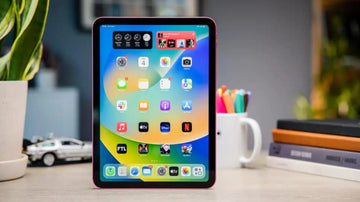
Hidden Features of the iPad 10th Generation

iPads are a major part of our professional and personal lives. From ordering food to making reports or presentations, they have a critical role in our daily life. Even some businesses such as retail stores now use iPads as an alternative to their cash registers.

Their growing popularity is primarily due to the amazing features and apps that streamline your whole process. Along with the capabilities of Siri, the iPad acts as a full-on virtual assistant for your business. But, many more hidden tricks can make owning and using this device even more fun.

Top 10 Features for the new iPad 10th Generation

These features offer you more privacy, streamline your processes, and improve your browsing experience. All of that and much more with just a few taps of your fingers. This section will help you delve deeper into the top 10 amazing and hidden features of the iPad 10th Generation.  

1. Split Keyboard

The iPad’s size is a critical factor in why many people choose it. However, not every time you would want to use it like a laptop. Sometimes you might prefer using it as your mobile phone. So, is there a possibility of typing with your thumb just like on your phone? Well, the answer is yes.

Using the split keyboard, you can type on your iPad by simply using your thumbs. To activate this feature, you can go to your settings and then to the general option. Next, choose the “Keyboard” option and tap the button next to Split Keyboard for its activation.

2. Share Safari Tabs across Devices

Working on your iPhone and want to switch iPad? If yes, then this feature is worth your attention. iCloud syncs the tab on all your devices, allowing you to open a tab on your Mac, iPhone, etc., and then continue using it on another. Simply follow the step-by-step process below to get it up and running:

  • Step 1 – Go to Settings
  • Step 2 – Tap on [your name]
  • Step 3 – Go to iCloud on your iPad. If you’re using Mac, then go to the Apple menu
  • Step 4 – Select System Preferences
  • Step 5 – Choose Apple ID
  • Step 6 – Select iCloud and Turn on Safari

3. Scan Documents Without Any Issue

It would be an unusual sight to see a scanner today. Unless you have one in your office, you might not use it again. That is because of the Notes app on your iPad.

If you want to scan something, take a picture of it and the camera will save it directly into your notes. You can click on the plus button and choose the Scan Document options. Next, you can start scanning it according to your preference.

4. Use an Apple Pencil

The Apple Pencil is undoubtedly the best accessory that you can get with iPad. You can use it to draw or sketch things on various apps.

Furthermore, the Apple Pencil is a great option to start writing with your Pencil in the built-in Notes app. The same is the case for various apps, such as calendar events, messages, etc.

5. Multitasking Gestures

The multitasking gestures allow you to view the app switcher, making it easy to switch from one app to another. This feature of the iPad 10 Generation is also very easy to use.

You can simply swipe from the iPad screen’s bottom edge and hold it till you see the app switcher. When using an app, you can swipe either left or right using your finger to switch from one app to another.

6. Apple’s Sidecar feature

The Apple’s Sidecar feature allows you to use your iPad as a screen with your Mac. However, the Mac shouldn’t be too old and must be compatible with macOS Catalina or later.  

To use the Sidecar feature, you can go to the display section of the Control Center on your Mac. Nest, you can beam your screen to the iPad and then use it as a second screen. It is a great option whether you want to use it for gaming or work purposes.

7. Hide Private Photos from View

While you might want to show one photo to someone, there are a few that you want to keep private. Luckily you can hide your private photos on the iPad 10th Generation. Open your photo app and then choose “Select” in the upper right-hand corner.

Next, choose the photos you want to keep private and tap on the “Share” button. Next, choose the “Hide” option from the menu appearing on the bottom side of the screen. These photos are hidden in a different album that you can view whenever you want.

8. Search for Anything Using Spotlight

Spotlight is the optimal way to search for anything. It makes using your iPad more fun and engaging. You can find it by simply going to your Home screen and swiping it down. Besides Siri recommendations, you’ll see a search bar.

Simply tap into it and then find whatever you’re looking for. This feature is great to find and launch any apps that you have recently installed. Furthermore, it also assists you in installing and rearranging apps.

9. Improve Safari with Extensions

Just like Mac, Safari on the iPad will also support all the extensions that can help improve its performance. Therefore, you can download various extensions for different purposes such as turning the webpages into the dark mode, and much more.

To get the Safari extensions, you can app the Settings app and then scroll down to Safari. Next, you can tap on Extension and choose any one of them that you want to add.

10. App Library

Last but not least, the App Library feature allows you to organize various applications into different categories. You can arrange into groups such as Work, Games, etc. Also, the app library will display the apps that you the most with large icons.

This feature makes searching for and opening an app more than easy. Type in the name of the app in the search bar and it will instantly show it to you.

Wrapping Up

These iPad 10th Generation features allow you to streamline your workflow and improve your user experience. Not just that, but it also allows you to increase your privacy. So, if you didn’t know about them, now is the time to start using them.

You May Also Like to Read:

How to Use the iPad 10th Generation for Work and Play

A Guide to iPad Accessories: Must-Have Add-Ons for the iPad 10th Generation

Which Keyboard Case Is Best for iPad 10th Generation?

FAQ

How do I activate the split keyboard feature on my iPad 10th generation?

To activate the split keyboard feature, go to your iPad’s settings, select “general,” then select “keyboard,” and tap the button next to “Split Keyboard” to activate it.

Can I scan documents using my iPad 10th generation?

Yes, you can scan documents using the Notes app on your iPad 10th generation. Simply take a picture of the document and save it directly into your notes app.

Can I use my iPad 10th generation as a second screen for my Mac?

Yes, you can use your iPad 10th generation as a second screen for your Mac using Apple’s Sidecar feature. However, your Mac must be compatible with macOS Catalina or later.

How do I hide private photos on my iPad 10th generation?

To hide private photos on your iPad 10th generation, open your Photos app, select “Select” in the upper right-hand corner, choose the photos you want to hide, tap the “Share” button, and select the “Hide” option from the menu.

Can I organize my apps into categories on my iPad 10th generation?

Yes, you can organize your apps into categories using the App Library feature on your iPad 10th generation. This feature displays the apps you use the most with large icons and allows you to search for and open apps quickly.

Vorherige
The Best iPad to Replace a MacBook in 2024
Nächste
What is The Best MagSafe Travel Charger for Apple Products?

In Verbindung stehende Artikel

Experience ESR at IFA 2026

ESR auf der IFA 2026: Erleben Sie unser komplettes mobiles Ökosystem in Berlin

iPhone 18 seires battery capacity

iPhone 18 Akku-Leak: Was sich wirklich ändert (und was nicht)

Should You Buy iPhone 17 Now or Wait for iPhone 18? The Price Hikes, the Split Launch, and the Fold, Explained

Sollten Sie jetzt das iPhone 17 kaufen oder auf das iPhone 18 warten? Preiserhöhungen, der geteilte Launch und das Fold, erklärt

Why You NEED an iPad Mini in 2026 (Seriously it's worth it)

iPad mini 8: Release, OLED und neue Farben erwartet – Ist ein Upgrade vom iPad mini 7 sinnvoll?

2 Kommentare

  • Ahmed Mohsin
    Dec 10, 2025 bei 16:09

    I put email in stead of gmail and then the full page restarted

    Antwort
  • Ahmed
    Dec 05, 2025 bei 13:30

    Update the page tell people about the Touch ID on the power button

    Antwort

Hinterlasse einen Kommentar

Deine Email-Adresse wird nicht veröffentlicht.

Recent Post

Apple Watch Armband für Sport und Outdoor: Wasserfest, schweißresistent und sicherer Halt

Apple Watch Sportarmbänder sind beim Sport und bei Outdoor-Aktivitäten größeren...

Apple Watch 2026 Kaufguide: Solltest du auf die Ultra 4 warten, zur Series 12 wechseln...

Apple wird voraussichtlich im September 2026 neue Watches vorstellen, und...

10 Handy-Accessoires, die Papa wirklich benutzt — Vatertags-Geschenkguide

Dein Dad nutzt immer noch eine kaputte Hülle von vor...

AirPods Ultra vs. AirPods 5 vs. AirPods Pro 3: Welche solltest du 2026 kaufen?

Kameras, KI, eine Verzögerung – und das Modell, auf das...

Wir haben die neue Sommerkollektion von ESR getestet – und so ist es, damit zu...

ESR hat sich historisch eher auf funktionale Accessoires als auf...

Die besten Zeichen-Apps für das iPad Pro 2026: Vom Hobbykünstler zum Profi

2026 fühlt sich Zeichnen auf dem iPad weniger wie Tablet-Nutzung...

Get 20% off with code: BLOG20

product.title

Kamera Schutzfolie aus Gehärtetem Glas für iPad Pro 13"/11" (2024) und 12,9″/11″ (2022/2021/2020) - 2 Pack

$9.80
Learn More
product.title

iPhone 14 Pro/14 Pro Max HD-Kamera Schutzfolie aus Gehärtetem Glas - 1 Set

$10.89
Learn More
product.title

iPad Air 11'' (2025/2024), Air 10,9'' (5./4. Generation) Zero Weiche Hülle - Clear

$10.89
Learn More

Unternehmen

  • Über ESR
  • Unser Blog
  • Pressebereich
  • Händler werden

Produkte

  • Schutzhüllen
  • iPhone Cases
  • iPad-Hüllen
  • Entwickelt für MagSafe
  • iPad-Produktivität
  • Schutzfolien
  • Kabelloses Laden
  • Geldbörse und Zubehör
  • Weitere Zubehörteile

Community

  • Mein Konto
  • Freunde empfehlen, CashBack verdienen
  • Werde ESR Super User
  • Affiliate Programm
  • Student Discount

Support

  • Kontaktieren Sie uns
  • Einrichtungsvideos und FAQs
  • Bestellstatus
  • Rückgabe und Rückerstattung
  • Garantiebestimmungen
  • Versandbedingungen
  • Zahlungsmethoden
  • Product Recalls

Zahlungsmöglichkeiten:
  • American Express
  • JCB
  • Mastercard
  • PayPal
  • Visa
  • Klarna Klarna
  • Afterpay
Hervorragend – 4,6 von 5 Sternen – Bewertungen:2594 •

© 2026 ESR All rights reserved.

  • Nutzungsbedingungen
  • Datenschutzrichtlinie
  • Rechtliche Erklärung
  • Cookie-Richtlinie
  • Versand Politik
  • Rückgabe und Rückerstattung
  • Track Your Order

Einkaufswagen

Get a 15% off coupon when you

sign up

for free shipping!

$38.00
You're $38.00 away from Free Shipping!

$50.00
You're $50.00 away from Free Shipping!

Benefits applied automatically at checkout

Your Cart is Empty

Sign In / Register to view saved cart items
Shop Now
ESR_IMG

Protect Your iPhone's Camera Control

ESR_IMG

Always Find Your Wallet

ESR_IMG

Drop-Proof FlickLlock, Effortless MagSafe

ESR_IMG

Qi2 Fast Charging on the Go

Zwischensumme $0.00
Warenkorb ansehen

Thank you for choosing to transfer to a human service.

Sorry! The previous responses were from our AI customer service. Since it didn't satisfy you, you've been transferred to a human agent. We'll reply within 24 hours from Mon to Fri and 48 hours on weekends for further help.

Please select the reason for transfer