










When an iPhone suddenly stops charging on a wireless pad, it's hard to know where to start. Is it the charger, or something wrong with the iPhone itself? On Reddit, some users report that their iPhones cannot charge wirelessly after iOS updates, and the battery drains completely.
Next, let’s look at why wireless charging may suddenly stop working, especially after iOS updates. This guide also provides practical fixes you can try right away.

Quick Answers to Common User Questions
iOS Versions and Wireless Charging Behavior
Common Wireless Charging Issues
How iOS Limits Fast Wireless Charging
Quick Answers to Common User Questions
What color should the charging light be, yellow or blue?
On many chargers, a blue or green light indicates the device is charging normally and is properly aligned. A yellow or orange light typically signals slower charging, less power being delivered, the device being misaligned, or that the charger is limiting power to prevent overheating.
 iOS Versions and Wireless Charging Behavior
Different iOS versions can change how fast wireless charging works and how your iPhone detects MagSafe chargers. Some users notice wireless charging feels less stable right after major iOS updates during overnight charging sessions.
Why Does it Happen?
● iOS manages battery health differently across versions, sometimes slowing wireless charging to reduce long‑term battery wear.
● If your iPhone or the charger gets too hot, iOS will pause or stop wireless charging. This prevents damage from overheating and is a standard safety feature.
● As Apple updates iOS, the way your iPhone detects Qi- and MagSafe-compatible chargers can change, affecting how quickly charging begins.
● Features like Low Power Mode or Optimized Battery Charging may pause wireless charging at specific battery levels to protect battery health. 
Real User Pain Points
Many people only notice these changes when wireless charging suddenly fails right after installing a new iOS update.
1. Overnight Drop: The phone starts charging normally but stops charging at some point during the night, leaving the battery low by morning.
2. Intermittent Charging: One YouTube creator reported the pad worked reliably before an update, then experienced random disconnects immediately afterward.
3. Slow Start and Interruptions:Some forum users report that wireless charging worked before an update, but slowed down and cut out frequently with the same charger afterward.
4. Car Wireless Pad Failure: iPhone charges fine by cable, yet the wireless pad in the car fails after a recent iOS upgrade. 
Deep Dive: Settings to Check
Go to Settings → Battery → Battery Health & Charging and check Optimized Battery Charging. Turn it off to see whether scheduled charging behavior is slowing wireless charging.
Practical Recommendation
Keeping your iPhone updated is important, as Apple regularly fixes charging bugs in newer iOS versions. If problems appear after an update, treat them as temporary bugs and watch for patch releases. After major updates, test with at least one Qi charger you know works.
Common Wireless Charging Issues
People find that when the charger light turns on, the iPhone battery won’t charge wirelessly as expected. The problems discussed below will help you see where wireless charging usually fails on iPhones.
1. Does Not Support Wireless Charging: Only iPhone 8 and later models support Qi wireless charging. Always confirm your exact model in Settings and check it against the wireless charging compatibility list.
2. Incompatible Charger: Some older pads are not Qi‑certified. Many reputable accessory makers advise choosing Qi‑certified chargers paired with a reliable USB‑C power adapter for consistent performance.
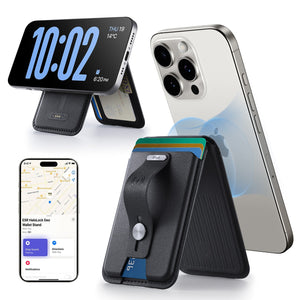
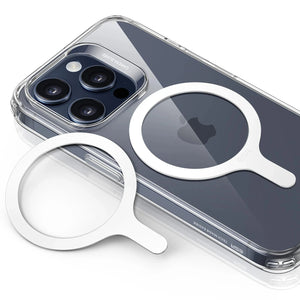
3. Accessories Blocking Charging: Thick cases, metal plates for car mounts, or non‑MagSafe magnetic rings can block the wireless charging field. Users on forums say they often fix “no charging” simply by removing the case, then switching to a wireless‑friendly case later.
4. Glitches After iOS Update: Users report that their phones begin charging but then fail to continue charging. Apple suggests resetting its settings before assuming there is hardware damage.
5. Power Delivery Limits: Fast wireless charging pushes more power and generates heat, triggering built-in thermal protection that temporarily slows charging. 
How iOS Limits Fast Wireless Charging
When your charger works but charging slows down, there are usually two reasons: your phone is getting warm, or your battery is almost full. iOS slows wireless charging to prevent overheating and to protect the battery when it gets over 80% charged. If you notice slower charging under these conditions, it’s the phone keeping itself safe, not a malfunction.
10 Ways to Quickly Fix Wireless Charging
When wireless charging fails, you should start with simple checks before assuming the charger is broken. A clear iPhone charging troubleshooting process helps you find the issue.
Check If The Charger Is Powered
Make sure the wall adapter is connected and powered on. Check the cable and ensure it clicks into place on the charger and adapter. If the indicator light never appears, try a different adapter and cable set before assuming anything is wrong with your phone.
Get iPhone Sitting In The Right Spot
Place your iPhone in the center of the pad and slide it until the charging icon appears. With MagSafe, you should feel a clear magnetic “snap.” If the magnetic snap feels weaker than usual, something may be interfering with it. That may be a thick case or a non-MagSafe wallet attached to the back. If charging keeps dropping, try rotating the phone and testing a stand-style charger for better alignment.
Update iOS to Clear Wireless Charging Bugs
In iPhone Settings, go to General → Software Update. Install any pending iOS version offered by Apple. Users report that wireless charging resumes after updating. After updating, restart your iPhone and test the same wireless charger again.

4. Remove Things That Block Charging
Many people forget there is metal hidden in their favorite case, stand, or magnetic car mount. Take the phone out of its case, remove any ring and wallet, and then place it on the pad. If it starts charging bare but fails again, you need a thinner case.

5. Test Another Charger and Pad Style
Flat Qi pads and MagSafe stands position the charging coil differently relative to your iPhone. If one consistently drops the connection, switching pad styles is worth testing before buying a new charger entirely. If one setup always works and another keeps dropping, keep the reliable one for nightly use and reserve the other for short wireless charging sessions.
6. Check Charger Power and Compatibility
Many “not charging” complaints come from chargers that cannot deliver enough power. Look for at least a 7.5W Qi rating and a solid USB‑C power adapter to avoid basic Qi wireless charger issues. Check your charger certification, since underpowered accessories often cause slow or failed wireless charging.
7. Restart iPhone
A phone restart can clear small glitches that prevent your iPhone from communicating with the wireless charger. Turn the iPhone off and restart it to test charging again.
8. Clean The Charging Area
Dust residue on the back glass surface weakens the charging connection. Wipe both surfaces gently with a soft cloth and try placing the phone again in the center. People who carry phones without cases often see better results after cleaning away fine dust.

9. Check for Overheating and Physical Misalignment (Especially in Cars)
Wireless charging is notoriously sensitive to temperature and positioning, which is exactly why car pads fail so frequently. If your iPhone is sitting on the dashboard in direct sunlight while GPS is running, it’s going to overheat. When that happens, iOS will trigger a thermal limit and stop charging immediately to protect the battery.
Beyond heat, physical movement is a major culprit; even a slight shift during a turn can knock the phone out of the "sweet spot" on a flat charging pad. If your charging is inconsistent on the road, switching to a magnetic MagSafe mount is often the best solution to keep the coils locked in place, even through road vibrations.
10. Get Help From Apple
If you have tried different chargers and wireless charging still fails, it may be a hardware issue. A hidden internal fault cannot be fixed at home. At that point, booking an appointment with Apple Support is the safest way to fix the problem.

Tip: If your wired charging port is broken, rely on MagSafe or Qi‑certified wireless power banks as your most dependable backup for everyday charging.
Chargers Worth Considering
On a desk, a Qi2.2 25W charging station can hold your iPhone upright so you can easily see notifications while charging. That kind of stand also reduces random dropouts compared with flat pads scattered around the workspace.

In the car, a Qi2 25W MagSafe car charger with CryoBoost can keep your navigation phone topped up during long drives. Stronger magnets and higher power help offset heat and movement that can cause weaker chargers to stop charging.

If you want a single solution for travel, a Qi‑certified multi-device charger, such as ESR’s foldable 3‑in‑1 station, lets you power your iPhone, AirPods, and Apple Watch from a single compact setup.

People Also Ask
Does Low Power Mode affect wireless charging speed?
Why does my iPhone get warm on a wireless pad?
Do I need an official MagSafe charger for stable wireless charging?
Final Verdict
If your iPhone cannot charge wirelessly, start with simple checks, such as checking for updates and removing the case. Use quality wireless chargers from trusted brands, and keep your phone and charger surfaces clean. Even with a damaged wired port, MagSafe- and Qi‑certified power banks still provide reliable charging.


What if my wire port doesn’t work how would I charge it and what color should the light be yellow or blue